
1. انتهى المنتجview
The DARKROCK 20-Port PC Case Fan Hub is designed to centralize control of your PC's cooling fans and addressable RGB lighting. It supports up to 10 PWM 4-pin fans for speed control and 10 ARGB 3-pin fans for lighting effects, all powered via dual SATA ports for stable operation. The included remote control allows for convenient adjustment of fan speed and lighting modes.
المميزات الرئيسية:
- Dual SATA Port Power: Ensures precise and stable control of fan speed.
- التحكم الذكي بتقنية تعديل عرض النبضة (PWM): Adjusts speed for up to 10 4-pin PWM fans via remote control.
- إضاءة RGB قابلة للتحكم: Supports up to 10 ARGB fans with 5V 3-pin connectors for customizable lighting.
- سهولة التركيب: Features magnets for secure attachment inside the PC case.
محتويات الحزمة:
- DARKROCK 20-Port PC Case Fan Hub
- جهاز التحكم عن بعد

Image 1.1: The DARKROCK 20-Port PC Case Fan Hub and its accompanying remote control.
2. معلومات السلامة
- Ensure your PC is powered off and unplugged from the wall outlet before installation.
- تعامل مع المكونات بعناية لتجنب التلف.
- Do not attempt to modify the hub or its components.
- This hub is designed for 5V 3-pin ARGB components only. It does not support 12V RGB components. Connecting 12V RGB devices may cause damage.
- احفظ الجهاز بعيداً عن الرطوبة ودرجات الحرارة القصوى.
3. الإعداد والتثبيت
3.1. مخطط المنتج
Familiarize yourself with the hub's ports and connections before installation.

Image 3.1: Detailed diagram of the fan hub's connection ports.
3.2. خطوات التثبيت
- Mount the Hub: The hub features strong magnets on its back. Attach it directly to a metal surface inside your PC case. Ensure it is securely placed and does not obstruct other components or airflow.
- توصيل الطاقة: Connect the two SATA power connectors from the hub to available SATA power cables from your power supply unit (PSU). This provides stable power to the fans and ARGB lighting.
- Connect to Motherboard (Optional for Sync):
- For PWM fan speed control, connect the 4-pin PWM cable from the hub to a 4-pin PWM fan header on your motherboard (labeled 'PWM/FG' on the hub).
- For motherboard ARGB lighting synchronization, connect the 3-pin 5V ARGB cable from the hub to a compatible 3-pin 5V ARGB header on your motherboard (labeled 'SYNC 5V 3PIN' on the hub).
- تواصل مع المعجبين: Connect your 4-pin PWM fans to the 'FAN-A1' through 'FAN-A5' and 'FAN-B1' through 'FAN-B5' ports on the hub. Connect your 3-pin 5V ARGB devices (fans or LED strips) to the 'ARGB-A1' through 'ARGB-A5' and 'ARGB-B1' through 'ARGB-B5' ports.
- Important Note for PWM: Ensure that at least one 4-pin PWM fan is connected to the FAN-A1 port. This port is crucial for the motherboard to read the fan speed and access the PWM signal for all connected fans. If FAN-A1 is not connected, the BIOS may not correctly detect or control fan speeds.
- Connect LED Switch (Optional): If you have an external LED switch on your PC case, you can connect it to the 2-pin 'LED SWITCH' port on the hub to toggle lighting effects.

Image 3.2: Magnetic installation of the fan hub.
4. التشغيل
4.1. وظائف التحكم عن بعد
The included remote control allows for comprehensive management of fan speed and ARGB lighting effects. Point the remote directly at the fan hub for optimal signal reception.

Image 4.1: Remote control button functions.
- ON/OFF Lights (Power Button): Toggles the ARGB lighting on or off.
- SPEED- / SPEED+ Buttons: Increases or decreases the fan speed.
- MODE- / MODE+ Buttons: Cycles through different ARGB lighting modes.
- زر تلقائي: Activates automatic cycling through all available lighting modes.
- Luminosity Adjustment Keys (Sun Icons): Adjusts the brightness of the ARGB lighting.
- مفاتيح الاختصار أحادية اللون (أحمر، أخضر، أزرق، أبيض): Directly sets the lighting to Red, Green, Blue, or White.
- Music Mode Keys (♪1, ♪2, ♪3): Activates different music-reactive lighting modes.
- M/B Button (Motherboard & Controller Signal Switching Key): Switches control between the remote controller and motherboard ARGB synchronization. When the hub is first connected to a 5V ARGB port on the motherboard, the lighting defaults to motherboard control. Pressing the M/B button will switch control back to the remote.
5. الصيانة
To ensure optimal performance and longevity of your DARKROCK fan hub, follow these simple maintenance guidelines:
- تنظيف: Periodically clean the hub and its connections using a soft, dry cloth. Avoid using liquid cleaners or solvents.
- إزالة الغبار: Ensure the area around the hub and connected fans is free from excessive dust buildup, which can impede cooling and affect component lifespan.
- إدارة الكابلات: Maintain tidy cable routing to prevent strain on connectors and improve airflow within your PC case.
6. استكشاف الأخطاء وإصلاحها
- المراوح لا تدور أو سرعتها غير صحيحة:
- Ensure all SATA power connectors are securely plugged into the PSU.
- Verify that the 4-pin PWM cable from the hub is connected to a motherboard fan header.
- Confirm that at least one 4-pin PWM fan is connected to the FAN-A1 port on the hub. This is essential for BIOS detection and PWM signal transmission.
- Check fan connections to the hub for proper seating.
- ARGB Lights Not Working or Incorrect Colors:
- Ensure all SATA power connectors are securely plugged in.
- Verify that 3-pin 5V ARGB devices are connected to the correct 3-pin 5V ARGB ports on the hub.
- ملاحظة التوافق: This hub is only compatible with 3-pin 5V addressable RGB components. It does not support 12V RGB components. Connecting 12V RGB devices will not work and may damage the hub or the device.
- If using motherboard sync, ensure the 3-pin 5V ARGB cable is connected to the motherboard's 5V ARGB header. If lights are controlled by the motherboard, press the M/B button on the remote to switch control back to the remote.
- Check ARGB device connections to the hub for proper seating.
- جهاز التحكم عن بعد لا يستجيب:
- Ensure there are no obstructions between the remote and the hub.
- تحقق من بطارية جهاز التحكم عن بعد واستبدلها إذا لزم الأمر.
7. المواصفات
| ميزة | التفاصيل |
|---|---|
| ماركة | داركروك |
| نموذج | DR-FAN-CONTROLLER |
| لون | أسود |
| مدخلات الطاقة | Dual SATA Port |
| منافذ المروحة | 10 x 4-pin PWM |
| منافذ ARGB | 10 x 3-pin 5V ARGB |
| المجلدtage | 12 Volts (for fans), 5 Volts (for ARGB) |
| مادة | معدن |
| وزن العنصر | 0.12 كيلوغرام |
| المكونات المضمنة | Controller hub and remote |
| رمز المنتج الموحد | 850059070291 |
7.1. أبعاد
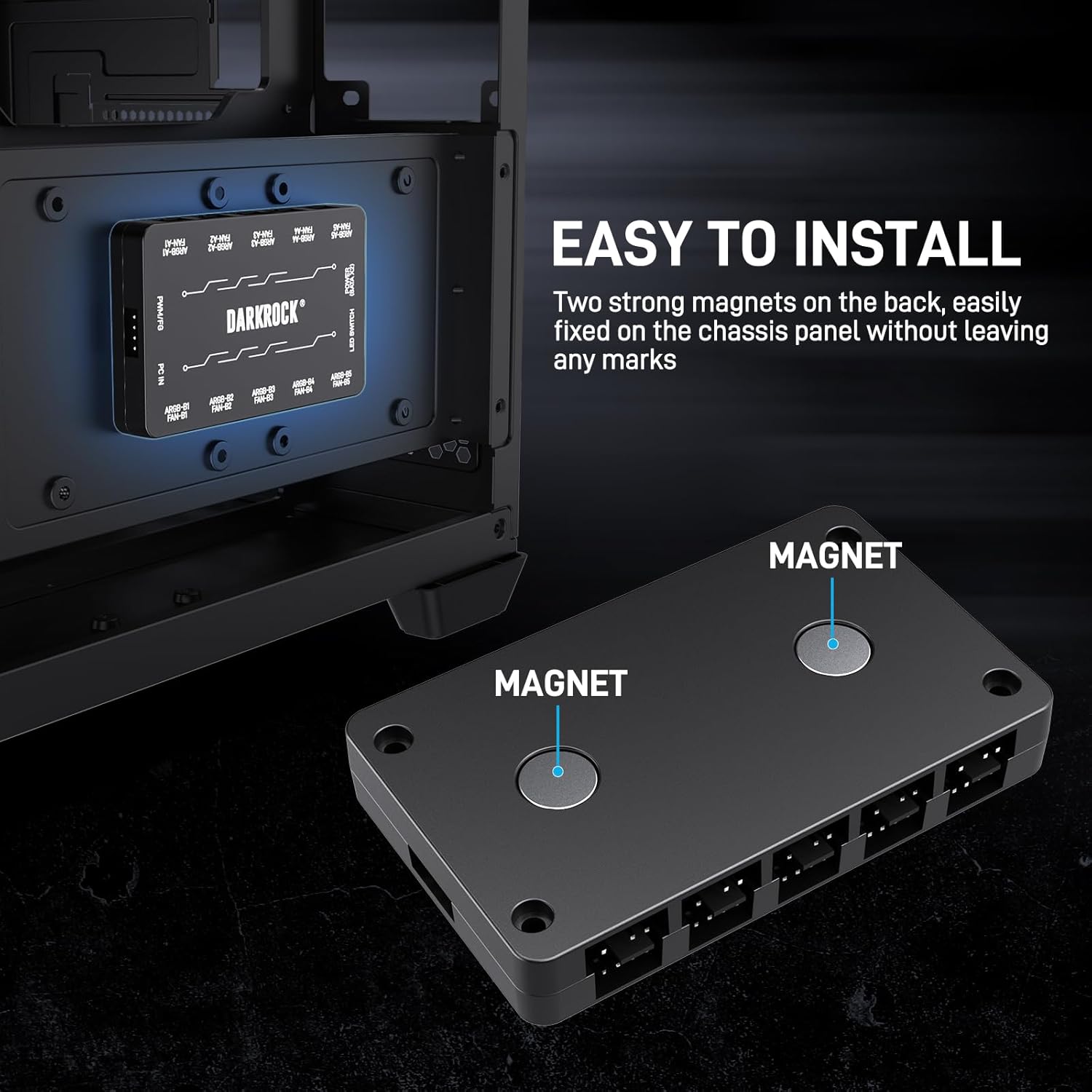
Image 7.1: Approximate dimensions of the fan hub (3.7" x 0.6" x 0.6").
8. الضمان والدعم
Specific warranty details are not provided in the product information. For warranty claims, technical support, or further inquiries, please contact DARKROCK customer service directly through their official webالموقع أو بائع التجزئة الذي تم شراء المنتج منه.
يرجى الاحتفاظ بإثبات الشراء لأي طلبات متعلقة بالضمان.