مقدمة
The Motorola DLR1060 is a 6-channel digital business radio designed for reliable and private communication in various professional environments. Operating in the digital 900 MHz ISM license-free band, this radio offers enhanced clarity and security compared to analog systems. Its compact and lightweight design, combined with robust features, makes it an essential tool for efficient team coordination.
ما هو المشمول
The Motorola DLR1060 package typically includes the following items:
- Motorola DLR1060 2-Way Digital Business Radio (quantity as per pack size)
- بطارية ليثيوم أيون قابلة للشحن
- صينية شحن مزودة بمحول طاقة
- جراب حزام دوار
- User Guide and Safety Leaflet

Image: A typical 6-pack of Motorola DLR1060 digital business radios, showcasing the compact design of each unit.
الميزات الرئيسية
- Digital 900 MHz ISM License-Free Band: Ensures private and reliable communication.
- نطاق ممتد: Covers up to 300,000 square feet or 20 floors.
- 6 قناة: Provides multiple communication lines for different teams or purposes.
- المطالبات الصوتية: User-friendly voice prompts for channel navigation, battery status, and feature customization.
- راديو بروfile بطاقة تعريف: Unique 4-digit ID for enhanced privacy and direct communication.
- Computer Programming Software (CPS): Allows for personalized setups, including Private Groups, custom channel names, and radio settings.
- بناء متين: Complies with Military Standards 810 C, D, E, F, and G for resistance against shock, vibration, extreme temperatures, and dust.
- عمر بطارية طويل: Internal rechargeable battery provides up to 14 hours of continuous operation.
- Instant Mute: Quickly silence the radio when needed.
- Customizable Top Button: قم بتعيين الوظائف المستخدمة بكثرة للوصول السريع إليها.
يثبت
1. شحن البطارية
- Insert the rechargeable Lithium-Ion battery into the radio, ensuring it clicks securely into place.
- Place the radio into the charging tray.
- Connect the power adapter to the charging tray and plug it into a standard electrical outlet.
- The charging indicator light on the tray will illuminate to show charging status. A full charge typically takes several hours.

Image: The Motorola DLR1060 radio securely seated in its charging cradle, ready for power connection.
2. Attaching the Belt Holster
- Align the radio with the swivel belt holster.
- Slide the radio into the holster until it locks into position.
- Attach the holster to your belt or clothing for convenient carrying.
تعليمات التشغيل
1. تشغيل/إيقاف التشغيل
- للتشغيل ، اضغط مع الاستمرار على الطاقة / القائمة button (usually located on the top or side) until you hear a tone or voice prompt.
- لإيقاف التشغيل ، اضغط مع الاستمرار على الطاقة / القائمة button again until the radio shuts down.

الصورة: الجانب view of the DLR1060 radio, highlighting the power button and volume controls for easy access.
2. ضبط الحجم
- استخدم رفع الصوت (+) و اخفض الصوت (-) أزرار على جانب الراديو لضبط مستوى الصوت.
3. اختيار القناة
- تدوير مقبض محدد القناة (typically on the top) to choose one of the 6 available channels.
- The radio will provide a voice prompt announcing the selected channel number.
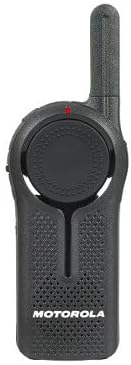
الصورة: الجبهة view of the DLR1060 radio, featuring the prominent channel selector knob and integrated speaker.
4. الإرسال والاستقبال
- للإرسال، اضغط مع الاستمرار على اضغط لتتحدث (PTT) على جانب الراديو. تحدّث بوضوح في الميكروفون.
- حرر زر PTT للاستماع إلى الرد.
- تأكد من أنك على نفس القناة مع الشخص الذي ترغب في التواصل معه.
5. Private Communication (Radio Profile بطاقة تعريف)
- The DLR1060 uses a unique 4-digit Radio Profile ID for private communication. This ID must be programmed into all radios intended for a private group.
- Refer to the Computer Programming Software (CPS) manual for detailed instructions on setting up and managing Radio Profile IDs and Private Groups.
صيانة
تنظيف الراديو
- امسح الجزء الخارجي من الراديو بقطعة قماش ناعمة و...amp قطعة قماش.
- Do not use harsh chemicals, cleaning solvents, or strong detergents, as these can damage the radio's casinالمكونات الداخلية والخارجية.
- Ensure the radio is powered off and disconnected from any charging accessories before cleaning.
العناية بالبطارية
- Always use genuine Motorola batteries and charging accessories.
- تجنب تعريض البطارية لدرجات حرارة عالية.
- If the radio will not be used for an extended period, store the battery separately in a cool, dry place.
استكشاف الأخطاء وإصلاحها
| مشكلة | الحل المحتمل |
|---|---|
| الراديو لا يعمل. | تأكد من شحن البطارية بالكامل وإدخالها بشكل صحيح. |
| لا يمكن الإرسال أو الاستقبال. | Verify that all radios are on the same channel and have the correct Radio Profile ID. Check if the battery is low. |
| جودة الصوت رديئة أو ثابتة. | Move closer to the other radio or to an open area. Check for obstructions. Ensure the antenna is clear. |
| عمر البطارية أقصر من المتوقع. | Ensure the battery is fully charged before use. Battery performance can degrade over time; consider replacing older batteries. |
تحديد
| ميزة | التفاصيل |
|---|---|
| نطاق التردد | 900 MHz ISM (License-Free) |
| القنوات | 6 |
| يتراوح | Up to 300,000 sq ft / 20 Floors |
| عمر البطارية | حتى 14 ساعة (الاستخدام النموذجي) |
| معايير المتانة | Military Standards 810 C, D, E, F, G |
| مواد الإسكان | بولي كربونات |
| معرف لجنة الاتصالات الفيدرالية | AZ489FT5870 |
| الأجهزة المتوافقة | Speaker, Headphone, Laptop (for CPS) |
| لون | أسود |
الضمان والدعم
For detailed warranty information and technical support, please refer to the documentation provided with your product or visit the official Motorola Solutions webالموقع. احتفظ بإيصال الشراء الخاص بك كإثبات للشراء في حالة مطالبات الضمان.