مقدمة
This manual provides detailed instructions for the proper use and maintenance of your 82Ms-A Scientific Calculator. Designed for students and professionals, this calculator features a 2-line display, multi-function keys, and supports up to 240 functions, including trigonometric calculations. Please read this manual thoroughly to ensure optimal performance and longevity of your device.
ماذا يوجد في الصندوق

Image: The 82Ms-A Scientific Calculator as packaged, indicating one unit is included.
- 82Ms-A Scientific Calculator (1 unit)
- دليل المستخدم (هذا المستند)
يثبت
تركيب البطارية

الصورة: تفصيلية view showing the open battery compartment of the calculator, revealing two AAA batteries.
The 82Ms-A Scientific Calculator is powered by a long-lasting battery. To install or replace batteries:
- تأكد من تشغيل الآلة الحاسبة عن.
- حدد مكان غطاء حجرة البطارية على الجزء الخلفي من الآلة الحاسبة.
- Slide the cover off in the direction indicated by the arrow (if present).
- Insert new batteries, ensuring correct polarity (+/-) as marked inside the compartment.
- أعد تركيب غطاء حجرة البطارية حتى يستقر في مكانه بإحكام.
تعليمات التشغيل
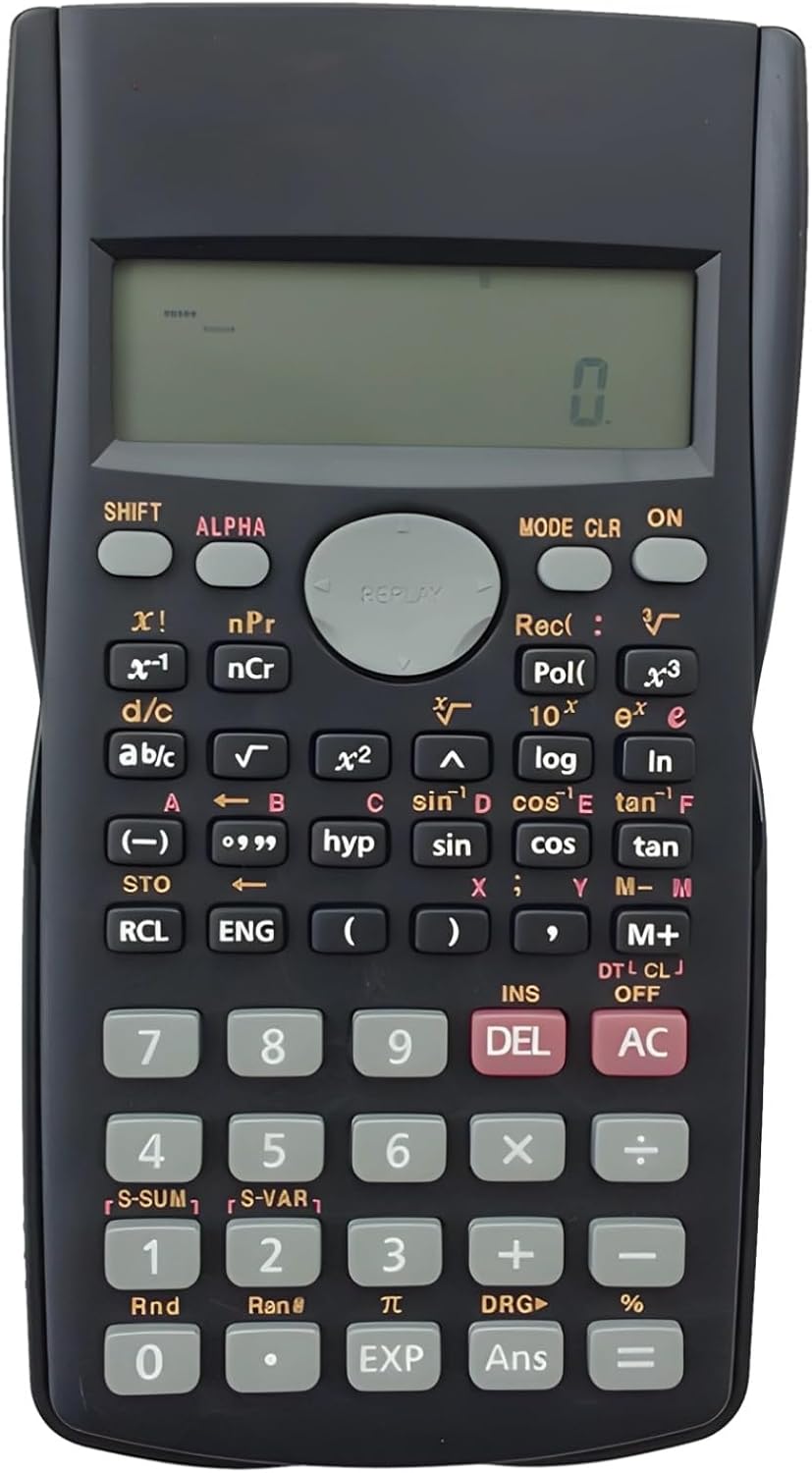
Image: The full layout of the 82Ms-A Scientific Calculator, highlighting its 2-line display and various function keys.
تشغيل/إيقاف الطاقة
- لتشغيل الجهاز: اضغط على ON مفتاح.
- To turn off: Press يحول ثم AC (إيقاف).
الحسابات الأساسية
أدخل الأرقام باستخدام لوحة المفاتيح الرقمية. استخدم +, -, ×، و ÷ keys for standard arithmetic operations. Press = لعرض النتيجة.
Multi-Function Keys and 2-Line Display
The calculator features a 2-line display, showing both the input expression and the result simultaneously. Many keys have multiple functions, indicated by colored labels above or below them. These functions are accessed using the يحول و ألفا المفاتيح.
- يحول: Activates the yellow-labeled functions. Press يحول, then the desired key.
- ألفا: Activates the red-labeled functions (variables, constants). Press ألفا, then the desired key.
- وضع: Changes the calculator's mode (e.g., COMP, STAT, EQN). Press وضع repeatedly to cycle through options.
- سي إل آر: Clears specific data or settings. Press يحول ثم سي إل آر to access clear options.
- ديل: Deletes the character at the cursor position.
- AC: Clears all input and returns to the initial state.
وظائف متقدمة
The 82Ms-A supports 240 functions, including trigonometric (sin, cos, tan), logarithmic (log, ln), power (x², x³), roots (√, ³√), fractions (a b/c), and statistical calculations. Refer to the specific key labels and their SHIFT/ALPHA functions for detailed usage.
- الدوال المثلثية: يستخدم خطيئة, كوس, تان keys. For inverse functions (sin⁻¹, cos⁻¹, tan⁻¹), use يحول with these keys.
- Logarithmic Functions: يستخدم سجل (الأساس 10) و ln (natural logarithm) keys.
- وظائف الطاقة والجذر: يستخدم x² for squaring, يحول ثم x² for square root (√). For other powers and roots, use x³ or يحول ثم x³ (³√).
- الكسور:استخدم أ ب/ج key to input and convert fractions.
صيانة
تنظيف
لتنظيف الآلة الحاسبة، استخدم قطعة قماش ناعمة وجافة. لإزالة الأوساخ المستعصية، امسحها برفق.ampen the cloth with water or a mild, non-abrasive cleaner. Do not use strong solvents, alcohol, or abrasive cleaners, as these can damage the casing وعرضها.
تخزين
Store the calculator in a cool, dry place away from direct sunlight and extreme temperatures. If storing for an extended period, it is recommended to remove the batteries to prevent leakage.
استكشاف الأخطاء وإصلاحها
| مشكلة | السبب المحتمل | حل |
|---|---|---|
| الآلة الحاسبة لا تعمل. | البطاريات الميتة أو المثبتة بشكل غير صحيح. | استبدل البطاريات بأخرى جديدة، مع التأكد من القطبية الصحيحة. |
| العرض باهت أو فارغ. | انخفاض طاقة البطارية. | استبدال البطاريات. |
| نتائج حسابية غير صحيحة. | Incorrect mode setting or previous calculation error. | يضعط AC to clear. Check the current mode using the وضع key and adjust if necessary. |
| المفاتيح لا تستجيب. | الغبار أو الحطام تحت المفاتيح؛ عطل داخلي. | Gently clean around the keys. If problem persists, contact support. |
تحديد

Image: The 82Ms-A Scientific Calculator with its length, width, and thickness measurements indicated.
| ميزة | التفاصيل |
|---|---|
| رقم الموديل | 71T71524TQPRRJC1J26SKQF |
| نوع العرض | شاشة عرض من سطرين |
| عدد الوظائف | ما يصل إلى 240 وظيفة |
| مصدر الطاقة | تعمل بالبطارية |
| الأبعاد (الطول × العرض × الارتفاع) | 6.1 × 3.27 × 0.39 بوصة |
| وزن العنصر | 5.3 أونصات |
| لون | أسود |
| مادة | بلاستيك |
الضمان والدعم
Specific warranty information for this product is not provided within this manual. For warranty details, technical support, or service inquiries, please refer to the product packaging or contact the retailer from whom the product was purchased. Keep your purchase receipt as proof of purchase.


