
1. انتهى المنتجview
The BoxWave miniSync is a versatile USB-A to USB Type-C retractable cable designed for convenient charging and data synchronization. Its innovative retractable mechanism helps prevent tangles and knots, making it ideal for portability and organized use. The cable offers multiple pre-set lengths to suit various needs and supports high-speed data transfers.
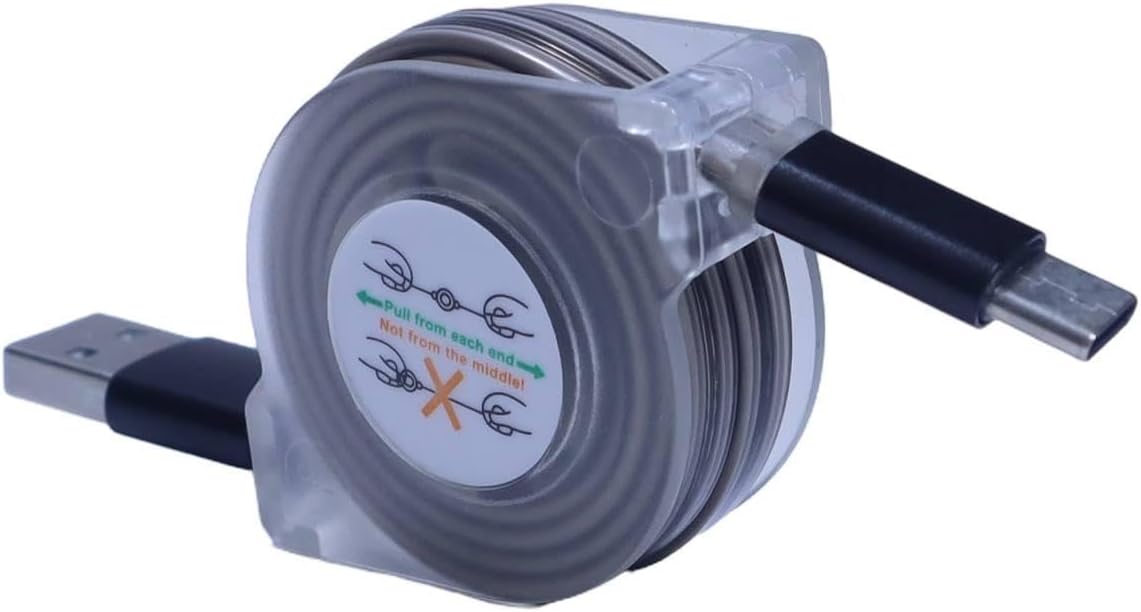
Image 1.1: The BoxWave miniSync Retractable Cable in its compact form, showing the USB-A and USB Type-C connectors.
المميزات الرئيسية:
- تصميم قابل للسحب: Keeps the cable organized and tangle-free.
- أطوال قابلة للتعديل: Features 5 pre-set lengths for optimal use.
- نقل البيانات بسرعة عالية: Supports USB 2.0 for efficient data synchronization.
- بناء متين: Made from high-quality polycarbonate and heavy-duty ribbon-style cable.
- صغير الحجم وقابل للحمل: Retracts to 4 inches (10 cm) and extends up to 37 inches (93 cm).
2. Setup and Extension
The miniSync cable is designed for easy extension and retraction. Follow these steps to adjust the cable length:
- للتمديد: Gently pull both ends of the cable simultaneously until it reaches your desired length. The cable will lock into one of the 5 pre-set positions. Avoid pulling only one end, as this can cause the retraction mechanism to jam.
- للتراجع: Gently pull both ends of the cable again until it unlocks from its current position. The cable will then retract automatically back into its compact housing.

Image 2.1: Illustration demonstrating how to extend the miniSync cable by pulling both ends, with five pre-set lengths from 4 inches to 37 inches.
The cable can extend up to 37 inches (93 cm) and retracts to a compact 4 inches (10 cm) for easy storage.
3. تعليمات التشغيل
3.1 شحن جهازك
- Connect the USB-A end of the miniSync cable to a standard USB power adapter, computer USB port, or power bank.
- Connect the USB Type-C end of the miniSync cable to your compatible device (e.g., Hantek HTM208C, smartphone, tablet).
- تأكد من أن كلا الوصلتين محكمتان. سيبدأ جهازك بالشحن.
The miniSync cable supports fast charging up to 15W, depending on the power source and device capabilities.

Image 3.1: Close-up of the USB Type-C connector of the miniSync cable, indicating fast charging capability.
3.2 مزامنة البيانات
- Connect the USB-A end of the miniSync cable to a USB port on your computer.
- Connect the USB Type-C end of the miniSync cable to your compatible device.
- Once connected, your computer should recognize the device. You can then transfer files, back up data, or perform other synchronization tasks as supported by your device and operating system.
The cable supports USB 2.0 data transfer speeds, allowing for efficient file إدارة.
4. الرعاية والصيانة
- التراجع الصحيح: Always pull both ends of the cable simultaneously when extending or retracting to prevent damage to the internal mechanism.
- تنظيف: استخدم قطعة قماش ناعمة وجافة لتنظيف الكابل والموصلات. تجنب استخدام المواد الكيميائية القاسية أو المواد الكاشطة.
- تخزين: Store the cable in its fully retracted position when not in use to protect it from damage and keep it tangle-free.
- تجنب التوتر: Do not bend the cable sharply or apply excessive force to the connectors. The cable features reinforced strain relief to enhance durability.

الصورة 4.1: تفصيلية view of the reinforced strain relief on the miniSync cable, designed to prevent cable damage near the connector.
5. استكشاف الأخطاء وإصلاحها
| مشكلة | السبب المحتمل | حل |
|---|---|---|
| Cable does not extend or retract smoothly. | Only one end was pulled, causing the internal mechanism to jam. | Gently pull both ends of the cable simultaneously until it releases, then try again. Avoid forcing the mechanism. |
| الجهاز لا يشحن. | Loose connection, faulty power source, or incompatible device. |
|
| نقل البيانات لا يعمل. | Loose connection, driver issues on computer, or device settings. |
|
6. المواصفات
- اسم الموديل: miniSync
- نوع الموصل: USB-A إلى USB Type-C
- سرعة نقل البيانات: USB 2.0 (حتى 480 ميجابت في الثانية)
- مخرج الشحن: Up to 15W (depending on power source)
- طول التراجع: حوالي 4 بوصة (10 سم)
- الطول الممتد: حتى 37 بوصة (93 سم)
- أطوال قابلة للتعديل: 5 pre-set lengths
- مادة: Durable polycarbonate housing, heavy-duty ribbon-style cable
- وزن السلعة: 1.2 أونصة (34 جرام)
- الشركة المصنعة: بوكس ويف
7. معلومات الدعم والاتصال
For technical assistance or inquiries regarding your BoxWave miniSync cable, please contact BoxWave customer support. Refer to the product packaging or the official BoxWave webالموقع للحصول على تفاصيل الاتصال الحالية.
Note: Limited third-party tech support for your device (up to 3 inquiries via messaging) is mentioned in some product descriptions. This support is not affiliated with or endorsed by Hantek.