
CENMING FAN-HD6UDL
CENMING Replacement Remote Control Instruction Manual
Model: FAN-HD6UDL for Hampمراوح سقف تون باي
1. المقدمة
This manual provides comprehensive instructions for the installation, operation, and maintenance of your CENMING Replacement Remote Control, Model FAN-HD6UDL. This remote is specifically designed for Hampton Bay ceiling fans featuring up and down light control and a 3-speed fan function. It is important to note that this product is the remote control unit only and does not include a receiver or a 9V battery.

Image 1.1: The CENMING FAN-HD6UDL replacement remote control, showing its buttons for fan speed and light control.
2. ملاحظات التوافق
This remote control is not universal. It is a direct replacement for specific Hampton Bay Hunter remote models that operate at a frequency of 303.9MHz. To ensure compatibility, verify the FCC ID/Model number on the back of your original remote control. Compatible models include:
- UC7078T / CHQ7078T
- UC7083T / CHQ7083T
- L3H2010FANHD / Fan-HD6UDL (with UP DOWN LIGHT Key)
If your original remote's FCC ID/Model number is not listed above, or if it features a reverse button (this remote does not), this replacement remote may not be compatible with your ceiling fan receiver. In such cases, a complete kit including a receiver may be required.

Image 2.1: Illustration of checking the FCC ID/Model number on the back of an original remote control to confirm compatibility.
3. محتويات العبوة
عند فتح العبوة، يرجى التأكد من وجود جميع العناصر التالية:
- 1 x CENMING Replacement Remote Control (Transmitter)
- 1 x Remote Holder (Wall Mount)
- 2 × مسامير التثبيت
يلزم وجود بطارية 9 فولت للتشغيل ولكنها غير مضمنة في العبوة.

Image 3.1: Visual representation of the package contents, including the remote, wall mount, and screws.
4. الإعداد والتثبيت
To ensure proper communication between the remote control and your ceiling fan receiver, you must match the DIP switch codes.
- Locate DIP Switches: Open the battery cover on your original remote control. The DIP switches are typically located behind the battery compartment. If you do not have the original remote, you will need to access the DIP switches on the ceiling fan receiver unit itself.
- Match DIP Codes: Carefully slide the switches on your new CENMING remote control to match the exact pattern (ON/OFF positions) of the DIP switches found on your original remote or receiver.
- تركيب البطارية: Insert a new 9V battery (not included) into the battery compartment of the new remote control, observing the correct polarity.
- وظيفة الاختبار: Replace the battery cover. The remote should now be ready for operation. Test all functions (fan speeds, light control) to confirm successful setup.
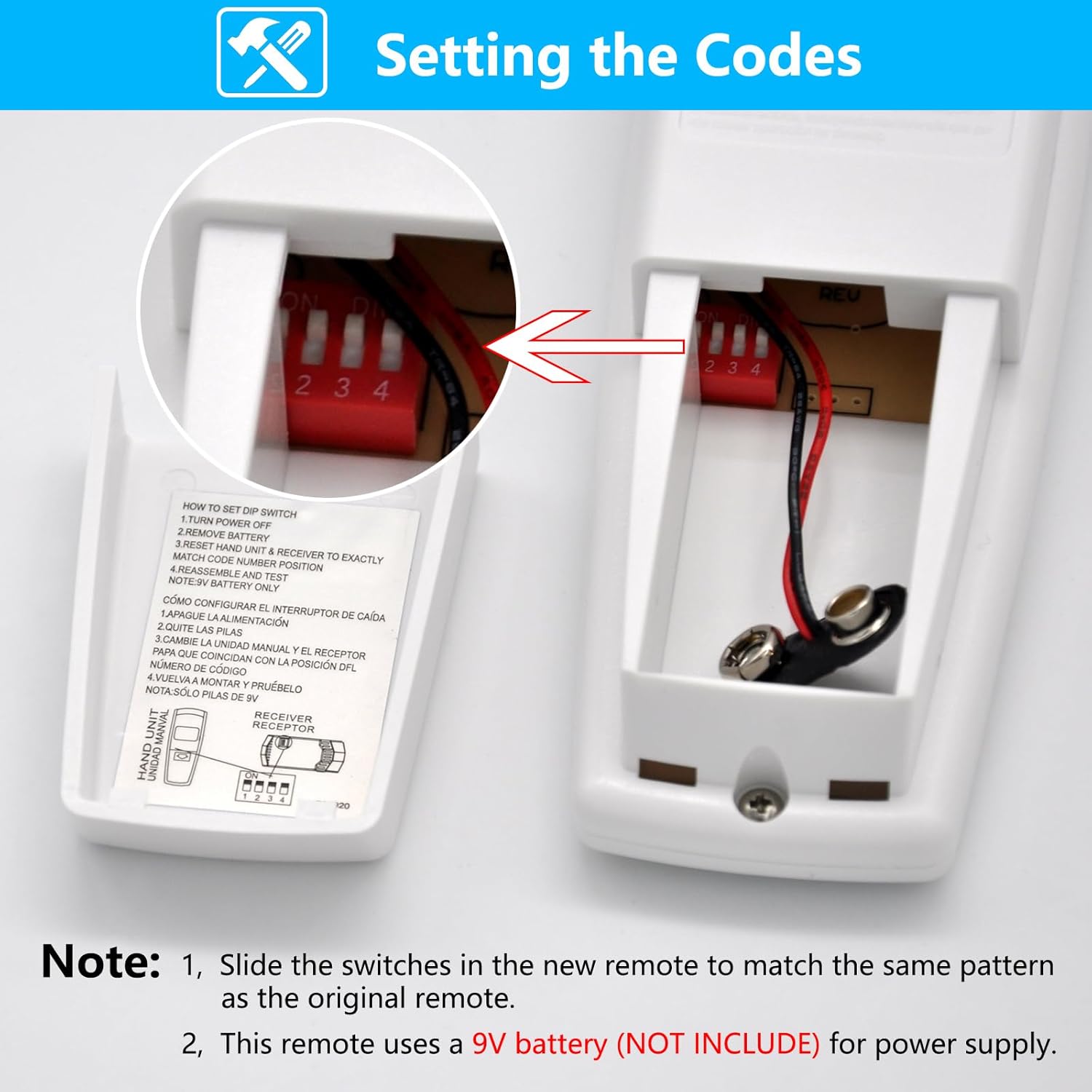
الصورة 4.1: تفصيلية view of the DIP switch compartment inside the remote control, illustrating how to match the code settings.
5. تعليمات التشغيل
The CENMING FAN-HD6UDL remote control provides intuitive control over your ceiling fan's functions:
- التحكم في سرعة المروحة:
- أهلاً: Sets the fan to high speed.
- ميد: Sets the fan to medium speed.
- ل: Sets the fan to low speed.
- إيقاف المروحة: يقوم بإيقاف تشغيل مروحة السقف.
- Light Control (Up and Down Lights):
- حتى الضوء: Controls the up-lighting feature of your fan. Press briefly to turn the up light ON or OFF. Press and hold for more than 0.7 seconds to activate the dimmer function; the light intensity will cycle through its range over 0.8 seconds.
- DOWN LIGHT: Controls the down-lighting feature of your fan. Press briefly to turn the down light ON or OFF. Press and hold for more than 0.7 seconds to activate the dimmer function; the light intensity will cycle through its range over 0.8 seconds.
This remote control does not include a reverse function for the fan blades.

Image 5.1: The remote control shown in a room setting, highlighting its 3-speed fan control and independent up/down light control with dimming capabilities.
6. المواصفات
| ميزة | التفاصيل |
|---|---|
| رقم الموديل | FAN-HD6UDL |
| الأجهزة المتوافقة | 110V 3-Speed AC Ceiling Fan with Up and Down Lights |
| تكنولوجيا الاتصال | Radio Frequency (RF) 303.9 MHz |
| مصدر الطاقة | 1 x 9V Battery (Not Included) |
| أبعاد المنتج | 2.2 × 1.4 × 5.8 بوصة (تقريبًا) |
| وزن العنصر | 3.2 أونصة (تقريبًا) |
| المميزات الخاصة | 3-Speed Fan Control, Up Down Light Control, Light Dimmer |
| لون | أبيض |

Image 6.1: Diagram illustrating the physical dimensions of the remote control in inches and millimeters.

Image 6.2: The remote control displayed alongside a summary of its compatible devices, connectivity, range, and battery requirements.
7. استكشاف الأخطاء وإصلاحها
If you encounter issues with your remote control, please refer to the following common solutions:
- جهاز التحكم عن بعد لا يستجيب:
- التحقق من البطارية: Ensure a fresh 9V battery is correctly installed in the remote control.
- Verify DIP Switches: Re-check that the DIP switch settings on the remote exactly match those on your ceiling fan receiver. Incorrect settings are a common cause of non-responsiveness.
- Fan or Lights Not Working:
- مزود الطاقة: Confirm that the ceiling fan unit is receiving power from the main electrical supply.
- وظائف جهاز الاستقبال: If the remote is correctly set up and has a fresh battery, but the fan/lights still do not respond, there might be an issue with the ceiling fan's receiver unit itself.
- وظيفة التعتيم لا تعمل:
- اضغط مع الاستمرار على: Remember to press and hold the UP LIGHT or DOWN LIGHT button for more than 0.7 seconds to activate the dimming feature. A brief press will only toggle ON/OFF.
- توافق المصباح: Ensure that the light bulbs installed in your ceiling fan are dimmable. Non-dimmable bulbs will not respond to the dimming function.
- Remote Does Not Match Original:
- FCC ID/Model Check: Refer to the "Compatibility Notes" section (Section 2) and re-verify that your original remote's FCC ID/Model number is listed as compatible. If not, this remote is likely not the correct replacement for your specific fan.
8. الضمان والدعم
For specific warranty information regarding your CENMING Replacement Remote Control, please refer to the product packaging or contact the seller directly. If you require further assistance or have questions not covered in this manual, please reach out to CENMING customer support through the retailer's platform where the product was purchased. Providing your product model number (FAN-HD6UDL) and a detailed description of the issue will help expedite support.