
1. المقدمة
Thank you for choosing the LEADZM Digital Piano Model Piano126. This instrument is designed to provide a realistic piano playing experience with its 88 fully weighted keys and advanced sound technology. This manual will guide you through the setup, operation, and maintenance of your new digital piano, ensuring you get the most out of its features.
2. مواصفات المنتج
- 88 Fully Weighted Keys: Provides a realistic touch and response, mimicking an acoustic piano.
- European Dream Sound Source: Delivers high-quality, authentic piano tones.
- Rich Sound Palette: Features 128 polyphony, 128 demo songs, 128 rhythms, and 380 timbres.
- مكبرات الصوت المتكاملة: Two built-in 20W stereo speakers for clear and powerful sound output.
- Triple Pedal System: Includes Soft, Sustain, and Sostenuto pedals for expressive playing.
- اتصال بلوتوث مزدوج: Supports both Audio Bluetooth for streaming and MIDI Bluetooth for wireless connection to apps.
- USB MIDI Interface: Connects to computers or tablets for multimedia interaction and use with music software (e.g., Cubase, FL Studio, Logic, Live).
- وظيفة التسجيل: Built-in MIDI sequencer for recording and playback.
- المسرع: Seven types of metronome for practice.
- لوحة التحكم: Simple control panel with LED display for easy navigation of functions.
3. محتويات العبوة
يرجى التأكد من وجود جميع العناصر في الحزمة:
- 1 x LEADZM Digital Piano
- 1 × محول الطاقة
- 1 x Triple Pedal Unit
- 1 × سماعة رأس
- 1 x Headphone Adapter
- 1 × كابل يو اس بي
- 1 x Android Cable
- 1 x Piano Cloth
- 1 x Piano Cover
- 1 x Keyboard Sticker
- 1 x Music Clip
- 1 x Screwdriver and Screw Accessories
- 1 × دليل المستخدم (هذه الوثيقة)
4. دليل الإعداد
4.1 التجميع
Refer to the included assembly instructions and use the screwdriver and screw accessories to attach the metal stand to the digital piano. Ensure all connections are secure before proceeding.

انتهىview of the LEADZM Digital Piano, showcasing its elegant white finish, metal stand, triple pedal unit, headphones, power adapter, and included user manual.
4.2 توصيل الطاقة
- Connect the power adapter to the DC 15V input port located at the rear of the piano.
- قم بتوصيل محول الطاقة بمأخذ كهربائي قياسي.
4.3 توصيل وحدة الدواسة
Connect the triple pedal unit cable to the dedicated pedal input port at the rear of the piano.
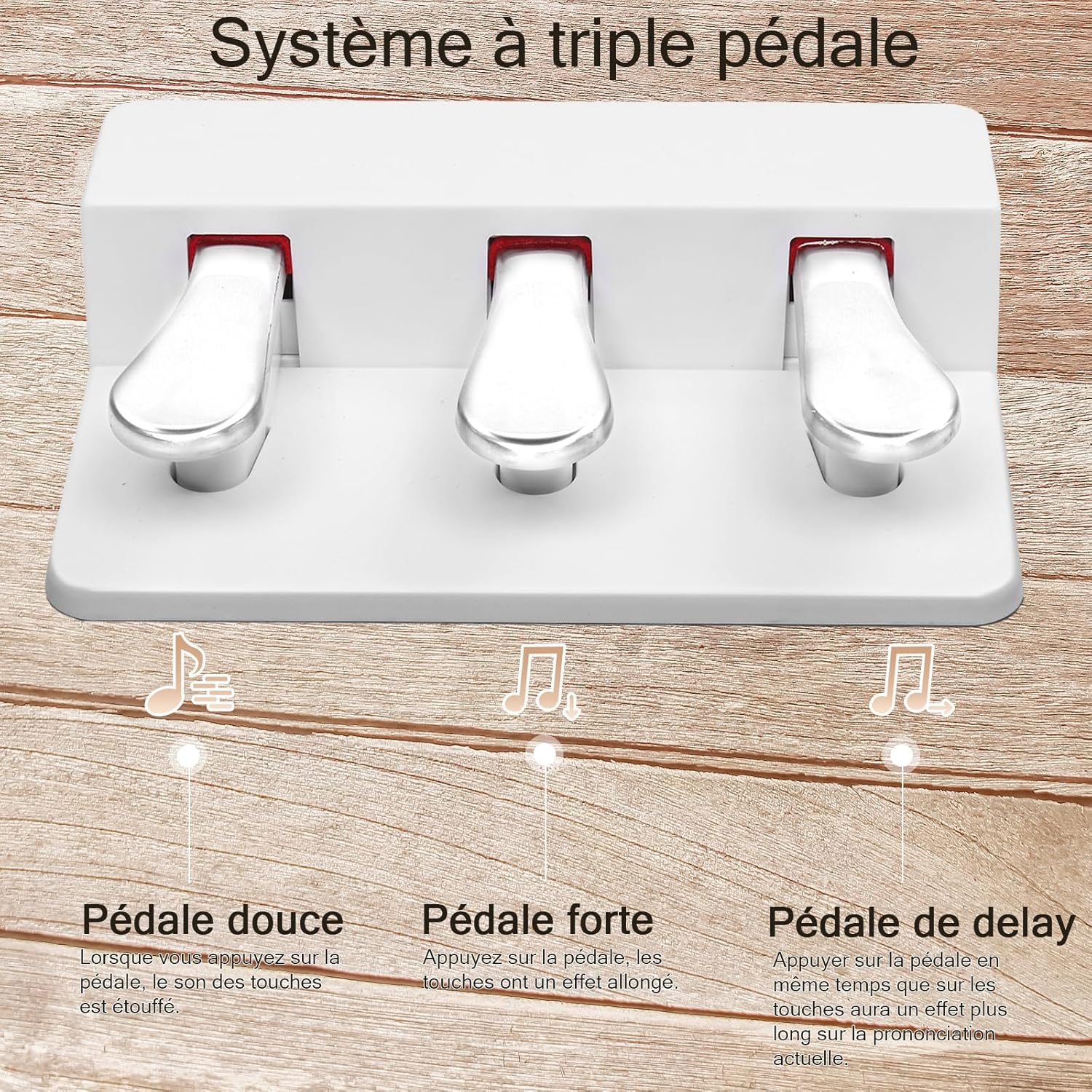
A close-up of the three-pedal unit, explaining the function of each pedal: the Soft pedal for a muted tone, the Sustain pedal for prolonged notes, and the Sostenuto pedal for selective note sustain.
4.4 توصيل سماعة الرأس
To practice privately, connect the included headphones (or your own 1/8" jack headphones) to the headphone jack on the piano. The built-in speakers will automatically mute when headphones are connected.

This image shows headphones connected to the piano, indicating the headphone jack feature that allows for private practice without disturbing others, as the built-in speakers are automatically muted.
5. تعليمات التشغيل
5.1 تشغيل/إيقاف التشغيل
Press the 'POWER' button on the control panel to turn the piano on or off. The LED display will illuminate when the piano is on.

تفصيلية view of the piano's control panel, featuring an LED display and buttons for functions like power, volume, metronome, rhythm, timbre selection, recording, and Bluetooth connectivity.
5.2 الوظائف الأساسية
- التحكم في مستوى الصوت: Use the 'VOLUME' knob to adjust the overall sound level.
- Timbre Selection: Press the 'FUNCTION' button, then use the '+' and '-' buttons to cycle through the 380 available timbres.
- اختيار الإيقاع: Press the 'RHYTHM' button, then use the '+' and '-' buttons to select from 128 rhythms.
- أغاني العرض التوضيحي: Press the 'DEMO' button to play through the 128 built-in demo songs. Use 'PREV' and 'NEXT' to navigate.
- المسرع: Press the 'METRONOME' button to activate the metronome. Use the '+' and '-' buttons to adjust tempo or select different metronome types.
5.3 استخدام الدواسات
- Soft Pedal (Left): Reduces the volume and softens the tone.
- Sostenuto Pedal (Middle): Sustains only the notes held down at the moment the pedal is pressed, allowing subsequent notes to remain unaffected.
- Sustain Pedal (Right): Sustains all notes played while the pedal is held down, allowing them to ring out longer.
5.4 اتصال البلوتوث
The piano features dual Bluetooth for audio and MIDI. Bluetooth automatically activates when the piano is powered on.
- بلوتوث الصوت: بحث عن the piano's Bluetooth name on your mobile device to stream audio through the piano's speakers.
- MIDI Bluetooth: On your mobile device or computer, open a compatible music app (e.g., learning apps, DAWs) and search for the piano's MIDI Bluetooth signal to establish a wireless connection for MIDI data transfer.
5.5 USB MIDI Connection
Connect the piano to a computer or tablet using the provided USB cable. This allows for MIDI data transfer, enabling you to use the piano as a controller for various music software applications such as Cubase, FL Studio, Logic, and Live.

The digital piano is shown connected to a laptop, illustrating its MIDI functionality for use with music production software like Cubase, FL Studio, Logic, and Live, enabling advanced learning and composition.
5.6 التسجيل والتشغيل
Use the 'RECORD' button to start recording your performance. Press 'PLAY' to listen to your recorded sequence. The piano features a MIDI sequencer for this function.
5.7 وظائف متقدمة
- نقل: Adjust the pitch of the keyboard up or down.
- ينقسم: Divide the keyboard into two sections, each with a different voice.
- مزدوج: Layer two different voices across the entire keyboard.
- وتر: Enable chord accompaniment styles.
- المزامنة: Synchronize rhythm playback.
6. الصيانة
- تنظيف: Use the provided piano cloth to gently wipe the surface of the piano and keys. Avoid abrasive cleaners or solvents.
- تخزين: When not in use, cover the piano with the provided piano cover to protect it from dust and spills.
- بيئة: Keep the piano away from direct sunlight, extreme temperatures, and high humidity to prevent damage.
- مواصلات: When moving the piano, ensure it is powered off and all cables are disconnected. Handle with care to avoid impact.
7. استكشاف الأخطاء وإصلاحها
- لا يوجد صوت:
- Check if the power adapter is securely connected and the piano is turned on.
- تأكد من رفع مستوى الصوت.
- إذا كانت سماعات الرأس متصلة، فافصلها لتمكين إخراج الصوت من مكبر الصوت.
- المفاتيح لا تستجيب:
- تأكد من تشغيل البيانو.
- Check if any specific function (e.g., Split, Dual) is active that might affect key response.
- مشاكل اتصال البلوتوث:
- Ensure Bluetooth is enabled on your mobile device or computer.
- Restart the piano and your device, then try pairing again.
- Ensure no other devices are currently connected to the piano via Bluetooth.
- الدواسات لا تعمل:
- Verify the pedal unit cable is securely connected to the correct port.
8. المواصفات
| ميزة | مواصفة |
|---|---|
| رقم الموديل | بيانو 126 |
| لون | أبيض |
| الأبعاد (مع الحامل) | 135 سم (الطول) × 32.5 سم (العرض) × 76 سم (الارتفاع) |
| الأبعاد (بدون الحامل) | 135 سم (الطول) × 32.5 سم (العرض) × 11.8 سم (الارتفاع) |
| وزن | 24 كجم |
| عدد المفاتيح | 88 (Fully Weighted, A1-C9) |
| نوع المفتاح | Piano Style |
| مصدر الصوت | European specialized Dream Sound Source |
| أقصى تعدد صوتي | 128 ملاحظة |
| الأجراس | 380 |
| الإيقاعات | 128 |
| الأغاني التجريبية | 128 |
| المسرع | 7 أنواع |
| المتحدثون | 2 × 20 واط ستيريو |
| الدواسات | Soft, Sustain, Sostenuto (Triple Pedal Unit) |
| الاتصال | Audio Bluetooth, MIDI Bluetooth, USB MIDI, AUX In, Line Out, Line In, 1/8" Headphone Jack |
| نوع التخزين | RAM 64KB, FLASH 128M |
| وظائف متكاملة | MIDI Sequencer (Record/Playback), Full Chord Accompaniment, Transpose, Split, Dual, Backlit LED Display |
| البرامج المدعومة | Cubase, FL Studio, Logic, Live, etc. |
9. الضمان والدعم
LEADZM is committed to providing quality products and customer satisfaction. For any technical assistance, warranty claims, or product inquiries, please refer to the contact information provided with your purchase or visit the official LEADZM webيرجى الاحتفاظ بإثبات الشراء لأغراض الضمان.
For specialized customer support, please visit the LEADZM Brand Store.