1. المقدمة
This manual provides detailed instructions for the assembly, operation, and maintenance of your HUANUO 80 cm Electric Standing Desk. Please read this manual thoroughly before use to ensure proper function and safety.
المميزات الرئيسية:
- Wide Height Adjustment Range: 71-116cm for versatile sitting and standing positions.
- Convenient Memory Presets: Four programmable height settings for quick adjustments.
- Durable Construction: High-quality alloy steel frame tested for 50,000 lift cycles.
- Quiet Operation: Motor operates at a low noise level for a calm workspace.
- Easy Assembly: Streamlined process with minimal lifting required.
2. معلومات السلامة
- تأكد من ربط جميع البراغي بشكل آمن قبل الاستخدام.
- احتفظ بالأطفال والحيوانات الأليفة بعيدًا عن المكتب أثناء التشغيل.
- لا تقم بتحميل المكتب بما يتجاوز قدرته المحددة على الوزن (70 كجم).
- تجنب وضع السوائل مباشرة على لوحة التحكم أو مكونات المحرك.
- افصل الطاقة قبل التنظيف أو إجراء أي صيانة.
- Do not attempt to disassemble or repair the motor or control system yourself. Contact qualified personnel for service.
3. محتويات العبوة
تأكد من وجود جميع المكونات قبل البدء بالتجميع. في حال وجود أي أجزاء مفقودة أو تالفة، يرجى التواصل مع خدمة العملاء.
| عنصر | كمية |
|---|---|
| Desktop Panel (Green 80 x 48 cm) | 1 |
| Leg Columns (Electric) | 2 |
| منصات القدم | 2 |
| مكونات العارضة/الإطار | متنوع |
| لوحة التحكم | 1 |
| Power Adapter & Cables | مجموعة واحدة |
| Hardware (Screws, Allen Key, etc.) | مجموعة واحدة |
4. تعليمات التجميع
Follow these steps carefully to assemble your HUANUO Electric Standing Desk. It is recommended to have a clear, spacious area for assembly.
دليل فيديو التجميع:
Official assembly video for the HUANUO Electric Standing Desk. This video provides a visual guide to the step-by-step installation process, including attaching the legs, crossbar, and control panel.
تجميع خطوة بخطوة:
- Attach the Feet to the Leg Columns: Secure the foot pads to the bottom of each leg column using the provided screws. Ensure they are firmly attached for stability.

Image: Fully assembled HUANUO Electric Standing Desk in a home office setting, showcasing its sleek design and green finish.
- Assemble the Crossbar: Connect the two main crossbar sections. This forms the central support structure for the desk.

Image: Diagram illustrating the product dimensions of the HUANUO Electric Standing Desk, including height range (71-116cm), desktop size (80x48cm), and base dimensions.
- Attach Leg Columns to Crossbar: Securely fasten the leg columns to the assembled crossbar. This creates the main frame of the desk.
- Install the Motor and Drive Rod: Carefully install the electric motor and connect the drive rod between the two leg columns. Ensure the rod is properly seated for smooth operation.
- تركيب لوحة التحكم: Attach the control panel to the underside of the desktop, typically on the front edge for easy access.
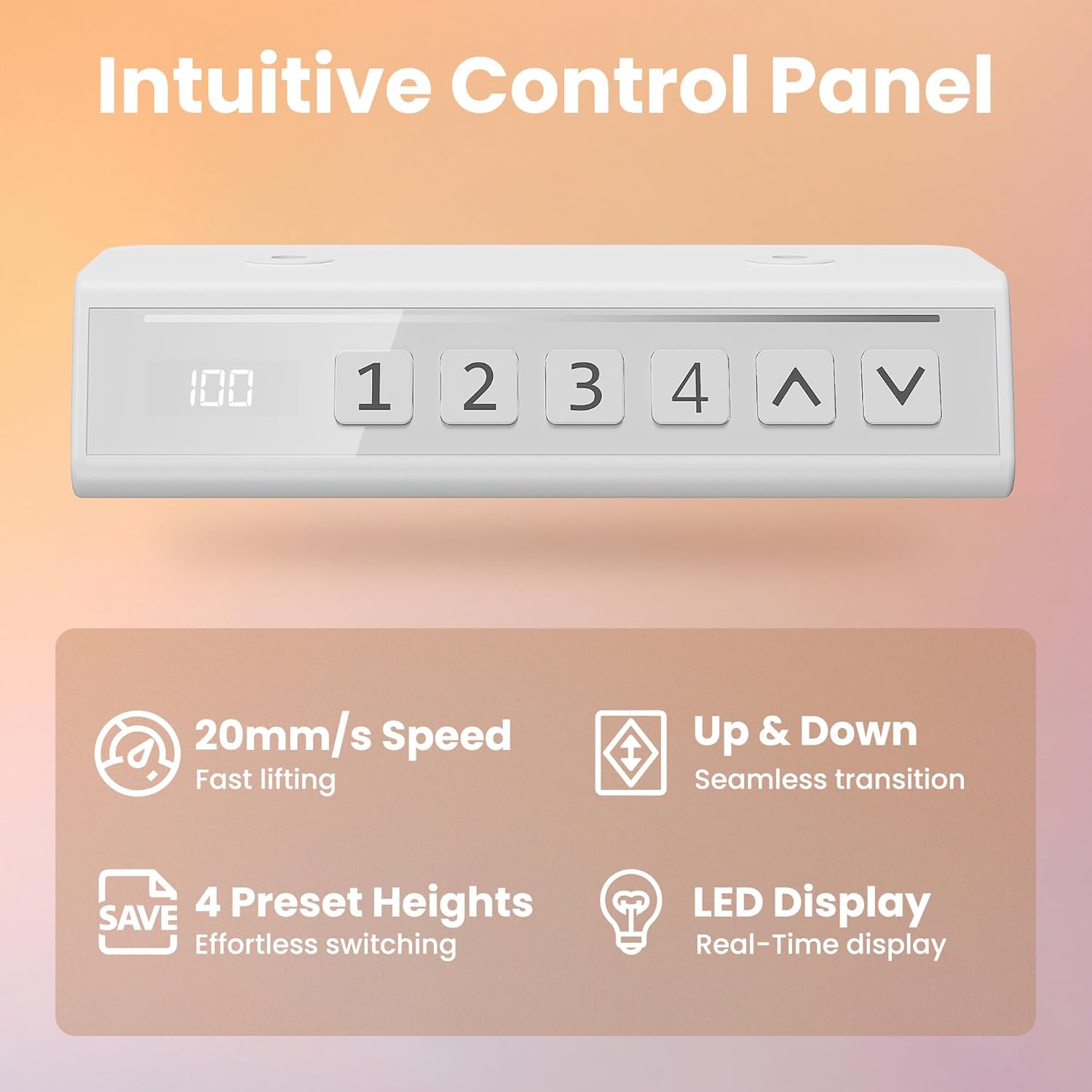
الصورة: مفصلة view of the intuitive control panel, highlighting its LED display, up/down buttons, and four preset height buttons.
- قم بتوصيل سطح المكتب بالإطار: Carefully place the desktop onto the assembled frame. Align the pre-drilled holes and secure the desktop using the provided screws.
- توصيل الكابلات: Connect the motor cables to the control panel and the power adapter. Ensure all connections are snug.
- التحقق النهائي: Double-check all screws and connections to ensure the desk is stable and ready for use.
5. تعليمات التشغيل
Your HUANUO Electric Standing Desk is designed for intuitive operation with its smart control panel.
وظائف لوحة التحكم:
- الأسهم لأعلى/لأسفل (▲ / ▼): اضغط مع الاستمرار لضبط ارتفاع المكتب يدويًا. حرر الزر للتوقف عند الارتفاع المطلوب.
- عرض الصمام: يعرض الارتفاع الحالي للمكتب بالسنتيمترات.
- أزرار الضبط المسبق (1، 2، 3، 4):
- لحفظ إعداد مسبق: Adjust the desk to your desired height. Press the "M" or "SAVE" button (if present, otherwise hold the number button) until the display flashes, then press the desired number button (1, 2, 3, or 4) to save the current height.
- لاستخدام الإعداد المسبق: اضغط ببساطة على الزر المقابل (1، 2، 3، أو 4). سينتقل المكتب تلقائيًا إلى الارتفاع المحفوظ.

Image: Illustration demonstrating the height adjustment range of the desk, showing it can transition smoothly between sitting (71cm) and standing (116cm) positions.

Image: Graphic illustrating the low noise level (45dB) of the desk's operation compared to other common sounds, emphasizing its quiet performance.
6. الصيانة
تضمن الصيانة الدورية طول عمر مكتبك القابل للوقوف وأداءه الأمثل.
- تنظيف: امسح سطح المكتب والإطار بقطعة قماش ناعمة.amp القماش. تجنب المنظفات الكاشطة أو المواد الكيميائية القاسية.
- إدارة الكابلات: Periodically check that all cables are securely connected and not pinched or tangled. Use cable ties if necessary to keep them tidy.
- إحكام المسمار: Every few months, check and re-tighten any loose screws on the frame to maintain stability.
- العناية بالمحرك: The motor is largely maintenance-free. Keep the area around the motor and drive rod clear of obstructions.
7. استكشاف الأخطاء وإصلاحها
إذا واجهت أي مشاكل مع مكتبك، فراجع المشاكل والحلول الشائعة التالية:
| مشكلة | السبب المحتمل | حل |
|---|---|---|
| المكتب لا يتحرك. | Power cable disconnected, motor error, overload. | Check power connections. Reduce weight on desk. Unplug for 30 seconds and plug back in to reset. |
| يتحرك المكتب بشكل غير متساوٍ أو يصدر أصواتًا غير عادية. | Loose screws, obstruction, damaged component. | Check all screws for tightness. Ensure no obstructions. Contact support if issue persists. |
| إعدادات الارتفاع المسبقة لا تعمل. | لم يتم حفظ الإعدادات المسبقة بشكل صحيح. | Re-save your desired height presets following the operating instructions. |
| رمز الخطأ معروض على الشاشة. | خطأ نظامي محدد. | Refer to the full troubleshooting guide (if provided separately) or contact customer support with the error code. |
8. المواصفات
| يصف | التفاصيل |
|---|---|
| ماركة | هوانوو |
| رقم الموديل | MSESD202GG-80A-UK |
| لون | أخضر |
| أبعاد المنتج | 48D x 80W x 71H cm (Min Height) |
| نطاق الارتفاع القابل للتعديل | 71 سم - 116 سم |
| مادة | Alloy Steel (Frame), Engineered Wood (Desktop) |
| وزن العنصر | 11.1 كجم |
| الحد الأقصى لسعة التحميل | 70 كجم |
| المميزات الخاصة | Adjustable Height, Ergonomic, Electric, Scratch Resistant, 4 Memory Height Settings |
| مستوى الضوضاء | ~45 ديسيبل |

Image: Visual representation of the desk's durability and 70 kg weight capacity, with two individuals sitting on the desktop.
9. الضمان والدعم
HUANUO products are designed for durability and performance. For warranty information, product support, or to report any issues, please contact HUANUO customer service through the retailer where you purchased the product or visit the official HUANUO webموقع.
معلومات الاتصال: Refer to your purchase documentation or the HUANUO brand store on Amazon for the most current support details.
الموارد المتاحة على الإنترنت: For additional tips, FAQs, and product registration, please visit the HUANUO official webموقع.