
معلومات هامة حول السلامة
Please read this manual thoroughly before using the REDTIGER F77 V2 Dash Cam. Improper use may result in product damage, property damage, or personal injury. Keep the device away from water, moisture, and extreme temperatures. Do not attempt to disassemble or repair the device yourself. Always ensure the dash cam is securely mounted and does not obstruct your view أثناء القيادة.
محتويات الحزمة
تأكد من تضمين جميع العناصر المدرجة أدناه في الحزمة الخاصة بك:
- 1 x REDTIGER F77 V2 4K Front Dash Cam
- 1 x 4K Rear Dash Cam
- 1 × 11.5 قدم كابل إمداد الطاقة مع شاحن السيارة
- 1 x Data Transfer USB Cable
- 1 × 21.3ft كابل الكاميرا الخلفية
- 1 × دليل المستخدم
- 1 x Crowbar (Car Wire Trim Tool)
- شنومكس x دليل سريع
- 2 × ملصق كهرباء
- 2 × لاصق تثبيت
- 5 × مشابك كابلات

المنتج انتهىview
The REDTIGER F77 V2 is a dual 4K dash cam system designed to record both front and rear views of your vehicle. It features a compact design with a 4-inch touchscreen for easy operation.
Front Dash Cam (Main Unit)
- عدسة الكاميرا الأمامية: Records 4K video.
- شاشة لمس مقاس 4 بوصات: للعيش view، التشغيل، وضبط الإعدادات.
- زر الطاقة: لتشغيل/إيقاف تشغيل الجهاز.
- منافذ USB-C: For power input and rear camera connection.
- منفذ كارت الذاكرة الصغيرة: For additional storage (device has built-in eMMC).
- وحدة GPS: Integrated into the mount for location and speed data.
كاميرا داش خلفية
- عدسة الكاميرا الخلفية: Records 4K video for the rear view.
- موصل USB-C: To connect to the main unit.
يثبت
1. تركيب كاميرا لوحة القيادة الأمامية
- نظّف المنطقة الموجودة على الزجاج الأمامي حيث تنوي تركيب كاميرا لوحة القيادة. تأكد من خلوها من الغبار والشحوم.
- Apply one of the electrostatic stickers to the cleaned area on the windshield. This helps protect your windshield and allows for easier removal.
- Attach an adhesive mount to the dash cam's main unit.
- Firmly press the dash cam with the attached mount onto the electrostatic sticker. Ensure a secure fit.
- Connect the 11.5ft power supply cable to the dash cam's power input (USB-C port).
- Route the power cable along the edge of the windshield and down to your vehicle's 12V power outlet (cigarette lighter) using the provided crowbar and cable clips to hide the cable neatly.
2. تركيب كاميرا لوحة القيادة الخلفية
- Choose a suitable location on your rear windshield for the rear dash cam, ensuring it has a clear view and does not obstruct your driving.
- Clean the chosen area and apply an electrostatic sticker, then attach the rear dash cam with an adhesive mount.
- Connect the 21.3ft rear camera cable to the rear dash cam.
- Route the rear camera cable from the rear windshield to the front dash cam, connecting it to the designated USB-C port. Use the crowbar and cable clips for a tidy installation.

3. توصيل الطاقة
Plug the car charger into your vehicle's 12V power outlet. The dash cam will automatically power on and begin recording when the vehicle starts.
تعليمات التشغيل
التشغيل الأساسي
- تشغيل/إيقاف التشغيل: The dash cam powers on/off automatically with your vehicle's ignition. You can also manually power it on/off using the power button.
- شاشة اللمس: Use the 4-inch touchscreen to navigate menus, view يعيش فوtage, and play back recordings.
- التحكم الصوتي: The F77 V2 supports 12 voice commands for hands-free operation. Examples include: "Lock the video," "Take picture," and "Turn on audio."
- التسجيل المتكرر: تسجل كاميرا السيارة باستمرار، وتستبدل التسجيلات الأقدم. files when the storage is full. Critical videos are locked and not overwritten.
- مستشعر الجاذبية: Automatically detects sudden shakes or collisions and locks the current video segment to prevent it from being overwritten.
- مراقب وقوف السيارات: With an optional hardwire kit (sold separately), the dash cam can monitor your vehicle 24/7. It supports collision sensing and time-lapse video recording when parked.
اتصال واي فاي والتطبيق
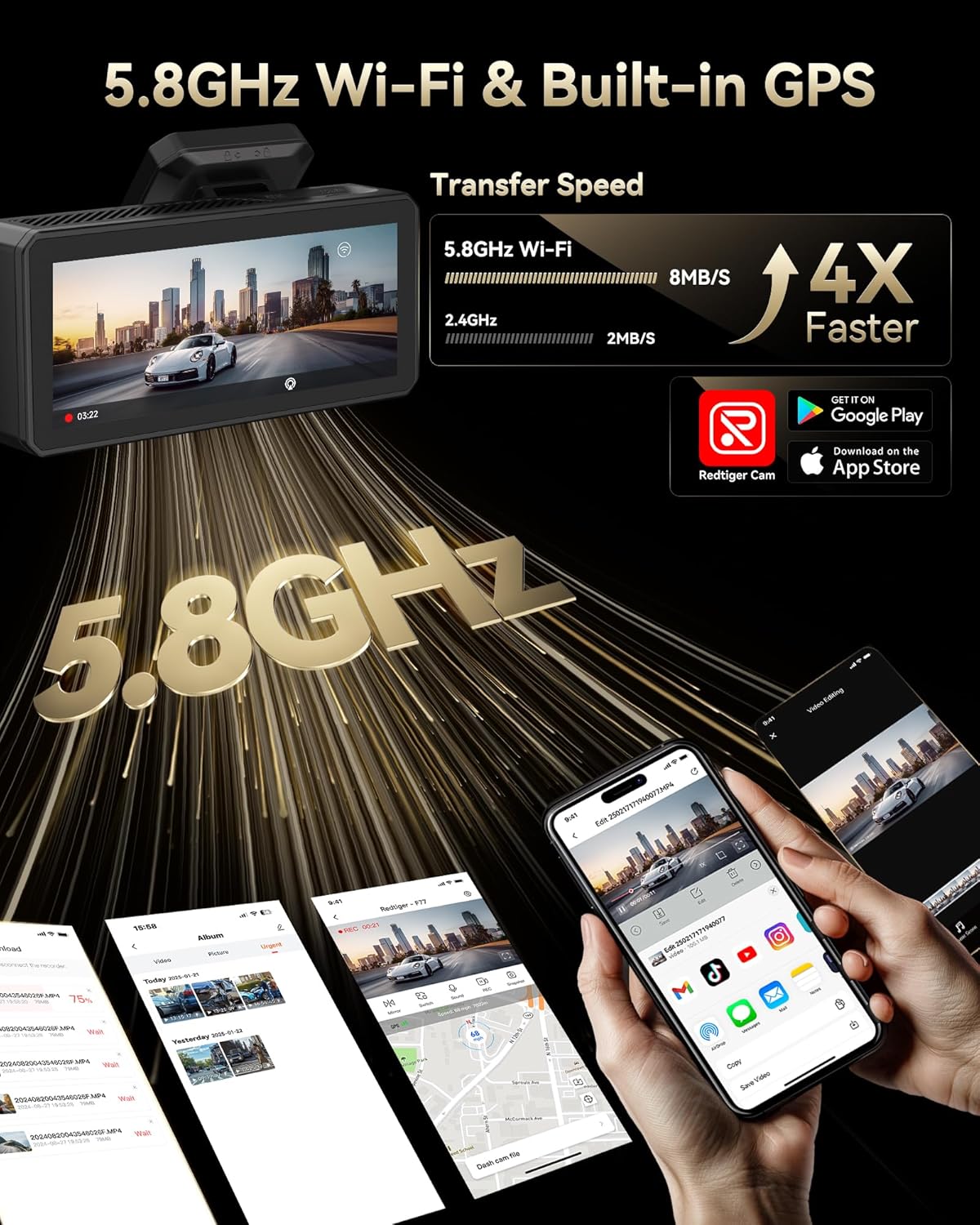
Connect your dash cam to the REDTIGER app for easy setup, live preview, video playback, and sharing.
- Download the "REDTIGER" app from the App Store or Google Play.
- Enable Wi-Fi on your dash cam (via settings or quick toggle).
- On your smartphone, connect to the dash cam's Wi-Fi network (SSID and password displayed on the dash cam screen).
- Open the REDTIGER app and add your device. You can now access live footagه، إعادةview recordings, and adjust settings.
وظيفة GPS
The built-in GPS module accurately records your vehicle's location, speed, and driving route. This data is embedded in your video fileق ويمكن أن يكون viewed via the REDTIGER app or dedicated PC player.
صيانة
- Formatting eMMC Storage: Periodically format the built-in eMMC storage (or microSD card if used) to ensure optimal performance and prevent data corruption. This can be done through the dash cam's settings menu.
- تنظيف: Regularly clean the camera lenses and touchscreen with a soft, lint-free cloth to ensure clear recordings and responsive touch functionality.
- تحديثات البرامج الثابتة: تحقق من ريد تايجر website or app for available firmware updates to ensure your dash cam has the latest features and bug fixes.
استكشاف الأخطاء وإصلاحها
- كاميرا لوحة القيادة لا تعمل: تأكد من توصيل كابل الطاقة بإحكام بكل من كاميرا لوحة القيادة ومأخذ الطاقة في السيارة. تحقق من وجود طاقة في مأخذ 12 فولت في السيارة.
- مشكلات الاتصال بشبكة Wi-Fi: Verify that Wi-Fi is enabled on the dash cam and your phone. Ensure you are entering the correct SSID and password. Try restarting both the dash cam and your phone.
- بطيئ File Transfer/Playback: Ensure your phone has a stable 5.8GHz Wi-Fi connection to the dash cam. Large 4K files may take longer to transfer.
- فيديو Files Corrupted/Missing: Regularly format the eMMC storage. Ensure you are using a high-quality microSD card if external storage is utilized.
- شاشة مراقبة وقوف السيارات لا تعمل: Confirm that an optional hardwire kit is correctly installed and configured.
For more detailed troubleshooting steps, please refer to the comprehensive User Manual included in your package or visit the REDTIGER support webموقع.
تحديد
| ميزة | مواصفة |
|---|---|
| دقة الفيديو الأمامي | 4K@30fps (8MP) |
| دقة الفيديو الخلفية | 4K@30fps (8MP) |
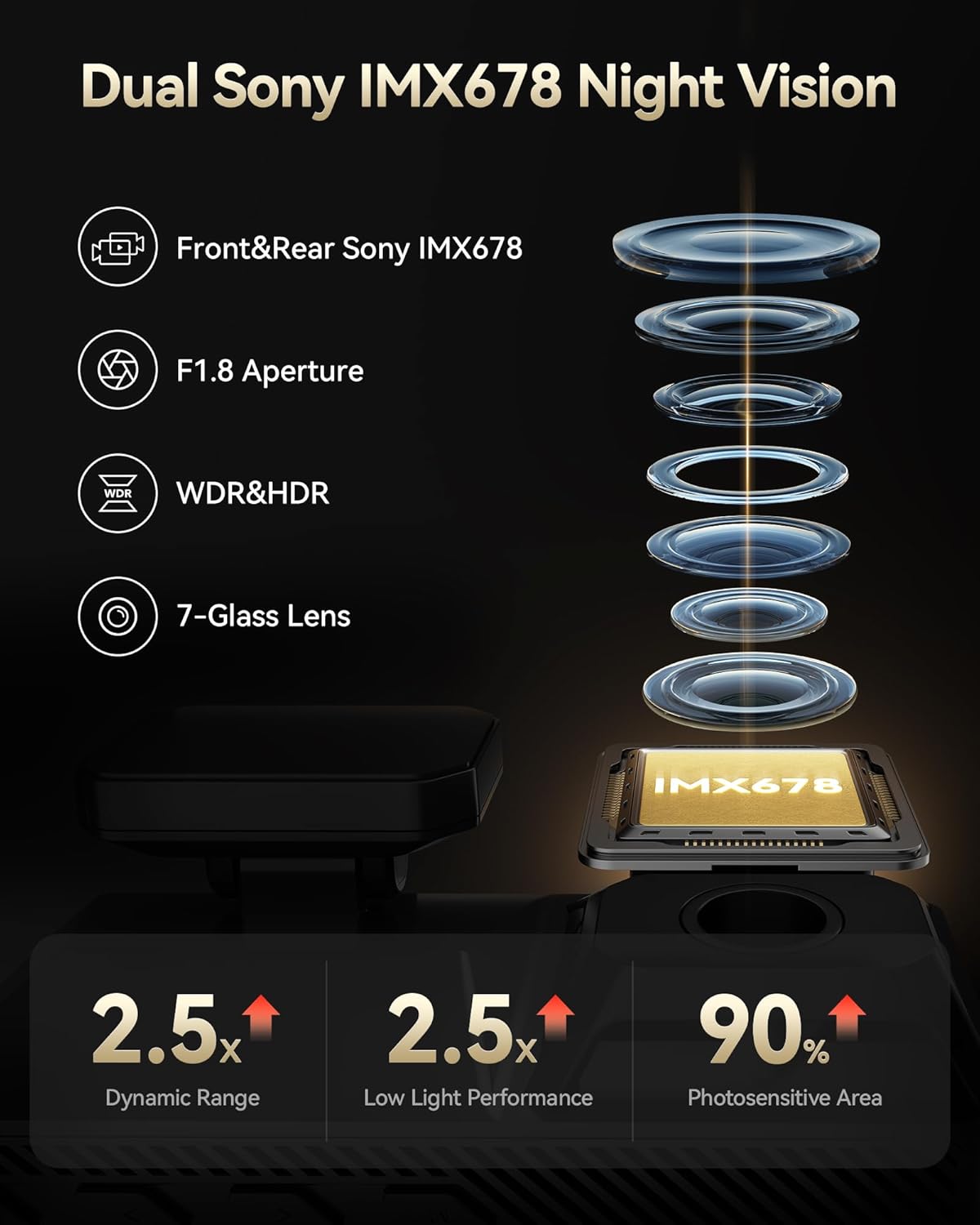
| مستشعر الصورة | Dual Sony STARVIS 2 IMX678 |
| التخزين الداخلي | 256 جيجابايت من ذاكرة إي إم إم سي |
| عرض | 4 بوصة تعمل باللمس |
| واي فاي | واي فاي مدمج بتردد 5.8 جيجاهرتز |
| نظام تحديد المواقع العالمي (جي بي اس) | نظام تحديد المواقع العالمي (GPS) المدمج |
| المميزات الخاصة | Dual HDR, Voice Control, G-Sensor, Parking Monitor (with optional hardwire kit) |
| تكنولوجيا الاتصال | يو اس بي، واي فاي |
| أبعاد المنتج | 1.88 × 1.22 × 0.27 بوصة |
| وزن العنصر | 1.92 رطل |
الضمان والدعم
- خطة الحماية: Enjoy 18 months of protection for your device.
- سياسة العائدات: A 7-day return policy is available for returns on defects.
- دعم العملاء: REDTIGER offers 24-hour customer support via email and phone for any inquiries or assistance.
For further assistance, please visit the official REDTIGER webالموقع أو الاتصال بدعم العملاء مباشرة.