
1. المقدمة
Thank you for choosing the Motast 1.96" HD Smart Watch. This manual provides essential information for setting up, operating, and maintaining your device. Please read it thoroughly to ensure optimal performance and a satisfying user experience.
2. انتهى المنتجview
The Motast Smart Watch features a 1.96-inch HD display, Bluetooth calling capabilities, and comprehensive health and fitness tracking. It is designed to be a versatile companion for daily activities and sports.
المميزات الرئيسية:
- 1.96" HD Touch Screen: Clear visuals and responsive interaction.
- Bluetooth Call & Notifications: Answer/make calls and receive alerts from your smartphone.
- أكثر من 110 وضعًا رياضيًا: Track various indoor and outdoor activities.
- مراقبة صحية على مدار الساعة طوال أيام الأسبوع: Heart Rate, SpO2, and Sleep tracking.
- IP68 مقاوم للماء: Suitable for daily use, including hand washing and rain.
- عمر بطارية طويل: Up to 7 days of daily use, 30 days standby.
- أقراص قابلة للتخصيص: Personalize your watch face with 200+ options or your own photos.

الشكل 1: انتهىview of the multifunctional features of the Motast Smart Watch.
3. ماذا يوجد في الصندوق
- ساعة ذكية x1
- كابل الشحن x1
- دليل التعليمات x1

Figure 2: Package contents and watch dimensions.
4. الإعداد
4.1 تنزيل التطبيق والاقتران
- تنزيل "GloryFit" App from Google Play Store (for Android) or Apple App Store (for iOS).
- تأكد من تمكين Bluetooth على هاتفك الذكي.
- Open the GloryFit App and follow the on-screen instructions to search for and bind your device (e.g., "Y66").
4.2 Bluetooth Calling Function Setup
- After successfully binding your watch to the GloryFit App, open the Bluetooth Call feature within the app.
- On your watch, open the Bluetooth Call menu.
- Find and connect to "Y66" in your phone's Bluetooth settings.
- بمجرد الاتصال، يمكنك استخدام ساعتك للرد على المكالمات وإجراءها.

Figure 3: Connection and Bluetooth calling setup guide.
Video 1: Demonstrates the 1.96" HD Smart Watch features, including answering and making calls, for men and women.
Video 2: Shows the Smart Watch's ability to answer and make calls.
5. تعليمات التشغيل
5.1 الملاحة الأساسية
The watch features a full touch screen. Swipe left, right, up, or down to navigate through menus and access different functions. Press the side button to return to the home screen or wake the device.
5.2 تخصيص واجهات الساعة
The Motast Smart Watch offers over 200 watch faces through the GloryFit App. You can also upload your own photos to create personalized watch faces directly from your phone gallery.

Figure 4: Customizable watch faces and 1.96" HD color touch screen details.

Figure 5: Extensive collection of watch faces and DIY options.
5.3 مراقبة الصحة
- مراقب معدل ضربات القلب: Continuously tracks your heart rate 24/7. Access detailed trends in the GloryFit App.
- SpO2 (Blood Oxygen) Monitor: يقيس مستويات الأكسجين في الدم.
- متتبع النوم: Monitors your sleep patterns (deep sleep, light sleep, awake time) and provides analysis to help improve sleep quality.

Figure 6: Health monitoring features including heart rate, SpO2, and sleep tracking.

Figure 7: Detailed heart rate monitoring interface.

Figure 8: Blood oxygen monitoring interface.

Figure 9: Sleep tracking data and analysis.
5.4 Sports Modes & Activity Tracking
The watch supports over 110 sports modes. It tracks all-day activity data including steps, calories burned, and distance. Connect to your phone's GPS to track outdoor workout routes.

Figure 10: Sports modes and activity tracking interface.

الشكل 11: مفصل view من أوضاع الرياضة وتتبع النشاط.
Video 3: Demonstrates the features of the Aycy Smart Watch, including fitness tracking.
5.5 الإشعارات
Receive intelligent notifications from apps like Facebook, Messenger, Instagram, Gmail, WhatsApp, and Twitter directly on your watch. Raise your wrist to view رسائل.

Figure 12: Bluetooth call and message notification display.

Figure 13: Message notification feature from connected apps.
5.6 التحكم في الموسيقى
تحكم في تشغيل الموسيقى على هاتفك الذكي مباشرة من ساعتك.
5.7 التحكم بالكاميرا
Use your watch as a remote shutter to control your smartphone's camera.
5.8 وظائف أخرى
The watch includes additional practical functions:
- التنبيه: اضبط عدة منبهات.
- المؤقت وساعة الإيقاف: For various timing needs.
- عرض الطقس: احصل على تحديثات الطقس في الوقت الحقيقي.
- مساعد صوت: تفاعل مع المساعد الصوتي لهاتفك.
- تذكير بالخمول: يحثك على الحركة بعد فترات من الخمول.
- صحة المرأة: ميزات تتبع خاصة بالنساء.
- تدريب التنفس: تمارين التنفس الموجهة.

Figure 14: Additional practical functions of the smartwatch.

Figure 15: Weather, music, camera, alarm, and voice assistant features.
Video 4: Instructions on how to turn off music playing on the P66D Smart Watch.
6. البطارية والشحن
The Motast Smart Watch is equipped with a large-capacity battery, providing approximately 5-7 days of daily use and up to 30 days on standby mode. Charging takes 1.5-2 hours using the magnetic charging cable provided.
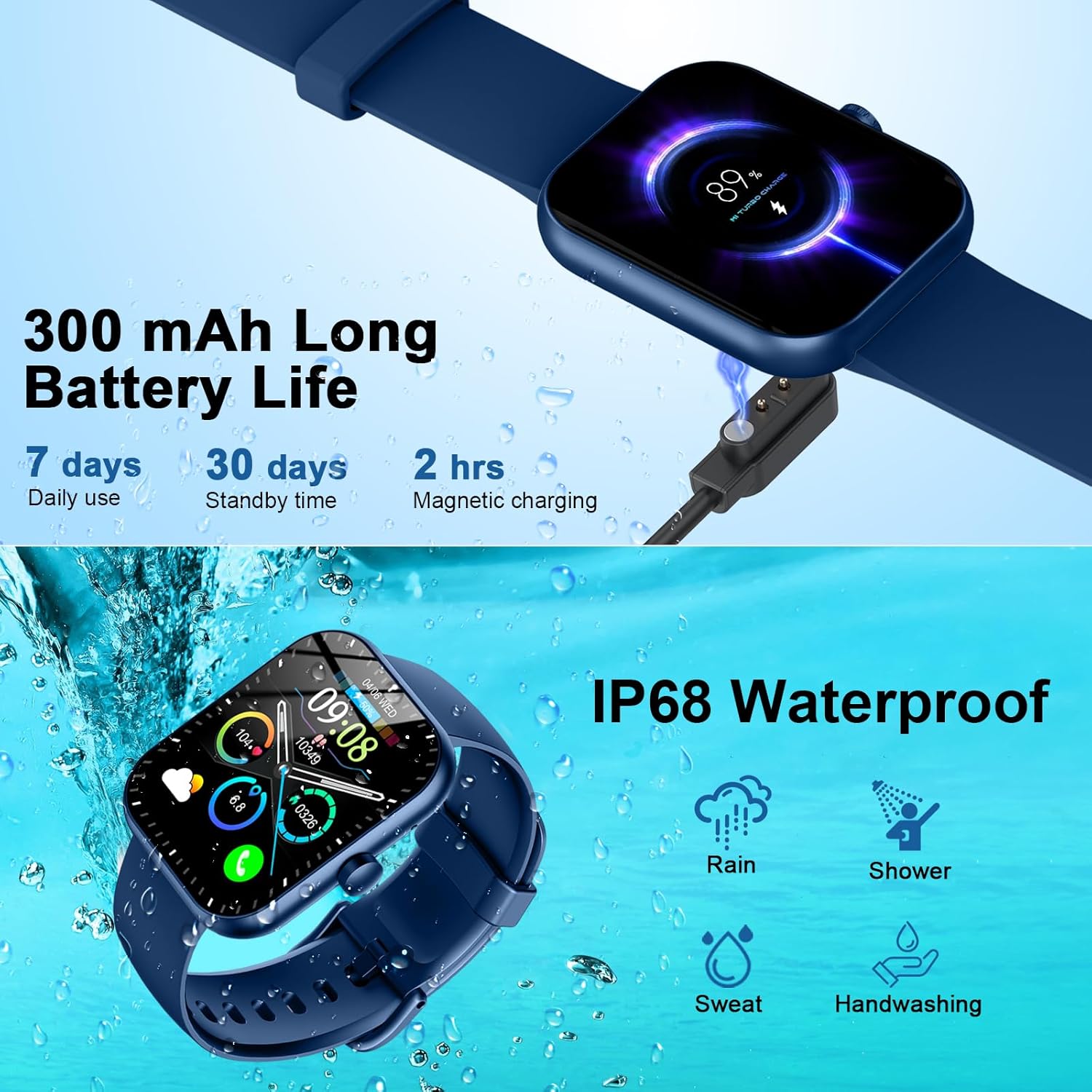
Figure 16: Battery life and magnetic charging details.

Figure 17: Battery capacity and charging method.
7. العزل المائي
The smartwatch is IP68 waterproof, meaning it is resistant to dust and can withstand immersion in water up to 1.5 meters for 30 minutes. You can wear it while washing hands or in the rain. ملحوظة: Do not use in showers, saunas, or hot tubs, as steam and hot water can damage the device.
Figure 18: IP68 Waterproof rating for the smartwatch.
8. الصيانة
- حافظ على نظافة الساعة وجفافها. امسحها بقطعة قماش ناعمة وجافة بانتظام.
- تجنب تعريض الساعة لدرجات حرارة عالية أو لأشعة الشمس المباشرة لفترات طويلة.
- لا تحاول تفكيك الساعة أو إصلاحها بنفسك. تواصل مع خدمة العملاء في حال واجهت أي مشاكل.
- Ensure the charging contacts on the back of the watch and the charging cable are clean to prevent charging issues.
9. استكشاف الأخطاء وإصلاحها
- الساعة لا تعمل: تأكد من شحن الساعة بالكامل. وصلها بالشاحن المغناطيسي لمدة 30 دقيقة على الأقل.
- لا يمكن الاقتران بالهاتف: Make sure Bluetooth is enabled on your phone and the watch is within range. Restart both devices and try pairing again through the GloryFit App.
- الإشعارات غير المستلمة: Check app notification settings on your phone and within the GloryFit App to ensure they are enabled for the watch. Ensure the watch is connected via Bluetooth.
- بيانات صحية غير دقيقة: تأكد من ارتداء الساعة بشكل مريح على معصمك، لا ضيقة جدًا ولا فضفاضة جدًا. حافظ على نظافة المستشعر.
- قضايا الشحن: Verify the magnetic charging cable is properly aligned with the contacts on the back of the watch. Try a different USB power source.
10. المواصفات
| ميزة | التفاصيل |
|---|---|
| رقم الموديل | 6db02fca-707d-49d2-b627-85fa94df7f3f |
| حجم الشاشة | 1.96 بوصة |
| نوع العرض | TFT HD Color Display (320*386 resolution) |
| الاتصال | بلوتوث 5.3 |
| تصنيف مقاومة الماء | IP68 |
| سعة البطارية | 300 mAh (1 A battery included) |
| وقت الشحن | 1.5-2 ساعات |
| عمر البطارية (للاستخدام اليومي) | 5-7 أيام |
| عمر البطارية (الاستعداد) | 30 يوما |
| التوافق | أندرويد 6.0+ / آي أو إس 10.0+ |
| وزن العنصر | 3.2 أونصات |
| الشركة المصنعة | موتاست |
11. الضمان والدعم
For warranty information and customer support, please refer to the contact details provided in your product packaging or visit the official Motast webموقع. احتفظ بإيصال الشراء الخاص بك لمطالبات الضمان.