
1. المقدمة
This manual provides comprehensive instructions for the setup, operation, maintenance, and troubleshooting of your Radxa E20C Mini PC. Please read this manual thoroughly before using the device to ensure proper functionality and to maximize its lifespan.
The Radxa E20C is a compact and powerful single-board computer designed for various applications, from home computing projects to industrial use. It features a robust RK3528A quad-core CPU, dual Gigabit Ethernet ports, and 4K video decoding capabilities, all housed within a durable CNC-machined aluminum alloy case.
2. انتهى المنتجview
2.1 الميزات الرئيسية
- المعالج: RK3528A Quad-Core CPU for efficient performance.
- الشبكات: Dual Gigabit Ethernet ports for flexible connectivity.
- الوسائط المتعددة: Supports 4K video decoding for high-resolution output.
- بناء: CNC-machined aluminum alloy case with integrated heat dissipation.
- التوافق: Supports multiple operating systems.
- ذاكرة: ذاكرة الوصول العشوائي LPDDR3 بسعة 2 جيجابايت.
- تخزين: 16GB onboard storage.
2.2 محتويات العبوة
- Radxa E20C Board Body
- (Additional accessories may be sold separately)
2.3 تخطيط الجهاز
Familiarize yourself with the various ports and indicators on your Radxa E20C Mini PC.
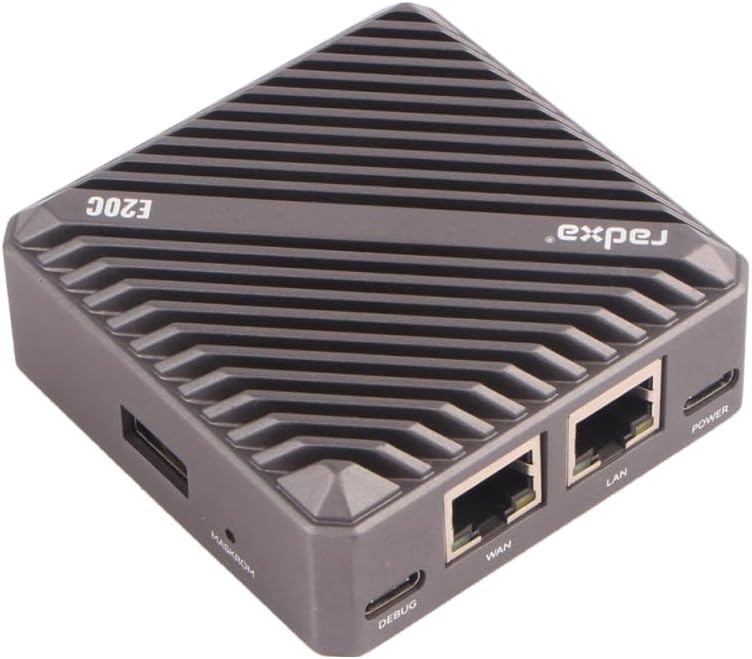
الشكل 1: من أعلى إلى أسفل view of the Radxa E20C Mini PC, showcasing its compact design and ribbed aluminum casing for heat dissipation. The "radxa" logo and "E20C" model name are visible on the top surface.
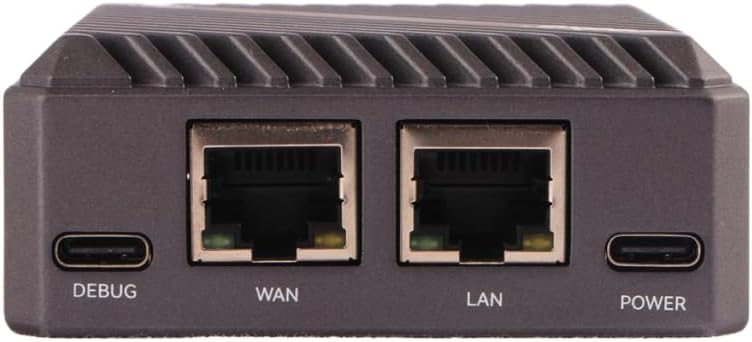
الشكل 2: Rear panel of the Radxa E20C, featuring the DEBUG USB-C port, WAN Gigabit Ethernet port, LAN Gigabit Ethernet port, and POWER USB-C port. These ports provide essential connectivity for debugging, network access, and power supply.

الشكل 3: Front panel of the Radxa E20C, showing three indicator LEDs labeled SYS, WAN, and LAN, along with a microSD card slot for expandable storage or operating system installation.
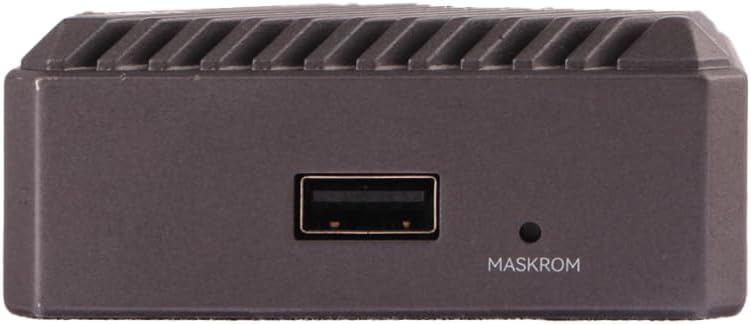
الشكل 4: جانب view of the Radxa E20C, featuring a standard USB-A port and a small button labeled MASKROM, used for system recovery or flashing firmware.
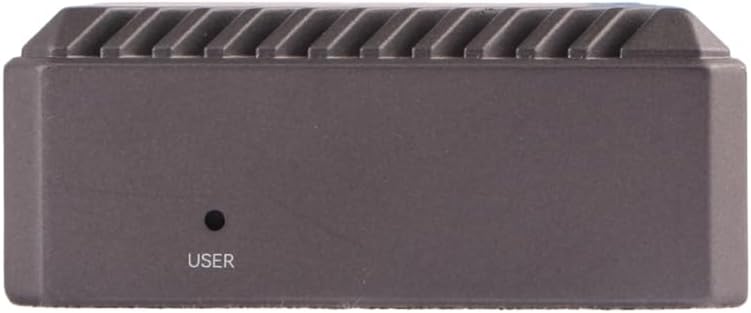
الشكل 5: الجانب المقابل view of the Radxa E20C, showing a single button labeled USER, which can be programmed for various functions depending on the operating system and application.
3. دليل الإعداد
3.1 التشغيل الأولي
- توصيل الطاقة: Connect a compatible 5V USB-C power adapter to the "POWER" port on the rear of the device (refer to Figure 2).
- إتصال شبكة: For wired network access, connect an Ethernet cable from your router or network switch to either the "WAN" or "LAN" Gigabit Ethernet port (refer to Figure 2).
- الاتصال المحيطي: If using a USB keyboard, mouse, or other peripherals, connect them to the available USB-A port (refer to Figure 4).
- نظام التشغيل: Ensure a compatible operating system is installed on the internal storage or a microSD card inserted into the front slot (refer to Figure 3). For first-time setup, you may need to flash an OS image. Refer to the official Radxa documentation for detailed OS installation instructions.
- تشغيل الطاقة: The device should power on automatically once connected to power. Observe the SYS, WAN, and LAN indicator LEDs on the front panel (refer to Figure 3) for status.
For detailed operating system installation and configuration, please visit the official Radxa documentation webموقع: wiki.radxa.com
3.2 Operating System Installation (Advanced)
The Radxa E20C supports various operating systems, including Debian. To install or re-install an operating system:
- Download the desired OS image from the official Radxa webموقع.
- Use a suitable imaging tool (e.g., Etcher) to write the image to a microSD card or directly to the internal eMMC storage.
- Insert the prepared microSD card into the slot on the front panel.
- Follow the specific instructions provided with the OS image for first-boot configuration.
4. تعليمات التشغيل
4.1 التشغيل الأساسي
- تشغيل/إيقاف التشغيل: The device powers on when connected to a power source. To safely shut down, use the operating system's shutdown function. Disconnecting power without proper shutdown may lead to data corruption.
- استخدام الشبكة: The dual Gigabit Ethernet ports allow for high-speed network connections. Configure network settings within your chosen operating system.
- الأجهزة الطرفية USB: Connect USB devices such as storage drives, keyboards, or mice to the USB-A port.
- System Status Indicators:
- مؤشر LED: يشير إلى نشاط النظام.
- مؤشر WAN LED: Indicates activity on the WAN Ethernet port.
- مؤشر LED للشبكة المحلية: Indicates activity on the LAN Ethernet port.
4.2 وظائف متقدمة
- MASKROM Button: This button (refer to Figure 4) is typically used for entering Maskrom mode, which is essential for low-level firmware flashing or recovery operations. Consult Radxa's developer documentation before using this feature.
- زر المستخدم: The USER button (refer to Figure 5) is programmable and its function depends on the operating system and user configuration. It can be used for custom scripts or actions.
- تصحيح الأخطاء: The DEBUG USB-C port (refer to Figure 2) provides a serial console interface for debugging purposes. A USB-to-serial adapter may be required.
5. الصيانة
- تنظيف: استخدم قطعة قماش ناعمة وجافة لتنظيف الجزء الخارجي من الجهاز. تجنب استخدام المنظفات السائلة أو المواد الكاشطة.
- تهوية: Ensure the device is placed in a well-ventilated area. Do not block the heat dissipation fins on the aluminum case.
- تحديثات البرامج الثابتة: Regularly check the official Radxa website for firmware and operating system updates to ensure optimal performance and security.
- النسخ الاحتياطي للبيانات: Periodically back up important data stored on the device to prevent data loss.
- الظروف البيئية: قم بتشغيل الجهاز ضمن نطاقات درجة الحرارة والرطوبة الموصى بها لمنع التلف.
6. استكشاف الأخطاء وإصلاحها
| مشكلة | السبب المحتمل | حل |
|---|---|---|
| الجهاز لا يعمل. | No power supply, faulty power adapter, or incorrect power port. | Ensure the USB-C power adapter is connected to the "POWER" port and is functioning correctly. Try a different power adapter if available. |
| لا يوجد اتصال بالشبكة. | Ethernet cable not connected, faulty cable, or incorrect network configuration. | Verify Ethernet cables are securely connected to the WAN/LAN ports. Check network settings within the operating system. Test with a different Ethernet cable. |
| Operating system fails to boot. | Corrupted OS image, improperly flashed microSD card, or incorrect boot order. | Re-flash the OS image to the microSD card or internal storage. Ensure the image is compatible with the Radxa E20C. Consult Radxa's documentation for boot troubleshooting. |
| Device becomes unresponsive. | Software issue, overheating, or power instability. | Perform a hard reboot by disconnecting and reconnecting power (as a last resort). Ensure adequate ventilation. Check for OS updates. |
If problems persist, please refer to the official Radxa support resources or community forums for further assistance.
7. المواصفات
| ميزة | التفاصيل |
|---|---|
| المعالج | Rockchip RK3528A Quad-Core ARM Cortex-A53 (2 GHz) |
| كبش | 2 جيجابايت LPDDR3 |
| تخزين | 16GB eMMC (onboard), MicroSD card slot |
| الشبكات | 2x Gigabit Ethernet ports (WAN, LAN) |
| مخرج الفيديو | 4K video decoding support (specific output port not detailed in input, assuming internal processing) |
| منافذ USB | 1x USB-A, 1x USB-C (DEBUG), 1x USB-C (POWER) |
| دعم نظام التشغيل | Debian, multiple other OS options |
| الأبعاد (الطول × العرض × الارتفاع) | 3.5 × 3.5 × 0.5 بوصة (8.9 × 8.9 × 1.3 سم) |
| وزن | 12 أونصة (340 جرام) |
| مادة العلبة | سبائك الألومنيوم CNC |
8. الضمان والدعم
8.1 معلومات الضمان
Specific warranty terms for the Radxa E20C Mini PC are provided by the manufacturer, Radxa. Please refer to the warranty card included with your product or visit the official Radxa website for detailed warranty policies and registration information.
Protection plans may be available for purchase separately. Check with your retailer for options such as 2-Year or 3-Year Protection Plans.
8.2 الدعم الفني
For technical assistance, software downloads, and community support, please visit the official Radxa resources:
- رسمي Webموقع: www.radxa.com
- ويكي/الوثائق: wiki.radxa.com
- منتدى المجتمع: التحقق من المسؤول website for links to community forums where you can find peer support and additional resources.
When contacting support, please have your product model (Radxa E20C) and any relevant error messages or symptoms ready.