مقدمة
Elevate your listening experience with the P2961 Wireless Bluetooth Headphones, designed for both music enthusiasts and active lifestyles. These over-ear headphones deliver rich, high-quality sound with HIFI stereo technology, perfect for enjoying your favorite tracks while on the go. The built-in microphone allows for hands-free calls, making them ideal for both casual listening and staying connected. Whether you're hitting the gym, going for a run, or relaxing at home, these headphones provide the perfect blend of comfort, durability, and sound performance. With Bluetooth connectivity, you can easily pair the headphones with your devices, while the TF card slot and AUX input offer versatile music playback options.
ماذا يوجد في الصندوق
- P2961 Wireless Bluetooth Headphones
- دليل المستخدم
- كابل الشحن (النوع C)
- كابل صوت AUX
Note: The specific contents may vary slightly based on the package.
المنتج انتهىview
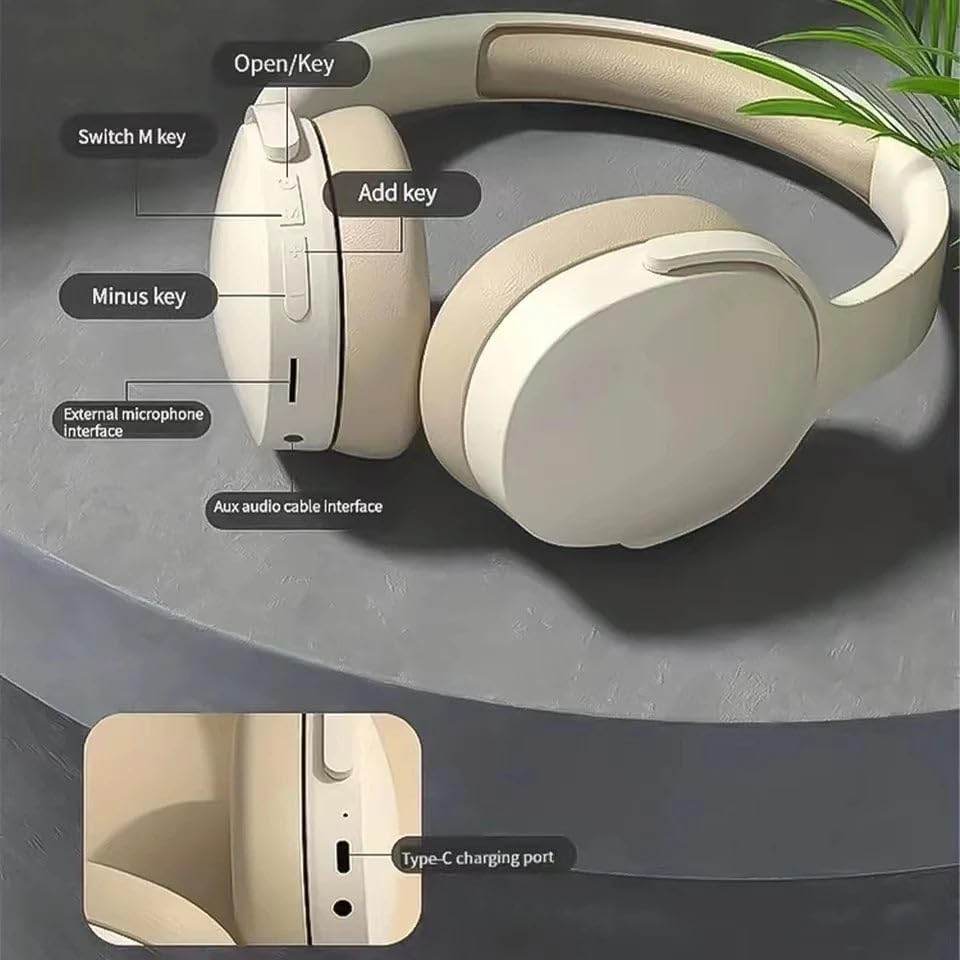
الشكل 1: عناصر التحكم في سماعات الرأس والمنافذ
- Open/Key: تشغيل/إيقاف الطاقة، تشغيل/إيقاف مؤقت، الرد على المكالمة/إنهاؤها.
- Switch M key: Mode switch (Bluetooth, TF Card, AUX).
- Add key (+): Volume Up, Next Track (long press).
- Minus key (-): Volume Down, Previous Track (long press).
- واجهة الميكروفون الخارجي: لتوصيل ميكروفون خارجي.
- Aux audio cable interface: للتوصيل السلكي باستخدام كابل صوت 3.5 ملم.
- منفذ شحن من النوع C: لشحن سماعات الرأس.
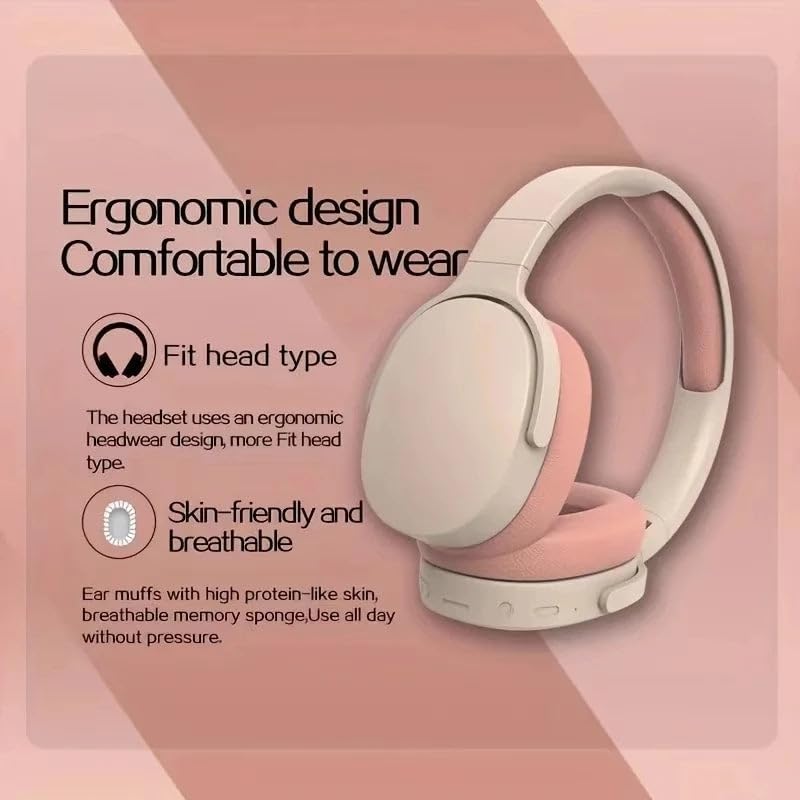
الشكل 2: ميزات التصميم المريح
- Fit head type: The headset uses an ergonomic headwear design for a better fit.
- Skin-friendly and breathable: Ear muffs made with protein-like skin and breathable memory sponge for comfortable all-day wear without pressure.
يثبت
1. شحن سماعات الرأس
Before first use, fully charge the headphones. Connect the provided Type-C charging cable to the charging port on the headphones and the other end to a USB power adapter (not included) or a computer's USB port. The indicator light will show charging status and turn off or change color when fully charged.
2. تشغيل / إيقاف التشغيل
- تشغيل الطاقة: Press and hold the "Open/Key" button for approximately 3 seconds until the indicator light flashes.
- إيقاف التشغيل: Press and hold the "Open/Key" button for approximately 3-5 seconds until the indicator light turns off.
3. اقتران بلوتوث
- تأكد من إيقاف تشغيل سماعات الرأس.
- Press and hold the "Open/Key" button for about 5-7 seconds until the indicator light flashes red and blue alternately, indicating pairing mode.
- على جهازك (الهاتف الذكي، الجهاز اللوحي، وما إلى ذلك)، قم بتمكين البلوتوث وابحث عن الأجهزة المتاحة.
- Select "P2961" from the list of found devices.
- Once paired, the indicator light will flash blue slowly, and you will hear a confirmation tone.
ملاحظة: ستحاول سماعات الرأس تلقائيًا إعادة الاتصال بآخر جهاز مقترن بها عند تشغيلها.
تعليمات التشغيل
تشغيل الموسيقى
- تشغيل/إيقاف مؤقت: Short press the "Open/Key" button.
- رفع الصوت: Short press the "Add key (+)" button.
- اخفض الصوت: Short press the "Minus key (-)" button.
- المسار التالي: Long press the "Add key (+)" button.
- المسار السابق: Long press the "Minus key (-)" button.
استدعاء إدارة
- الرد/إنهاء المكالمة: Short press the "Open/Key" button.
- رفض المكالمة: Long press the "Open/Key" button for 2 seconds.
- إعادة الاتصال بالرقم الأخير: Double-press the "Open/Key" button.
تبديل الوضع
Press the "Switch M key" to cycle through available modes: Bluetooth, TF Card (if a card is inserted), and AUX (if an audio cable is connected).
خيارات الاتصال
وضع بلوتوث
Connect wirelessly to your Bluetooth-enabled devices for audio playback and hands-free calls. Refer to the "Bluetooth Pairing" section under Setup for instructions.
وضع بطاقة TF
Insert a TF (microSD) card with your favorite music files into the TF card slot. The headphones will automatically switch to TF card mode or can be selected using the "Switch M key".
AUX Mode (Wired Connection)
Connect one end of the 3.5mm AUX audio cable (not included) to the AUX audio cable interface on the headphones and the other end to the audio output of your device. The headphones will automatically switch to AUX mode, allowing for wired audio playback even when the battery is low or Bluetooth is not desired.
صيانة
- تنظيف: استخدم قطعة قماش ناعمة وجافة لتنظيف سماعات الرأس. لا تستخدم منظفات أو مذيبات كاشطة.
- تخزين: قم بتخزين سماعات الرأس في مكان بارد وجاف بعيدًا عن أشعة الشمس المباشرة ودرجات الحرارة القصوى.
- العناية بالبطارية: لإطالة عمر البطارية، اشحن سماعات الرأس بانتظام، حتى لو لم تستخدمها بكثرة. تجنب تفريغ البطارية بالكامل لفترات طويلة.
- تجنب الماء: هذه السماعات ليست مقاومة للماء. تجنب تعريضها للماء أو الرطوبة الزائدة.
استكشاف الأخطاء وإصلاحها
| مشكلة | السبب المحتمل | حل |
|---|---|---|
| لا يتم تشغيل سماعات الرأس. | بطارية منخفضة. | اشحن سماعات الرأس بالكامل. |
| لا يمكن الاقتران بالجهاز. | سماعات الرأس ليست في وضع الاقتران؛ تم تعطيل البلوتوث على الجهاز؛ الجهاز بعيد جدًا. | Ensure headphones are in pairing mode (flashing red/blue). Enable Bluetooth on your device. Move headphones closer to the device. |
| لا يوجد صوت. | مستوى الصوت منخفض جدًا؛ الوضع غير صحيح؛ الجهاز غير متصل. | Increase volume on headphones and device. Check if the correct mode (Bluetooth, TF, AUX) is selected. Ensure successful Bluetooth connection or proper cable insertion. |
| جودة الصوت رديئة. | Interference; low battery; source audio quality. | Move away from sources of interference. Charge the headphones. Try a different audio source. |
تحديد
| ميزة | التفاصيل |
|---|---|
| اسم الموديل | P2961 Wireless Bluetooth Headphones |
| تكنولوجيا الاتصال | لاسلكي (بلوتوث) |
| وضع الأذن | فوق الأذن |
| عامل الشكل | فوق الأذن |
| لون | الكاكي |
| ميزات الصوت | HIFI Stereo Sound, 40mm driver unit, Shocking Bass, 45dB Noise Reduction |
| ميكروفون | Built-In Mic, External microphone interface |
| خيارات التشغيل | Bluetooth, TF Card, AUX Input |
| منفذ الشحن | النوع-C |
| الشركة المصنعة | مزيج البراعم |
الضمان والدعم
للحصول على معلومات الضمان والدعم الفني، يُرجى مراجعة الوثائق المرفقة مع المنتج أو التواصل مع الشركة المصنعة مباشرةً. احتفظ بإيصال الشراء لتقديم مطالبات الضمان.
Manufacturer: Mix Buds


