
1. انتهى المنتجview
The Rosewill Helium Flow is a mid-tower computer case designed for optimal airflow and ease of assembly. It features a mesh panel design for enhanced cooling and tool-free access for convenient component installation and maintenance.
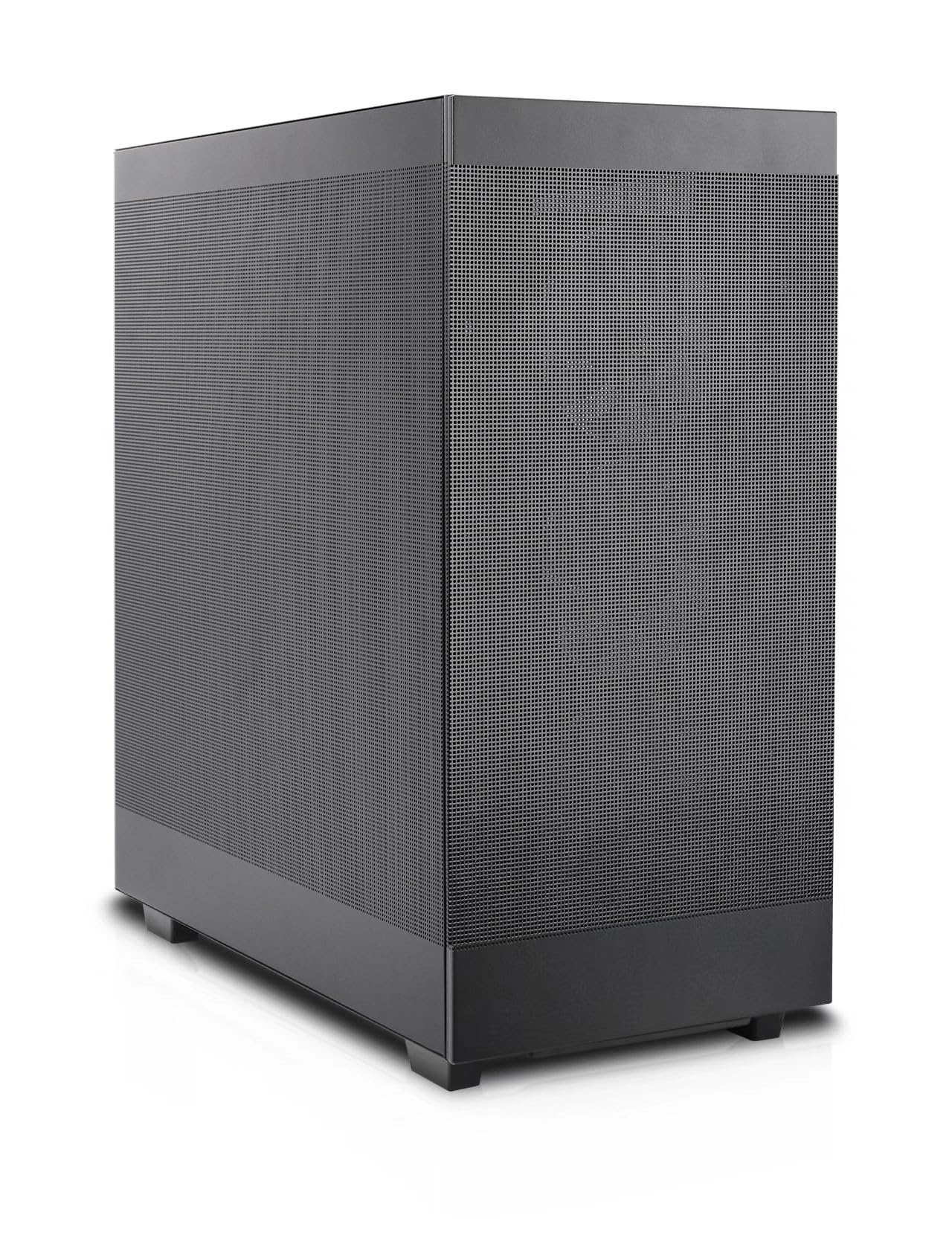
Figure 1: Rosewill Helium Flow Mid Tower Computer Case, angled view showing the mesh side panel.
المميزات الرئيسية:
- Tool-Free Disassembly: Side panels can be removed without tools for quick access and maintenance.
- Versatile Modular Design: Supports various configurations and dual 360mm liquid cooling solutions.
- Enhanced Cooling System: Features 1mm mesh ventilation holes for optimal airflow and dust resistance, ensuring efficient heat dissipation.
- مساحة داخلية واسعة: Accommodates GPUs up to 390mm with 40mm clearance from the side panel, suitable for high-end components and 12VHPWR cables.
- تجميع سهل الاستخدام: Designed for straightforward building, suitable for both new and experienced PC builders.
2. الإعداد والتثبيت
2.1 إعداد القضية
Before installing components, ensure the case is placed on a stable, flat surface. Remove the side panels by unscrewing the thumb screws at the rear and sliding the panels off. The tool-free design allows for easy access to the interior.

الشكل 2: الداخلية view of the case, highlighting the spacious layout for component installation.
2.2 تثبيت المكونات
- اللوحة الأم: Install your ATX motherboard onto the pre-installed standoffs. Secure it with the provided screws.
- وحدة إمداد الطاقة (PSU): The PSU mounts at the bottom of the case. Slide the PSU into its designated bay and secure it with screws from the rear.
- محركات التخزين: The case supports 2.5" and 3.5" drives. Utilize the mounting points behind the motherboard tray for installation.
- بطاقة الرسومات (GPU): Install your GPU into the appropriate PCIe slot. The spacious interior supports cards up to 390mm in length. A GPU support bracket is included and adjustable to prevent sag for larger cards.
- Cooling Fans and Radiators: The case supports up to ten 120mm cooling fans. Radiators up to 360mm can be installed at the top and front. An included 120mm PWM fan is pre-installed at the rear.
2.3 إدارة الكابلات
The case provides 28mm of space behind the motherboard tray for cable routing. Utilize the cable tie-down points and channels to organize cables, ensuring optimal airflow and a clean build appearance.

Figure 3: Cable management space behind the motherboard tray for a tidy build.
2.4 إدخال / إخراج اللوحة الأمامية
The front panel provides convenient access to essential ports:
- 1x USB 3.1 Type-C port
- 1 × منفذ USB 3.0
- Combination audio/microphone jack
- زر الطاقة
- زر إعادة الضبط

Figure 4: Front panel I/O for easy peripheral connection.
3. التشغيل والتبريد
The Rosewill Helium Flow case is designed for high-airflow operation, ensuring your components remain cool under load. The 1mm mesh panels on the front, top, and sides facilitate unrestricted air intake and exhaust.

Figure 5: Airflow diagram demonstrating the case's cooling potential.
For optimal cooling performance, ensure that fans are installed to create a balanced airflow, typically with intake fans at the front and exhaust fans at the rear and top.
4. الصيانة
Regular maintenance helps prolong the life of your components and ensures consistent performance. The mesh panels act as a dust filter, but periodic cleaning is recommended.
4.1 تنظيف العلبة
- الخارج: امسحي الأسطح الخارجية بقطعة ناعمة ، دamp قماش. تجنب المنظفات الكاشطة.
- Interior and Mesh Panels: Use compressed air to remove dust from the mesh panels and internal components. For stubborn dust, the side panels can be easily removed for thorough cleaning.
- المشجعين: Gently clean fan blades with a soft brush or compressed air to prevent dust buildup, which can impede airflow.
5. استكشاف الأخطاء وإصلاحها
إذا واجهت مشاكل أثناء التجميع أو بعده، فضع في اعتبارك خطوات استكشاف الأخطاء وإصلاحها الشائعة التالية:
- النظام لا يعمل: Double-check all power connections, including the 24-pin ATX, 8-pin CPU, and GPU power cables. Ensure the PSU switch is in the 'ON' position. Verify front panel header connections (power switch, reset switch).
- ارتفاع درجة الحرارة: Confirm all fans are spinning correctly and installed in the correct orientation for optimal airflow (intake/exhaust). Ensure CPU cooler and GPU fans are functioning. Check for dust buildup on mesh panels and components.
- لا يوجد إخراج للعرض: Ensure the monitor is connected to the graphics card (not the motherboard integrated graphics, unless no dedicated GPU is present). Reseat the graphics card and RAM modules.
- الاتصالات الفضفاضة: During transport or after initial build, components can sometimes become loose. Reseat all major components and cables.
6. المواصفات
| ميزة | مواصفة |
|---|---|
| ماركة | روزويل |
| مسلسل | Helium Flow |
| اسم الموديل | Helium Flow |
| نوع الحالة | البرج الاوسط |
| التوافق مع اللوحة الأم | ايه تي اكس |
| لون | أسود |
| مادة | سبائك الفولاذ |
| أبعاد المنتج (الطول × العرض × الارتفاع) | 17.5 × 9.05 × 19.44 بوصة (444.5 × 230 × 494 مم) |
| وزن العنصر | 20.2 رطل |
| عدد منافذ USB 3.0 | 1 |
| نوع تركيب مصدر الطاقة | التركيب السفلي |
| طريقة التبريد | هواء |
| أقصى طول GPU | 390 ملم |
| أقصى ارتفاع لمبرد وحدة المعالجة المركزية | 165 ملم |
| دعم المبرد | Dual 360mm (Top and Side) |
7. فيديو المنتج
الفيديو 1: المنتج الرسميview of the Rosewill Helium Flow case, demonstrating its features and design. (Duration: 1:01)
8. الضمان والدعم
Rosewill products are designed for reliability and performance. For specific warranty details, please refer to the warranty card included with your product or visit the official Rosewill website. For technical support, product inquiries, or assistance with your Rosewill Helium Flow case, please contact Rosewill customer service through their official channels.
Rosewill Inc.
Webموقع: Rosewill Store on Amazon