
1. علىview
The Vansuny 2TB Portable External SSD is a compact and high-performance solid-state drive designed for fast data transfer and reliable storage. Its durable metal casing ensures longevity and efficient heat dissipation. This device offers broad compatibility with various operating systems and devices, making it a versatile solution for expanding your storage.

Image: The Vansuny Portable SSD connected to a laptop via a USB-C cable, highlighting its ultra-fast USB 3.1 Gen 2 transmission with indicated read and write speeds.
- سرعة نقل فائقة السرعة: Achieves read speeds up to 500MB/s and write speeds up to 450MB/s for efficient data backup and retrieval.
- Mini Design & Lightweight: Smaller than a palm, making it highly portable and easy to carry.
- بناء متين: Features a metal-made design for enhanced solidity, durability, and fast heat dissipation.
- أداء ممتاز: Offers stable and secure data transfer, with waterproof, shockproof, and wear-resistant properties.
- التوافق القوي: Compatible with Windows, Mac OS, and Android systems, supporting PCs, laptops, and smartphones with USB or Type-C ports.
2. ماذا يوجد في الصندوق
تأكد من وجود جميع العناصر في العبوة:
- 1 x Vansuny 2TB Portable External SSD
- 1 x Type-A to Type-C Data Adapter
- 1 x Type-A to Type-C Data Cable
- 1 × حقيبة تخزين
- 1 × دليل البدء السريع
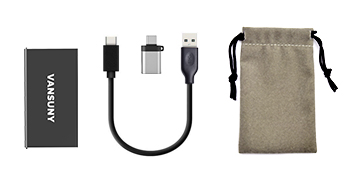
Image: The package contents laid out, showing the Vansuny SSD, a USB-C to USB-A cable, a USB-A to USB-C adapter, and a protective storage bag.
3. الإعداد
The Vansuny Portable SSD is designed for plug-and-play functionality, requiring no additional drivers for most operating systems.
- قم بتوصيل الكابل: Insert the USB-C end of the provided data cable into the USB-C port on the Vansuny SSD.
- الاتصال بالجهاز:
- For USB-C Ports (Laptops, Phones, Tablets): Connect the other USB-C end of the cable directly to your device's USB-C port.
- For USB-A Ports (Older PCs, Laptops): Attach the Type-A to Type-C data adapter to the USB-C end of the cable, then connect the USB-A adapter to your device's USB-A port.
- مؤشر الطاقة: A blue LED light on the SSD will illuminate when it is successfully connected and receiving power.
- الوصول إلى محرك الأقراص: Your operating system should automatically detect the SSD. It will appear as an external drive in your file explorer (Windows) or Finder (Mac). For Android devices, access it through a file تطبيق الإدارة.

Image: The Vansuny Portable SSD connected to a laptop, smartphone, and tablet, showcasing its strong compatibility across different device types using the included cables and adapter.
4. تعليمات التشغيل
Once connected, the Vansuny Portable SSD functions like any other external storage device.
- نقل البيانات: السحب والإفلات files or folders to and from the SSD. Utilize its high-speed capabilities for large fileالنسخ الاحتياطية.
- التنسيق: If the drive is not recognized or you wish to change its file system (e.g., for specific operating system compatibility or larger file support), you may need to format it. Refer to your operating system's documentation for instructions on how to format an external drive. Note: Formatting will erase all data on the drive.
- Gaming and Media Storage: The SSD can be used to expand storage for gaming consoles like PS4, PS5, or Xbox, or to store large media files for video editing and music production.
- الطرد الآمن: Always safely eject the SSD from your device before disconnecting it to prevent data corruption. This can typically be done through your operating system's taskbar (Windows) or by dragging the drive icon to the Trash (Mac).
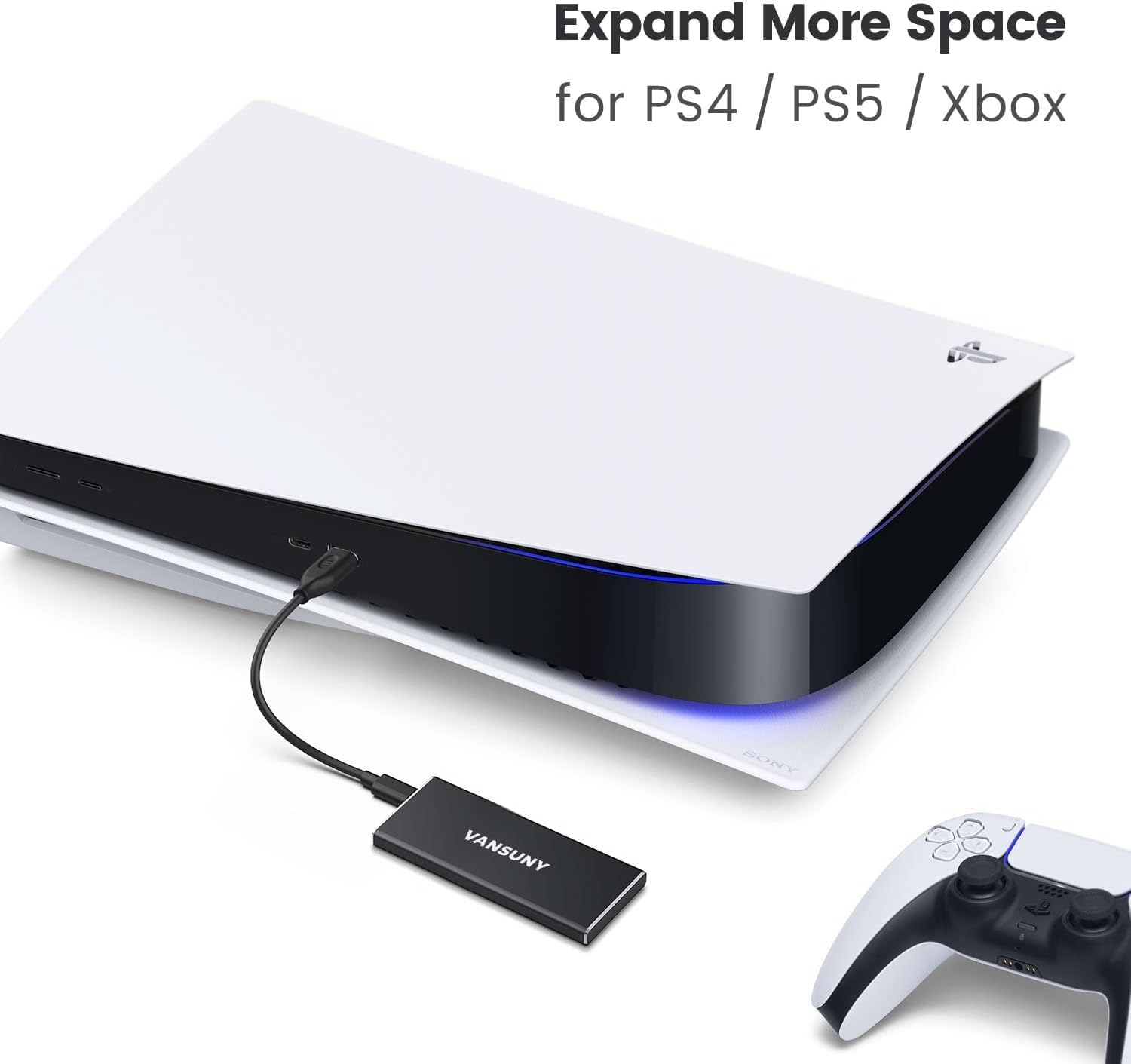
Image: The Vansuny Portable SSD connected to a PlayStation 5 console, demonstrating its capability to expand storage for gaming systems.
5. الصيانة
To ensure the longevity and optimal performance of your Vansuny Portable SSD, follow these maintenance guidelines:
- الحماية الجسدية: المعدن جasing provides robust protection against shocks and wear. However, avoid dropping the device from significant heights or subjecting it to extreme physical impact.
- مقاومة الماء: The SSD is designed to be waterproof. While it can withstand splashes, avoid prolonged submersion in water.
- درجة حرارة: Operate and store the SSD within recommended temperature ranges to prevent damage. Avoid exposing it to extreme heat or cold.
- تنظيف: Use a soft, dry cloth to clean the exterior of the SSD. Do not use harsh chemicals or abrasive materials.
- تخزين: When not in use, store the SSD in the provided storage bag to protect it from dust and scratches.

Image: The Vansuny Portable SSD, highlighting its durable full-metal design and rugged aluminum alloy casing, which provides excellent shock and drop resistance.
6. استكشاف الأخطاء وإصلاحها
If you encounter issues with your Vansuny Portable SSD, refer to the following common troubleshooting steps:
- لم يتم التعرف على محرك الأقراص ذي الحالة الصلبة (SSD):
- تأكد من توصيل الكابل بشكل آمن بكل من SSD والجهاز الخاص بك.
- Try connecting the SSD to a different USB port on your computer or device.
- If using the adapter, ensure it is properly attached and functioning.
- Test the SSD with a different cable if available.
- Check your device's Disk Management (Windows) or Disk Utility (Mac) to see if the drive is detected but unformatted or uninitialized.
- سرعات نقل بطيئة:
- Ensure you are using a USB 3.0/3.1/3.2 compatible port on your device for optimal speeds. Older USB 2.0 ports will result in significantly slower transfers.
- تأكد من أن برامج تشغيل جهازك محدثة.
- تجنب نقل العديد من الأشياء الصغيرة files simultaneously, as this can reduce overall transfer speed compared to large single files.
- مؤشر LED لا يضيء:
- Confirm the SSD is properly connected to a powered USB port.
- جرب منفذ USB أو جهازًا مختلفًا.
7. المواصفات
| ميزة | التفاصيل |
|---|---|
| سعة التخزين الرقمية | 2 تيرابايت |
| واجهة القرص الصلب | يو اس بي 2.0/3.0 |
| تكنولوجيا الاتصال | USB |
| ماركة | Vansuny |
| ميزة خاصة | محمول |
| عامل شكل القرص الصلب | 2.5 بوصة |
| وصف القرص الصلب | محرك الحالة الصلبة |
| الأجهزة المتوافقة | Laptop, PC, Phones, Tablets, PS4, PS5, Xbox |
| نوع التثبيت | القرص الصلب الخارجي |
| لون | أسود |
| سرعة القراءة | 500 ميغا في الثانية |
| Media Speed (Write Speed) | 450 ميجابايت/ثانية |
| معدل نقل البيانات | 500 Megabits Per Second (USB 3.1 Gen2) |
| عامل الشكل | 2.5 بوصة |
| الربط الأجهزة | يو اس بي 3.1 نوع سي |
| مواد التغليف | الألومنيوم |
| رقم الموديل | Vansuny-2TB-Portable-External-SSD |
| وزن العنصر | 0.09 كيلوغرام |
8. الضمان والدعم
The Vansuny Portable External SSD comes with a manufacturer's warranty to cover defects in materials and workmanship.
- فترة الضمان: 2 شهر من تاريخ الشراء.
- سياسة العائدات: يُعد هذا المنتج مؤهلاً لاسترداد الأموال أو الاستبدال خلال 30 يومًا من الشراء، وفقًا لسياسة الإرجاع الخاصة بالتاجر.
- دعم العملاء: For technical assistance, warranty claims, or product inquiries, please refer to the contact information provided in the Quick Start Guide or visit the official Vansuny webموقع.