
Micool BT-X easy
دليل مستخدم سماعات الرأس Micool BT-X Easy On-Ear
Model: BT-X easy
مقدمة
Thank you for choosing the Micool BT-X Easy On-Ear Headphones. These headphones are designed to provide a comfortable listening experience with high-quality audio and extended battery life. Featuring Bluetooth 5.4 technology and a unique open-ear design, they are perfect for various activities, from sports to daily commutes.
ماذا يوجد في الصندوق
- Micool BT-X Easy On-Ear Headphones (Left & Right)
- حافظة الشحن اللاسلكي
- كابل شحن USB-C
- دليل المستخدم
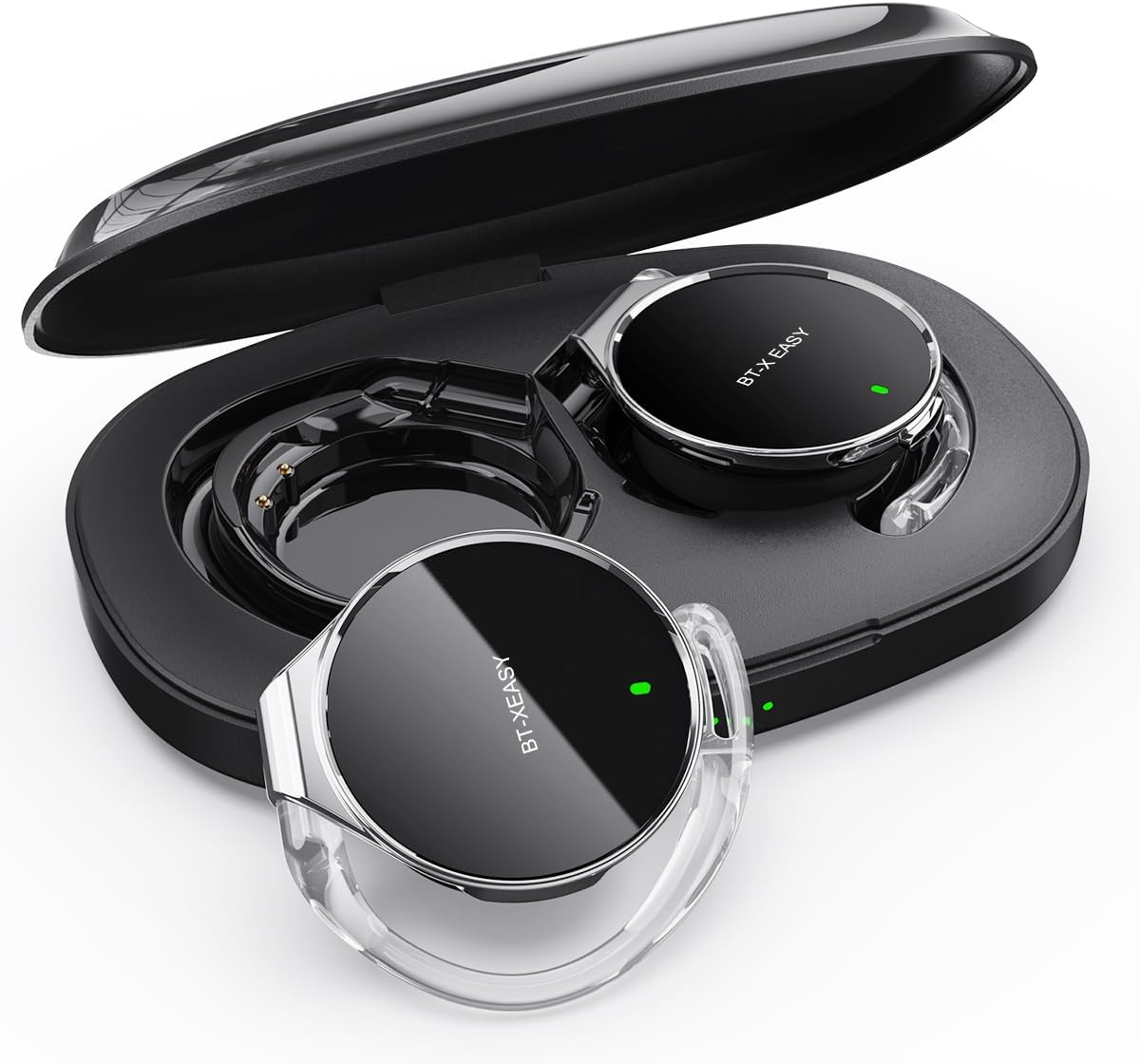
Image: Micool BT-X Easy On-Ear Headphones and their charging case, showing the headphones placed inside the open case.
مميزات المنتج
- HD Stereo Audio: 28mm speakers for rich bass and clear sound.
- بلوتوث شنومكس: Fast pairing, stable connection, and reliable use.
- تقليل الضوضاء: ANC+ENC adaptive noise reduction for clearer calls with 4 microphones.
- عمر بطارية طويل: Up to 18 hours of music playback on a single charge, and up to 52 hours total with the charging case.
- ملاءمة مريحة: Small, lightweight 36mm diameter with sponge earcup design for comfortable wear without ear compression.
- اتصال متعدد النقاط: Connect to two devices simultaneously (e.g., phone, laptop, tablet).
- ضوابط بديهية: Easy control of music and calls via multifunction buttons.
- مقاوم للماء: مصمم لتحمل رذاذ الماء والعرق.

الصورة: عن قرب view of the headphone highlighting its compact design and touch control area.
يثبت
1. الشحن الأولي
Before first use, fully charge the headphones and the charging case. Connect the provided USB-C cable to the charging case and a power source. The 4-stage power indicator lights on the case will show the charging progress (each light represents 25% battery capacity).

Image: The charging case displaying its 4-stage battery indicator lights.
2. الاقتران بجهاز
- افتح علبة الشحن. ستدخل سماعات الرأس تلقائيًا في وضع الاقتران.
- على جهازك (الهاتف الذكي، الجهاز اللوحي، الكمبيوتر المحمول)، قم بتمكين البلوتوث.
- بحث عن "BT-XEASY" in the list of available Bluetooth devices and select it to connect.
- بمجرد الاتصال، سيؤكد صوت التنبيه نجاح الاقتران.
3. Multi-point Connection (Optional)
To connect to a second device, disconnect the headphones from the first device's Bluetooth settings. Then, pair with the second device following the steps above. Reconnect to the first device from its Bluetooth settings. The headphones will now be connected to both devices simultaneously.
تعليمات التشغيل
ارتداء سماعات الرأس
- الخطوة 1: Open the ear-hook at a 30° angle.
- الخطوة 2: Rotate the headphone around your ear to the bottom of the ear-hook.
- الخطوة 3: اضغط على سماعات الرأس ثم اضغط علىamp them tightly to your ear.
- الخطوة 4: Adjust the angle to make wearing more comfortable.

Image: Step-by-step visual guide on how to properly wear the on-ear headphones.
عناصر التحكم باللمس
The BT-X Easy headphones feature intuitive touch controls on each headset for easy management of audio and calls.
| وظيفة | فعل |
|---|---|
| تشغيل/إيقاف الموسيقى مؤقتًا | انقر فوق x1 |
| الرد على المكالمة/إنهائها | انقر فوق x1 |
| رفض المكالمة | الضغط لفترة طويلة |
| Mute (in call) | Click x2 (prompt sound will confirm) |
| المسار التالي | Click x2 (Right Headphone) |
| المسار السابق | Click x2 (Left Headphone) |
| رفع الصوت | Hold (Right Headphone) |
| خفض الصوت | Hold (Left Headphone) |

Image: Diagram illustrating the touch control functions on the headphone.
فيديو المنتج الرسمي
Video: An official product video from Micool demonstrating the features and usage of the BT-X Easy On-Ear Headphones. This video provides a visual guide to the product's design, comfort, and functionality, including how to wear them and use the touch controls.
صيانة
- تنظيف: Use a soft, dry cloth to clean the headphones and charging case. Do not use abrasive cleaners or solvents.
- تخزين: عندما لا تكون قيد الاستخدام، قم بتخزين سماعات الرأس في علبة الشحن الخاصة بها لحمايتها والتأكد من شحنها للاستخدام التالي.
- العناية بالبطارية: لإطالة عمر البطارية، تجنب تفريغ سماعات الرأس بالكامل بشكل متكرر. اشحنها بانتظام، حتى لو لم تستخدمها لفترات طويلة.
- مقاومة الماء: The headphones are water-resistant, but not waterproof. Avoid submerging them in water or exposing them to heavy rain. Dry them thoroughly if they get wet.
استكشاف الأخطاء وإصلاحها
| مشكلة | الحل المحتمل |
|---|---|
| سماعات الرأس غير مقترنة | Ensure headphones are charged. Turn off and on Bluetooth on your device. Forget "BT-XEASY" from your device's Bluetooth list and re-pair. |
| لا يوجد صوت أو مستوى صوت منخفض | Check device volume and headphone volume. Ensure headphones are properly connected. Try playing different audio sources. |
| سماعة أذن واحدة لا تعمل | Place both headphones back in the charging case, close the lid, wait a few seconds, then open and try again. Ensure both are charged. |
| علبة الشحن لا تشحن | Check USB-C cable and power adapter. Ensure proper connection. |
| الاتصال غير مستقر | Move closer to your device. Avoid strong electromagnetic interference. Ensure no other devices are trying to connect simultaneously. |
تحديد
| ميزة | التفاصيل |
|---|---|
| اسم الموديل | BT-X easy |
| تكنولوجيا الاتصال | لاسلكي (بلوتوث 5.4) |
| نوع برنامج تشغيل الصوت | Dynamic Driver (28mm speakers) |
| عمر البطارية (سماعات الرأس) | تصل إلى 18 ساعة |
| إجمالي عمر البطارية (مع العلبة) | تصل إلى 52 ساعة |
| التحكم في الضوضاء | Active Noise Cancellation (ANC+ENC for calls) |
| الميكروفونات | 4 الميكروفونات |
| مستوى مقاومة الماء | مقاوم للماء |
| مادة | أكريلونيتريل بوتادين ستايرين (ABS) |
| وزن العنصر | 5 أونصات |
| رمز المنتج الموحد | 775494925862 |
الضمان والدعم
Micool provides 24-hour after-sales service for all purchased items. For any issues or inquiries, please contact Micool customer support through the official brand store or the platform where you purchased the product.
For detailed warranty information, please refer to the warranty card included in your product packaging or visit the official Micool webقد تكون خطط الحماية متاحة أيضًا لتغطية ممتدة.
Micool Brand Store: Visit Micool Store on Amazon
Ask a question about this manual
Ask about setup, troubleshooting, compatibility, parts, safety, or missing instructions. Manuals+ will review the question and use this page’s manual context to help answer it.