
1. المقدمة
This manual provides detailed instructions for the installation, operation, and maintenance of your CHSTEK 8581A Android 13 Car Radio Multimedia Navigation System. This unit is designed for specific Porsche models, including the Cayman, Boxster, 911, 987, and 997 from 2004-2013. Please read this manual thoroughly before installation and use to ensure proper functionality and safety.
2. معلومات السلامة
- يوصى بالتركيب الاحترافي: نظراً لتعقيد الأنظمة الكهربائية للسيارات، يُنصح بشدة بالتركيب الاحترافي لمنع حدوث أضرار للوحدة أو سيارتك.
- مزود الطاقة: Ensure the unit is connected to a 12V DC power supply with negative grounding.
- تجنب المشتتات: لا تشغّل الجهاز بطريقة تُشتّت انتباهك عن القيادة. اجعل سلامة الطريق دائمًا على رأس أولوياتك.
- درجة حرارة: تجنب تعريض الوحدة لدرجات حرارة عالية أو لأشعة الشمس المباشرة لفترات طويلة.
- رُطُوبَة: Keep the unit dry. Exposure to moisture can cause malfunction or damage.
3. محتويات العبوة
تأكد من وجود جميع العناصر في العبوة:
- CHSTEK 8581A Car Radio Unit
- ميكروفون خارجي
- هوائي نظام تحديد المواقع العالمي (GPS)
- مجموعة كابلات الطاقة
- كابلات USB
- دليل المستخدم (هذا المستند)

الشكل 3.1: The CHSTEK 8581A car radio unit and its primary accessories, including the external microphone, highlighting key features like 2GB RAM + 32GB storage, 8-core 1.6GHz processor, DSP*36EQ, CarPlay, Android Auto, and Android 13 operating system.
4. التثبيت
The CHSTEK 8581A is designed for a plug-and-play installation in compatible Porsche models. However, specific vehicle configurations may require additional components or professional assistance.
4.1 التحقق من التوافق
- This unit is compatible with Porsche Cayman 911 981 997 Boxster models from 2004-2013.
- BOSE Audio System: If your vehicle is equipped with an original BOSE or Harman Kardon audio system, a separate fiber optic box is required for sound output. Please contact customer support for details on obtaining this component.
- الضوابط عجلة القيادة: Some high-grade versions of the car, such as certain Cayman 2010-2012 models, may not fully support the steering wheel control keys.
4.2 خطوات التثبيت (عامة)
- افصل البطارية: قبل البدء، افصل الطرف السالب لبطارية السيارة لمنع حدوث ماس كهربائي.
- إزالة الراديو الأصلي: Carefully remove the existing car radio unit from the dashboard. Refer to your vehicle's service manual for specific instructions.
- توصيل الأسلاك: Connect the provided power harness, GPS antenna, and any other necessary cables to the CHSTEK 8581A unit. Ensure all connections are secure.
- تركيب الميكروفون: Route and install the external microphone in a suitable location for clear voice pickup.
- وظيفة الاختبار: Before fully reassembling the dashboard, reconnect the battery and perform a basic test of the unit's functions (power, audio, touch screen).
- وحدة آمنة: Mount the CHSTEK 8581A unit securely into the dashboard opening.
- إعادة تجميع لوحة المعلومات: Reinstall any removed trim panels and components.
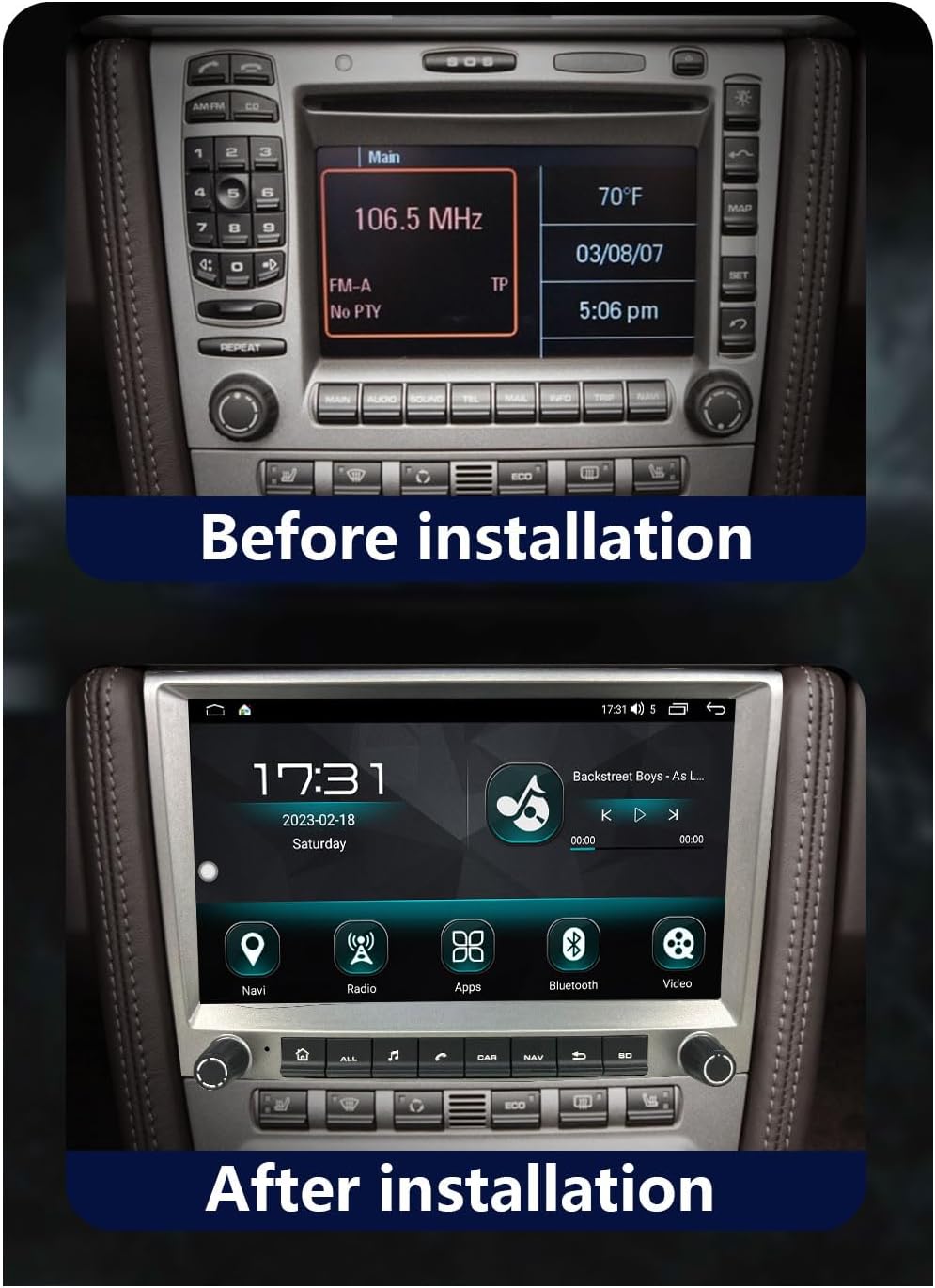
الشكل 4.1: Example of a Porsche dashboard with the original radio unit prior to the CHSTEK 8581A installation.

الشكل 4.2: Example of a Porsche dashboard after the CHSTEK 8581A unit has been successfully installed, showing the integrated display.
4.3 4G SIM Card Functionality (Americas)
If you are located in the Americas (e.g., United States, Canada, Mexico, Brazil) and require 4G SIM card network functionality, please inform customer service at the time of purchase or installation. Specific hardware configurations may be necessary to ensure 4G network compatibility in these regions.
5. تعليمات التشغيل
This section details the primary functions and features of your CHSTEK 8581A car radio.
5.1 تشغيل/إيقاف التشغيل والتنقل الأساسي
- تشغيل الطاقة: عادةً ما يتم تشغيل الوحدة تلقائيًا عند تشغيل محرك السيارة.
- إيقاف التشغيل: The unit will power off when the vehicle's ignition is turned off.
- شاشة اللمس: Navigate through menus and applications by touching the icons and controls on the 8-inch 1280x720P HD touch screen.
- Physical Buttons/Knobs: Use the physical buttons and rotary knobs for quick access to common functions like volume, home, navigation, and radio.
5.2 Wireless CarPlay and Wired Android Auto
The unit supports both wireless Apple CarPlay and wired Android Auto, allowing seamless integration with your smartphone.
5.2.1 Wireless CarPlay (for iPhone users)
- تأكد من تفعيل البلوتوث والواي فاي على جهاز الآيفون الخاص بك.
- On the car radio, navigate to the CarPlay application.
- Follow the on-screen prompts to pair your iPhone via Bluetooth.
- Once paired, CarPlay will launch automatically, displaying a simplified version of your iPhone's interface on the car radio screen.
- Use Siri voice control for hands-free operation of navigation, calls, messages, and music.
الشكل 5.1: The wireless Apple CarPlay interface displayed on the car radio screen, showing common applications and Siri voice control functionality.
5.2.2 Wired Android Auto (for Android users)
- Ensure Android Auto is installed on your Android phone.
- قم بتوصيل هاتفك الذي يعمل بنظام Android براديو السيارة باستخدام كابل USB.
- On the car radio, navigate to the Android Auto application.
- Follow any on-screen prompts on both your phone and the car radio to establish the connection.
- Android Auto will mirror essential features like GPS mapping, music playback, and communication.

الشكل 5.2: The wired Android Auto interface displayed on the car radio screen, demonstrating connectivity with an Android smartphone.
5.3 ملاحة GPS
The unit features built-in GPS navigation with support for both online and offline maps.
- التنقل عبر الإنترنت: Connect to Wi-Fi or 4G (if enabled) to access real-time traffic conditions and up-to-date map data.
- التنقل دون اتصال بالإنترنت: Download desired map regions for navigation without an internet connection. This is useful in areas with poor network coverage.
- تحديد المواقع بدقة: The system uses accurate satellite positioning to prevent getting lost and provide precise directions.
5.4 وظيفة البلوتوث
قم بتوصيل هاتفك الذكي عبر البلوتوث لإجراء مكالمات بدون استخدام اليدين وبث الصوت.
- الاتصال بدون استخدام اليدين: Pair your phone to make and receive calls directly through the car radio. The external microphone ensures clear communication.
- موسيقى البلوتوث: قم ببث الصوت من هاتفك إلى مكبرات الصوت في السيارة.
- Phonebook Sync: Download your phone's contacts to the unit for easy access.
5.5 راديو FM
يمكنك الوصول إلى محطات الراديو المحلية باستخدام موالف FM المدمج.
- نطاق التردد: FM 87.50-108.0 ميجا هرتز.
- المحطات مسبقة الضبط: احفظ ما يصل إلى 18 محطة من محطاتك المفضلة للوصول السريع إليها.
- وظيفة معادلة الطاقة: Utilize the equalizer to customize audio output for an optimal listening experience.
5.6 UI Desktop Themes & Split Screen
Personalize your user experience and enhance multitasking.
- Multiple UI Themes: Choose from various built-in desktop themes to refresh the look and feel of your interface.
- وظيفة تقسيم الشاشة: Run two applications simultaneously on the screen, such as navigation and music playback, for improved convenience.

الشكل 5.3: A visual representation of various user interface (UI) desktop themes and integrated features available on the CHSTEK 8581A system, including navigation, radio, apps, Bluetooth, and DSP equalizer settings.
5.7 التحكم في عجلة القيادة
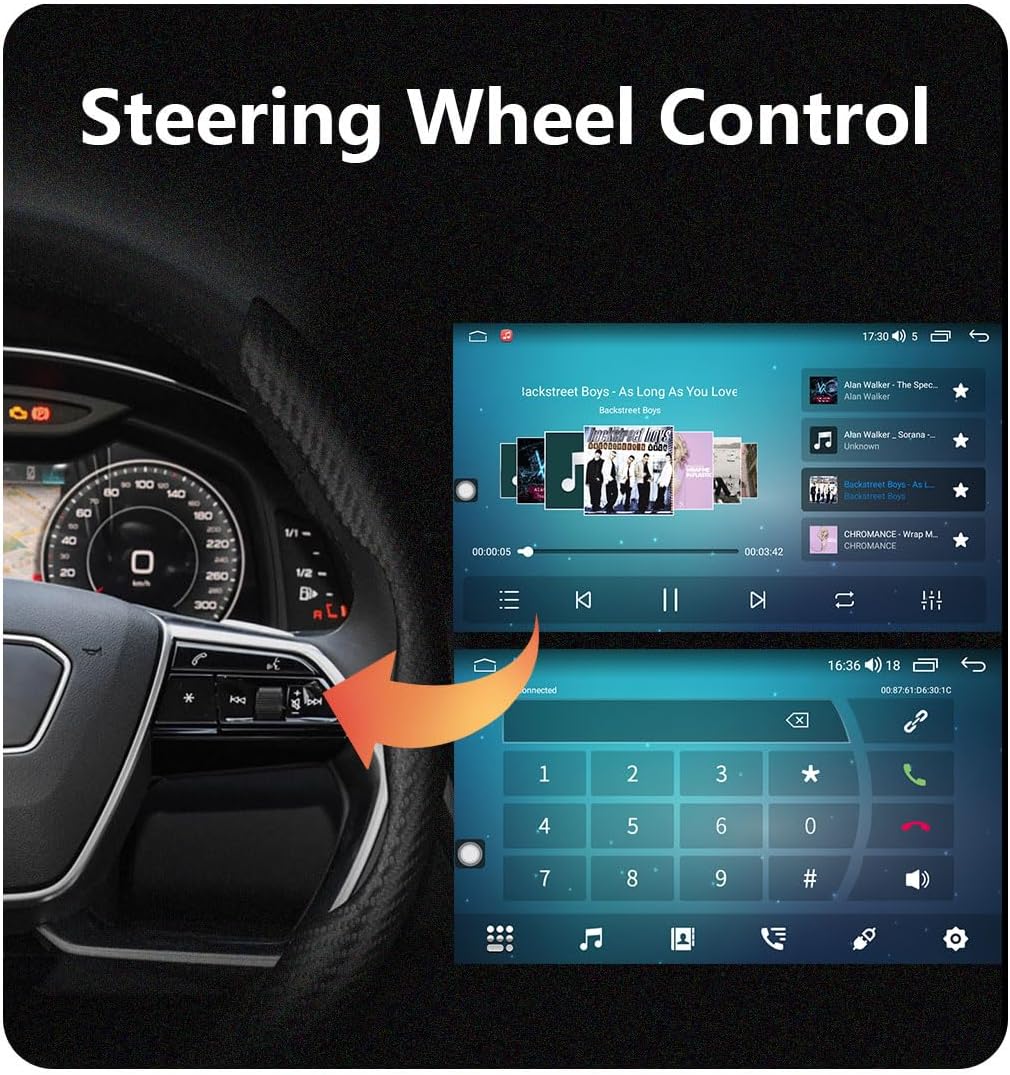
Integrate with your vehicle's steering wheel controls for safe and convenient operation.
- الوظائف: Control volume, track skipping, answer/end calls, and other functions directly from your steering wheel.
- ملاحظة التوافق: As mentioned in the installation section, some high-grade Porsche models (e.g., Cayman 2010-2012) may have limited or no support for steering wheel controls.
الشكل 5.4: Illustration of how the car radio integrates with existing steering wheel controls for convenient operation while driving.
6. الصيانة
تضمن الصيانة المناسبة طول عمر وأداء راديو سيارتك على النحو الأمثل.
- تنظيف الشاشة: استخدم قطعة قماش ناعمة وخالية من الوبر لمسح شاشة اللمس برفق. بالنسبة للبقع العنيدة، افركها قليلاًampامسح الشاشة بقطعة قماش مبللة بالماء أو بمنظف آمن. تجنب المواد الكاشطة أو المواد الكيميائية القاسية.
- تحديثات البرامج: Periodically check for available software updates to ensure the unit has the latest features and bug fixes. Updates can typically be performed via Wi-Fi.
- تجنب السوائل: Do not spill liquids on the unit. If accidental spillage occurs, power off the unit immediately and allow it to dry completely before use.
- التحكم في درجة الحرارة: While the unit is designed for automotive environments, extreme heat or cold can affect performance. Park in shaded areas when possible during hot weather.
7. استكشاف الأخطاء وإصلاحها
This section addresses common issues you might encounter with your CHSTEK 8581A unit.
| مشكلة | السبب المحتمل | حل |
|---|---|---|
| لا يوجد صوت من الوحدة. | Vehicle has BOSE/Harman Kardon audio system without fiber optic box. Incorrect wiring. | Install a fiber optic box (if applicable). Check all audio wiring connections. |
| لا تعمل أزرار التحكم في عجلة القيادة. | Vehicle incompatibility (e.g., certain Cayman 2010-2012 models). Incorrect wiring. | Verify vehicle compatibility. Check steering wheel control wiring. |
| 4G network not working in Americas. | Unit not configured for Americas 4G bands. | Contact customer service to ensure your unit has the correct hardware for Americas 4G SIM card functionality. |
| Android Auto not connecting with Samsung phone. | Known compatibility issue with some Samsung devices. | Ensure Android Auto app is updated. Try different USB cables. If issue persists, contact support. |
| شاشة اللمس لا تستجيب أو غير دقيقة. | Software glitch. Physical damage. | أعد تشغيل الجهاز. إذا استمرت المشكلة، فاتصل بدعم العملاء. |
If you encounter issues not listed here or require further assistance, please contact CHSTEK customer support.
8. المواصفات
Key technical specifications for the CHSTEK 8581A Car Radio.
| ميزة | مواصفة |
|---|---|
| رقم الموديل | 8581 أمبير |
| نظام التشغيل | أندرويد 13 |
| عرض | 8-inch 1280*720P HD Touch Screen |
| ذاكرة الوصول العشوائي + التخزين | ذاكرة وصول عشوائي 2 جيجابايت + سعة تخزين داخلية 32 جيجابايت |
| المعالج | 8 Core 1.6GHz |
| الاتصال | Bluetooth, USB, Wi-Fi, 4G (optional) |
| المميزات الخاصة | Built-In Bluetooth, Touchscreen, Wireless CarPlay, Wired Android Auto, GPS Navigation, Split Screen, Multiple UI Themes, DSP Equalizer |
| وضع إخراج الصوت | ستيريو |
| تكوين قناة الصوت المحيطي | 2.0 |
| وزن العنصر | 4.41 رطل |
| أبعاد الحزمة | 7.87 × 7.87 × 7.87 بوصة |
9. الضمان والدعم
For warranty information, technical support, or service inquiries, please refer to the warranty card included with your product or contact CHSTEK customer service directly. Ensure you have your product model number (8581A) and purchase details available when contacting support.