1. المقدمة
Thank you for choosing the Generic T10 Ultra Smartwatch Series 8. This manual provides essential information for setting up, operating, and maintaining your new smartwatch. Please read it carefully to ensure proper use and to fully utilize all its features.
2. انتهى المنتجview
The T10 Ultra Smartwatch Series 8 features a 49mm stunning large screen and a durable aluminum body. It is designed to assist you with health monitoring, fitness tracking, and communication.
2.1 الميزات الرئيسية
- 49mm large display
- Durable aluminum body with four screws and two strap locks
- ECG function, heart rate, blood pressure, blood oxygen, and sleep monitoring
- Bluetooth call and notification support (SMS, email, social media)
- Multiple sports modes for indoor and outdoor activities
- مقاومة الماء IP68
- Stopwatch, music control, vibration support, NFC payments, and password protection
- بطارية ليثيوم أيون بوليمر
2.2 المكونات المضمنة
- T10 Ultra Smartwatch Series 8
- حزام ساعة
- شاحن لاسلكي
- دليل المستخدم
2.3 مخطط المنتج
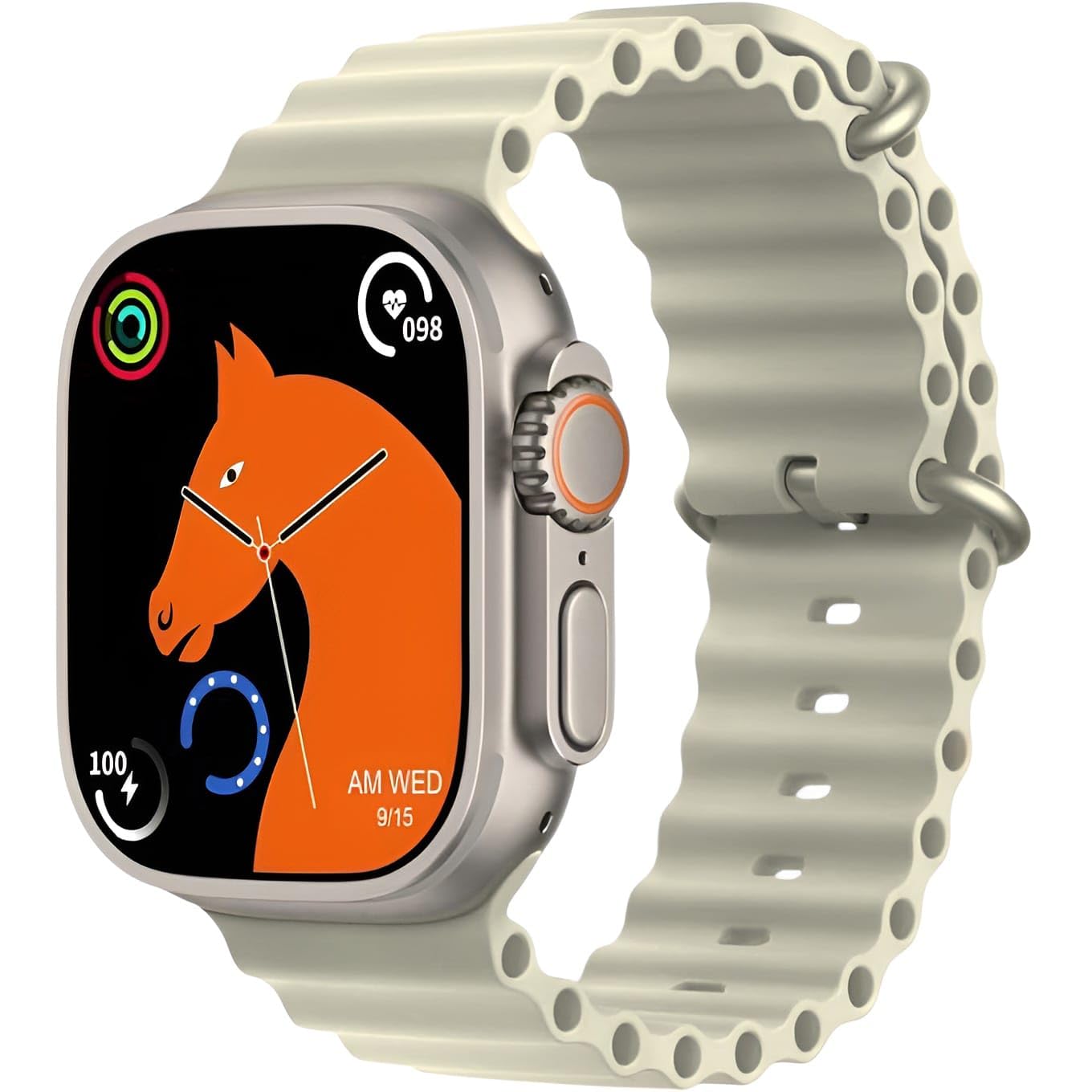
This image displays the T10 Ultra Smartwatch Series 8 in off-white. The watch features a large rectangular screen, a digital crown on the side, and a comfortable silicone strap. It highlights the sleek design and prominent display.
3. الإعداد
3.1 الشحن الأولي
Before first use, fully charge your smartwatch. Place the watch on the wireless charging pad. The screen will indicate charging status. A full charge typically takes 2-3 hours.
3.2 تشغيل/إيقاف التشغيل
- تشغيل الطاقة: اضغط مع الاستمرار على الزر الجانبي حتى تضيء الشاشة.
- إيقاف التشغيل: اضغط مع الاستمرار على الزر الجانبي، ثم حدد "إيقاف التشغيل" على الشاشة.
3.3 الاقتران بهاتفك الذكي
- Download the companion app (refer to the packaging or watch screen for app name) from your smartphone's app store.
- تأكد من تمكين Bluetooth على هاتفك الذكي.
- افتح التطبيق واتبع التعليمات التي تظهر على الشاشة لإنشاء حساب أو تسجيل الدخول.
- In the app, search for your smartwatch. Select 'T10 Ultra Series 8' from the list of available devices.
- قم بتأكيد طلب الاقتران على كل من هاتفك الذكي وساعتك الذكية.
4. تعليمات التشغيل
4.1 الملاحة الأساسية
- شاشة اللمس: مرر لليسار/اليمين، لأعلى/لأسفل للتنقل بين القوائم والميزات. انقر للاختيار.
- زر جانبي: Press to return to the home screen or wake the watch. Hold to access power options.
- التاج الرقمي: Rotate to scroll through lists or zoom in/out. Press to select or return to the previous screen.
4.2 تخصيص واجهات الساعة
Long-press on the watch face to access watch face options. Swipe left or right to browse available designs and tap to select your preferred watch face. Additional watch faces may be available through the companion app.
5. مراقبة الصحة
The T10 Ultra Smartwatch provides various health monitoring features. For accurate readings, ensure the watch is worn snugly on your wrist.
5.1 مراقبة معدل ضربات القلب
Access the heart rate function from the main menu. The watch will automatically start measuring your heart rate. View real-time data on the watch screen or in the app.
5.2 Blood Pressure and Blood Oxygen (SpO2)
Navigate to the blood pressure or blood oxygen features. Remain still during measurement for best results. These measurements are for reference only and should not be used for medical diagnosis.
5.3 ECG Function
To use the ECG function, follow the instructions on the watch screen or in the companion app. This feature provides an electrocardiogram reading, which is for informational purposes and not a substitute for professional medical advice.
5.4 تتبع النوم
Wear the smartwatch while sleeping to track your sleep patterns. The watch automatically detects sleep duration and quality, providing data on deep sleep, light sleep, and awake times in the companion app.
6. Communication & Notifications
6.1 استلام الإشعارات
Once paired with your smartphone, the smartwatch will display notifications for incoming calls, SMS messages, emails, and various social media apps (e.g., Facebook, WhatsApp, WeChat). Ensure notification permissions are enabled in your phone's settings and the companion app.
6.2 إجراء المكالمات والرد عليها
You can make and answer calls directly from your smartwatch. When a call comes in, tap the answer icon on the watch screen. To make a call, access the dialer or contacts list on your watch.
7. أوضاع الرياضة
The smartwatch supports various sports modes to track your physical activity.
7.1 Indoor Sports
- جري
- ركوب الدراجات
- تمرين الجلوس
- تمرين الضغط
- Free Movement
7.2 Outdoor Sports
- المشي
- تسلق الجبال
- رياضات أخرى
In each mode, the watch tracks metrics such as steps, calories burned, and distance. Select your desired sport from the activity menu to begin tracking.
8. ميزات أخرى
8.1 مقاومة الماء بمعيار IP68
The smartwatch is IP68 rated for water resistance, meaning it can withstand dust and immersion in water up to 1.5 meters for 30 minutes. It is suitable for daily use and light water activities, but not recommended for swimming or diving.
8.2 ساعة توقيت
Access the stopwatch function from the menu to time activities.
8.3 التحكم في الموسيقى
Control music playback on your paired smartphone directly from your watch. You can play, pause, skip tracks, and adjust volume.
8.4 Vibration Support
The watch provides vibration alerts for notifications, alarms, and other functions.
8.5 NFC Payments
The smartwatch supports NFC payments. Refer to the companion app or specific payment service instructions for setup and usage details.
8.6 حماية كلمة المرور
Set a password on your smartwatch to protect your data and privacy. This can be configured in the watch settings.
9. الصيانة
9.1 التنظيف
امسح الساعة وحزامها بانتظام بقطعة قماش ناعمة وجافة. وللأوساخ المستعصية، استخدم قطعة قماش ناعمة قليلاً.amp امسح بقطعة قماش ثم جففها جيداً. تجنب استخدام المواد الكيميائية القاسية أو المواد الكاشطة.
9.2 التخزين
When not in use for extended periods, store the smartwatch in a cool, dry place. Ensure it has some charge to prevent deep discharge of the battery.
10. استكشاف الأخطاء وإصلاحها
If you encounter issues with your smartwatch, try the following solutions:
- الساعة لا تعمل: تأكد من شحن الساعة بالكامل. وصّلها بالشاحن اللاسلكي لمدة 30 دقيقة على الأقل.
- لا يمكن الاقتران بالهاتف الذكي: Make sure Bluetooth is enabled on your phone and the watch. Restart both devices and try pairing again. Check if the companion app has necessary permissions.
- قراءات صحية غير دقيقة: تأكد من أن الساعة مُحكمة على معصمك، ليست ضيقة جدًا ولا واسعة جدًا. نظّف المستشعرات الموجودة على ظهر الساعة.
- عدم ظهور الإشعارات: Verify that notifications are enabled in your phone's settings and within the companion app. Ensure the watch is connected via Bluetooth.
- عمر بطارية قصير: Reduce screen brightness, disable unnecessary features, and limit background app refresh.
If problems persist, consult the manufacturer's support resources or contact customer service.
11. المواصفات
| ميزة | التفاصيل |
|---|---|
| الشركة المصنعة | نوعي |
| بلد المنشأ | الصين |
| وزن العنصر | 100 جرام |
| ASIN | B0DRTLGS96 |
| المميزات الخاصة | إشعارات البريد الإلكتروني |
| تكنولوجيا الاتصال | بلوتوث |
| العلامة التجارية | نوعي |
| لون | أبيض مائل للصفرة |
| المكونات المضمنة | Strap, Smartwatch, Wireless Charger |
12. معلومات السلامة
- Do not attempt to disassemble or modify the smartwatch.
- احتفظ بالجهاز بعيدًا عن درجات الحرارة العالية وأشعة الشمس المباشرة واللهب المكشوف.
- تجنب تعريض الساعة للصدمات القوية أو السقوط.
- The health monitoring features are for general wellness and fitness purposes only and are not intended for medical diagnosis, treatment, or prevention of any disease. Consult a medical professional for health-related concerns.
- Keep the watch and its accessories out of reach of children.
- Use only the provided wireless charger or a compatible charger.
13. الضمان والدعم
Specific warranty details and customer support contact information are not provided in the product data. Please refer to the product packaging, the seller's website, or contact the retailer for information regarding warranty coverage and technical support for your Generic T10 Ultra Smartwatch Series 8.


