
مقدمة
Thank you for choosing the Phomemo M221 Bluetooth Thermal Label Printer. This manual provides essential information for the safe and efficient operation of your device. Please read it thoroughly before use and retain it for future reference. The Phomemo M221 is designed for fast, clear, and smart label printing, supporting various label types and applications for small businesses, home, and school use.
معلومات السلامة
لضمان التشغيل الآمن ومنع الضرر، اتبع الاحتياطات التالية:
- Do not disassemble, repair, or modify the printer.
- أبقِ الطابعة بعيدة عن الماء والرطوبة وأشعة الشمس المباشرة.
- Use only Phomemo-approved power adapters and accessories.
- تجنب لمس رأس الطباعة مباشرة بعد الطباعة، فقد يكون ساخناً.
- Store the printer and labels in a cool, dry place.
محتويات الحزمة
تأكد من وجود جميع العناصر في الحزمة الخاصة بك:
- طابعة ملصقات فوميمو M221
- كابل شحن USB من النوع C
- 1 roll of 40 x 30 mm thermal labels
- 1 roll of 50 x 80 mm thermal labels
- 1 roll of 70 x 80 mm thermal labels
- حقيبة حمل محمولة
- دليل المستخدم (هذا المستند)
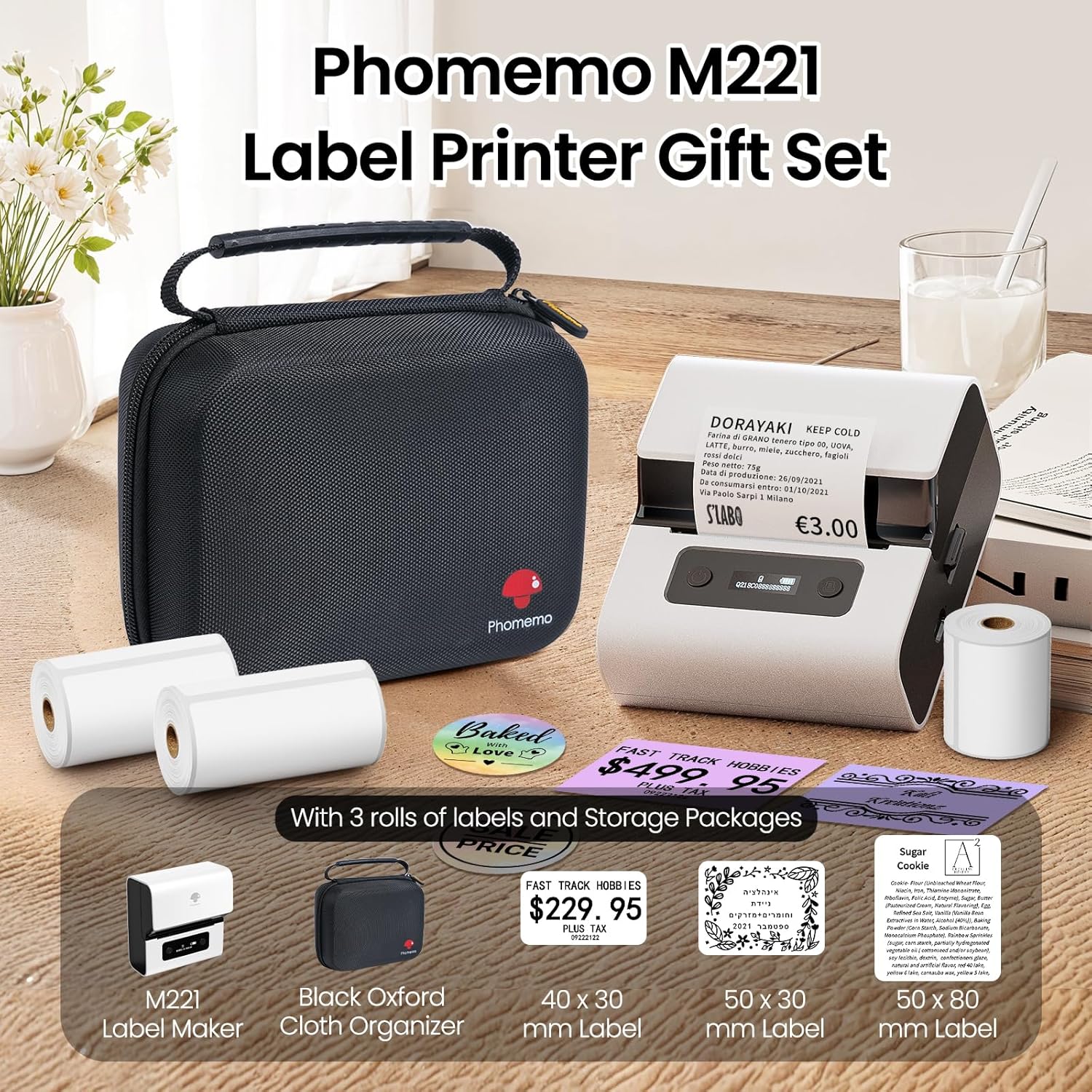
Image: Phomemo M221 Label Printer Gift Set, showing the printer, a black carrying case, and three rolls of white thermal labels.
المنتج انتهىview
The Phomemo M221 is a compact and efficient thermal label printer. Key features include:
- تكنولوجيا الطباعة الحرارية: No ink or toner required.
- توافق واسع النطاق مع الملصقات: Supports labels from 20mm to 80mm (0.78" to 3.14") wide, including rectangular, round, transparent, and colored types.
- الاتصال: Bluetooth for iOS/Android smartphones and tablets, USB for Windows PCs.
- بطارية ذات سعة عالية: 2200 mAh battery with Type-C fast charging.
- Fast and Quiet Operation: Prints at 50 mm/s with reduced noise.
- تصميم سهل الاستخدام: Easy label loading and automatic gap detection.

Image: Phomemo M221 Label Maker Set, illustrating its features such as no ink requirement, large battery capacity, Bluetooth wireless printing, and its suitability as a gift.
يثبت
1. شحن الطابعة
Before first use, fully charge the Phomemo M221 printer.
- قم بتوصيل كابل USB Type-C المرفق بمنفذ شحن الطابعة.
- Connect the other end of the cable to a 5V USB power adapter (not included) or a computer's USB port.
- The indicator light will show charging status. A full charge typically takes several hours. The 2200 mAh battery supports extended use.
2. تحميل العلامات
The M221 features an integrated label fixing structure for easy loading.
- افتح غطاء الطابعة.
- Insert the label roll into the compartment, ensuring the printing side faces upwards and the labels feed smoothly.
- Adjust the side guide plates to secure the label roll in place.
- Close the printer cover. The printer will automatically detect and calibrate the label gap.
3. الاتصال بجهازك
يدعم جهاز Phomemo M221 كلاً من اتصالات Bluetooth و USB.
Bluetooth Connection (Smartphones/Tablets)
- تأكد من تفعيل البلوتوث على جهازك الذي يعمل بنظام iOS أو Android.
- Download and install the "Print Master" application from your device's app store.
- Open the "Print Master" app and follow the on-screen instructions to search for and connect to your M221 printer.

Image: Phomemo M221 printer demonstrating Bluetooth wireless connection with a tablet and a smartphone.
USB Connection (Windows PC)
- Connect the USB Type-C cable from the printer to an available USB port on your Windows PC.
- Download and install the "Labelife" software and printer drivers from the official Phomemo webموقع.
- Follow the software installation prompts. Once installed, you can select the M221 as your printer.

Image: Phomemo M221 printer connected to a laptop using a USB cable, indicating wired connectivity.
تعليمات التشغيل
1. Basic Printing with "Print Master" App (Mobile)
- Ensure your M221 printer is connected via Bluetooth to your mobile device.
- Open the "Print Master" app.
- Select a template or create a new label design. The app offers various templates for text, images, barcodes, QR codes, and more.
- Customize your label content.
- Tap the print icon. Confirm print settings such as quantity.
- The printer will begin printing your labels.
2. Printing with "Labelife" Software (PC)
- Ensure your M221 printer is connected via USB to your Windows PC.
- Open the "Labelife" software.
- Design your label using the software's features, including text, images, barcodes, and QR codes.
- انتقل إلى "File" > "طباعة" أو انقر فوق رمز الطباعة.
- Select the Phomemo M221 from the list of available printers and adjust any necessary print settings.
- Click "Print" to start printing.
3. Batch Printing
Both "Print Master" and "Labelife" support batch printing for efficiency.
- In the print dialogue, specify the desired number of copies.
- The printer will automatically print multiple labels consecutively.

Image: Phomemo M221 printer demonstrating its versatility with examples of address labels, price tags, ingredient labels, and gift tags.

Image: Phomemo M221 printer showcasing its compatibility with over 50 types of thermal labels, including various shapes and designs.
صيانة
1. تنظيف رأس الطباعة
يضمن التنظيف المنتظم لرأس الطباعة جودة طباعة مثالية.
- أطفئ الطابعة وافصل كابل الطاقة.
- افتح غطاء الطابعة.
- امسح رأس الطباعة برفق باستخدام قطعة قطن.ampمخفف بالكحول الأيزوبروبيل.
- اترك رأس الطباعة يجف تمامًا قبل إغلاق الغطاء وتشغيل الطابعة.
2. التخزين
Store the printer in a clean, dry environment, away from extreme temperatures and direct sunlight. When not in use for extended periods, ensure the printer is fully charged and then powered off.

Image: A man holding the Phomemo M221 printer's carrying case, illustrating its portable design.
استكشاف الأخطاء وإصلاحها
Printer Does Not Turn On or Charge
- تحقق من اتصال الطاقة: Ensure the USB Type-C cable is securely connected to both the printer and a working power source (5V adapter or PC USB port).
- التحقق من محول الطاقة: Use a reliable 5V USB power adapter.
- مدة الشحن: Allow sufficient time for charging. The battery indicator should show charging status.
No Printing or Blank Output
- Check Label Orientation: Ensure the thermal labels are loaded correctly with the printing side facing upwards.
- نوع الملصق: Confirm you are using thermal labels. The M221 does not use ink.
- Print Head Cleanliness: A dirty print head can cause blank lines or poor print quality. Refer to the Maintenance section for cleaning instructions.
- محاذاة الملصق: Ensure the label roll is properly seated and aligned by the side guide plates to prevent misalignment errors.
مشاكل اتصال البلوتوث
- Printer On: تأكد من تشغيل الطابعة وأنها ضمن نطاق البلوتوث الخاص بجهازك.
- تمكين البلوتوث: Verify Bluetooth is active on your smartphone or tablet.
- اتصال التطبيق: Connect through the "Print Master" app, not directly through your device's Bluetooth settings.
- إعادة تشغيل الأجهزة: Try restarting both the printer and your mobile device.
جودة طباعة سيئة
- Print Head Cleanliness: قم بتنظيف رأس الطباعة كما هو موضح في قسم الصيانة.
- جودة التسمية: Use high-quality thermal labels.
- Print Density Settings: Adjust print density settings within the "Print Master" app or "Labelife" software if available.
تحديد
| ميزة | التفاصيل |
|---|---|
| رقم الموديل | م221 |
| ماركة | فوميمو |
| تكنولوجيا الاتصال | بلوتوث، منفذ USB من النوع C |
| تكنولوجيا الطباعة | حراري |
| مخرجات الطباعة | أحادي اللون |
| أقصى سرعة للطباعة (أحادية اللون) | 15.0 pages per minute (50 mm/s) |
| أقصى دقة طباعة (أبيض وأسود) | 203 نقطة في البوصة |
| عرض التسمية المعتمدة | 20mm - 80mm (0.78" - 3.14") |
| بطارية | 2200 mAh (1 D - included) |
| وزن العنصر | 820 جرام |
| أبعاد المنتج (الطول × العرض × الارتفاع) | 12.9 × 6.7 × 11.9 سم |
| Control Device Type | Smartphone/PC |
| نوع الوسائط | العلامات |
الضمان والدعم
للحصول على معلومات الضمان والدعم الفني، يرجى الرجوع إلى موقع Phomemo الرسمي webالموقع أو تواصل مع خدمة العملاء مباشرةً. احتفظ بإيصال الشراء كإثبات للشراء.
الموارد المتاحة على الإنترنت: قم بزيارة متجر فوميمو على أمازون للحصول على تحديثات المنتج والأسئلة الشائعة.