1. المقدمة
This manual provides essential information for the safe and effective use of your H9 Pro Max Smartwatch. Please read it thoroughly before operating the device and retain it for future reference. The H9 Pro Max Smartwatch is designed to integrate into your daily life, offering fitness tracking, communication features, and health monitoring.
2. ماذا يوجد في الصندوق
Upon opening your H9 Pro Max Smartwatch package, you should find the following items:
- H9 Pro Max Smartwatch
- دليل المستخدم
- كابل الشحن
- مشاهدة الفرقة
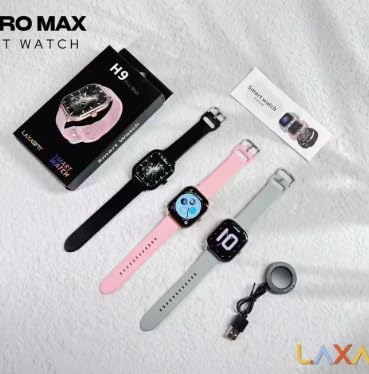
Image: The H9 Pro Max Smartwatch packaging, showing the smartwatch in various colors, the charging cable, and the user manual.
3. انتهى المنتجview
The H9 Pro Max Smartwatch features a 2.01-inch HD Retina Display, providing clear visuals and an intuitive touch interface. Its design is suitable for various daily activities and fitness routines.
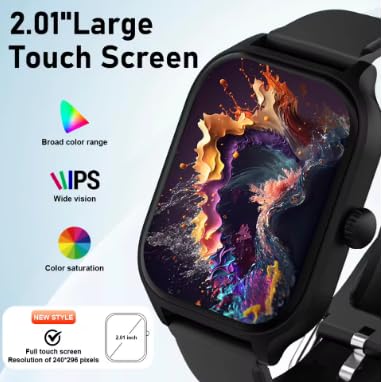
الصورة: تفصيلية view of the smartwatch's 2.01-inch large touch screen, highlighting its IPS display with broad color range and saturation.
المكونات الرئيسية:
- عرض: 2.01-inch HD Retina IPS Touch Screen (240x240 resolution)
- أجهزة الاستشعار: Heart rate sensor, Blood oxygen sensor, Accelerometer
- الاتصال: بلوتوث
- بطارية: Lithium Ion (180 Amp Hours capacity)
4. الإعداد
4.1 الشحن الأولي
Before first use, fully charge your H9 Pro Max Smartwatch. Connect the charging cable to the watch's charging port and a compatible USB power source. The watch will display a charging indicator.
4.2 تثبيت التطبيق وإقرانه
لفتح جميع وظائف ساعتك الذكية، قم بتنزيل وتثبيت لاكساس فيت app on your smartphone. You can find the app by scanning the QR code provided in the user manual or searching in your device's app store.
- تأكد من تمكين Bluetooth على هاتفك الذكي.
- Open the LaxasFit app and follow the on-screen instructions to create an account or log in.
- اختر "إضافة جهاز" أو خيارًا مشابهًا داخل التطبيق.
- The app will search for your H9 Pro Max Smartwatch. Select it from the list of available devices.
- قم بتأكيد طلب الاقتران على كل من ساعتك الذكية وهاتفك الذكي.
5. تعليمات التشغيل
5.1 الملاحة الأساسية
The smartwatch is operated primarily via its touchscreen. Swipe left, right, up, or down to navigate through menus and features. Press the side button to return to the home screen or access the app list.
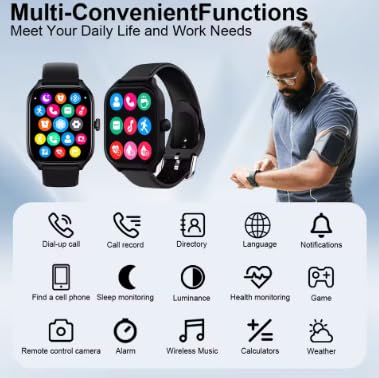
Image: The smartwatch interface showing multiple functions and app icons, demonstrating its versatile capabilities.
5.2 مكالمات بلوتوث
بمجرد إقرانها بهاتفك الذكي، يمكنك إجراء واستقبال المكالمات مباشرة من ساعتك الذكية.
- اجراء اتصالات: يمكنك الوصول إلى لوحة الاتصال أو قائمة جهات الاتصال على ساعتك لبدء مكالمة.
- استقبال المكالمات: An incoming call notification will appear on your watch. Tap to answer or decline.
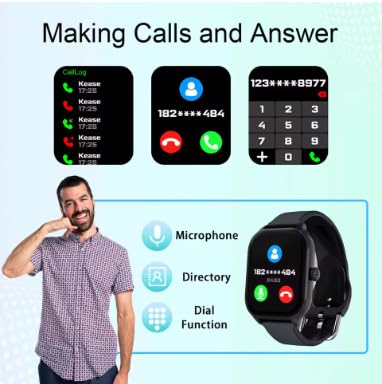
Image: The smartwatch demonstrating its Bluetooth calling features, including call logs, answering calls, and using the dial function.
5.3 الإشعارات الذكية
Receive notifications from various apps (WeChat, WhatsApp, Instagram, etc.) directly on your wrist. Ensure notification permissions are granted in the LaxasFit app and your phone's settings.
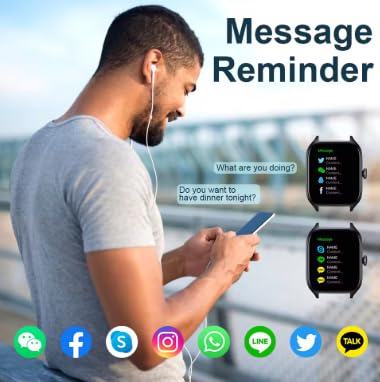
Image: The smartwatch showing message reminders from popular social media applications.
5.4 مراقبة الصحة
تقوم الساعة الذكية بتتبع العديد من المؤشرات الصحية:
- معدل ضربات القلب: مراقبة معدل ضربات القلب بشكل مستمر أو عند الطلب.
- الأكسجين في الدم: قياس مستويات تشبع الأكسجين في الدم.
- مراقبة النوم: يتتبع أنماط النوم والجودة.
- ضغط الدم: يوفر قراءات ضغط الدم.
تنصل: The health monitoring features are for general wellness and fitness purposes only and are not intended for medical diagnosis, treatment, or prevention of any disease. Consult a medical professional for any health concerns.
5.5 أوضاع الرياضات المتعددة
Select from various sport modes to track your workouts accurately. Modes include outdoor running, walking, indoor cycling, indoor running, and free exercise.

Image: The smartwatch interface showing available sports modes, with examples of people performing different exercises.
5.6 Music Playback and Remote Camera Control
- التحكم بالموسيقى: قم بالتحكم في تشغيل الموسيقى على هاتفك الذكي المتصل (تشغيل، إيقاف مؤقت، تخطي المسارات).
- كاميرا عن بعد: Use your smartwatch as a remote shutter button for your smartphone's camera.
6. الميزات الخاصة
- TWS Bluetooth Headset Pairing: Connect your True Wireless Stereo (TWS) Bluetooth headsets directly to the smartwatch for an enhanced audio experience.
- وجوه الساعة القابلة للتخصيص: Personalize your smartwatch with a variety of watch faces available through the LaxasFit app.
- تحديثات البرامج الثابتة عبر الهواء (OTA): Receive over-the-air (OTA) updates to keep your smartwatch software current with the latest features and improvements.
- توقعات الطقس العالمية: Stay informed with accurate, up-to-date weather information displayed on your watch.
7. الصيانة
7.1 التنظيف
Wipe the smartwatch and band regularly with a soft, dry cloth. Avoid using harsh chemicals or abrasive materials.
7.2 الشحن
Charge the device using the provided charging cable. Avoid using damaged cables or chargers. The average battery life is 3 years, with a charging time of approximately 90 hours for a full charge.
7.3 مقاومة الماء
مهم: This smartwatch is غير مقاوم للماء. Avoid exposure to water, including showering, swimming, or heavy rain, to prevent damage.
8. استكشاف الأخطاء وإصلاحها
- الجهاز لا يعمل: تأكد من أن الجهاز مشحون بالكامل.
- لا يمكن الاقتران بالهاتف الذكي: Check if Bluetooth is enabled on both devices and the LaxasFit app is open. Try restarting both the watch and phone.
- عدم ظهور الإشعارات: Verify notification permissions in the LaxasFit app and your phone's settings.
- بيانات صحية غير دقيقة: Ensure the watch is worn snugly on your wrist. Environmental factors and movement can affect readings.
9. المواصفات
| ميزة | التفاصيل |
|---|---|
| نموذج | LAXASFIT H9 Pro Max |
| حجم العرض | 2.01 بوصة |
| نوع العرض | IPS 240x240 resolution |
| سعة تخزين الذاكرة | 512 ميجا بايت |
| نظام التشغيل | Android Wear 1.4, Android Wear 2.8 |
| تكنولوجيا الاتصال | بلوتوث |
| سعة البطارية | 180 Amp ساعات |
| متوسط عمر البطارية | 3 سنة |
| وقت الشحن | 90 ساعة |
| وزن العنصر | 180 جرام |
| الأجهزة المتوافقة | Smartphone, iPhone |
| المميزات الخاصة | Accelerometer, Activity Tracker, Custom Activity Tracking, Lightweight, Music Player |
10. الضمان والدعم
10.1 معلومات الضمان
Your H9 Pro Max Smartwatch comes with a ضمان لمدة 1 شهرًا من تاريخ الشراء. يغطي هذا الضمان عيوب التصنيع. يُرجى الاحتفاظ بإيصال الشراء للمطالبة بالضمان.
10.2 دعم العملاء
For further assistance, troubleshooting, or warranty claims, please contact your retailer or the manufacturer's customer support. Refer to the packaging or product webموقع للحصول على تفاصيل الاتصال.


