
مقدمة
Thank you for choosing the CREATE Speaker Retro. This portable Bluetooth speaker combines a classic retro design with modern audio technology, offering versatile connectivity and powerful sound. This manual will guide you through the setup, operation, and maintenance of your new speaker to ensure optimal performance and longevity.

Image: The CREATE Speaker Retro, highlighting its elegant retro aesthetic and compact form factor.
تعليمات السلامة الهامة
- اقرأ جميع التعليمات بعناية قبل استخدام المنتج.
- احتفظ بهذا الدليل للرجوع إليه في المستقبل.
- Do not expose the speaker to water or excessive moisture. This product is غير مقاوم للماء.
- لا تضعه بالقرب من مصادر الحرارة مثل المشعات أو فتحات التدفئة أو المواقد أو الأجهزة الأخرى (بما في ذلك ampالمُضخِّمات) التي تنتج الحرارة.
- استخدم فقط المرفقات/الملحقات المحددة من قبل الشركة المصنعة.
- افصل هذا الجهاز أثناء العواصف الرعدية أو عند عدم استخدامه لفترات طويلة.
- قم بإحالة جميع أعمال الصيانة إلى موظفي الخدمة المؤهلين.
محتويات الحزمة
The CREATE Speaker Retro package includes:
- CREATE Speaker Retro Portable Bluetooth Speaker (1 unit)
- كابل شحن USB-C
- دليل المستخدم (هذا المستند)
عناصر التحكم والمنافذview
تعرّف على عناصر التحكم في السماعة ومنافذ التوصيل الخاصة بها:

الصورة: مفصلة view من لوحة التحكم العلوية للسماعة.
- مقبض الصوت: Adjusts the overall sound volume.
- مقبض الجهير: يضبط مستوى الجهير.
- مقبض ثلاثي: يضبط مستوى الطبقة الثلاثية.
- مفتاح محدد المدخلات: Toggles between AUX, Bluetooth (BT), and USB input modes.
- مفتاح التشغيل: يقوم بتشغيل/إيقاف مكبر الصوت.
- مدخل AUX (3.5 مم): For connecting external audio devices via an audio cable.
- منفذ USB: لتشغيل الملفات من محرك أقراص USB.
- DC-IN 5V Port: لشحن مكبر الصوت.
- مؤشر الضوء: يعرض حالة الطاقة، وحالة الشحن، وحالة اقتران البلوتوث.
يثبت
1. شحن مكبر الصوت
Before first use, fully charge the speaker. Connect the provided USB-C charging cable to the DC-IN 5V port on the speaker and the other end to a compatible USB power adapter (not included) or a computer's USB port. The indicator light will show the charging status. A full charge takes approximately 4-5 hours.
- الشحن: Indicator light glows (color may vary).
- مشحونة بالكامل: Indicator light turns off or changes color.
2. تشغيل / إيقاف التشغيل
To power on the speaker, flip the مفتاح الطاقة to the "ON" position. To power off, flip the switch to the "OFF" position.
تعليمات التشغيل
1. وضع بلوتوث
The speaker features Bluetooth 5.2 for wireless audio streaming with a range of up to 10 meters.
- قم بتشغيل مكبر الصوت.
- ضبط مفتاح محدد المدخلات to "BT/AUX" and then ensure it's in Bluetooth mode (indicator light will blink, indicating pairing mode).
- على هاتفك الذكي أو جهازك اللوحي أو أي جهاز آخر مزود بتقنية البلوتوث، قم بتمكين البلوتوث وابحث عن الأجهزة المتاحة.
- Select "CREATE Speaker Retro" from the list.
- Once paired, the indicator light will stop blinking and remain solid. You can now play music wirelessly.
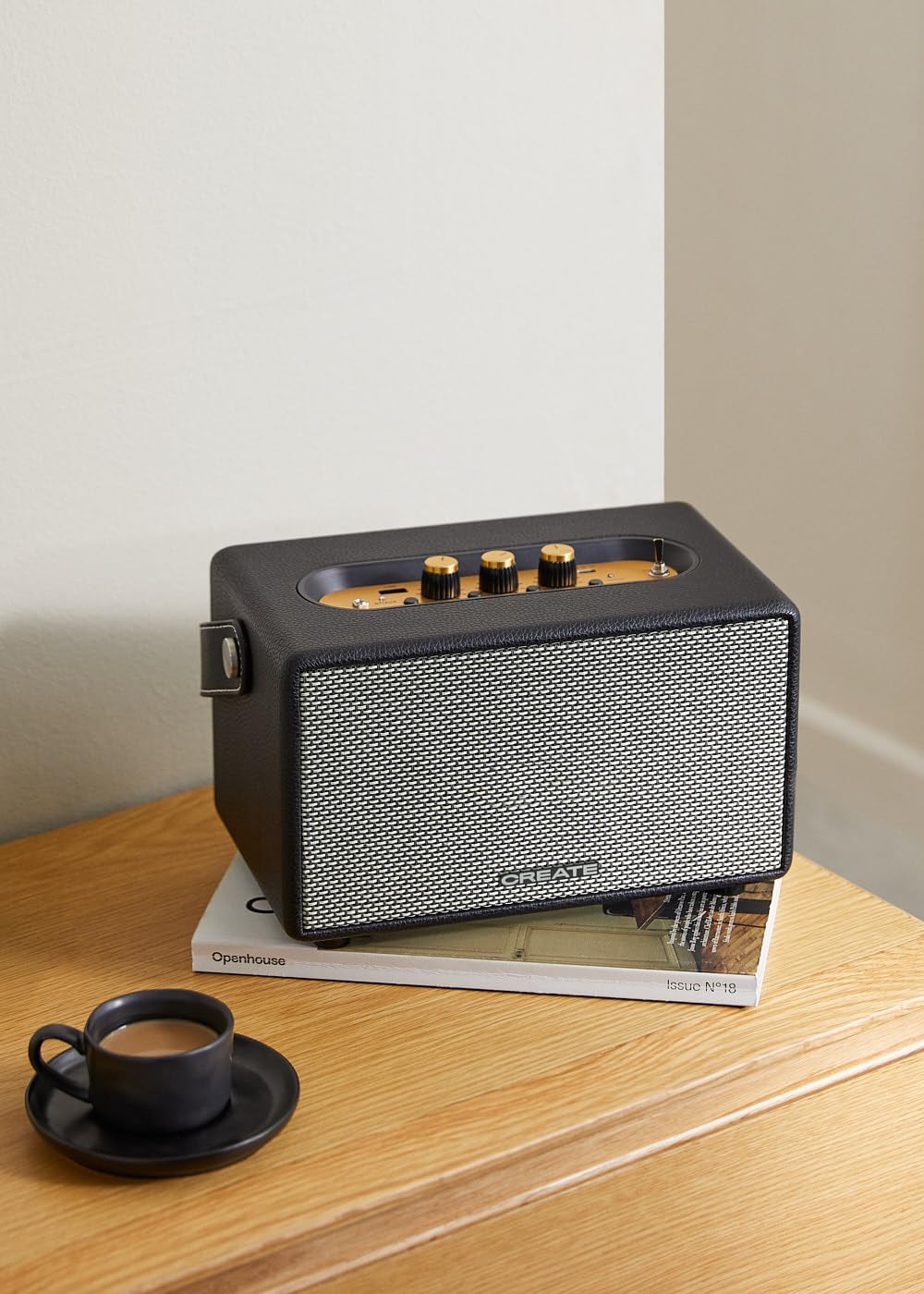
Image: Connecting to the speaker via Bluetooth from a mobile device.
2. وضع تشغيل USB
تشغيل الصوت files مباشرة من محرك أقراص فلاش USB.
- قم بتشغيل مكبر الصوت.
- أدخل محرك أقراص فلاش USB يحتوي على الصوت fileس في منفذ يو اس بي.
- ضبط مفتاح محدد المدخلات to "USB". The speaker will automatically begin playing music from the USB drive.

Image: Inserting a USB drive for direct audio playback.
3. وضع إدخال AUX
قم بتوصيل الأجهزة الصوتية الخارجية باستخدام كابل صوت مقاس 3.5 ملم.
- قم بتشغيل مكبر الصوت.
- قم بتوصيل أحد طرفي كابل الصوت 3.5 مم (غير مرفق) بـ مدخلات AUX المنفذ الموجود على مكبر الصوت.
- Connect the other end of the cable to the headphone jack or audio output of your external device (e.g., MP3 player, laptop).
- ضبط مفتاح محدد المدخلات to "AUX". The speaker will now play audio from your connected device.
4. ضبط الصوت
استخدم المقابض المخصصة على لوحة التحكم لضبط تجربة الصوت بدقة:
- تدوير مقبض الصوت لزيادة أو تقليل مستوى الصوت الإجمالي.
- تدوير مقبض باس to adjust the low-frequency sounds.
- تدوير مقبض ثلاثي to adjust the high-frequency sounds.
صيانة
تنظيف
To clean the speaker, use a soft, dry cloth. Do not use abrasive cleaners, waxes, or solvents as they may damage the finish. Avoid spraying liquids directly onto the speaker.
تخزين
عند عدم استخدام السماعة لفترات طويلة، احفظها في مكان بارد وجاف بعيدًا عن أشعة الشمس المباشرة ودرجات الحرارة القصوى. تأكد من شحن السماعة بالكامل قبل تخزينها للحفاظ على صحة البطارية.
العناية بالبطارية
The speaker is equipped with a built-in rechargeable battery. To maximize battery life:
- تجنب تفريغ البطارية بالكامل بشكل متكرر.
- Recharge the battery regularly, even if the speaker is not used often.
- لا تعرض مكبر الصوت لدرجات حرارة أعلى من 45 درجة مئوية (113 درجة فهرنهايت) أو أقل من 0 درجة مئوية (32 درجة فهرنهايت).
استكشاف الأخطاء وإصلاحها
If you encounter any issues with your CREATE Speaker Retro, please refer to the following common problems and solutions:
| مشكلة | السبب المحتمل | حل |
|---|---|---|
| لا يتم تشغيل مكبر الصوت. | نفدت طاقة البطارية. | Charge the speaker for 4-5 hours using the USB-C cable. |
| لا يوجد صوت من السماعة. | مستوى الصوت منخفض جداً؛ وضع الإدخال غير صحيح؛ الجهاز غير متصل بشكل صحيح. | Increase volume. Ensure the correct input mode (BT, USB, AUX) is selected. Reconnect Bluetooth device or AUX cable. |
| فشل اقتران البلوتوث. | السماعة ليست في وضع الاقتران؛ الجهاز خارج النطاق؛ تداخل. | Ensure speaker is in Bluetooth pairing mode (blinking indicator). Move device closer to speaker (within 10m). Turn off other Bluetooth devices. |
| تشغيل الملفات عبر منفذ USB لا يعمل. | Incorrect input mode; USB drive not formatted correctly or no compatible files. | Ensure "USB" input mode is selected. Check USB drive for compatible audio files (e.g., MP3). Try a different USB drive. |
| Play/Pause button not responding. | مشكلة محتملة في الأجهزة أو خلل في البرامج. | Restart the speaker. If the issue persists, contact customer support. (Note: A user review mentioned this issue.) |
تحديد
| اسم الموديل | SPEAKER RETRO |
| رقم الموديل | 181643_452174 |
| الأبعاد (D x W x H) | 17 × 26 × 15 سم |
| وزن | 2.5 كجم |
| Max. Speaker Output Power | 40 واط |
| وضع إخراج الصوت | ستيريو (2.0 قناة) |
| تكنولوجيا الاتصال | Bluetooth 5.2, USB, AUX (3.5mm) |
| مدى البلوتوث | حتى 10 أمتار |
| سعة البطارية | 3000 مللي أمبير |
| عمر البطارية | تصل مدة التشغيل إلى 5 ساعات (حسب الاستخدام) |
| وقت الشحن | حوالي 4-5 ساعات |
| طريقة التحكم | Touch (knobs and switches) |
| لون | أسود |
| ضد للماء | لا |
الضمان والدعم
معلومات الضمان
The CREATE Speaker Retro comes with a standard manufacturer's warranty. Please retain your proof of purchase for warranty claims. The warranty covers defects in materials and workmanship under normal use. It does not cover damage caused by misuse, accidents, unauthorized modifications, or exposure to water.
For specific warranty terms and conditions, please refer to the warranty card included with your product or contact CREATE customer service.
دعم العملاء
If you have any questions, require technical assistance, or need to report an issue that cannot be resolved using the troubleshooting guide, please contact CREATE customer support.
يمكنكم العثور على مزيد من المعلومات وتفاصيل الاتصال على الموقع الرسمي لـ CREATE webالموقع الإلكتروني أو من خلال متجر علامتهم التجارية على أمازون: