
1. المقدمة
Thank you for choosing the OKP Life K5 Robot Vacuum. This intelligent cleaning device is designed to provide efficient and convenient floor cleaning for your home. Featuring Wi-Fi connectivity and remote control capabilities, the K5 offers multiple cleaning modes and smart navigation to ensure a thorough clean. Please read this manual carefully before using the product to ensure proper operation and maintenance.
2. محتويات العبوة
تأكد من أن جميع العناصر موجودة وفي حالة جيدة عند فك التعبئة.
- OKP Life K5 Robot Vacuum Cleaner (1 unit)
- جهاز التحكم عن بعد (وحدة واحدة)
- Charging Dock (1 unit)
- محول طاقة (وحدة واحدة)
- Side Brushes (4 units, 2 for immediate use, 2 spares)
- أداة تنظيف (وحدة واحدة)
- دليل المستخدم (هذه الوثيقة)

Image: The OKP Life K5 Robot Vacuum, its remote control, and a set of four side brushes, illustrating the typical package contents.
3. انتهى المنتجview
3.1 مكونات المكنسة الكهربائية الروبوتية
Familiarize yourself with the main parts of your K5 Robot Vacuum.

الصورة: من أعلى إلى أسفل view of the OKP Life K5 Robot Vacuum, highlighting its sleek, disc-shaped design and central power button.
- Main Body: Contains the motor, dustbin, and navigation sensors.
- Power Button/Indicator Light: For manual operation and status indication.
- Dustbin: 550ml capacity for collecting debris.
- Side Brushes: Two rotating brushes to sweep debris into the suction path.
- Driving Wheels: For movement across various floor types.
- Charging Contacts: For automatic recharging at the charging dock.
- Sensors: Anti-drop and anti-collision sensors for safe navigation.
3.2 التحكم عن بعد
The remote control provides convenient access to various cleaning functions.

Image: A close-up of the white remote control for the OKP Life K5 Robot Vacuum, showing its various function buttons for control and mode selection.
- Power Button: Turns the robot on/off or starts/pauses cleaning.
- Directional Buttons: Manually control the robot's movement.
- Home Button: Sends the robot back to the charging dock.
- Mode Selection Buttons: Switch between Auto, Spot, Edge, and Zigzag cleaning modes.
- Suction Power Adjustment: Adjusts the vacuum's suction strength.
4. الإعداد
4.1 تجهيز الروبوت
- قم بإزالة جميع الأغشية الواقية والملصقات من الروبوت وقاعدة الشحن.
- قم بتثبيت الفرش الجانبية بالضغط عليها على الأعمدة المربعة حتى تستقر في مكانها.
4.2 Placing the Charging Dock
- ضع قاعدة الشحن على الحائط على سطح صلب ومستوٍ.
- تأكد من وجود مساحة خالية لا تقل عن 0.5 متر (1.6 قدم) على جانبي الرصيف و 1.5 متر (4.9 قدم) أمامه.
- قم بتوصيل محول الطاقة بقاعدة الشحن ثم بمأخذ الحائط.
4.3 الشحن الأولي
For optimal performance, fully charge the robot before its first use.
- Manually place the robot onto the charging dock, ensuring the charging contacts align.
- The indicator light on the robot will show charging status (e.g., breathing light).
- يستغرق الشحن الكامل عادةً 4-5 ساعات.

Image: The OKP Life K5 Robot Vacuum automatically navigating back to its charging dock, demonstrating its self-charging capability when the battery is low.
4.4 Connecting to Wi-Fi and App
The OKP Life App allows for advanced control and scheduling.
- Download the "OKP Life" app from the App Store (iOS) or Google Play Store (Android).
- تسجيل حساب وتسجيل الدخول.
- Follow the in-app instructions to add your K5 robot vacuum. Ensure your Wi-Fi network is 2.4GHz.
- The robot can also be connected to Amazon Alexa and Google Assistant for voice control. Refer to the app for detailed instructions on integrating with these smart home platforms.

Image: A user interacting with the OKP Life K5 Robot Vacuum via a smartphone app, with icons indicating compatibility with Google Assistant and Amazon Alexa, and a note about 2.4GHz Wi-Fi connectivity.
5. تعليمات التشغيل
5.1 بدء عملية التنظيف
- من الروبوت: Press the power button on the robot once.
- من جهاز التحكم عن بعد: اضغط على زر الطاقة في جهاز التحكم عن بعد.
- من التطبيق: Tap the "Start Cleaning" button in the OKP Life app.
- الأمر الصوتي: Use a connected smart assistant (e.g., "Alexa, turn on Robot Vacuum").
5.2 Pausing/Resuming a Clean
- Press the power button on the robot or remote, or use the app/voice command.
- Press again to resume cleaning.
5.3 Sending Robot to Charging Dock
- Press the "Home" button on the remote control or in the app.
- The robot will automatically return to its charging dock when the battery is low.
5.4 أوضاع التنظيف
The K5 offers multiple cleaning modes to suit different needs, selectable via the remote control or app.
- التنظيف التلقائي: يقوم الروبوت بالتنقل بذكاء وتنظيف المنطقة التي يمكن الوصول إليها بالكامل. هذا هو الوضع الافتراضي.
- تنظيف البقعة: The robot cleans a concentrated area in a spiral pattern, ideal for localized dirt or spills.
- تنظيف الحواف: يقوم الروبوت بالتنظيف على طول الجدران وحواف الأثاث لضمان تغطية شاملة.
- التنظيف المتعرج: The robot cleans in a systematic back-and-forth pattern, covering the maximum area and reducing missed spots.

Image: The OKP Life K5 Robot Vacuum cleaning a room, with an overlay illustrating its efficient Z-Shape (zigzag) cleaning path, designed to maximize coverage and minimize missed areas.
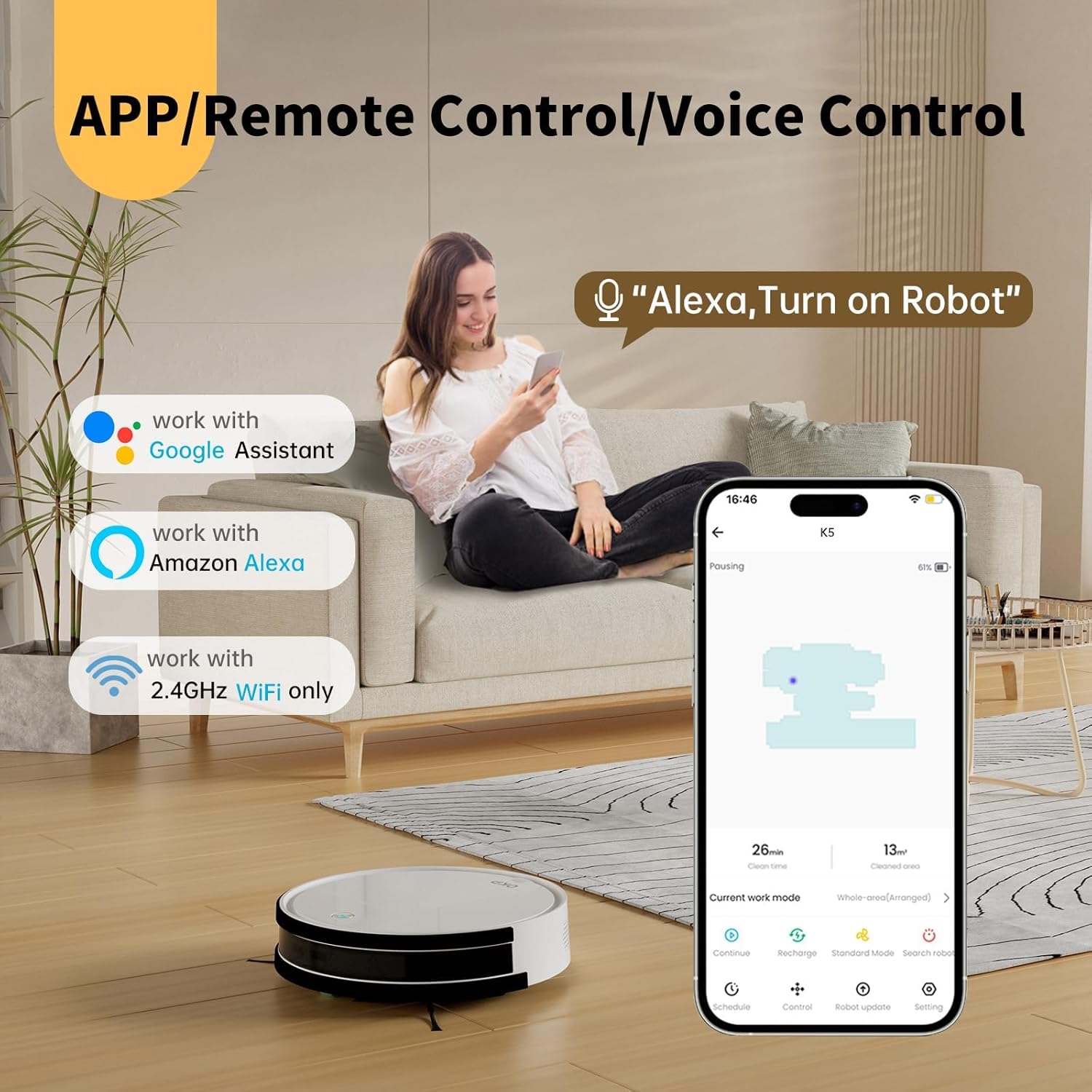
Image: The OKP Life K5 Robot Vacuum demonstrating its suction power, with illustrations of various debris types (debris, dust, beans, hair) being effectively vacuumed, indicating its versatility for different cleaning scenarios.
6. الصيانة
تضمن الصيانة الدورية الأداء الأمثل وتطيل عمر مكنسة الروبوت الخاصة بك.
6.1 إفراغ سلة المهملات
- اضغط على زر تحرير سلة المهملات واسحبها للخارج.
- افتح غطاء سلة المهملات وأفرغ محتوياتها في سلة المهملات.
- اشطف سلة المهملات بالماء إذا لزم الأمر (تأكد من أنها جافة تمامًا قبل إعادة إدخالها).
6.2 تنظيف المرشح
- قم بإزالة الفلتر من سلة المهملات.
- انقر برفق على الفلتر لإزالة الغبار. لا تغسل فلتر HEPA بالماء.
- استبدل الفلتر كل 3-6 أشهر، حسب الاستخدام.
6.3 تنظيف الفرش الجانبية
- Remove the side brushes by pulling them upwards.
- Remove any hair or debris wrapped around the brushes.
- Reattach the brushes. Replace if worn or damaged.
6.4 تنظيف أجهزة الاستشعار ونقاط اتصال الشحن
- امسح أجهزة استشعار منع السقوط، وأجهزة استشعار منع التصادم، وموصلات الشحن الموجودة على كل من الروبوت وقاعدة الشحن بقطعة قماش نظيفة وجافة.
- حافظ على نظافة هذه المناطق لضمان سهولة التنقل والشحن.
7. استكشاف الأخطاء وإصلاحها
If your robot vacuum encounters issues, refer to the following common problems and solutions.
| مشكلة | السبب المحتمل | حل |
|---|---|---|
| الروبوت لا يعمل. | انخفاض مستوى البطارية؛ تم إيقاف تشغيل الجهاز. | Charge the robot; Ensure the main power switch (if present) is ON. |
| لا يمكن للروبوت الشحن. | نقاط التلامس الخاصة بالشحن متسخة؛ قاعدة الشحن غير موصولة بالكهرباء. | Clean charging contacts; Ensure charging dock is plugged in and has power. |
| الروبوت يتعطل بشكل متكرر. | Obstacles; Sensors dirty. | Clear cables, rugs, or small objects; Clean sensors. |
| أداء التنظيف ضعيف. | سلة مهملات ممتلئة؛ فلتر مسدود؛ فرش مهترئة. | أفرغ سلة المهملات؛ نظف/استبدل الفلتر؛ نظف/استبدل الفرش الجانبية. |
| لا يمكن الاتصال بشبكة Wi-Fi/التطبيق. | Incorrect Wi-Fi band (only 2.4GHz supported); Incorrect password; Robot too far from router. | Ensure 2.4GHz Wi-Fi; Re-enter password; Move robot closer to router. |
إذا استمرت المشكلة، يرجى الاتصال بدعم العملاء.
8. المواصفات
| ماركة | OKP الحياة |
| اسم الموديل | K5 |
| قوة الشفط | 2100 با |
| سعة سلة المهملات | 550 مل |
| مصدر الطاقة | تعمل بالبطارية |
| عامل الشكل | على شكل قرص |
| المميزات الخاصة | Smart, Edge Cleaning, Obstacle Avoidance, Selective Room Cleaning, Bagless, Wi-Fi Connectivity, Remote Control, Voice Control (Alexa, Google Assistant), Automatic Charging, Multiple Cleaning Modes (Auto/Spot/Edge/Zigzag) |
| الأبعاد (تقريبًا) | 280mm (width) x 77mm (height) / 11.02 inches (width) x 3 inches (height) |
9. الضمان والدعم
OKP Life products come with a standard manufacturer's warranty. Please refer to the warranty card included in your package or visit the official OKP Life webالموقع للحصول على شروط وأحكام الضمان التفصيلية.
For technical support, troubleshooting assistance, or to order replacement parts, please contact OKP Life customer service through the contact information provided on their official website or within the OKP Life app.
Webموقع: Visit the OKP Life Store on Amazon