
1. المقدمة
This manual provides essential information for the safe and effective operation of your MATRIX APS-4000B Programmable Bench AC Power Supply. The APS-4000B is a single-phase SPWM variable frequency AC power source designed for precise control of AC voltage, current, and frequency. It features a 700VA capacity, with output ranges of 0-150V/0-6A or 0-300V/0-3A, and a frequency range of 45-250Hz. Please read this manual thoroughly before use and retain it for future reference.
2. معلومات السلامة
يرجى دائمًا مراعاة احتياطات السلامة التالية لمنع الإصابة وتلف الجهاز:
- التأريض: تأكد من تأريض مصدر الطاقة بشكل صحيح لمنع حدوث صدمة كهربائية.
- مصدر الطاقة: Connect the unit to an AC power source within the specified voltage and frequency range (99-121 Vac, 47-63Hz).
- تهوية: لا تسد فتحات التهوية. تأكد من وجود تدفق هواء كافٍ حول الوحدة لمنع ارتفاع درجة حرارتها.
- بيئة: Operate the power supply in a dry environment, away from moisture, dust, and corrosive gases.
- الخدمة: Refer all servicing to qualified personnel. Do not attempt to open or repair the unit yourself.
- اتصال الإخراج: Ensure all output connections are secure before applying power.
3. مواصفات المنتج
- مواصفات الإخراج: Low range 0-150V/0-6A/0-700VA, High range: 0-300V/0-3A/0-700VA.
- مدخل: Single phase 99-121 Vac, 47-63Hz.
- دقة: 0.1 فولت/10 مللي أمبير.
- تكرار: 45-250Hz, step 0.1Hz.
- الواجهة: RS232C for remote control.
- برامج الكمبيوتر: Free APS-4000 Series PC software provided for remote control via RS-232C.
- موثوقية عالية: Utilizes advanced Direct Digital Frequency Synthesizer (DDS) waveform for high frequency stability and accurate measurements.
- Intelligent Analyzing Function: Automatically identifies failure causes and displays error codes.
- وظيفة التشغيل التدريجي: Prevents damage from instantaneous impulse current during power-on.
- اختصارات لوحة المفاتيح: Customizable shortcuts for 110V, 220V, 50Hz, 60Hz.
- Measuring Function: يعرض المجلدtage, current, frequency, power, and power factor.
- وظيفة الذاكرة: Five sets of memory (M1-M5) to store commonly used voltage and frequency settings for quick recall.
- وظيفة قفل المفتاح: Prevents inadvertent changes to settings.
- واجهة المستخدم: Push-down infinite coding knob switch for adjustments, 4-window 5-digit display.
- عزل: Input and output are isolated for safety.
4. محتويات العبوة
The package for the MATRIX APS-4000B Programmable AC Power Supply includes:
- 1 x MATRIX APS-4000B Programmable AC Power Supply
- 1 x RS-232C Cable
- 1 الحبل العاشر الطاقة
- 1 × دليل المستخدم (هذه الوثيقة)
5. الإعداد
Follow these steps to set up your power supply:
- فك التعبئة: انزع مصدر الطاقة وجميع الملحقات بعناية من العبوة. افحص الجهاز بحثًا عن أي علامات تلف.
- الموقع: Place the unit on a stable, level surface with adequate ventilation space around it. Ensure the heat dissipation holes are not obstructed.
- التأريض: Connect the ground terminal on the rear panel to a reliable earth ground using an appropriate wire.
- اتصال إدخال التيار المتردد: Connect the provided power cord to the AC Input outlet on the rear panel and then to a suitable grounded AC power source.
- اتصال التحميل: Connect your load to the Output jack on the rear panel. Ensure connections are secure and correct polarity is observed if applicable.
- RS-232C Connection (Optional): If using PC control, connect the RS-232C cable from the power supply's RS-232 port to your computer. Install the provided PC software.

الشكل 5.1: توصيلات اللوحة الخلفية
This image displays the rear panel connections of the power supply. Key components include the RS-232 serial port for PC communication, a heat dissipation fan, the main AC output jack, a fuse protection cover, a ground terminal for safety, and the AC input power outlet.
6. تعليمات التشغيل
This section details the basic operation of the MATRIX APS-4000B.

الشكل 6.1: اللوحة الأماميةview
The front panel features a multi-window digital display for voltage, current, power, and frequency. It includes control knobs for adjustment, various function buttons for settings and shortcuts, and the main power switch.
- تشغيل/إيقاف التشغيل: Press the main POWER switch on the front panel to turn the unit on or off.
- Setting Output Parameters:
- Use the push-down infinite coding knob switch to navigate through the display parameters (Voltage, Current, Frequency).
- Press the knob to select a parameter, then rotate it to adjust the value. Press again to confirm or move to the next digit.
- The 4-window 5-digit display shows the set and measured values.
- اختصارات لوحة المفاتيح: Utilize the dedicated shortcut buttons for quick setting of common voltages (110V, 220V) and frequencies (50Hz, 60Hz). These can be self-assembled/configured.
- Memory Functions (M1-M5): The unit allows storing up to five sets of frequently used voltage (V) and frequency (F) settings. Refer to the detailed programming manual for saving and recalling these settings with a single key.
- وظيفة قفل المفتاح: To prevent accidental changes to settings, activate the Key LOCK function. This will disable the front panel controls. Refer to the display for 'LocH' status.
- وظيفة التشغيل التدريجي: The power supply incorporates a soft start function to protect both the unit and the load from sudden current surges upon activation.
- Measuring Function: The display provides real-time measurements of voltage (Vrms), current (Arms), frequency (Fre), power (Wattage), and power factor (PF).
- التحكم ببرامج الكمبيوتر الشخصي: For advanced control and automation, use the provided PC software. Connect via the RS-232C interface. The software supports commands in ASCII and HEX codes.
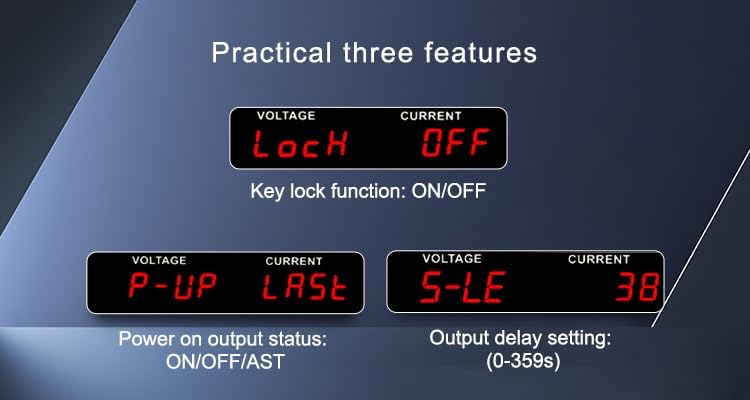
Figure 6.2: Practical Features Display
This image shows three practical features on the display: 'LocH' for Key Lock function (ON/OFF), 'P-UP' for Power On Output Status (ON/OFF/AST), and 'S-LE' for Output Delay Setting (0-359 seconds).
Video 6.3: APS-4000 Series Programmable AC Power Supplies Demonstration
This video provides a visual demonstration of the MATRIX APS-4000 Series Programmable AC Power Supplies, showcasing its features and operational aspects.
7. الصيانة
Proper maintenance ensures the longevity and reliable operation of your power supply:
- تنظيف: نظّف الجزء الخارجي من الجهاز بانتظام باستخدام قطعة قماش ناعمة وجافة. لا تستخدم المنظفات الكاشطة أو المذيبات.
- تهوية: Keep the heat dissipation holes clear of dust and debris. Use compressed air to gently clean the fan area if necessary.
- تخزين: When not in use for extended periods, store the power supply in a cool, dry place, protected from extreme temperatures and humidity.
- استبدال الصمامات: If the fuse blows, replace it only with a fuse of the same type and rating as specified in the specifications. Ensure the unit is disconnected from the main power before replacing the fuse.
8. استكشاف الأخطاء وإصلاحها
يقدم هذا القسم إرشادات حول المشكلات الشائعة. في حال وجود مشكلات معقدة، يُرجى التواصل مع الدعم الفني.
- لا يوجد طاقة: Check the power cord connection, the main power switch, and the fuse on the rear panel. Ensure the AC input voltagيقع ضمن النطاق المحدد.
- لا إخراج: Verify that the output is enabled. Check for any active protection mechanisms (e.g., overcurrent, overload).
- حماية التيار الزائد: If the load current exceeds the set limit, the output will be turned off, and an audible/visual alarm will activate. Reduce the load or increase the current limit if appropriate.

Figure 8.1: Overcurrent Protection Display
This image illustrates the power supply's display indicating an 'Overcurrent protection' status. When the load current exceeds the set limit, the output is automatically turned off, and an audible and visual alarm is activated.
- Intelligent Analyzing Function: The unit can automatically diagnose certain failures and display corresponding error codes. Consult the detailed programming manual for a list of error codes and their meanings.
- قراءات غير دقيقة: Ensure proper connections and calibration. If issues persist, contact support.
9. المواصفات
Detailed technical specifications for the MATRIX APS-4000B (700VA) model:

Figure 9.1: APS-4000 Series Specifications Overview
This table provides detailed technical specifications for the APS-4000 series, comparing models A, B, and C. It covers parameters such as capacity (VA), working mode, input and output voltage/current ranges, frequency, resolution, communication interface, protection features, and physical dimensions. Refer to the 'APS4000B' column for this specific model.
| المعلمة | Value (APS-4000B) |
|---|---|
| اسم الموديل | APS-4000B |
| ماركة | المصفوفة |
| انتاج واتtage | 700 واط |
| طريقة التبريد | هواء |
| أبعاد العنصر (الطول × العرض × الارتفاع) | 14.6 × 17 × 6 بوصة |
| وزن العنصر | 41 رطل |
| الشركة المصنعة | شركة ماتريكس للتكنولوجيا |
| رقم الجزء Mfr | APS-4000B-110VIN |
| الوسائط المدمجة | Programmable AC Power Supply, RS-232 cable |
| مرحلة الإدخال | Single Phase (1∅2W) |
| حجم الإدخالtage | 99-121 فولت تيار متردد |
| تردد الإدخال | 47-63 هرتز |
| حجم الإخراجtage المدى | 0-150VAC / 0-300VAC (Auto) |
| Output Current (L=120V) | 6A |
| Output Current (H=240V) | 3A |
| خرج نطاق الترددات | 45-250Hz (0.1 Step) |
| المجلدtagهـ القرار | 0.1 فولت |
| القرار الحالي | 10 مللي أمبير |
| قرار التردد | 0.1 هرتز |
| واجهة الاتصال | RS-232C |
| بيئة التشغيل | 0-40℃, 20-80% RH |
10. الضمان والدعم
ضمان: The MATRIX APS-4000B Programmable Bench AC Power Supply comes with a 3-year warranty from the date of purchase. This warranty covers defects in materials and workmanship under normal use.
يدعم: For technical assistance, troubleshooting, or warranty claims, please contact MATRIX TECHNOLOGY INC. OFFICIAL STORE. Our dedicated support team is available to provide assistance and ensure your satisfaction with MATRIX products.