
BYTECH BC-AU-BE-146-WT
User Manual: BYTECH TWS Earbuds
Model: BC-AU-BE-146-WT
مقدمة
Thank you for choosing the BYTECH TWS Earbuds. This manual provides essential information for setting up, operating, and maintaining your new wireless earbuds. Please read this manual carefully before use to ensure optimal performance and longevity of your device.
These earbuds feature advanced Bluetooth 5.3 technology and True Wireless Stereo (TWS) connectivity, offering a seamless audio experience.
ماذا يوجد في الصندوق؟
- BYTECH TWS Earbuds (Left and Right)
- حافظة الشحن اللاسلكي
- دليل المستخدم (هذا المستند)
- (Note: Charging cable may be included but not explicitly listed in product specifications. Please check packaging.)
المنتج انتهىview

الشكل 1: The BYTECH TWS Earbuds in their open wireless charging case. The case features a digital display indicating the battery level, and the earbuds are white with a sleek design. The case also shows subtle color gradients, possibly from an LED indicator.
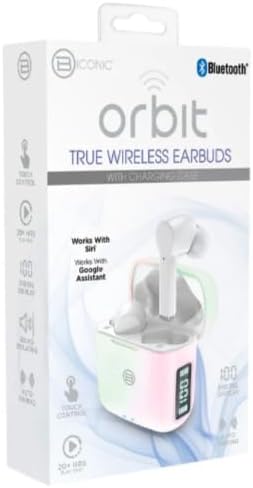
الشكل 2: Retail packaging for the BYTECH Orbit True Wireless Earbuds. The box highlights key features such as Bluetooth connectivity, touch control, 20+ hours of play, auto pairing, and compatibility with Siri and Google Assistant.
يثبت
1. شحن سماعات الأذن والعلبة
Before first use, fully charge the earbuds and the charging case. Place the earbuds into the charging case. The case is equipped with wireless charging capability. Connect the charging case to a power source using a compatible charging cable (not explicitly listed as included, please check your package) or place it on a wireless charging pad.
- ستعرض الشاشة الرقمية الموجودة على علبة الشحن مستوى البطارية.
- Ensure the earbuds are properly seated in their slots for charging.
2. الاقتران بجهازك (عبر البلوتوث)
- تأكد من شحن وسادات الأذن.
- Open the charging case. The earbuds will automatically enter pairing mode (indicated by flashing lights on the earbuds, if applicable).
- على هاتفك الذكي أو جهازك المزود بتقنية Bluetooth، انتقل إلى إعدادات Bluetooth.
- قم بتشغيل البلوتوث.
- بحث عن new devices. You should see "BYTECH BC-AU-BE-146-WT" or a similar name appear in the list of available devices.
- Select the device name to connect. Once connected, a voice prompt will confirm the successful pairing, and the indicator lights on the earbuds will stop flashing.
- For subsequent uses, the earbuds will automatically connect to the last paired device when taken out of the case, provided Bluetooth is enabled on your device.
These earbuds support True Wireless Stereo (TWS) connectivity, meaning both earbuds connect to each other wirelessly to provide a stereo sound experience.
تشغيل سماعات الأذن
The BYTECH TWS Earbuds feature intuitive touch controls for various functions. While specific touch gestures are not detailed in the product description, common functions typically include:
- تشغيل/إيقاف مؤقت: ضغطة واحدة على أي سماعة أذن.
- المسار التالي: اضغط مرتين على سماعة الأذن اليمنى.
- المسار السابق: اضغط مرتين على سماعة الأذن اليسرى.
- الرد/إنهاء المكالمة: اضغط مرة واحدة على أي سماعة أذن أثناء المكالمة الواردة.
- رفض المكالمة: اضغط مع الاستمرار على أي سماعة أذن لمدة ثانيتين أثناء المكالمة الواردة.
- تنشيط مساعد الصوت: Triple tap or press and hold (check specific model behavior) to activate Siri (for iOS devices) or Google Assistant (for Android devices).
- التحكم في مستوى الصوت: Some models allow volume adjustment via touch (e.g., tap and hold left for volume down, right for volume up). If not, adjust volume directly on your connected device.
Please refer to the quick start guide included in your packaging for precise touch control instructions specific to your BC-AU-BE-146-WT model.
صيانة
تضمن الصيانة المناسبة طول عمر سماعات الأذن والأداء الأمثل لها.
- تنظيف: نظّف سماعات الأذن وعلبة الشحن بانتظام باستخدام قطعة قماش ناعمة وجافة وخالية من الوبر. تجنّب استخدام المنظفات الكاشطة أو الكحول أو المذيبات الكيميائية. أزل برفق أي شمع أذن أو شوائب من أطراف سماعات الأذن وشبكة السماعة باستخدام فرشاة صغيرة ناعمة أو قطعة قطن.
- تخزين: When not in use, always store the earbuds in their charging case to protect them from dust, dirt, and physical damage. Store the case in a cool, dry place away from direct sunlight and extreme temperatures.
- العناية بالبطارية: للحفاظ على عمر البطارية، تجنب تفريغ سماعات الأذن وعلبتها بالكامل بشكل متكرر. اشحنها بانتظام، حتى لو لم تستخدمها لفترات طويلة.
- مقاومة الماء: These earbuds are not specified as water-resistant. Avoid exposure to water, sweat, and high humidity to prevent damage.
استكشاف الأخطاء وإصلاحها
If you encounter issues with your BYTECH TWS Earbuds, try the following solutions:
- سماعات الأذن غير مقترنة بالجهاز:
- تأكد من شحن سماعات الأذن وإخراجها من العلبة.
- قم بإيقاف وتشغيل البلوتوث على جهازك.
- Forget the device ("BYTECH BC-AU-BE-146-WT") from your device's Bluetooth settings and try pairing again.
- تأكد من عدم وجود أجهزة أخرى متصلة بسماعات الأذن.
- سماعة أذن واحدة فقط تعمل:
- قم بوضع سماعتي الأذن مرة أخرى في علبة الشحن، وأغلق الغطاء، وانتظر لبضع ثوانٍ، ثم أخرجهما مرة أخرى.
- تأكد من شحن كلا سماعات الأذن.
- Try resetting the earbuds (refer to quick start guide for specific reset procedure).
- لا يوجد صوت أو مستوى الصوت منخفض:
- تحقق من مستوى الصوت على كل من الجهاز المتصل وسماعات الأذن.
- تأكد من تثبيت سماعات الأذن بشكل صحيح في أذنيك.
- قم بتنظيف أي حطام من شبكة سماعة الأذن.
- قضايا الشحن:
- Ensure the charging cable (if used) is securely connected and functional.
- إذا كنت تستخدم الشحن اللاسلكي، فتأكد من وضع العلبة بشكل صحيح على لوحة الشحن.
- تحقق من وجود أي شوائب في منفذ الشحن الخاص بالعلبة.
إذا استمرت المشاكل، يرجى الاتصال بدعم العملاء.
تحديد
| ميزة | مواصفة |
|---|---|
| ماركة | بايتك |
| اسم الموديل | BC-AU-BE-146-WT |
| رقم الموديل | BC-AU-BE-146-WT |
| تكنولوجيا الاتصال | بلوتوث 5.3 |
| عامل الشكل | داخل الأذن (داخل الأذن) |
| لون | أبيض |
| المكونات المضمنة | حافظة الشحن اللاسلكي |
| الشركة المصنعة | Biconic |
| ASIN | B0DPRCBT76 |
| أول تاريخ متاح | 6 ديسمبر 2024 |
الضمان والدعم
For warranty information and customer support, please refer to the documentation included with your product packaging or visit the official BYTECH webقد تختلف شروط وأحكام الضمان حسب المنطقة والتاجر.
احتفظ بإثبات الشراء الخاص بك لاستخدامه في حالة وجود أي مطالبات بالضمان.
Ask a question about this manual
Ask about setup, troubleshooting, compatibility, parts, safety, or missing instructions. Manuals+ will review the question and use this page’s manual context to help answer it.