
1. المقدمة
This manual provides essential instructions for the safe and efficient operation, installation, and maintenance of your G21 Osmo 2200 W Reverse Osmosis System. Please read this manual thoroughly before using the appliance and retain it for future reference. This system is designed to provide purified and remineralized water with adjustable temperature settings.
2. تعليمات السلامة
- تأكد من وضع الجهاز على سطح مستوٍ وثابت بعيدًا عن أشعة الشمس المباشرة ومصادر الحرارة.
- لا تغمر الجهاز أو سلك الطاقة أو القابس في الماء أو أي سوائل أخرى.
- Keep out of reach of children. The appliance features a child safety lock, but supervision is always recommended.
- Use only potable water with this system.
- افصل الجهاز قبل التنظيف أو إجراء أي صيانة.
- لا تقم بتشغيل الجهاز إذا كان سلك الطاقة أو القابس تالفًا. اتصل بفنيي الصيانة المؤهلين لإجراء الإصلاحات.
- تأكد من التهوية المناسبة حول الوحدة.
3. انتهى المنتجview
The G21 Osmo 2200 W Reverse Osmosis System is a countertop water purification unit featuring advanced filtration and instant heating capabilities.
المميزات الرئيسية:
- Removes up to 99% of impurities from water.
- Provides clean, healthy, and great-tasting water.
- Filtration capacity of 7.8 liters per hour (LPH).
- Rapid 3-second heating function.
- Six adjustable temperature levels from 25°C to 95°C.
- User-friendly touchscreen display.
- Integrated child safety lock.
- Automatic filter change indicator.
- Reduces limescale, extending the lifespan of other appliances.
عناصر:


4. الإعداد
4.1 فك العبوة ووضعها:
- قم بإزالة جميع المكونات بعناية من العبوة.
- Place the main unit on a clean, dry, and stable countertop. Ensure there is adequate space around the unit for ventilation.
- Insert the drip tray into its designated slot at the front base of the unit.
4.2 Filter Installation:
- Open the filter compartment cover, usually located on the side or back of the unit.
- Identify the PAC, RO, and CF filters. Each filter is typically labeled.
- Insert each filter into its corresponding slot, twisting gently until securely locked. Refer to the markings on the unit for correct filter placement.
- أغلق غطاء حجرة الفلتر.
4.3 Initial Water Filling and Flushing:
- قم بإزالة خزان المياه من الوحدة.
- Fill the water tank with clean, potable tap water up to the 'MAX' line.
- Place the filled water tank back into the unit.
- قم بتوصيل سلك الطاقة بمأخذ كهربائي أرضي.
- The system will automatically begin an initial flushing cycle to prepare the filters. This process may take several minutes. Follow any on-screen prompts.
- Discard the water from the first few cycles as recommended by the system's display or until the water quality indicator shows optimal levels.
5. تعليمات التشغيل
5.1 تشغيل/إيقاف التشغيل:
Press the 'Power' button on the touchscreen to turn the unit on or off.
5.2 Using the Touchscreen:
The intuitive touchscreen allows you to select desired water temperatures and dispense water.
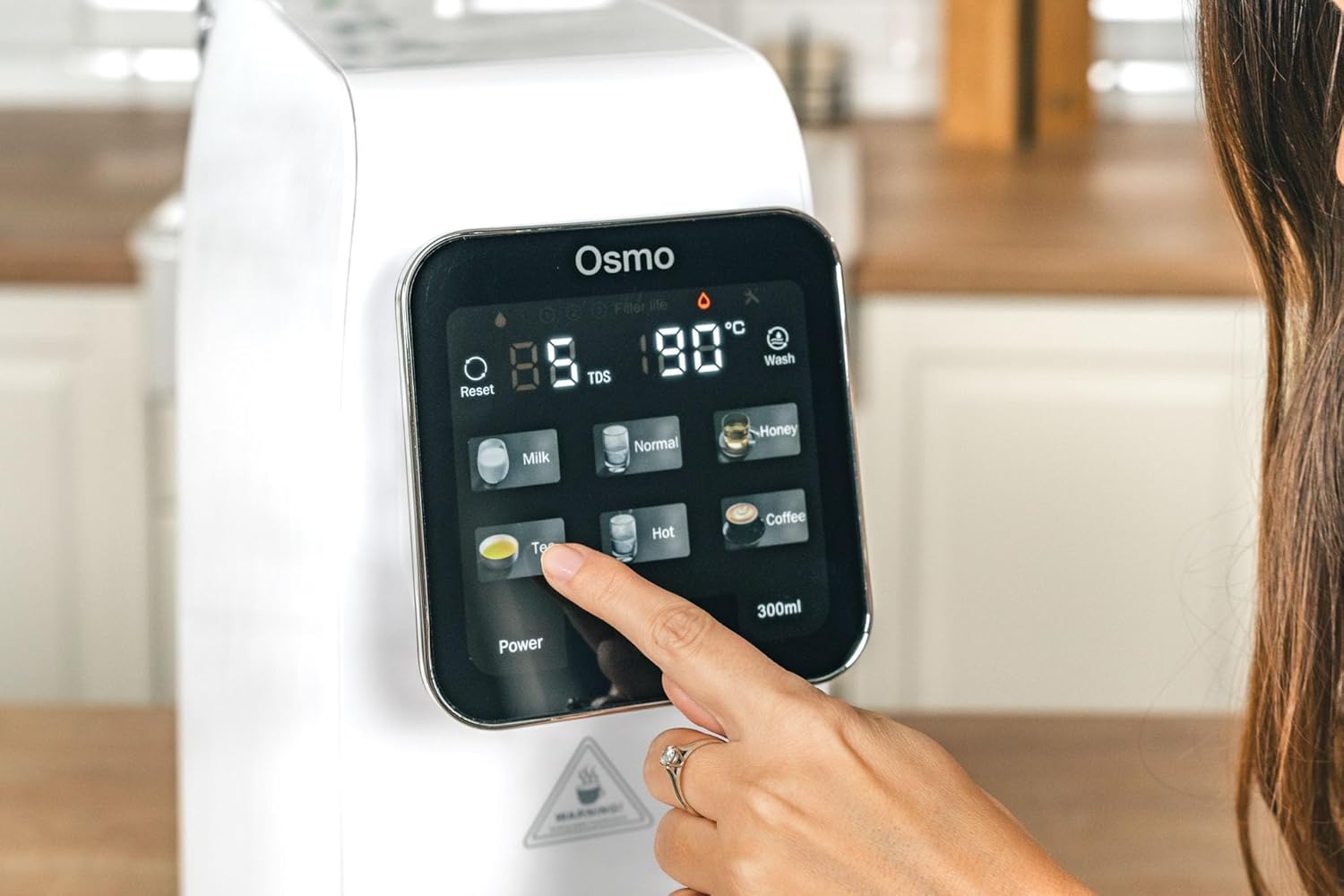
5.3 Selecting Temperature Levels:
The system offers six temperature presets:
- طبيعي: Room temperature purified water.
- 25 درجة مئوية: Ideal for specific beverages or cooling.
- 45 درجة مئوية: Suitable for baby formula or warm drinks.
- 60 درجة مئوية: For certain teas or warm water needs.
- 80 درجة مئوية: مثالي للشاي الأخضر.
- 95 درجة مئوية: Perfect for black tea, coffee, or instant noodles.
Tap the desired temperature icon on the touchscreen. The system will rapidly heat the water to the selected temperature.
5.4 Dispensing Water:
After selecting the temperature, place your cup or container under the dispenser nozzle. Press the dispense button (often labeled with a water drop icon or a volume, e.g., '300ml') to start dispensing. Press again to stop, or it will stop automatically after dispensing the preset volume.
5.5 Child Safety Lock:
To activate or deactivate the child safety lock, press and hold the designated lock icon on the touchscreen for a few seconds. This prevents accidental dispensing of hot water.
5.6 Filter Change Indicator:
The touchscreen display will show an indicator when a filter needs replacement. Refer to the maintenance section for filter replacement procedures.
6. الصيانة
6.1 تنظيف الوحدة:
- افصل الجهاز عن مأخذ التيار الكهربائي.
- امسح الجزء الخارجي من الوحدة بقطعة قماش ناعمة دamp القماش. لا تستخدم المنظفات أو المذيبات الكاشطة.
- Remove and empty the drip tray regularly. Clean it with mild soap and water, then rinse thoroughly and dry before reinserting.
- Clean the water tank with mild soap and water. Rinse thoroughly to remove all soap residue before refilling.
6.2 استبدال الفلتر:
The system will indicate when filters need replacement. Typically, PAC and CF filters require more frequent replacement than the RO filter. Always use genuine G21 replacement filters.
- افصل الجهاز عن التيار الكهربائي.
- افتح غطاء حجرة الفلتر.
- Twist the old filter counter-clockwise to unlock and remove it.
- Insert the new filter into the slot, aligning the markings, and twist clockwise to lock it in place.
- أغلق غطاء حجرة الفلتر.
- Plug in the appliance and perform a flushing cycle as per initial setup instructions to prime the new filter.
7. استكشاف الأخطاء وإصلاحها
- لا يوجد طاقة: تأكد من توصيل سلك الطاقة بإحكام بمقبس كهربائي سليم. افحص قاطع الدائرة.
- لا يوجد توزيع للمياه: Check if the water tank is properly installed and filled. Ensure the child safety lock is not activated.
- تدفق المياه البطيء: This may indicate clogged filters. Check the filter change indicator and replace filters if necessary.
- طعم/رائحة غير عادية: Perform a flushing cycle. If the issue persists, replace the filters.
- رموز الخطأ: Refer to the specific error code displayed on the touchscreen and consult the G21 support webالموقع أو الاتصال بخدمة العملاء للحصول على المساعدة.
8. المواصفات
| ميزة | مواصفة |
|---|---|
| اسم الموديل | CISV-G21-RO |
| ماركة | جي21 |
| الأبعاد (الطول × العرض × الارتفاع) | 39 × 20 × 45 سم |
| وزن | 9.5 كيلوغرام |
| مادة | البوليمر |
| طريقة التنقية | التناضح العكسي |
| سعة | 7.8 LPH (Liters Per Hour) |
| مستويات درجة الحرارة | 25°C, 45°C, 60°C, 80°C, 95°C, Normal |
| مصدر الطاقة | الكابلات الكهربائية |
| نوع التثبيت | سطح العمل |
| المميزات الخاصة | Remineralization, Touchscreen, Child Safety, PAC/RO/CF Filters |
9. الضمان والدعم
For warranty information, technical support, or to purchase replacement parts and filters, please refer to the documentation included with your product or visit the official G21 webالموقع. احتفظ بإيصال الشراء الخاص بك كإثبات للشراء في حالة مطالبات الضمان.