
1. المقدمة
This manual provides detailed instructions for the installation, operation, and maintenance of the ADVANTECH PCIE-1612C-AE 4-Port RS-232/422/485 PCIe Communication Card. This interface module is designed to expand your system's serial communication capabilities, offering robust and reliable data transfer for industrial and commercial applications. Please read this manual thoroughly before attempting to install or operate the device.
2. معلومات السلامة
يرجى مراعاة احتياطات السلامة التالية لمنع تلف الجهاز وضمان السلامة الشخصية:
- Always disconnect power from your computer system before installing or removing any internal components.
- Wear an anti-static wrist strap and work on an anti-static mat to prevent electrostatic discharge (ESD) damage to the card and other components.
- Handle the card by its edges to avoid touching sensitive components.
- تأكد من التهوية المناسبة داخل علبة الكمبيوتر لديك لمنع ارتفاع درجة الحرارة.
- Do not expose the card to moisture or extreme temperatures.
3. محتويات العبوة
Verify that all items are present in the package. If any item is missing or damaged, contact your vendor immediately.
- 1 x ADVANTECH PCIE-1612C-AE 4-Port RS-232/422/485 PCIe Communication Card
- Documentation (e.g., Quick Start Guide, Driver CD/USB - may vary by package)
4. انتهى المنتجview
The ADVANTECH PCIE-1612C-AE is a high-performance PCIe communication card designed for reliable serial data transmission. It features four independent serial ports, configurable for RS-232, RS-422, or RS-485 standards, making it versatile for various industrial and embedded applications.
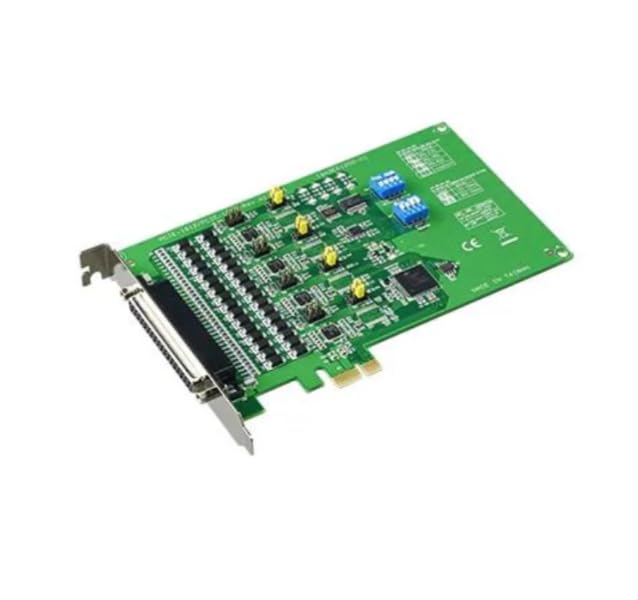
Figure 1: ADVANTECH PCIE-1612C-AE 4-Port RS-232/422/485 PCIe Communication Card. This image shows the physical card with its PCIe connector and four serial port connectors.
المميزات الرئيسية:
- Number of Channels / Ports: 4 منافذ
- الحد الأقصى لمعدل البيانات: 921.6 كيلو بايت/ثانية
- نوع الواجهة: PCIe, RS-232/422/485
- حجم العرض التشغيليtage: 3.3 فولت
- نطاق درجة حرارة التشغيل: من -10 درجة مئوية إلى +60 درجة مئوية
5. الإعداد
Follow these steps to properly install the PCIE-1612C-AE card into your computer system:
- حضّر نظامك: Power off your computer and disconnect the power cord from the wall outlet. Disconnect all peripheral devices.
- افتح علبة الكمبيوتر: قم بإزالة اللوحة الجانبية لحافظة الكمبيوتر للوصول إلى اللوحة الأم وفتحات التوسعة.
- حدد موقع فتحة PCIe متاحة: Identify an empty PCI Express (PCIe) slot on your motherboard. The PCIE-1612C-AE requires a standard PCIe slot.
- قم بإزالة غطاء الفتحة: Remove the metal slot cover corresponding to the chosen PCIe slot from the back of your computer case.
- قم بتثبيت البطاقة: Carefully align the PCIE-1612C-AE card with the PCIe slot. Apply even pressure to both ends of the card until it is firmly seated in the slot. Ensure the card's bracket is flush with the back of the computer case.
- تأمين البطاقة: Secure the card's bracket to the computer case using the screw or latch mechanism provided by your case.
- إغلاق القضية: Replace the computer's side panel and secure it.
- إعادة توصيل الطاقة: Reconnect the power cord and all peripheral devices. Power on your computer.
- تثبيت برامج التشغيل: Once the operating system boots, it may automatically detect the new hardware. Install the necessary drivers from the provided media or download them from the ADVANTECH webاتبع التعليمات التي تظهر على الشاشة لتثبيت برنامج التشغيل.
6. التشغيل
After successful installation and driver setup, the PCIE-1612C-AE card's serial ports will be available in your operating system's Device Manager (Windows) or equivalent system information utility (Linux). Each port can be configured for its specific communication parameters (baud rate, data bits, parity, stop bits, flow control) through your operating system's settings or application software.
- توصيل الأجهزة: Connect your RS-232, RS-422, or RS-485 compatible devices to the corresponding ports on the PCIE-1612C-AE card using appropriate serial cables.
- تكوين البرنامج: Use your serial communication software or application to select the correct COM port number assigned to each physical port on the card and configure the communication parameters to match your connected device.
- RS-422/485 Mode: For RS-422/485 modes, ensure proper termination and biasing are applied if required by your network topology. Refer to your device's documentation for specific requirements.
7. الصيانة
The PCIE-1612C-AE card is designed for long-term reliability with minimal maintenance. However, adhering to general computer maintenance practices will help ensure optimal performance:
- إزالة الغبار: Periodically open your computer case (after disconnecting power) and use compressed air to gently remove dust buildup from the card and surrounding components. Dust can impede heat dissipation and lead to component failure.
- الرقابة البيئية: تأكد من أن بيئة التشغيل تظل ضمن نطاقات درجة الحرارة والرطوبة المحددة.
- إدارة الكابلات: Keep internal cables tidy to maintain good airflow within the case.
8. استكشاف الأخطاء وإصلاحها
If you encounter issues with your PCIE-1612C-AE card, consider the following troubleshooting steps:
- لم يتم اكتشاف البطاقة:
- تأكد من تثبيت البطاقة بالكامل في فتحة PCIe.
- حاول تثبيت البطاقة في فتحة PCIe مختلفة.
- Check your computer's BIOS/UEFI settings to ensure PCIe slots are enabled.
- برامج التشغيل لا يتم تثبيتها/لا تعمل:
- Verify you have downloaded the correct drivers for your operating system and card model from the ADVANTECH webموقع.
- Uninstall any previous serial port drivers before installing new ones.
- Check Device Manager for any error codes related to the serial ports.
- أخطاء الاتصال:
- Confirm that the serial cable is correctly connected and not damaged.
- Verify that the communication parameters (baud rate, data bits, parity, stop bits, flow control) in your software match those of the connected device.
- For RS-485, check for proper wiring (A/B lines) and termination.
- Test with a known working serial device or loopback test if possible.
9. المواصفات
| ميزة | مواصفة |
|---|---|
| رقم الموديل | PCIE-1612C-AE |
| الشركة المصنعة | أدفانتيك |
| نوع المنتج | وحدات الواجهة |
| Number of Channels / Ports | 4 منافذ |
| نوع الواجهة | PCIe, RS-232/422/485 |
| الحد الأقصى لمعدل البيانات | 921.6 كيلو بايت/ثانية |
| حجم العرض التشغيليtage | 3.3 فولت |
| أدنى درجة حرارة تشغيل | -10 درجة مئوية |
| الحد الأقصى لدرجة حرارة التشغيل | +60 درجة مئوية |
| وزن العنصر | 7 رطل |
10. الضمان والدعم
For warranty information, please refer to the documentation included with your purchase or contact your reseller or ADVANTECH directly. Warranty terms and conditions may vary by region and purchase agreement.
For technical support, driver downloads, or further assistance, please visit the official ADVANTECH website or contact their customer support services. Provide your product model number (PCIE-1612C-AE) and any relevant system information when seeking support.