
مقدمة
This manual provides detailed instructions for the safe and efficient operation of your THINKYA Y11 Portable Retro CD Bluetooth Player. This versatile device supports multiple audio playback modes including CD, Bluetooth, USB, AUX, and Optical. It features dual HiFi speakers, a rechargeable battery, and an RGB light show, all controllable via a convenient remote.
محتويات الحزمة
يرجى تحديد المربع للعناصر التالية:
- THINKYA Y11 Portable CD Player
- جهاز التحكم عن بعد (البطاريات غير متضمنة)
- كابل شحن USB
- كابل صوت AUX
- دليل المستخدم

Image: Contents of the THINKYA Y11 package, showing the player, remote control, USB cable, AUX cable, and user manual.
المنتج انتهىview
Familiarize yourself with the various parts and controls of your THINKYA Y11 CD Player.
Image: Labeled diagram of the THINKYA Y11 CD Player, indicating the Ambient Light, Previous/Next buttons, Play/Pause, Volume Adjustment, Power Switch, Power Supply Port, USB, Headphone, Audio, and Optical ports.
- الإضاءة المحيطة: Multi-color LED indicator.
- Pre/Next Buttons: Navigate tracks or adjust settings.
- زر التشغيل/الإيقاف المؤقت: التحكم في التشغيل.
- مقبض ضبط مستوى الصوت: اضبط مستوى إخراج الصوت.
- مفتاح التشغيل: قم بتشغيل الجهاز أو إيقاف تشغيله.
- منفذ إمداد الطاقة: USB-C input for charging and power.
- منفذ USB: لتشغيل الملفات من محرك أقراص USB.
- مقبس سماعة الرأس: مخرج 3.5 ملم للاستماع الخاص.
- منفذ AUX: مدخل 3.5 ملم لمصادر الصوت الخارجية.
- المنفذ البصري: إخراج الصوت الرقمي.
يثبت
- فك التعبئة: أزل جميع المكونات من العبوة بعناية. احتفظ بالعبوة للنقل أو التخزين مستقبلًا.
- شحن البطارية: Connect the provided USB charging cable to the Power Supply Port on the back of the player and to a USB power adapter (not included). The built-in 2600mAh battery provides 8-10 hours of playback on a full charge. Charging time is approximately 3.5 hours.
- تشغيل/إيقاف التشغيل: Flip the Power Switch on the back of the unit to turn the player on or off.
- إعداد جهاز التحكم عن بعد: أدخل بطاريتين AAA (غير مرفقتين) في جهاز التحكم عن بعد.

Image: Visual representation of the THINKYA Y11's 2600mAh battery, 4-6 hours playback time, and 3.5 hours charging time.
تعليمات التشغيل
1. تشغيل القرص المضغوط
- Open the transparent lid of the CD player.
- Carefully place a CD (CD, CD-R, CD-DA, MP3, WMA, WAV, APE, FLAC compatible) onto the spindle, ensuring it is seated correctly.
- Close the lid. The player will automatically detect the CD and begin playback.
- Use the Play/Pause button, Pre/Next buttons, and Volume Adjustment knob on the unit or remote control to manage playback.
- أوضاع التكرار: Use the remote control to cycle through 'Repeat All', 'Random', 'In Order', and 'Repeat 1' track playback modes.

Image: The THINKYA Y11 CD Player showcasing its HiFi stereo sound capabilities and various CD playback options.
2. وضع بلوتوث
The Y11 player functions as both a Bluetooth transmitter and receiver.
Bluetooth Transmitter (Connecting to external Bluetooth devices)
- Ensure the player is in Bluetooth transmission mode (refer to the display or manual for mode indication).
- Place your Bluetooth headphones or speaker in pairing mode.
- The player will search for and connect to nearby Bluetooth devices. Once connected, audio from the CD player will stream to your external device.
Bluetooth Receiver (Connecting your phone/tablet to the player)
- Switch the player to Bluetooth receiver mode.
- On your mobile phone, tablet, or computer, enable Bluetooth and search for available devices.
- Select "THINKYA Y11" from the list to pair. Once connected, audio from your device will play through the Y11's speakers.

Image: The THINKYA Y11 CD Player's two-way Bluetooth functionality, enabling it to transmit to Bluetooth headphones/speakers and receive from smartphones/tablets.
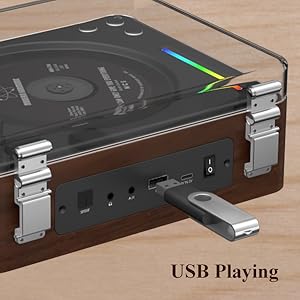
3. تشغيل USB
- أدخل محرك أقراص فلاش USB يحتوي على الصوت files (MP3, WMA, WAV, APE, FLAC compatible) into the USB Port on the back of the player.
- The player will automatically switch to USB mode and begin playing audio from the drive.
- Use the Play/Pause and Pre/Next buttons to control playback.
Image: A USB flash drive inserted into the USB port of the THINKYA Y11 CD Player, ready for audio playback.
4. وضع AUX
- Connect one end of the 3.5mm AUX audio cable to the AUX Port on the back of the player.
- Connect the other end to the headphone jack or audio output of an external device (e.g., smartphone, MP3 player).
- Switch the player to AUX mode. Audio from the external device will play through the Y11's speakers.
5. الوضع البصري
- Connect an optical audio cable (not included) from the Optical Port on the back of the player to an optical audio input on a compatible device (e.g., TV, amplifier, soundbar).
- Switch the player to Optical mode. This allows for high-quality digital audio output to your connected system.
6. استخدام جهاز التحكم عن بعد
The included remote control allows convenient operation from a distance of up to 15 feet (10 meters).
- زر الطاقة: قم بتشغيل الوحدة / إيقاف تشغيلها.
- الحجم +/-: ضبط مستوى الصوت.
- تشغيل/إيقاف مؤقت: ابدأ التشغيل أو أوقفه مؤقتًا.
- السابق التالي: Skip tracks or navigate menus.
- زر الوضع: Cycle through CD, Bluetooth, USB, AUX, and Optical modes.
- EQ/Bass/Treble: Adjust sound equalization (if available).
- زر الضوء: Control the RGB night light modes.
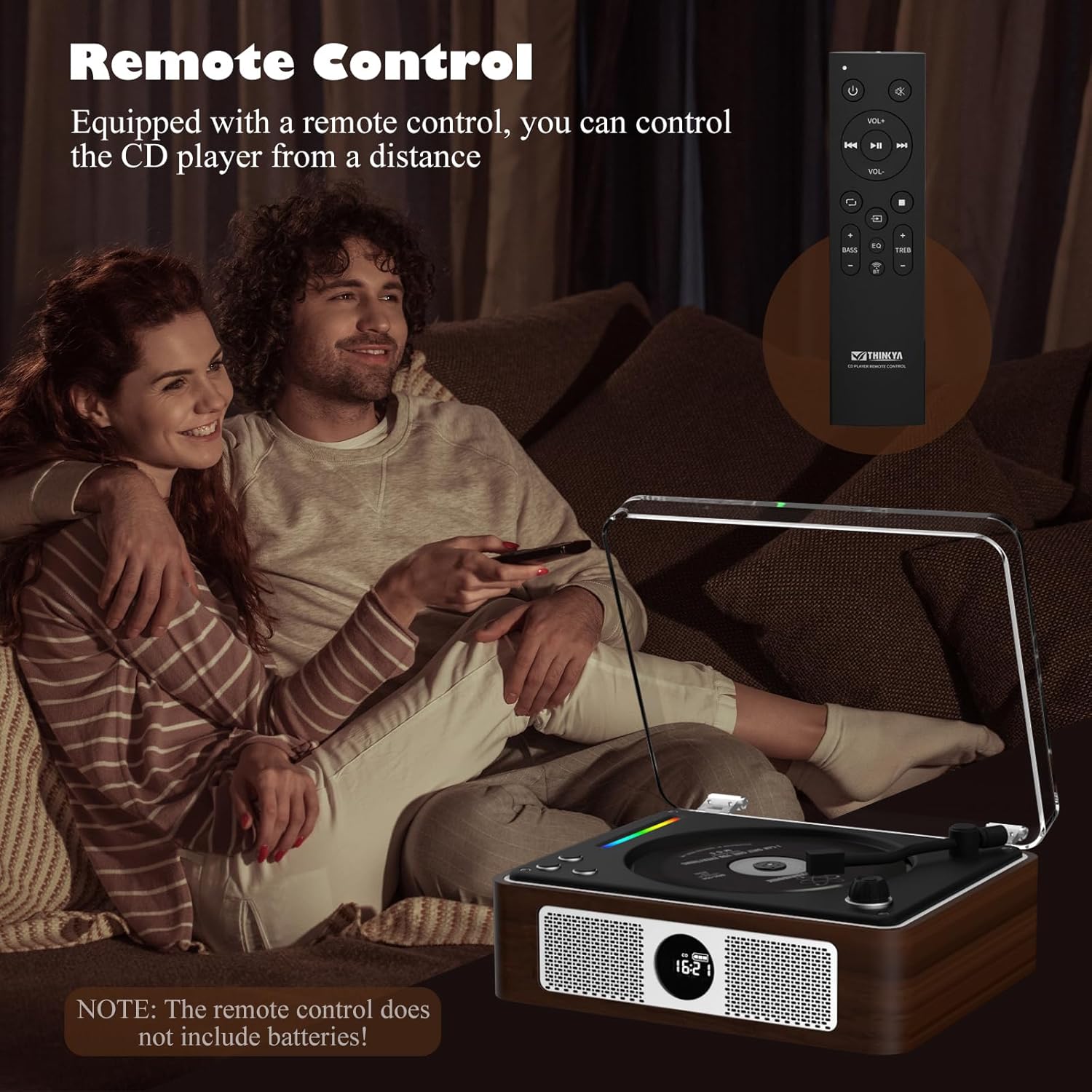
Image: A person using the remote control to operate the THINKYA Y11 CD Player while relaxing on a sofa.
7. RGB Colorful Light Show
The player features an RGB light bar that offers 10 different color-changing themes. Use the 'Light' button on the remote control to cycle through these modes, including colorful lights, automatic change, white light, blue light, and yellow light.
الصورة: لقطة مقربة view of the vibrant RGB light bar integrated into the THINKYA Y11 CD Player.
صيانة
- تنظيف: Use a soft, dry cloth to clean the exterior of the player. For the CD lens, use a specialized CD lens cleaner. Do not use abrasive cleaners or solvents.
- العناية بالبطارية: To prolong battery life, avoid fully discharging the battery frequently. Charge the player regularly, even if not in use for extended periods.
- تخزين: قم بتخزين المشغل في مكان بارد وجاف بعيدًا عن أشعة الشمس المباشرة ودرجات الحرارة القصوى.
- تصميم مقاوم للصدمات: The player features a 3-point silicone shockproof design to reduce vibrations and prevent skipping. However, avoid harsh impacts.

Image: Diagram illustrating the 3-point silicone shockproof design of the THINKYA Y11 CD Player, which helps maintain stability and prevent disc skipping.
استكشاف الأخطاء وإصلاحها
| مشكلة | السبب المحتمل | حل |
|---|---|---|
| المشغل لا يعمل. | البطارية فارغة أو كابل الطاقة غير موصول. | Charge the battery using the USB-C cable. Ensure the power switch is in the 'ON' position. |
| CD is not playing or skipping. | CD is dirty, scratched, or incorrectly placed. Player is unstable. | Clean the CD with a soft cloth. Ensure the CD is placed correctly on the spindle. Place the player on a stable, flat surface. |
| لا يمكن لجهاز البلوتوث الاتصال. | Player is not in correct Bluetooth mode or device is out of range. | Ensure the player is in the correct Bluetooth mode (transmitter or receiver). Place devices within 10 meters. Restart both devices. |
| لا يوجد إخراج صوت. | Volume is too low, incorrect mode selected, or cables are loose. | Increase volume. Verify the correct playback mode (CD, Bluetooth, USB, AUX, Optical) is selected. Check all cable connections. |
| جهاز التحكم عن بعد لا يعمل. | البطاريات فارغة أو جهاز التحكم عن بعد خارج نطاق التغطية. | Replace remote control batteries (2x AAA). Ensure you are within 15 feet (10 meters) of the player and pointing the remote towards it. |
تحديد
- رقم الموديل: سنة 11
- ماركة: ثينكيا
- تقنية الاتصال: Auxiliary, USB, Bluetooth, Optical
- نوع السماعة: ستيريو
- مصدر الطاقة: يعمل بالبطارية (قابلة لإعادة الشحن بسعة 2600 مللي أمبير)
- عمر البطارية: 8-10 hours playback
- وقت الشحن: حوالي 3.5 ساعات
- تنسيقات الأقراص المدعومة: CD, CD-R, CD-DA
- تنسيقات الصوت المدعومة: MP3 ، WMA ، WAV ، APE ، FLAC
- وزن السلعة: 2.88 رطل
- أبعاد الحزمة: 14.17 × 10.87 × 5.28 بوصة
- لون: بني

Image: The THINKYA Y11 Portable CD Player with its dimensions clearly marked, highlighting its compact and portable size.
الضمان والدعم
THINKYA products are designed for reliability and performance. This product comes with a standard manufacturer's warranty against defects in materials and workmanship. For specific warranty terms, please refer to the warranty card included in your package or contact THINKYA customer support.
For technical assistance, troubleshooting, or service inquiries, please contact THINKYA customer support through the contact information provided in your product documentation or on the official THINKYA webموقع.