
THINKYA Y19
THINKYA Portable CD Player User Manual
Model: Y19 | Brand: THINKYA
1. المقدمة
Thank you for choosing the THINKYA Portable CD Player Y19. This multi-functional device combines classic CD playback with modern connectivity options, including Bluetooth, USB, AUX, and Optical modes. Featuring built-in HiFi stereo speakers and a convenient remote control, it offers a versatile audio experience for your home or on the go. Please read this manual thoroughly before use to ensure proper operation and longevity of your device.
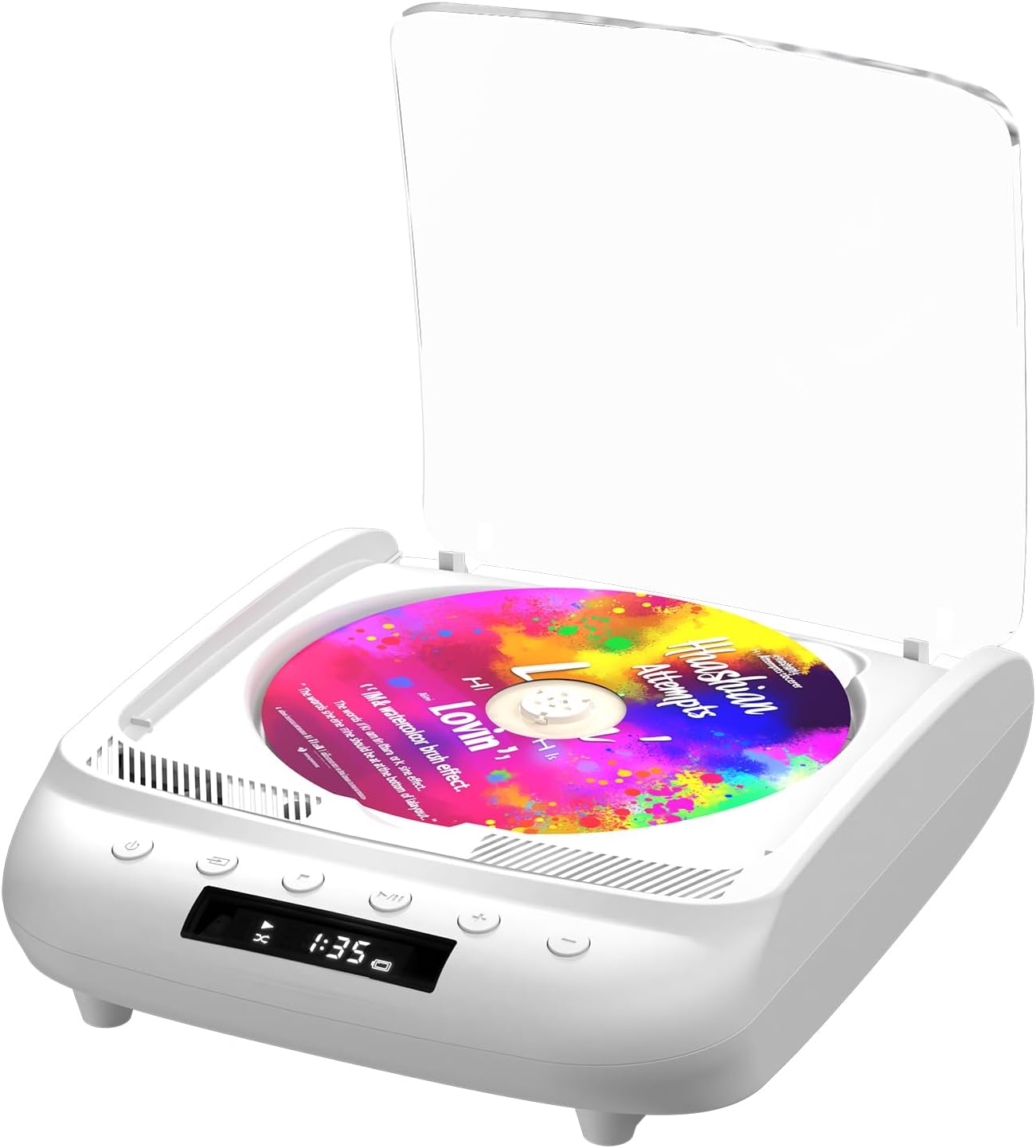
Figure 1.1: THINKYA Portable CD Player Y19
2. محتويات العبوة
تأكد من وجود جميع العناصر وأنها في حالة جيدة عند فتح العلبة:
- Portable CD Player x 1
- جهاز التحكم عن بعد × 1
- كابل USB-C × 1
- كابل AUX مقاس 3.5 ملم × 1
- دليل المستخدم × 1
الشكل 2.1: جميع العناصر المضمنة في العبوة.
3. انتهى المنتجview & ضوابط
Familiarize yourself with the player's layout and functions:

Figure 3.1: Front panel controls and rear ports. (1) Optical, (2) Headphone, (3) AUX, (4) USB, (5) DCIN 5V, (6) On/Off switch.
أزرار اللوحة الأمامية:
- زر الطاقة: يقوم بتشغيل/إيقاف تشغيل الجهاز.
- زر الوضع: Cycles through playback modes (CD, USB, Bluetooth, AUX, Optical).
- زر التوقف: يوقف التشغيل.
- زر التشغيل/الإيقاف المؤقت: يبدأ التشغيل أو يوقفه مؤقتًا.
- مستوى الصوت - / المسار السابق: يخفض مستوى الصوت أو ينتقل إلى المقطع السابق.
- المجلد + / المسار التالي: يزيد من مستوى الصوت أو ينتقل إلى المسار التالي.
منافذ اللوحة الخلفية:
- مخرج SPDIF (بصري): للتوصيل بأنظمة الصوت الخارجية عبر كابل بصري.
- مقبس سماعة الرأس (3.5،XNUMX ملم): للاستماع الخاص مع سماعات الرأس.
- مدخل AUX (3.5 مم): لتوصيل أجهزة الصوت الخارجية عبر كابل AUX.
- منفذ USB: لتشغيل الصوت files من محرك أقراص USB.
- DCIN 5V (USB-C): Power input for charging and continuous operation.
- مفتاح التشغيل/الإيقاف: مفتاح الطاقة الرئيسي للجهاز.

الشكل 3.2: مفصل view of 3.5mm Earphone Jack and USB Playback port.

Figure 3.3: Enjoying purer singing with Optical Mode connection to external speakers.
4. الإعداد الأولي
4.1 شحن الجهاز
The THINKYA CD Player has a built-in 2600mAh rechargeable battery. Before first use, fully charge the device.
- Connect the provided USB-C cable to the DCIN 5V port on the rear of the player.
- Connect the other end of the USB-C cable to a compatible 5V/2A USB power adapter (not included), power bank, or computer USB port.
- The LED screen will indicate charging status. A full charge takes approximately 3 hours and provides 4-8 hours of playback time.

Figure 4.1: Flexible charging options for the built-in rechargeable battery.
4.2 إدخال قرص مضغوط
To insert a CD:
- Gently lift the transparent lid of the CD player.
- If present, remove the protective cardboard from the CD compartment.
- Place the CD onto the spindle with the label side facing up. Ensure it clicks securely into place.
- Close the transparent lid.
Figure 4.2: Correct placement of a CD in the player.
5. تعليمات التشغيل
The THINKYA CD Player supports multiple playback modes. Press the زر الوضع on the front panel or remote control to switch between them.
5.1 وضع تشغيل الأقراص المدمجة
After inserting a CD and powering on the device, it will automatically enter CD mode and begin playback. The LED screen will display the track number and playback time.
- تشغيل/إيقاف مؤقت: اضغط على زر التشغيل / الإيقاف المؤقت.
- المسار التالي / السابق: Use the Volume +/- buttons (short press) to skip tracks.
- توقف: اضغط على زر التوقف.

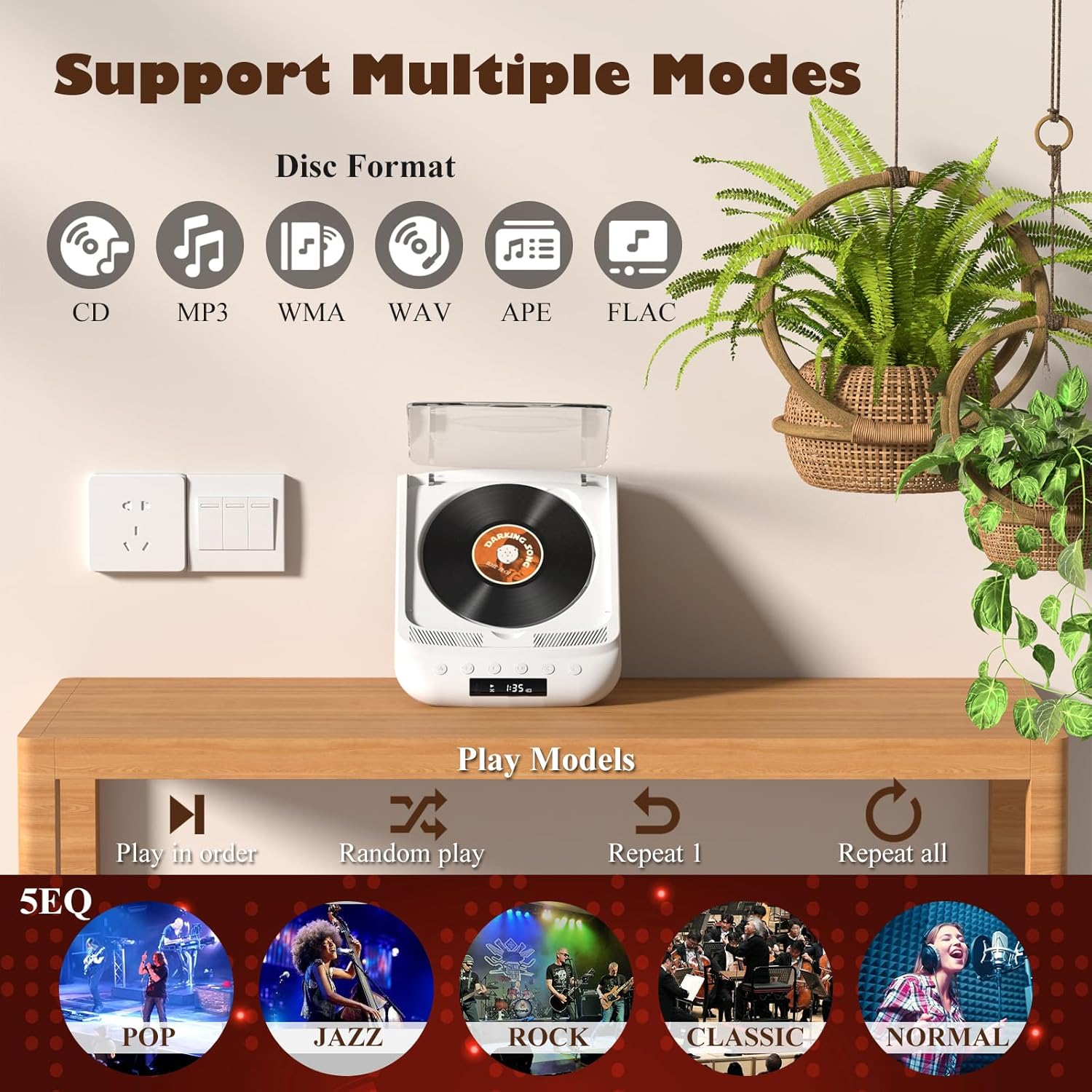
Figure 5.1: Dual HiFi Stereo Speakers and CD playback options (Repeat All, Random, In Order, Repeat 1).
5.2 Bluetooth Mode (Input & Output)
The player can act as both a Bluetooth transmitter and receiver.
Bluetooth Receiver (Connect your phone/tablet to the CD Player):
- Switch the CD player to Bluetooth mode (BT will flash on the LED screen).
- On your mobile device, search for "THINKYA Y19" in the Bluetooth settings.
- Select to pair. Once connected, the BT indicator will stop flashing. You can now play audio from your device through the CD player's speakers.
Bluetooth Transmitter (Connect the CD Player to Bluetooth headphones/speakers):
- Ensure the CD player is in CD, USB, or AUX mode.
- قم بتنشيط وضع الاقتران على سماعات الرأس أو مكبر الصوت الذي يعمل بتقنية Bluetooth.
- The CD player will automatically search for and connect to nearby Bluetooth audio devices. Once connected, audio will be transmitted to your external Bluetooth device.

Figure 5.2: Bluetooth 5.0 connectivity for both transmitting and receiving audio.
Video 5.1: Demonstration of THINKYA Portable CD Player's Bluetooth functionality, including pairing with external speakers.
5.3 وضع تشغيل USB
Insert a USB flash drive into the USB port on the rear panel. The player supports MP3/WMA/WAV/APE/FLAC formats. Switch to USB mode using the Mode button.
5.4 وضع AUX
Connect an external audio device (e.g., smartphone, MP3 player) to the AUX input port using the provided 3.5mm AUX cable. Switch to AUX mode using the Mode button.
5.5 Optical Mode
Connect the SPDIF (Optical) output port to an external audio system with an optical input. This mode is for digital audio output from the CD player to a compatible receiver or soundbar.
6. استخدام جهاز التحكم عن بعد
The included remote control allows for convenient operation from a distance (up to 15ft). It requires 2 AAA batteries (not included).
الشكل 6.1: جهاز التحكم عن بعد للتشغيل المريح.
وظائف التحكم عن بعد:
- قوة: تشغيل/إيقاف.
- المجلد +/-: يضبط مستوى الصوت.
- السابق التالي: يتخطى المسارات.
- تشغيل/إيقاف مؤقت: يبدأ التشغيل أو يوقفه مؤقتًا.
- توقف: يوقف التشغيل.
- EQ: Cycles through equalizer presets (POP, JAZZ, ROCK, CLASSIC, NORMAL).
- BT: Switches to Bluetooth mode.
- أزرار أخرى: May include Bass, Treble adjustments depending on the remote version.
7. المواصفات الفنية
| ميزة | مواصفة |
|---|---|
| نموذج | سنة 19 |
| حجم الإدخالtage | 5 فولت-2 أمبير |
| سعة البطارية | 2600 مللي أمبير من نوع ليثيوم أيون |
| وقت الشحن | حوالي 3 ساعات |
| وقت التشغيل | حوالي 4-8 ساعات |
| الحجم المحمول | 8.27 × 6.69 × 3.03 بوصة |
| وزن | 2.2 lb (1.72 pounds listed in specs, using A+ content for consistency) |
| المتحدث | 4Ω-2*2W (Independent Sound Cavity) |
| CD Format Support | CD-DA, CD-R, MP3 |
| USB Format Support | MP3 / WMA / WAV / APE / FLAC |
| الواجهة | 3.5mm Audio, USB, Optical, Headphone, USB-C Charge |
| وضع اللاعب | CD Play, Bluetooth, USB, AUX, Optical |
8. الرعاية والصيانة
- تنظيف: Use a soft, dry cloth to clean the exterior of the player. For the CD lens, use a specialized CD lens cleaner. Do not use abrasive cleaners or solvents.
- التعامل مع الأقراص المضغوطة: Always hold CDs by their edges. Avoid touching the playing surface. Store CDs in their cases to prevent scratches and dust accumulation.
- تخزين: عند عدم استخدام الجهاز لفترات طويلة، قم بتخزينه في مكان بارد وجاف بعيدًا عن أشعة الشمس المباشرة ودرجات الحرارة القصوى.
- العناية بالبطارية: لإطالة عمر البطارية، تجنب تفريغها بالكامل بشكل متكرر. اشحن الجهاز بانتظام، حتى في حالة عدم استخدامه.
9. دليل استكشاف الأخطاء وإصلاحها
If you encounter issues with your THINKYA CD Player, refer to the common problems and solutions below:
9.1 لا يوجد طاقة / الجهاز لا يعمل
- Ensure the main On/Off switch on the rear panel is in the 'On' position.
- Check if the device is properly charged. Connect the USB-C cable and verify the charging indicator.
- جرّب كابل USB-C أو محول طاقة مختلفًا.
9.2 CD Not Playing / Disc Error
- Ensure the CD is clean and free of scratches or smudges. Clean with a soft, lint-free cloth from the center outwards.
- Verify the CD is inserted correctly with the label side facing up and securely on the spindle.
- Make sure the player is in CD mode.
- Try a different CD to rule out a faulty disc.
9.3 لا يوجد صوت
- Adjust the volume using the buttons on the player or the remote control.
- If using headphones or external speakers, ensure they are properly connected and functional.
- If in Bluetooth mode, ensure the player is correctly paired with your external device and the volume on both devices is adjusted.
- If in AUX mode, check the AUX cable connection and ensure the external device's volume is up.
- Ensure the correct playback mode is selected (CD, USB, BT, AUX, Optical).
9.4 مشاكل اتصال البلوتوث
- Ensure the player is in Bluetooth mode (BT flashing).
- Keep the player and the Bluetooth device within the effective range (typically 10 meters/33 feet).
- Turn off and on the Bluetooth function on both the player and your external device, then try pairing again.
- Clear previous Bluetooth pairings on your external device and try to connect again.
10. الضمان ودعم العملاء
10.1 معلومات الضمان
THINKYA products are manufactured to the highest quality standards. For specific warranty details, please refer to the warranty card included in your product packaging or contact THINKYA customer support. Keep your purchase receipt as proof of purchase.
10.2 دعم العملاء
If you require further assistance or have questions not covered in this manual, please contact our customer support team:
- بريد إلكتروني: support@thinkya.com
- Webموقع: www.thinkya.com
Ask a question about this manual
Ask about setup, troubleshooting, compatibility, parts, safety, or missing instructions. Manuals+ will review the question and use this page’s manual context to help answer it.