
مقدمة
Thank you for choosing the Walfront Smart Thermostat TRV Valve. This device is designed to provide intelligent temperature control for your home, offering convenience through app and voice control, multiple operating modes, and programmable schedules. Please read this manual carefully before installation and operation to ensure proper use and optimal performance.
معلومات السلامة
- تأكد من فصل مصدر الطاقة قبل التثبيت أو الصيانة.
- هذا الجهاز مخصص للاستخدام الداخلي فقط.
- لا تعرض الجهاز للماء أو الرطوبة الزائدة.
- يحفظ بعيدًا عن متناول الأطفال.
- استخدم فقط نوع البطارية المحدد (بطاريتان AA).
محتويات الحزمة
تأكد من وجود جميع العناصر في العبوة:
- 1 x Thermostatic Valve
- 10 x Installation Accessories
- 1 × برغي
- شنومكس x الجوز
- 1 × دليل المستخدم (هذه الوثيقة)
ملحوظة: A Zigbee hub is required for smart functionality and app control. The Zigbee hub is not included and must be purchased separately.
المنتج انتهىview
The Walfront Smart Thermostat TRV Valve features an integrated display and control knob for easy interaction. Below is a diagram illustrating the key components and display indicators:

صورة: أمام view of the Walfront Smart Thermostat TRV Valve, highlighting its display and various indicators for modes, settings, and battery status.
- عرض درجة الحرارة: يعرض درجة الحرارة الحالية أو درجة الحرارة المضبوطة.
- مؤشر قفل الطفل: Appears when the child lock function is active.
- مؤشر مستوى البطارية: يعرض مستوى طاقة البطارية المتبقية.
- سهم لأعلى ولأسفل: Used for adjusting temperature or navigating settings.
- مؤشر الوضع اليدوي: Shows when the thermostat is in manual control.
- Programming Mode Indicator: Indicates an active programmed schedule.
- Holiday Mode Indicator: Activates during holiday settings.
- Comfort Mode Indicator: Engaged for comfort temperature settings.
- ECO Mode Indicator: Shows when energy-saving mode is active.
- Energy Saving Mode Indicator: Indicates energy-saving operation.
تحديد
| ميزة | مواصفة |
|---|---|
| نوع العنصر | صمام ترموستاتي |
| مادة | عبس، بيسي |
| مزود الطاقة | 3V, 2 x AA Batteries (not included) |
| الحد الأقصى للضربة | حوالي 5.5 مم / 0.22 بوصة |
| دقة | ±0.5 درجة مئوية |
| ضبط نطاق درجة الحرارة | 5 إلى 45 درجة مئوية |
| عرض نطاق درجة الحرارة | 0 إلى 70 درجة مئوية |
| درجة حرارة التشغيل | 0 إلى 45 درجة مئوية |
| رطوبة التشغيل | 5 إلى 95% رطوبة نسبية (بدون تكاثف) |
| درجة حرارة التخزين | -5 إلى 45 درجة مئوية |
| خطأ التوقيت | 1% |
| مستوى | IP20 |
| زر | مقبض الدوران |
| توافق التطبيق | Tuya, Smart Life App |

صورة: Detailed dimensions of the Walfront Smart Thermostat TRV Valve.
Motor Characteristics:
- Ultra quiet: Motor sound less than 25 decibels.
- Ultra large stroke: The motor stroke is 5.5mm / 0.22in.
- Extra large diameter: The motor rod diameter is 8mm / 0.31in.
- حفظ الطاقة: The standby power consumption of the motor is very small.
يثبت
1. تركيب البطارية
- Gently twist and remove the top cover of the thermostatic valve.
- Insert two AA batteries (not included) into the battery compartment, ensuring correct polarity (+/-).
- Replace the top cover, twisting it until it clicks securely into place.
2. التثبيت المادي
The Walfront Smart Thermostat TRV Valve is designed for easy installation on various radiator valves. Use the provided installation accessories to match your specific valve type.
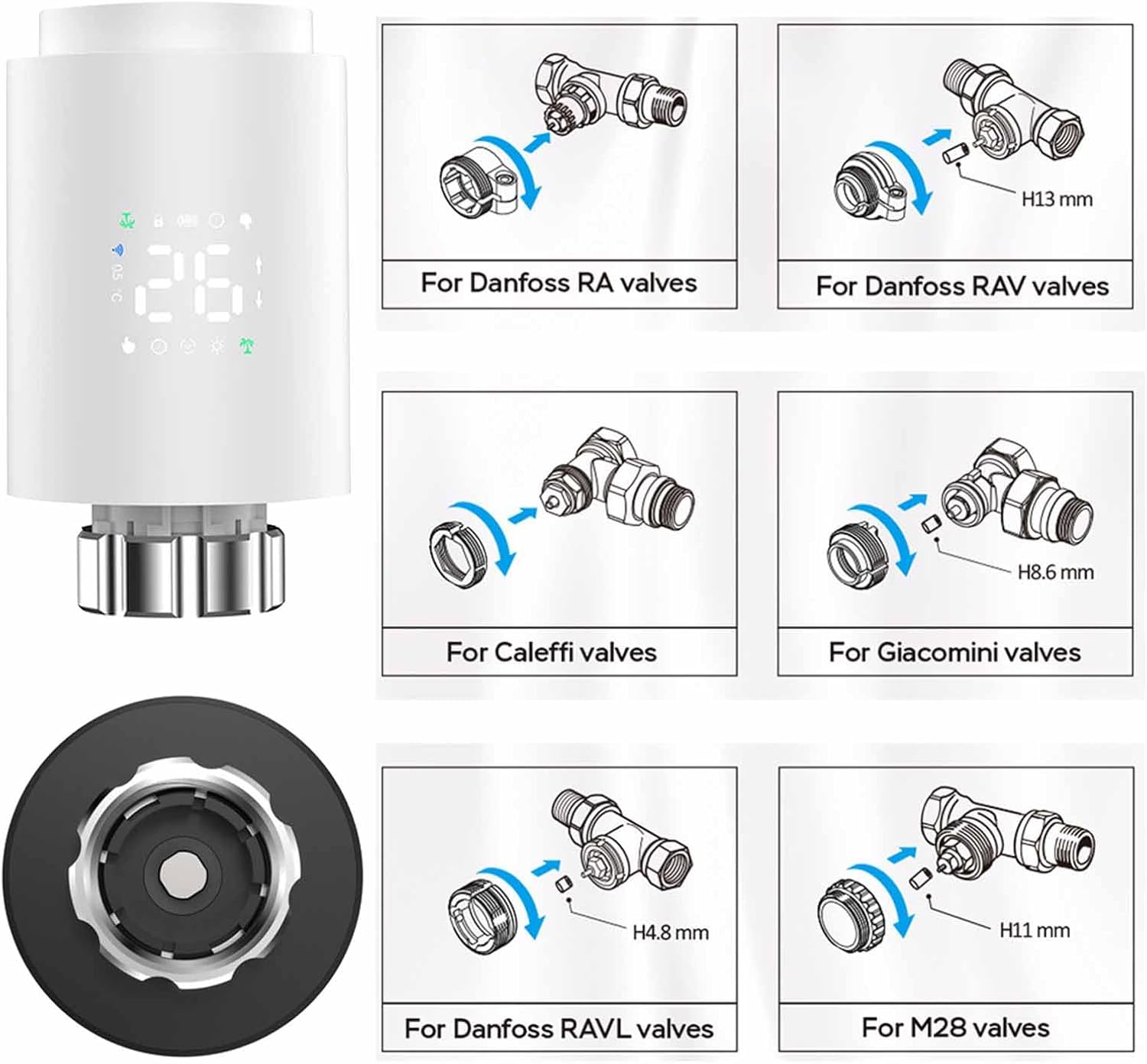
صورة: Installation guide for various radiator valve types, including adapters for Danfoss, Caleffi, Giacomini, and M28 valves.
- Identify your existing radiator valve type.
- Select the appropriate adapter from the installation accessories.
- Attach the adapter to your radiator valve as shown in the diagrams.
- Screw the Walfront Smart Thermostat TRV Valve onto the adapter until it is firmly secured.
3. App Installation and Pairing (Requires Zigbee Hub)
To utilize the smart features of your thermostat, you need to connect it to a Zigbee hub via the Tuya or Smart Life app.

صورة: Visual representation of the Zigbee pairing process between the thermostat, a Zigbee gateway, and the mobile app.
- تنزيل تويا سمارت or الحياة الذكية قم بتنزيل التطبيق من متجر تطبيقات هاتفك الذكي (iOS أو Android).
- تسجيل أو تسجيل الدخول إلى حسابك.
- Ensure your Zigbee hub is powered on and connected to your home Wi-Fi network.
- في التطبيق، انقر فوق "إضافة جهاز" أو الرمز "+".
- Select 'Gateway' or 'Zigbee Gateway' and follow the on-screen instructions to add your Zigbee hub.
- Once the Zigbee hub is added, select it and then choose 'Add sub-device'.
- Follow the app's instructions to put the TRV valve into pairing mode (usually by pressing and holding a button on the device until an indicator flashes).
- The app will detect and add the TRV valve. You can then rename the device for easy identification.
تعليمات التشغيل
1. Basic Operation (Manual Control)
- ضبط درجة الحرارة: Rotate the knob on the thermostat to increase or decrease the desired temperature. The new set temperature will be displayed.
- الوضع اليدوي: The thermostat will maintain the set temperature until changed manually or a programmed schedule takes over.
2. التحكم في التطبيق
Once paired with the Tuya or Smart Life app, you can control your thermostat remotely.

صورة: Mobile app interface demonstrating temperature control and device status.
- Open the Tuya Smart or Smart Life app and select your TRV valve.
- أنت تستطيع view the current room temperature and adjust the set temperature directly from the app.
- Access various operating modes and programming options through the app interface.
3. أوضاع التشغيل
The thermostat offers several modes to suit your needs:

صورة: App screenshots showing mode selection, weekly programming, and general settings.
- الوضع اليدوي: Maintains a constant temperature set by the user.
- الوضع التلقائي: يتبع الجدول الأسبوعي المبرمج.
- وضع الراحة: Sets the temperature to a predefined comfortable level.
- وضع توفير الطاقة (ECO): Sets the temperature to an energy-efficient level.
- وضع الإجازة: Maintains a lower, energy-saving temperature for extended periods when you are away.
- Vent Open Mode (Window Check): Automatically detects open windows/vents and temporarily suspends heating to save energy.
4. Weekly Programmable Schedules
Create personalized heating schedules for maximum convenience and energy efficiency.
- The thermostat supports 5+2 (weekdays/weekend), 6+1 (weekdays/Saturday/Sunday), or 7-day programming options.
- You can set up to six time slots per day, each with its own desired temperature.
- Access and configure schedules through the Tuya or Smart Life app under the 'Weekly Program' section.
5. قفل الأطفال
Activate the child lock feature via the app settings to prevent unauthorized changes to the thermostat settings.
6. التحكم الصوتي
The thermostat supports voice control through compatible smart home assistants (e.g., Amazon Alexa, Google Assistant) when integrated with the Tuya/Smart Life app. Refer to your smart assistant's instructions for connecting Tuya/Smart Life devices.
7. Sharing Device
You can share control of the thermostat with family members through the Tuya or Smart Life app.

صورة: Illustration of sharing device control with multiple family members via the app.
- In the app, navigate to the device settings for your TRV valve.
- Look for the 'Share Device' option.
- Follow the prompts to invite family members to control the device. They will need their own Tuya/Smart Life accounts.
صيانة
- استبدال البطارية: When the battery indicator shows low power, replace the two AA batteries promptly to ensure continuous operation.
- تنظيف: امسح الجهاز بقطعة قماش ناعمة وجافة. لا تستخدم منظفات أو مذيبات كاشطة.
- تخزين: If storing the device for an extended period, remove the batteries.
استكشاف الأخطاء وإصلاحها
- الجهاز لا يعمل: تحقق من تركيب البطارية وتأكد من أن البطاريات جديدة.
- لا يمكن الاتصال بالتطبيق: Ensure a Zigbee hub is present and properly connected to your Wi-Fi. Confirm the thermostat is in pairing mode. Check Wi-Fi signal strength.
- لا يتم ضبط درجة الحرارة: Verify the device is not in child lock mode. Check if the valve is physically obstructed.
- قراءات درجة حرارة غير دقيقة: تأكد من عدم تعرض منظم الحرارة لأشعة الشمس المباشرة أو التيارات الهوائية، لأن ذلك قد يؤثر على القراءات.
- يُظهر التطبيق الجهاز غير متصل بالإنترنت: Check the Zigbee hub's connection to the internet and ensure the thermostat is within range of the hub.
الضمان والدعم
For warranty information and technical support, please refer to the documentation provided at the point of purchase or contact Walfront customer service. Keep your purchase receipt as proof of purchase.
تصرف
This product contains electronic components and batteries. Do not dispose of it with general household waste. Please follow local regulations for the proper disposal of electronic waste and batteries to protect the environment.