
1. المقدمة
This manual provides essential information for the installation, operation, and maintenance of your new Vetroo 850W 80 Plus Gold Full Modular ATX 3.1 Power Supply. Please read this manual thoroughly before installation and keep it for future reference.

Figure 1: Vetroo 850W Power Supply (White)
2. مواصفات المنتج
- جاهزية PCIe من الجيل 5.1: Meets the latest PCIE 5.1 standards for improved performance and efficiency. Backward compatible with both PCIE 4.0 and 3.0.
- متوافق تمامًا مع معيار ATX 3.1: Designed to meet the newest, most advanced power supply standards.
- مكثفات ممتازة تتحمل درجة حرارة 105 درجة مئوية: High-quality materials and construction ensure stable, low-temperature operation.
- حاصل على شهادة 80 بلس الذهبية: Meets high standards for quality and efficiency, ensuring reliable performance and energy savings.
- تصميم وحدات بالكامل: Allows for easy cable management and customization, reducing cable clutter by only installing necessary cables.
- التشغيل الهادئ: Features a 120mm FDB (Fluid Dynamic Bearing) fan for quiet cooling.
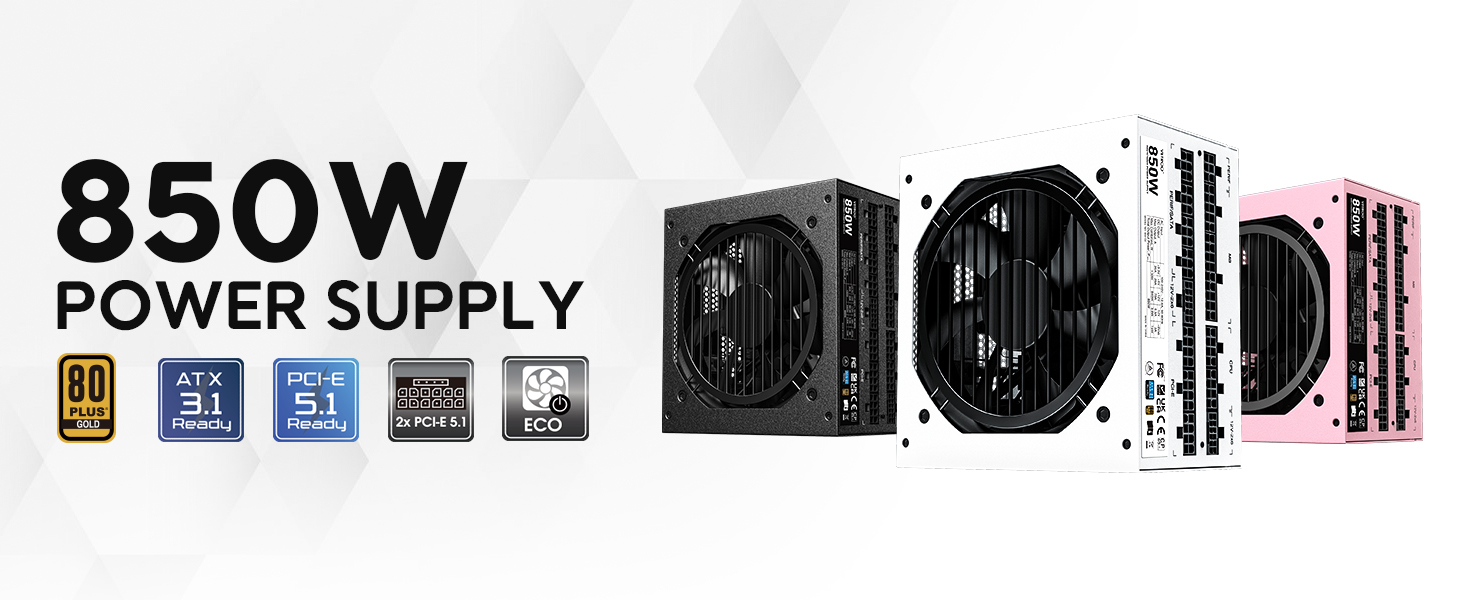
الشكل 2: انتهىview of Vetroo 850W Power Supply features
3. محتويات العبوة
تأكد من وجود جميع المكونات في العبوة:
- وحدة تزويد الطاقة Vetroo بقدرة 850 واط
- Modular Cable Set (including 24-pin ATX, CPU, PCIe, SATA, Molex, FDD connectors)
- سلك الطاقة المتردد
- مسامير التثبيت
- علاقات إدارة الكابلات
- Storage Bag for Unused Cables
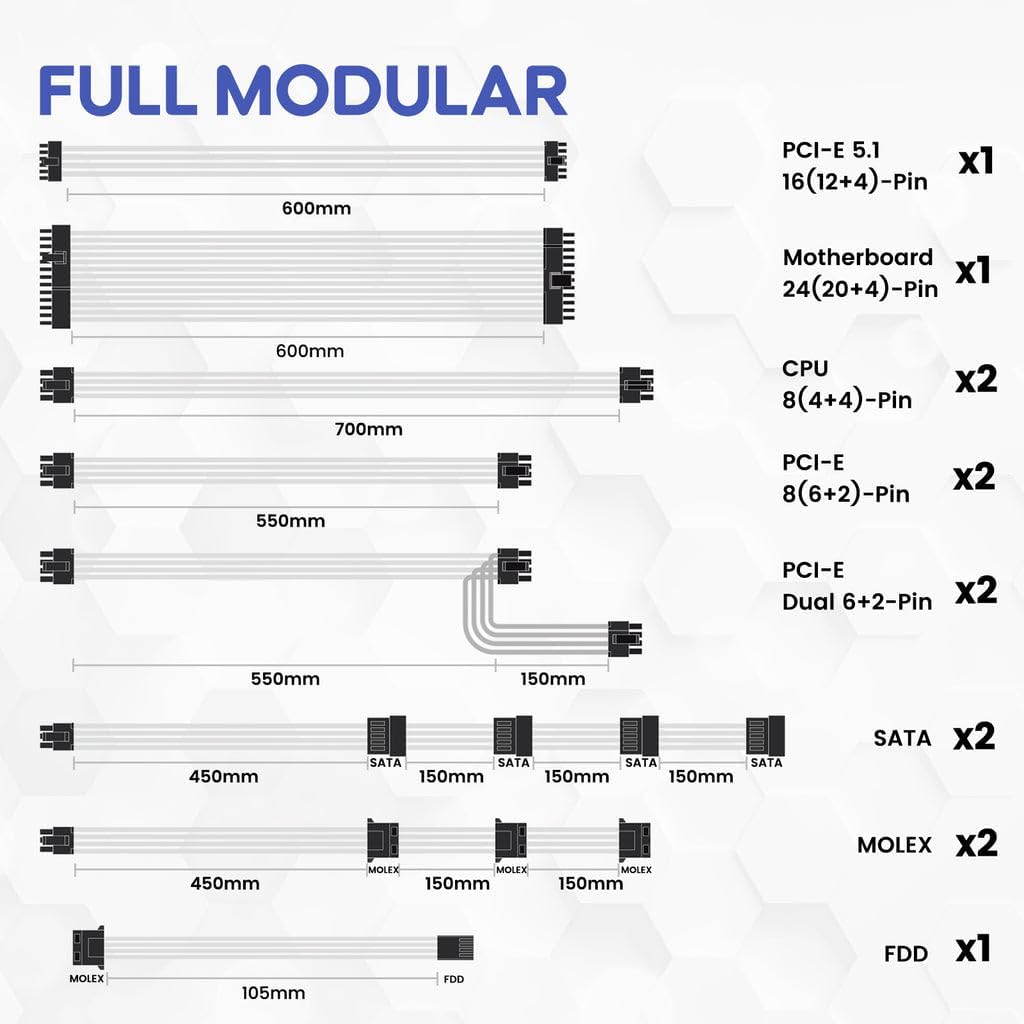
Figure 3: Included Modular Cables
4. معلومات السلامة
WARNING: Improper installation or use can result in serious injury or damage to your system.
- Always disconnect the AC power cord from the wall outlet before installing or removing the power supply.
- لا تفتح وحدة إمداد الطاقة. مستوى الصوت مرتفعtagإنها موجودة في الداخل، حتى عند فصلها.
- Ensure all cables are securely plugged into their respective ports. Loose connections can cause damage.
- Use only the modular cables provided with this power supply. Third-party cables may not be compatible and could cause serious damage.
- Install the power supply in a well-ventilated area, away from high humidity and extreme temperatures.
5. الإعداد والتثبيت
Follow these general steps for installing your power supply. Refer to your PC case and motherboard manuals for specific instructions.
- حضّر نظامك: تأكد من إيقاف تشغيل جهاز الكمبيوتر الخاص بك وفصله عن مقبس الحائط.
- قم بتركيب وحدة التزويد بالطاقة: Secure the power supply unit into the designated bay in your PC case using the provided mounting screws.
- قم بتوصيل كابلات الطاقة الرئيسية: قم بتوصيل كابل ATX ذو 24 سنًا باللوحة الأم.
- قم بتوصيل كابلات طاقة وحدة المعالجة المركزية: قم بتوصيل كابل (كابلات) طاقة وحدة المعالجة المركزية ذات 8 دبابيس (4+4) باللوحة الأم.
- قم بتوصيل كابلات طاقة PCIe: Connect the necessary PCIe power cables (e.g., 12V-2x6 for PCIe 5.1 GPUs, or 8-pin (6+2) for older GPUs) to your graphics card(s).

Figure 4: Dual PCIe 5.1 Connectors
- توصيل الكابلات الطرفية: Connect SATA, Molex, and FDD cables to your storage drives and other peripherals as needed.
- إدارة الكابلات: Utilize the fully modular design and included cable ties to route cables neatly, improving airflow and aesthetics.
- التحقق النهائي: Double-check all connections to ensure they are secure before closing your PC case.
Video 1: Vetroo Power Supply Installation Guide. This video demonstrates the process of installing a Vetroo power supply into a PC case, including cable connections.
6. تعليمات التشغيل
بعد اكتمال التثبيت بنجاح، يمكنك تشغيل النظام.
- تشغيل الطاقة: Connect the AC power cord to the power supply and a wall outlet. Flip the main power switch on the power supply to the 'ON' position.
- نمط الصدى: The power supply features an ECO mode switch. When 'ON', the fan will stop spinning unless the load is above approximately 50% of the rated capacity, ensuring silent operation at low loads. When 'OFF', the fan will spin continuously.

Figure 5: Power Switch and ECO Mode
7. الصيانة
تضمن الصيانة المناسبة طول عمر وأداء مصدر الطاقة الخاص بك على النحو الأمثل.
- تنظيف: Periodically clean the exterior of the power supply and the fan grille to prevent dust buildup, which can impede airflow and cooling. Use compressed air or a soft brush. Ensure the power supply is off and unplugged before cleaning.
- تشغيل مروحة: The 120mm Fluid Dynamic Bearing fan is designed for durability and quiet operation. In ECO mode, the fan may not spin at low loads; this is normal.
8. استكشاف الأخطاء وإصلاحها
إذا واجهت مشاكل في مصدر الطاقة الخاص بك، فضع في اعتبارك ما يلي:
- لا يوجد طاقة: Ensure the AC power cord is securely connected to both the power supply and the wall outlet. Verify the main power switch on the power supply is in the 'ON' position. Check your wall outlet with another device.
- عدم استقرار النظام/إيقاف التشغيل: This power supply includes multiple protection features (OVP, OCP, OPP, SCP, UVP, OTP) to safeguard your components. If your system is unstable or shuts down unexpectedly, it could indicate an issue with power delivery or another component. Ensure all power connections are firm.
- المروحة لا تدور: If the ECO mode is enabled, the fan will not spin until the power supply reaches approximately 50% load. This is normal operation for quiet performance. If the fan does not spin under heavy load, contact support.
- ضوضاء غير عادية: If you hear unusual noises (e.g., coil whine, grinding), power down your system immediately and contact support.
9. المواصفات
| ميزة | التفاصيل |
|---|---|
| اسم الموديل | 850 جي 5 |
| انتاج واتtage | 850 واط |
| شهادة الكفاءة | 80 بلس الذهب |
| معيار ATX | متوافق مع معيار ATX 3.1 |
| معيار PCIe | جاهز لتقنية PCIe من الجيل الخامس |
| عامل الشكل | ايه تي اكس |
| طريقة التبريد | هواء (مروحة FDB مقاس 120 مم) |
| النوع المعياري | وحدات كاملة |
| المكثفات | Premium 105°C |
| أبعاد المنتج (الطول × العرض × الارتفاع) | 5.9 × 5.5 × 3.4 بوصة |
| وزن العنصر | 5.7 جنيه (2.59 كيلوجرام) |
| الأجهزة المتوافقة | كمبيوتر شخصي |
| ميزات الحماية | OVP (أكثر من المجلدtage Protection), OCP (Over Current Protection), OPP (Over Power Protection), SCP (Short Circuit Protection), UVP (Under Voltage Protection), OTP (Over Temperature Protection) |
10. الضمان والدعم
The Vetroo 850W Power Supply comes with a ضمان لمدة سنتين, ensuring long-term reliability and peace of mind. For technical support, warranty claims, or any questions regarding your product, please visit the official Vetroo webالموقع أو الاتصال بقسم خدمة العملاء.
Video 2: Vetroo 850W Power Supply - White Product Overviewيوفر هذا الفيديو عرضًا مرئيًاview of the white Vetroo 850W Power Supply.