
SHARP KN-HW16H-B
SHARP Healsio Hot Cook KN-HW16H-B 1.6L Automatic Cooking Pot User Manual
Model: KN-HW16H-B
1. المقدمة
شكرا لك على الشراءasing the SHARP Healsio Hot Cook KN-HW16H-B Automatic Cooking Pot. This appliance is designed to simplify your cooking process by offering automatic, waterless cooking and various convenient features. Please read this manual thoroughly before use to ensure safe and optimal operation.
For more information and recipes, please visit the official SHARP website or consult the recipe book included with your product.

Image: The SHARP Healsio Hot Cook KN-HW16H-B Automatic Cooking Pot, black color.
2. احتياطات السلامة
اتبع دائمًا احتياطات السلامة الأساسية عند استخدام الأجهزة الكهربائية لتقليل خطر نشوب حريق أو التعرض لصدمة كهربائية و/أو إصابة الأشخاص.
- لا تغمر الوحدة الرئيسية في الماء أو السوائل الأخرى.
- تأكد من توصيل سلك الطاقة بشكل آمن بمأخذ كهربائي مؤرض.
- يحفظ بعيدًا عن متناول الأطفال.
- Do not operate if the appliance or power cord is damaged.
- افصل الجهاز دائمًا عن التيار الكهربائي عندما لا يكون قيد الاستخدام وقبل التنظيف.
3. مكونات المنتج وأبعاده
Familiarize yourself with the parts of your Healsio Hot Cook.
- الوحدة الرئيسية
- وعاء الداخلية
- غطاء
- Stirring Unit
- سلك الطاقة

Image: The SHARP Healsio Hot Cook KN-HW16H-B with dimensions indicated. Height: 24.0cm, Width: 33.0cm, Depth: 28.2cm.
4. الإعداد
- فك التعبئة: قم بإزالة جميع مواد التغليف والملحقات بعناية. احتفظ بالتغليف لاستخدامه في النقل المستقبلي إذا لزم الأمر.
- التنظيف الأولي: Before first use, wash the inner pot, lid, and stirring unit with warm soapy water. Rinse thoroughly and dry. Wipe the exterior of the main unit with a damp قطعة قماش.
- الموقع: ضع الجهاز على سطح مستوٍ وثابت ومقاوم للحرارة، بعيدًا عن أشعة الشمس المباشرة ومصادر الحرارة. تأكد من وجود تهوية كافية حول الجهاز.
- توصيل الطاقة: Connect the power cord to the appliance and then to a suitable electrical outlet.
5. تعليمات التشغيل
5.1 Basic Automatic Cooking
The Healsio Hot Cook simplifies cooking by automatically adjusting heat and stirring. Simply add ingredients and seasonings, select a menu, and start cooking.
- Place ingredients and seasonings into the inner pot.
- أغلق الغطاء جيدًا.
- Select the desired cooking menu from the control panel.
- Press the Start button. The appliance will automatically cook the dish.

Image: The SHARP Healsio Hot Cook demonstrating automatic waterless cooking, with various dishes prepared.
5.2 Automatic Stirring Function
The built-in stirring unit ensures even cooking and prevents food from sticking. It stirs ingredients during heating, allowing flavors to penetrate thoroughly and resulting in a consistent, delicious finish.
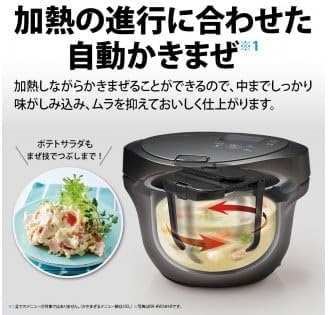
Image: Diagram showing the automatic stirring mechanism inside the SHARP Healsio Hot Cook, illustrating how it mixes ingredients.
5.3 Triple Sensor Technology
The appliance utilizes three sensors (temperature, steam, and load) to precisely monitor the cooking environment and the state of the ingredients. This allows for fine-tuned automatic heat adjustment, ensuring optimal cooking results.
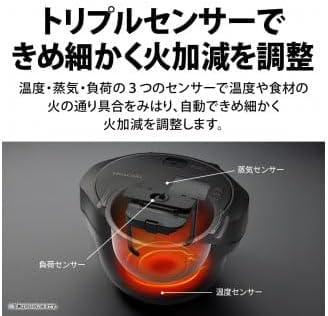
Image: Diagram illustrating the location of the three sensors (temperature, steam, and load) within the SHARP Healsio Hot Cook.
5.4 Reservation Cooking
The reservation cooking function allows you to set a delayed start time, so your meal is ready when you need it. This feature can be set for up to 15 hours, considering food hygiene.
- Prepare ingredients and place them in the inner pot.
- Select a menu that supports reservation cooking.
- Set the desired finish time using the control panel.
- Press the Start button. The appliance will begin cooking at the appropriate time to finish at your set time.
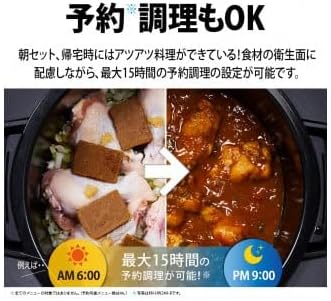
الصورة: السابقample of reservation cooking on the SHARP Healsio Hot Cook, showing ingredients placed in the pot at 6:00 AM for a meal ready by 9:00 PM.
6. الصيانة والتنظيف
يضمن التنظيف المنتظم طول عمر جهازك وتشغيله بشكل صحي.
- قبل التنظيف: افصل الجهاز دائمًا عن الكهرباء واتركه ليبرد تمامًا قبل التنظيف.
- Inner Pot and Stirring Unit: These parts are removable and can be washed with warm soapy water or placed in a dishwasher (refer to specific instructions for dishwasher compatibility).
- غطاء: The lid can be detached and washed with warm soapy water. Ensure all food residues are removed.
- الوحدة الرئيسية الخارجية: امسحي الجزء الخارجي بقطعة قماش ناعمة.amp لا تستخدم المنظفات الكاشطة أو تغمر الوحدة الرئيسية في الماء.
- Easy-Clean Coat: The bottom heating plate of the main unit features an easy-clean coating, making it simple to wipe away spills and dirt with a damp قطعة قماش.

Image: A hand wiping the interior base of the SHARP Healsio Hot Cook, demonstrating the easy-clean coating.
7. استكشاف الأخطاء وإصلاحها
If you encounter issues with your Healsio Hot Cook, please refer to the following common problems and solutions:
| مشكلة | السبب المحتمل | حل |
|---|---|---|
| الجهاز لا يعمل. | سلك الطاقة غير متصل بشكل صحيح. | Check if the power cord is securely plugged into both the appliance and the outlet. |
| لا يتم طهي الطعام بشكل متساوٍ. | Ingredients not properly distributed or stirring unit not installed correctly. | Ensure ingredients are spread evenly. Verify the stirring unit is correctly attached. |
| تم عرض رسالة الخطأ. | حالة خطأ محددة. | Refer to the detailed error code list in the full product manual or contact customer support. |
إذا استمرت المشكلة بعد تجربة هذه الحلول، فيرجى الاتصال بدعم عملاء شارب.
8. المواصفات
| ماركة | حاد |
| رقم الموديل | KN-HW16H-B |
| سعة | 1.6 لتر |
| لون | أسود |
| أبعاد المنتج (العمق × العرض × الارتفاع) | 30.5 سم × 33.4 سم × 39.5 سم |
| المكونات المضمنة | سلك الطاقة |
| نوع المنتج | آلة الطبخ |
9. الضمان والدعم
This product comes with a manufacturer's warranty. Please refer to the warranty card included with your purchase for details on coverage and duration. For technical support, service, or inquiries, please contact SHARP customer service through their official webالموقع أو معلومات الاتصال المقدمة في وثائق المنتج الخاص بك.
SHARP Official Webموقع: https://jp.sharp/hotcook/
Ask a question about this manual
Ask about setup, troubleshooting, compatibility, parts, safety, or missing instructions. Manuals+ will review the question and use this page’s manual context to help answer it.