
1. معلومات هامة حول السلامة
Please read all safety instructions carefully before using your COLORROOM A30 tablet. Keep this manual for future reference.
- لا تعرض الجهاز لدرجات حرارة عالية، أو أشعة الشمس المباشرة، أو الرطوبة العالية.
- تجنب إسقاط الجهاز اللوحي أو تعريضه لصدمات قوية.
- استخدم فقط الشواحن والملحقات المعتمدة لمنع التلف وضمان السلامة.
- لا تحاول تفكيك الجهاز أو إصلاحه بنفسك. اتصل بدعم العملاء للحصول على المساعدة.
- احفظ الجهاز اللوحي بعيداً عن متناول الأطفال والحيوانات الأليفة لمنع ابتلاع الأجزاء الصغيرة عن طريق الخطأ.
2. محتويات العبوة
تأكد من وجود جميع العناصر في العبوة:
- COLORROOM A30 Tablet
- كابل USB Type-C
- Power Adapter (18W PD compatible)
- دليل المستخدم
- حافظة حماية
- واقي الشاشة (مُطبق مسبقًا أو مُرفق)
- SIM Ejector Tool (SD pin)

Image: The COLORROOM A30 tablet and its included accessories, such as the USB-C cable, power adapter, and documentation, neatly arranged in the product box.
3. انتهى الجهازview
Familiarize yourself with the physical components of your COLORROOM A30 tablet.
- الكاميرا الأمامية: يقع في أعلى المنتصف عند حمله أفقيًا، ويستخدم لإجراء مكالمات الفيديو والتقاط صور السيلفي.
- عرض: 10.1-inch IPS screen for clear visuals.
- زر الطاقة: Typically on the side, used to turn the device on/off or wake/sleep the screen.
- أزرار التحكم في الصوت: بجوار زر التشغيل، لضبط مستويات الصوت.
- منفذ USB من النوع C: للشحن ونقل البيانات.
- منفذ كارت الذاكرة الصغيرة: لتوسيع سعة التخزين حتى 2 تيرابايت.
- الكاميرا الخلفية: يوجد في الخلف، ويستخدم لالتقاط الصور والفيديوهات.
- المتحدثون: مكبرات صوت مزدوجة لتجربة صوتية محسّنة.
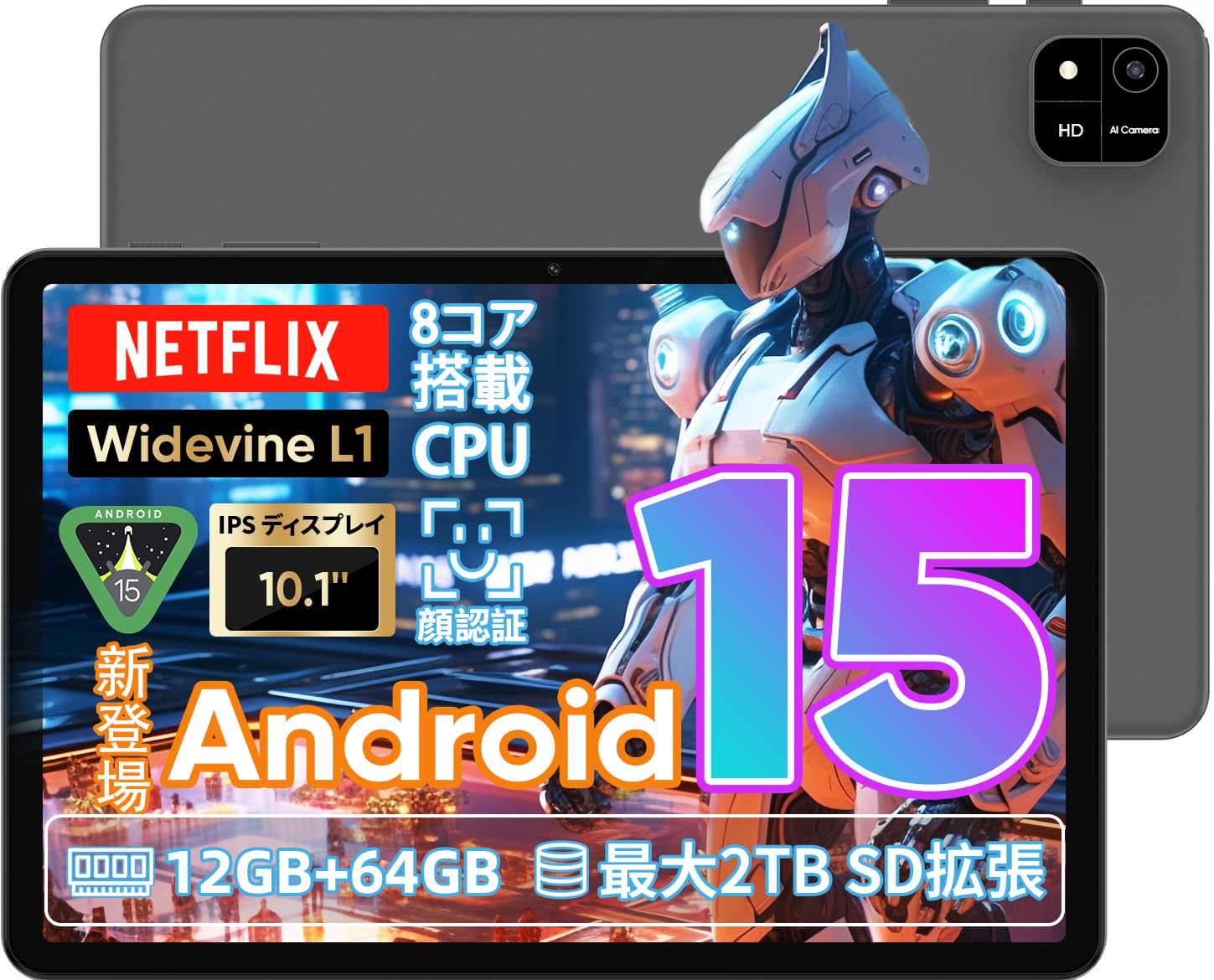
Image: A visual representation of the COLORROOM A30 tablet, highlighting its 10.1-inch display, Android 15 OS, T606 8-core CPU, 12GB RAM, 64GB ROM, 6000mAh battery, 5MP front camera, 8MP rear camera, 2.4G/5G WiFi, Bluetooth 5.0, GPS, and Widevine L1 support.
4. الإعداد
4.1 التشغيل الأولي واختيار اللغة
- Press and hold the Power button until the COLORROOM logo appears.
- Follow the on-screen prompts to select your preferred language (e.g., Japanese).
- Tap 'Start' or 'Next' to proceed.
4.2 اتصال واي فاي
- حدد شبكة Wi-Fi المطلوبة من القائمة.
- أدخل كلمة مرور Wi-Fi إذا طُلب منك ذلك.
- Tap 'Connect'.
4.3 إعداد حساب Google
- سجّل الدخول باستخدام حسابك على جوجل أو أنشئ حسابًا جديدًا. هذا ضروري لتنزيل التطبيقات من متجر جوجل بلاي.
- Review and accept the Google Terms of Service and Privacy Policy.
4.4 Set Screen Lock (PIN/Pattern/Password)
- For security, set a screen lock method (PIN, pattern, or password). A 6-digit PIN is recommended.
- You may choose to skip this step, but it is not recommended for device security.
Video: This video demonstrates the initial setup process for an Android 15 tablet, including language selection, Wi-Fi connection, Google account setup, and setting a screen lock. While the video features an M30 tablet, the setup steps are generally applicable to the COLORROOM A30.
5. تعليمات التشغيل
5.1 العمليات الأساسية
- الحاجيات: Long-press on an empty area of the home screen to add widgets like a clock or calendar for quick access to information.
- تشغيل/إيقاف الشاشة: The tablet can be configured to turn on the screen automatically when lifted, allowing you to quickly check notifications. This setting can be found under System > Gestures.
Video: This video illustrates basic Android tablet functions, including adding and removing widgets from the home screen, and enabling the 'lift to wake' feature for notifications. Although shown on an M30 tablet, these features are common to Android 15 devices like the COLORROOM A30.
5.2 ميزات العرض
The COLORROOM A30 features a 10.1-inch IPS display with 1280x800 resolution, offering clear and vibrant visuals for all your content. It supports Widevine L1, enabling high-definition streaming from platforms like Netflix and Hulu.

Image: The COLORROOM A30 tablet showcasing its 10.1-inch IPS display with vivid colors and sharp details, ideal for watching movies and reading e-books.
أداء 5.3
Powered by an 8-core T606 CPU, the COLORROOM A30 delivers smooth performance for multitasking, gaming, and media consumption. It comes with 12GB (virtual) RAM and 64GB of internal storage, expandable up to 2TB via a TF (MicroSD) card.

الصورة: تفصيلية view of the COLORROOM A30 tablet's internal components, emphasizing the T606 8-core CPU and the 6000mAh large-capacity battery, indicating high performance and extended usage.
5.4 كاميرا
The tablet is equipped with an 8MP rear camera for capturing photos and videos, and a 5MP front camera for video calls and selfies. Face recognition is supported for convenient unlocking.

Image: The COLORROOM A30 tablet displayed from the front and back, showcasing its 8MP rear camera and 5MP front camera, designed for capturing moments and facilitating video communication.
5.5 الاتصال
Enjoy seamless connectivity with 2.4G/5G dual-band Wi-Fi, Bluetooth 5.0, and built-in GPS for navigation and location services.
5.6 إدارة البطارية
The 6000mAh battery provides extended usage, and with Type-C and 18W PD fast charging, you can quickly recharge your device.
5.7 Kids Space
The tablet includes a Kids Space feature, offering a safe and curated environment for children. Parents can manage content, set usage limits, and monitor activities remotely.
Video: This video demonstrates the Kids Space feature on a tablet, showing how children can access age-appropriate content and how parents can manage settings like usage time and content restrictions remotely. While shown on a T10 tablet, the functionality is similar for the COLORROOM A30.
5.8 تعدد المهام وتقسيم الشاشة
Android 15 enhances multitasking capabilities. You can use the split-screen feature to run two applications simultaneously, improving productivity. For example, watch a video while browsing the web.
Video: This video showcases the unboxing of an Android 15 tablet and demonstrates various features including reading comics, watching videos, using split-screen mode for multitasking, and taking screenshots. While the video features an AvidPad S60, the demonstrated features are applicable to the COLORROOM A30.
6. الصيانة
- تنظيف: استخدم قطعة قماش ناعمة وخالية من الوبر لتنظيف شاشة الجهاز اللوحي وجسمه. تجنب استخدام المواد الكيميائية القاسية أو المواد الكاشطة.
- تحديثات البرامج: تحقق من تحديثات النظام بانتظام وثبّتها لضمان الأداء الأمثل والأمان والوصول إلى الميزات الجديدة. انتقل إلى الإعدادات > النظام > تحديث النظام.
- ادارة التخزين: قم بإزالة غير الضروري بشكل دوري fileالتطبيقات والملفات لتحرير مساحة التخزين والحفاظ على سرعة الجهاز.
7. استكشاف الأخطاء وإصلاحها
| مشكلة | حل |
|---|---|
| الجهاز اللوحي لا يعمل | تأكد من شحن البطارية. وصّل الشاحن وانتظر بضع دقائق قبل محاولة تشغيل الجهاز مرة أخرى. إذا لم يستجب، فأعد تشغيله قسرًا بالضغط على زر التشغيل لمدة 10-15 ثانية. |
| مشاكل اتصال Wi-Fi | تأكد من تفعيل الواي فاي في الإعدادات. أعد تشغيل جهاز التوجيه والجهاز اللوحي. تأكد من أنك ضمن نطاق إشارة الواي فاي. |
| التطبيقات تتعطل أو تتجمد | Close and reopen the app. Clear the app's cache (Settings > Apps > [App Name] > Storage > Clear cache). Ensure the app is updated to the latest version. Restart the tablet. |
| الأداء البطيء | أغلق التطبيقات غير المستخدمة. امسح ذاكرة التخزين المؤقت والذاكرة المؤقتة. files. Check for system updates. Consider a factory reset if the issue persists (backup data first). |
8. المواصفات
| ميزة | التفاصيل |
|---|---|
| ماركة | غرفة الألوان |
| نموذج | أ30 |
| نظام التشغيل | أندرويد 15 |
| المعالج | Unisoc T606 8-core CPU |
| كبش | 12GB (Virtual) |
| ذاكرة للقراءة فقط | 64 جيجا بايت |
| تخزين قابل للتوسيع | Up to 2TB via TF (MicroSD) card |
| عرض | 10.1-inch IPS, 1280x800 resolution, Widevine L1 support |
| سعة البطارية | 6000 مللي أمبير |
| الشحن | Type-C, 18W PD |
| الكاميرا الخلفية | 8 ميجا بكسل |
| الكاميرا الأمامية | 5 ميجا بكسل |
| الاتصال | 2.4G/5G WiFi, Bluetooth 5.0, GPS |
| أبعاد | 32.29 × 19.8 × 3.7 سم (حجم العبوة) |
| وزن | 1.04 كجم (وزن العبوة) |
9. الضمان والدعم
Your COLORROOM A30 tablet comes with a manufacturer's warranty. Please refer to the warranty card included in your package for specific terms and conditions.
For technical support, troubleshooting, or warranty claims, please contact COLORROOM customer service through the retailer where you purchased the product or visit the official COLORROOM webموقع لمعلومات الاتصال.
Always provide your product model (A30) and purchase details when seeking support.