
مقدمة
يوفر هذا الدليل معلومات أساسية للاستخدام الآمن والفعال لجهاز بلاك الخاص بكview BV7300 Rugged Smartphone. Please read this guide thoroughly before operating the device to ensure proper functionality and to understand its features.
الأسودview BV7300 is designed for durability and performance, featuring a robust construction, a large battery, and advanced camera capabilities, including night vision and powerful campأضواء جي.
المنتج انتهىview
الأسودview BV7300 is a rugged smartphone built to withstand challenging environments. It features a 6.67-inch HD+ IPS display, a powerful processor, and a triple camera system.

الشكل 1: الأمامي والخلفي view من السودview BV7300 Rugged Smartphone, highlighting its robust design and camera module.
المكونات المادية
- عرض: 6.67-inch HD+ IPS screen with 90Hz refresh rate.
- الكاميرات: 50MP main rear camera, 20MP night vision camera, 32MP front camera.
- Camping Lights: Two 800 lumen LED camping lights located on the rear.
- الموانئ: منفذ USB من النوع C للشحن ونقل البيانات.
- أزرار: Power button, volume buttons, customizable function button.
- فتحة بطاقة SIM: Dual SIM support.
- المتحدثون: Dual box speakers.
يثبت
1. إدخال بطاقات SIM وبطاقة MicroSD
- حدد مكان درج بطاقة SIM على جانب الجهاز.
- استخدم أداة إخراج بطاقة SIM المتوفرة لفتح الدرج.
- Carefully place your Nano-SIM cards and/or a MicroSD card (up to 2TB) into the designated slots. Ensure correct orientation.
- قم بدفع الدرج برفق إلى داخل الجهاز حتى يصبح مستويًا.
2. التشغيل الأولي والإعداد
- اضغط مع الاستمرار على زر التشغيل حتى يظهر اللون الأسودview يظهر الشعار.
- اتبع التعليمات التي تظهر على الشاشة لتحديد اللغة والاتصال بشبكة Wi-Fi وإعداد حساب Google الخاص بك.
- Configure security settings, including facial recognition or a PIN/pattern/password.
3. شحن الجهاز
Connect the USB Type-C cable to the phone's charging port and the other end to a compatible power adapter. The device supports fast charging. A full charge of the 15000mAh battery provides extended usage.
تعليمات التشغيل
العرض والملاحة

Figure 2: Details of the 6.67-inch HD+ IPS display, showing resolution, brightness, screen-to-body ratio, panel type, and dynamic refresh rate.
The 6.67-inch HD+ IPS display offers a resolution of 1280x720 pixels and a 90Hz dynamic refresh rate for smooth visuals. Navigate the Android 14 operating system using touch gestures.
وظائف الكاميرا
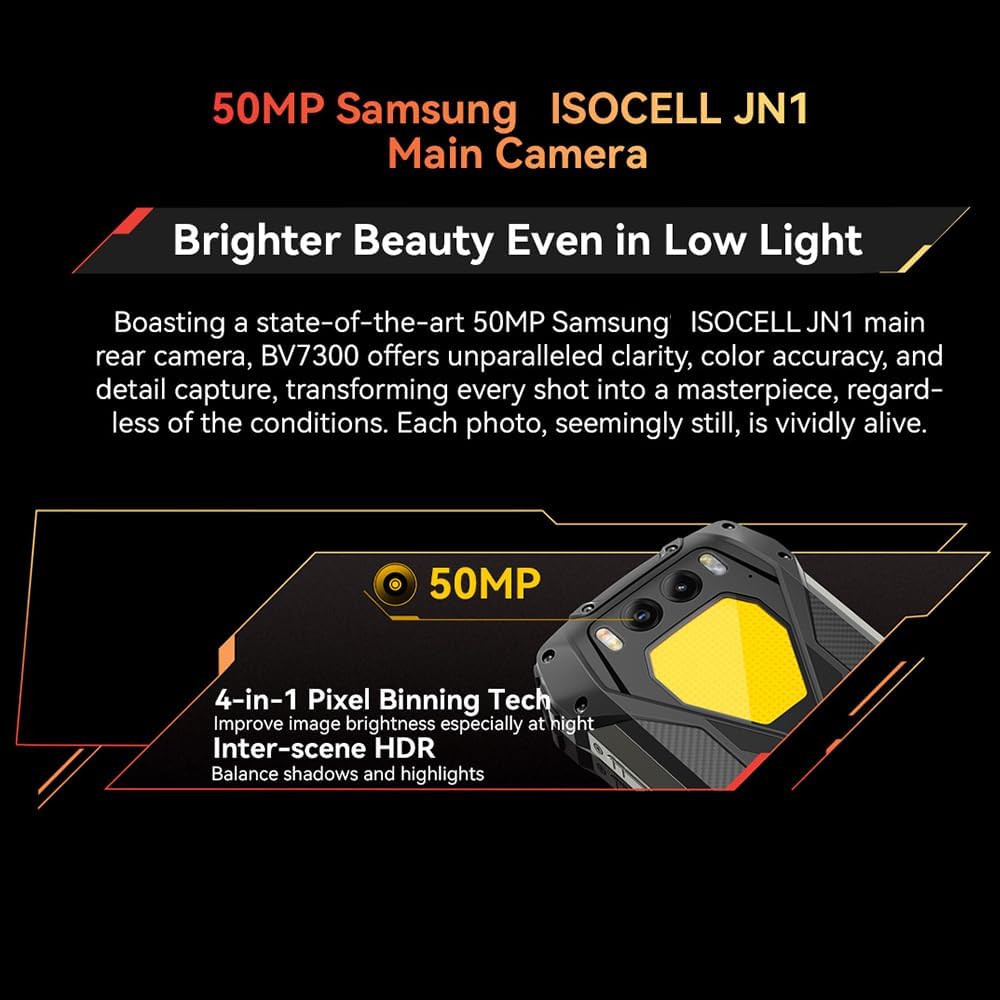
Figure 3: Close-up of the Blackview BV7300's rear camera module, featuring the 50MP main camera.

Figure 4: Diagram illustrating the Blackview BV7300's triple camera setup, including 32MP front, 50MP main, and 20MP night vision cameras.
- الكاميرا الرئيسية (50 ميجابكسل): For high-resolution photos and 1080p video recording. Features 4-in-1 Pixel Binning and Inter-scene HDR for improved image quality in various lighting conditions.
- كاميرا الرؤية الليلية (20 ميجابكسل): Activates in low-light or complete darkness to capture clear images. Access this mode through the camera application.
- الكاميرا الأمامية (32 ميجابكسل): For selfies and video calls, includes beauty mode features.
- To switch between camera modes, open the Camera app and select the desired option (Photo, Video, Night Vision, Portrait, etc.).
ثنائي سيampأضواء جي
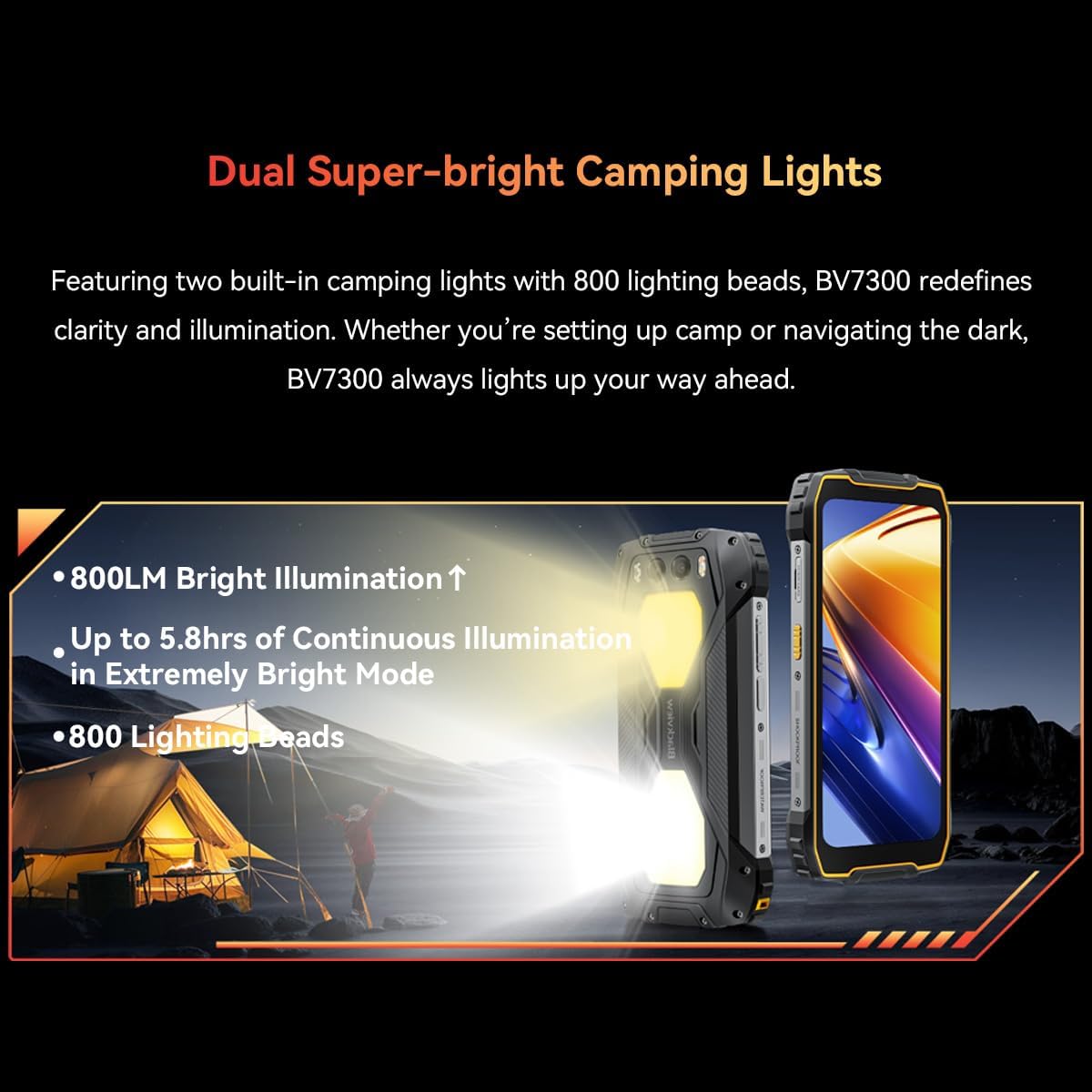
Figure 5: The Blackview BV7300 with its dual 800 lumen camping lights activated, providing strong illumination.

Figure 6: Illustration detailing the dual super-bright camping lights, highlighting 800LM brightness, up to 5.8 hours of continuous illumination in extremely bright mode, and 800 lighting beads.
The BV7300 features two powerful 800 lumen LED camping lights on its rear. These lights offer three lighting modes and three brightness levels. To activate and adjust the lights, use the dedicated function button or access the quick settings panel.
إدارة البطارية

الشكل 7: داخلي view من السودview BV7300 highlighting its 15000mAh battery and charging port.

Figure 8: Graphic showing estimated usage times for the 15000mAh battery: 18 hrs game, 16.5 hrs video, 28 hrs website, 56.5 hrs calling, 32.5 hrs music, 1368 hrs standby.
The BV7300 is equipped with a 15000mAh battery. For optimal battery life, use the provided charger and cable. The device supports OTG (On-The-Go) functionality, allowing it to act as a power bank to charge other devices.
صوتي

Figure 9: Image depicting the Blackview BV7300 with sound waves emanating from its dual box speakers, illustrating its audio capabilities.
The device features dual box speakers for enhanced audio output. Adjust volume using the dedicated volume buttons on the side of the phone.
صيانة
- تنظيف: استخدم قطعة قماش ناعمة وخالية من الوبر لتنظيف الشاشة وجسم الجهاز. تجنب المواد الكيميائية القاسية.
- مقاومة الماء: The BV7300 is waterproof. Ensure all port covers are securely closed before exposing the device to water. Do not intentionally submerge the device beyond its rated depth and time limits.
- تحديثات البرامج: قم بالتحقق من تحديثات النظام وتثبيتها بانتظام لضمان الأداء والأمان الأمثل.
- ادارة التخزين: قم بإزالة غير الضروري بشكل دوري files and applications to maintain sufficient storage space. The device supports up to 2TB TF expansion.
استكشاف الأخطاء وإصلاحها
| مشكلة | حل |
|---|---|
| الجهاز لا يعمل. | Ensure the battery is charged. Connect the device to a charger for at least 30 minutes. If it still doesn't power on, perform a forced restart by holding the Power button for 10-15 seconds. |
| إشارة الشبكة ضعيفة. | Check if SIM cards are correctly inserted. Ensure you are in an area with network coverage. Restart the device. |
| التطبيقات بطيئة أو تتعطل. | Close background applications. Clear app cache. Ensure sufficient storage space is available. Restart the device. |
| يتم استنزاف البطارية بسرعة. | Reduce screen brightness. Disable unused features like Wi-Fi, Bluetooth, GPS. Close power-intensive applications. Check for background app activity. |
| Camping lights not working. | Ensure the battery has sufficient charge. Check settings or dedicated button for activation. |
تحديد
| ميزة | التفاصيل |
|---|---|
| اسم الموديل | بى فى 7300 |
| نظام التشغيل | أندرويد 14 |
| المعالج | MediaTek Kompanio 800T Octa Core, 2 GHz |
| كبش | 18 GB (6GB fixed + 12GB virtual expansion) |
| التخزين الداخلي | 256 جيجا بايت |
| تخزين قابل للتوسيع | Up to 2 TB via MicroSD card |
| حجم العرض | 6.67 بوصة |
| دقة العرض | 1280x720 (HD+), 263 PPI |
| معدل التحديث | 90 Hz Dynamic |
| الكاميرا الخلفية | 50 ميجابكسل (سامسونج آيزوسيل JN1) |
| كاميرا للرؤية الليلية | 20 MP (Sony IMX376) |
| الكاميرا الأمامية | 32 ميجا بكسل |
| سعة البطارية | 15000 مللي أمبير |
| الشحن | Type-C, Fast Charging, OTG support |
| الاتصال | 4G, Dual SIM, GPS, NFC, USB |
| المميزات الخاصة | مصباح مزدوج بقوة 800 لومن من الفئة جamping Lights, Stereo Speakers, Rugged Construction, Waterproof, Facial Recognition |
| أبعاد | 186 × 85 × 24 ملم |
| وزن | 528 جرام |
الضمان والدعم
الأسودview BV7300 comes with a 24-month warranty in Europe. For warranty claims or technical support, please contact Blackview customer service or the retailer from whom you purchased the device. Keep your proof of purchase for warranty validation.
For further assistance, visit the official Blackview webيمكنك زيارة الموقع أو الرجوع إلى معلومات الاتصال المرفقة مع عملية الشراء.