
DEPSTECH DS650, DS300
دليل مستخدم أنظمة التنظير الداخلي DEPSTECH DS650 و DS300
دليل شامل للتشغيل والصيانة واستكشاف الأعطال وإصلاحها
مقدمة
This manual provides detailed instructions for the safe and effective use of your DEPSTECH DS650 Two-Way Articulating Borescope and DS300 Industrial Endoscope Camera. Please read this manual thoroughly before operating the devices.

Image: The DEPSTECH DS650 articulating borescope (right) and the DS300 industrial endoscope (left), showcasing both devices included in the system.
احتياطات السلامة
- لا تستخدم الجهاز في بيئات تحتوي على غازات قابلة للاشتعال أو الانفجار.
- احتفظ بالجهاز بعيدًا عن المجالات الكهرومغناطيسية القوية.
- Ensure the probe is clean before and after each use.
- لا تحاول فك أو تعديل الجهاز.
- قم بتخزين الجهاز في مكان جاف وبارد عند عدم استخدامه.
محتويات الحزمة
تأكد من وجود جميع العناصر في الحزمة الخاصة بك:
- DEPSTECH DS650 Articulating Borescope Unit
- DEPSTECH DS300 Industrial Endoscope Unit
- كابل (كابلات) شحن USB
- دليل المستخدم
- Carrying Case (for DS650)
الإعداد والاستخدام الأول
شحن الجهاز
Before first use, fully charge both borescope units using the provided USB charging cables. The charging indicator will typically change color or turn off when fully charged.
تشغيل/إيقاف التشغيل
Press and hold the power button (usually marked with a power symbol) for a few seconds to turn the device on or off. The display will illuminate upon successful power-on.
Inserting the Probe (DS300)
The DS300 features a semi-rigid cable. Carefully uncoil the cable and ensure the probe head is securely connected to the main unit. The 5.5mm ultra-thin lens is designed for narrow spaces.

Image: Comparison illustrating the 5.5mm ultra-thin lens of the DS300, highlighting its ability to access confined areas compared to larger lenses.
Articulating Probe (DS650)
The DS650 features a 210° two-way articulating probe. This allows for precise control of the camera angle using the joystick or control wheel on the handle. The 6.2mm (0.24in) slim probe is ideal for detailed inspections in challenging areas. Practice articulating the probe before inserting it into an inspection area.

Image: The 210° two-way articulating probe of the DS650, demonstrating its flexibility for seamless detection without blind spots.

Image: The DEPSTECH DS650 articulating borescope being used to inspect an engine component, showcasing its articulating capability.
تعليمات التشغيل
العرض والضوابط
Both models feature an integrated display (4.3" for DS300, 4.5" IPS for DS650) for real-time viewing. Familiarize yourself with the buttons:
- زر الطاقة: تشغيل/إيقاف.
- زر القائمة: إعدادات الوصول والخيارات.
- OK/Confirm Button: Select options or confirm actions.
- أزرار التنقل: Up/Down/Left/Right for menu navigation, digital zoom, or 180° image rotation (DS300).
- زر الصورة/الفيديو: Capture images or start/stop video recording.
- تعديل سطوع LED: Control the intensity of the LED lights on the probe tip.

Image: The DEPSTECH DS300 industrial endoscope unit, showing its 4.3-inch screen and control buttons for operation.
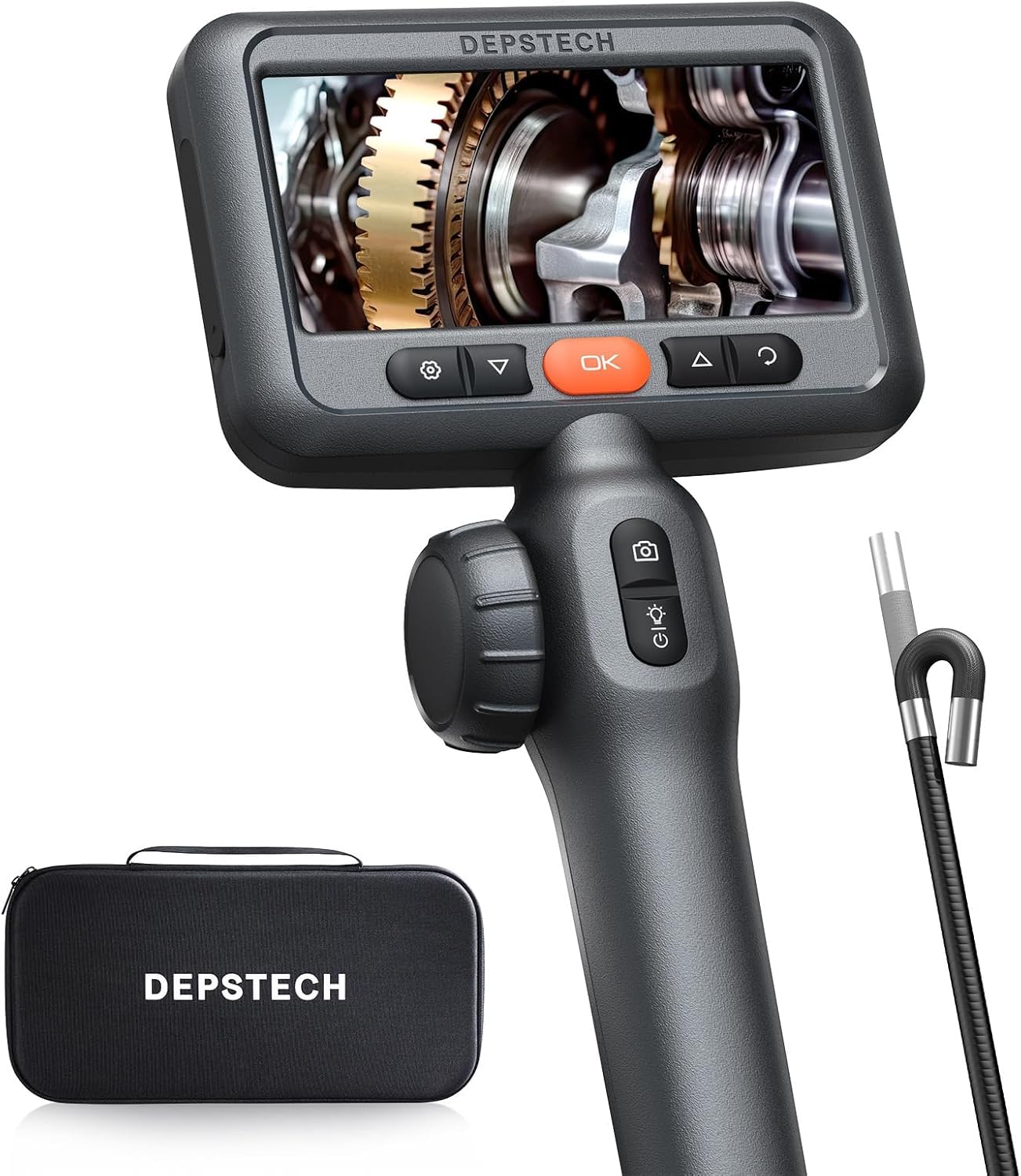
Image: The DEPSTECH DS650 articulating borescope unit, displaying its 4.5-inch IPS screen and ergonomic controls for articulation and image capture.
ضبط أضواء LED
Both models feature adjustable LED lights on the probe tip to illuminate dark inspection areas. Use the dedicated button to cycle through brightness levels. The DS300 has 3 adjustable brightness levels, while the DS650 also has adjustable LED lighting for optimal clarity.

Image: The IP67 waterproof probe of the DS300, demonstrating its resistance to water and the functionality of its 6 adjustable LED lights.
التقاط الصور والفيديو
Press the photo/video button to capture still images or start/stop video recording. Captured media is saved to the internal memory or an inserted SD card (if applicable). The DS650 utilizes Bluart 3.0 technology for enhanced image clarity and 2.0MP resolution.

Image: Graphic illustrating Bluart 3.0 technology, highlighting improvements in image clarity, processing speed, and low light performance.
Focal Range and Depth of Field
The DS300 camera focal range is 1.96~3.93 inches (5 - 10cm). For optimal image clarity, ensure the object being inspected is within this range.
صيانة
- تنظيف المسبار: After each use, gently wipe the probe and lens with a soft, damp cloth. For the DS300, the probe is IP67 waterproof, allowing for cleaning with water if necessary. Ensure it is dry before storage.
- العناية بالبطارية: أعد شحن البطارية بانتظام، حتى لو لم يتم استخدام الجهاز بشكل متكرر، للحفاظ على صحة البطارية.
- تخزين: Store the devices in their original packaging or a protective case in a cool, dry place, away from direct sunlight and extreme temperatures.
استكشاف الأخطاء وإصلاحها
| مشكلة | السبب المحتمل | حل |
|---|---|---|
| الجهاز لا يعمل. | بطارية منخفضة؛ زر الطاقة غير مضغط لفترة كافية. | اشحن الجهاز بالكامل؛ اضغط مع الاستمرار على زر التشغيل لمدة 3-5 ثانية. |
| الصورة ضبابية أو غير واضحة. | Object out of focal range; Lens is dirty; Insufficient lighting. | Adjust distance to object (DS300 focal range: 1.96~3.93 in); Clean the lens; Increase LED brightness. |
| Probe articulation is stiff (DS650). | Debris in articulation mechanism; Cable kinked. | Gently manipulate the articulation to clear minor obstructions; Ensure cable is not severely bent. If problem persists, contact support. |
| Cannot capture photos/videos. | Memory full; SD card not inserted or faulty. | حذف القديم files; Insert a compatible SD card or replace existing one. |
تحديد
| ميزة | DS650 Articulating Borescope | المنظار الصناعي DS300 |
|---|---|---|
| قطر التحقيق | شنومكسم (شنومكسين) | شنومكسم (شنومكسين) |
| التعبير | 210° Two-Way | N/A (180° image rotation) |
| حجم العرض | شاشة IPS مقاس 4.5 بوصة | شاشة LCD مقاس 4.3 بوصة |
| دقة الكاميرا | 2.0MP (1080P HD Video) | شنومكسب هد فيديو |
| المدى البؤري | Not specified (optimized by Bluart 3.0) | 1.96~3.93 in (5 - 10cm) |
| طول الكابل | 5 قدمًا (حوالي 1.5 مترًا) | 16.5 قدم (5 م) |
| تصنيف مقاومة الماء | Not explicitly stated for DS650 probe, but typically high. | IP67 |
| الاتصال | العرض المباشر | Direct display (No Wi-Fi/Bluetooth) |
| أوضاع التصوير | أوتوماتيكي، يدوي | |
| التحكم في التعرض | اوتوماتيكي | |
| نوع التكبير | تقريب رقمي | |
معلومات الضمان
DEPSTECH products typically come with a standard manufacturer's warranty. Please refer to the warranty card included in your product packaging or visit the official DEPSTECH webللاطلاع على شروط وأحكام الضمان المفصلة، يُرجى زيارة الموقع. احتفظ بإيصال الشراء كإثبات للشراء في حال وجود أي مطالبات بالضمان.
دعم العملاء
For technical assistance, troubleshooting not covered in this manual, or warranty inquiries, please contact DEPSTECH customer support:
- Webموقع: www.depstech.com (Check for support contact details)
- بريد إلكتروني: يرجى الرجوع إلى عبوة المنتج أو webالموقع مخصص لبريد الدعم المحدد.
When contacting support, please have your product model (DS650, DS300) and ASIN (B0DMSMBJFR) ready.
Ask a question about this manual
Ask about setup, troubleshooting, compatibility, parts, safety, or missing instructions. Manuals+ will review the question and use this page’s manual context to help answer it.