
مقدمة
This manual provides essential information for setting up, operating, maintaining, and troubleshooting your HP 14 inch Laptop. Please read this guide thoroughly to ensure proper use and to maximize the performance and longevity of your device.

Image: An HP 14 inch laptop being used by a person on a kitchen counter, demonstrating its portability and suitability for various environments.
1. الإعداد الأولي
1.1 فك التغليف والتشغيل الأولي
أخرج الكمبيوتر المحمول وجميع ملحقاته من العبوة بحرص. تأكد من وجود جميع المكونات:
- HP 14 inch Laptop
- محول الطاقة
- التوثيق
Connect the power adapter to the laptop's power port and then to a wall outlet. Press the power button to turn on the laptop. Follow the on-screen instructions to complete the initial Windows 11 setup, including language selection, network connection, and user account creation.
1.2 توصيل الأجهزة الطرفية
يحتوي الكمبيوتر المحمول الخاص بك على منافذ مختلفة لتوصيل الأجهزة الخارجية:

الصورة: الجانب view of the HP 14 inch laptop, highlighting the various ports available for connecting peripherals such as USB devices and external displays.
- USB 3.2 Gen 1 Type-C (5Gbps): لتوصيل أجهزة USB-C الحديثة.
- USB 3.2 Gen 1 Type-A (2x, 5Gbps): لأجهزة USB القياسية مثل الفئران ولوحات المفاتيح ومحركات الأقراص الخارجية.
- HDMI الإصدار 1.4: للاتصال بالشاشات أو أجهزة العرض الخارجية.
- مقبس سماعة الرأس/الميكروفون المشترك: For audio input/output devices.
Simply plug the peripheral's cable into the corresponding port on the laptop. Most devices are plug-and-play and will be recognized automatically by Windows 11.
2. التشغيل
2.1 الاستخدام الأساسي
The laptop features a standard keyboard and a responsive touchpad for navigation. Familiarize yourself with the function keys (Fn) for quick access to settings like volume, brightness, and Wi-Fi.
2.2 Connecting to Networks (Wi-Fi)
Your laptop supports Wi-Fi 6 for fast wireless connectivity. To connect to a Wi-Fi network:
- Click the Wi-Fi icon in the taskbar (usually bottom-right).
- حدد الشبكة المطلوبة من القائمة.
- أدخل مفتاح أمان الشبكة (كلمة المرور) إذا طُلب منك ذلك.
- انقر فوق "اتصال".
2.3 Bluetooth Device Pairing
The laptop includes Bluetooth 5.3 for connecting wireless accessories. To pair a Bluetooth device:
- اذهب الى الإعدادات > البلوتوث والأجهزة.
- تأكد من تشغيل البلوتوث On.
- انقر إضافة جهاز وحدد بلوتوث.
- ضع جهاز Bluetooth في وضع الإقران.
- Select your device from the list and follow any on-screen prompts.
2.4 باستخدام ملف Webكاميرا
The integrated 720p HD camera is suitable for video calls and conferences. For privacy, your laptop features a physical privacy shutter. Slide the shutter to cover or uncover the camera lens as needed.
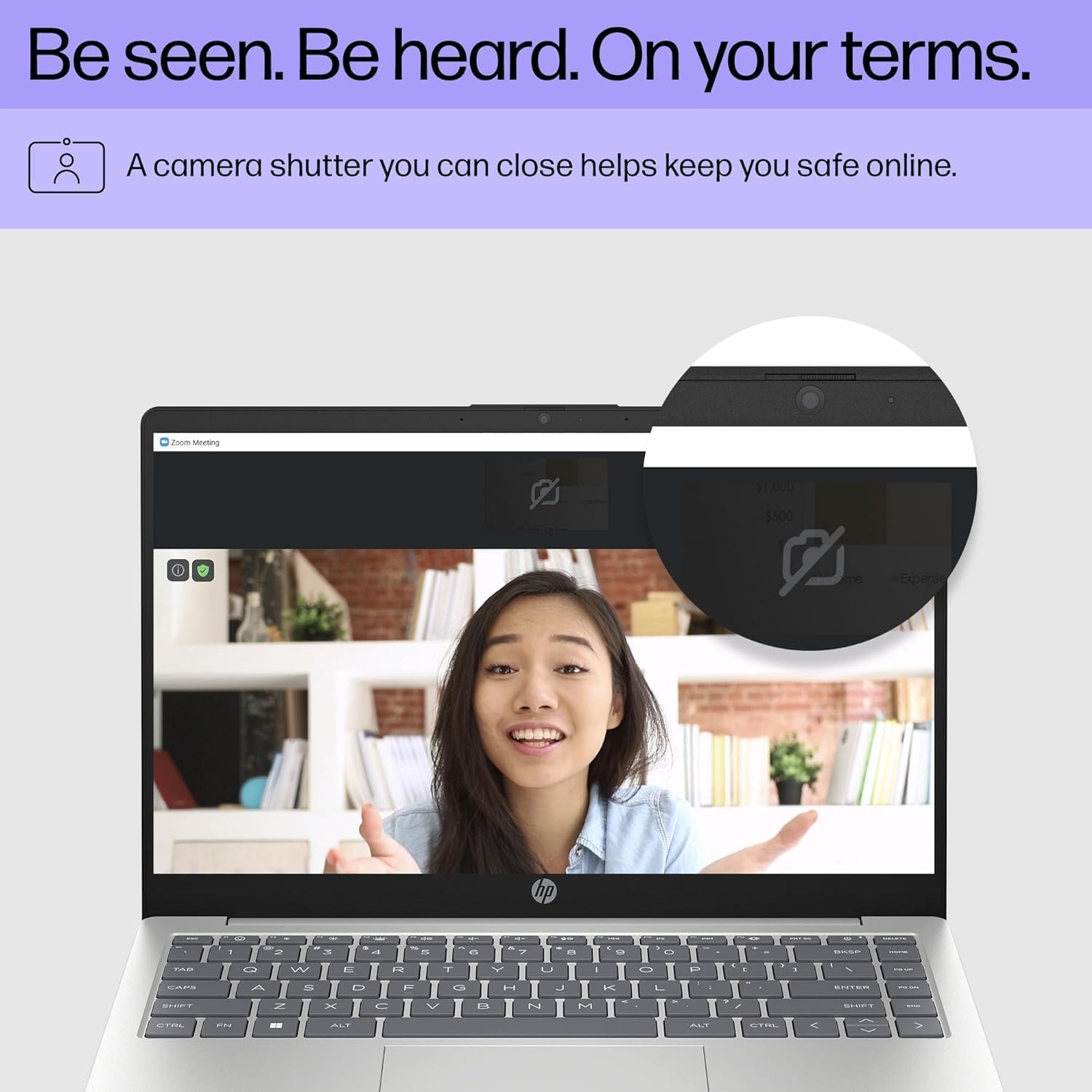
Image: Close-up of the HP laptop's integrated webcam, showing the physical privacy shutter in the open position. This feature allows users to physically block the camera lens for enhanced privacy.
2.5 إدارة البطارية
The laptop is equipped with a 3-cell 41Wh battery, providing up to 8 hours of non-gaming battery life. To optimize battery longevity:
- تجنب تفريغ البطارية بالكامل بشكل متكرر.
- Keep the laptop in a cool, dry environment.
- ضبط سطوع الشاشة إلى المستوى المريح.
- Utilize Windows power saving modes when on battery power.

Image: Diagram illustrating the HP laptop's dimensions (14" display, 12.74" W, 8.46" D, 0.70" H) and indicating up to 8 hours of mixed usage battery life. This highlights the laptop's portability and endurance.
3. الصيانة
3.1 تنظيف الكمبيوتر المحمول
يساعد التنظيف المنتظم في الحفاظ على مظهر جهاز الكمبيوتر المحمول ووظائفه:
- شاشة: استخدم قطعة قماش ناعمة وخالية من الوبر برفق دampاغسلها بالماء أو بمنظف الشاشة. تجنب المواد الكيميائية القاسية.
- لوحة المفاتيح والهيكل: استخدم قطعة قماش ناعمة. للأوساخ العنيدة، افركها برفق.ampيمكن استخدام قطعة قماش مبللة بمحلول صابون خفيف، مع التأكد من عدم دخول أي سائل إلى الفتحات.
- الموانئ: استخدم الهواء المضغوط لإزالة الغبار من المنافذ بلطف.
3.2 تحديثات البرامج
Keep your Windows 11 operating system and drivers updated to ensure optimal performance and security. Windows Update typically handles this automatically, but you can manually check by going to الإعدادات > تحديث Windows.
3.3 Storage and Memory Management
Your laptop is equipped with a 4TB NVMe M.2 SSD and 64GB DDR4 RAM. While these provide ample capacity, regular management is recommended:
- احذف بشكل دوري العناصر غير الضرورية fileوتطبيقات لتحرير مساحة التخزين.
- استخدم التخزين السحابي للملفات الكبيرة files to reduce local drive usage.
- Windows 11 includes tools like Storage Sense (in Settings > System > Storage) to automate cleanup.
4. استكشاف المشكلات الشائعة وإصلاحها
4.1 مشاكل الطاقة
- الكمبيوتر المحمول لا يعمل: تأكد من توصيل محول الطاقة بإحكام بالكمبيوتر المحمول ومأخذ طاقة يعمل. جرّب مقبسًا آخر.
- البطارية لا تشحن: تأكد من توصيل محول الطاقة. تحقق من وجود أي تلف في المحول أو الكابل.
4.2 مشاكل العرض
- لا توجد صورة على الشاشة: If connected to an external monitor, ensure the correct input source is selected on the monitor. Try pressing فن + F4 (or the equivalent display toggle key) to switch display outputs.
- شاشة خافتة: Adjust brightness using the function keys (e.g., الجبهة الوطنية + F2 / F3) أو من خلال إعدادات العرض في Windows.
4.3 مشاكل الاتصال (واي فاي/بلوتوث)
- لا يمكن الاتصال بشبكة Wi-Fi: Ensure Wi-Fi is enabled in Windows settings. Restart your router and the laptop. Check if other devices can connect to the network.
- جهاز البلوتوث غير مقترن: Ensure the Bluetooth device is in pairing mode and within range. Restart Bluetooth on the laptop and the device.
For more detailed troubleshooting or persistent issues, refer to the HP support webالموقع أو الاتصال بخدمة العملاء.
5. المواصفات
Detailed technical specifications for your HP 14 inch Laptop (Model EP01):

Image: Infographic detailing key specifications of the HP 14 inch laptop, including 13th Gen Intel Core i7-1355U processor, 16GB DDR4-3200 MHz RAM, 1TB PCIe NVMe M.2 SSD, Intel Iris Xe Graphics, Windows 11 Home, and a Full HD IPS anti-glare display.
| ميزة | مواصفة |
|---|---|
| ماركة | HP |
| اسم الموديل | 14 inch Laptop (EP01) |
| المعالج | 13th Generation Intel Core i7-1355U (10 Cores, up to 5.0GHz) |
| الرسومات | رسومات Intel Iris Xe (متكاملة) |
| الذاكرة (RAM) | 64GB DDR4 3200 MHz SDRAM (Upgraded from 16GB) |
| تخزين | 4TB NVMe M.2 SSD (Upgraded from 1TB) |
| عرض | 14" FHD (1920 x 1080) IPS Anti-Glare, 300 nits, 45% NTSC, 60Hz |
| نظام التشغيل | ويندوز 11 هوم |
| الاتصال | واي فاي 6 (2x2)، بلوتوث 5.3 |
| الموانئ | 1x USB 3.2 Gen 1 Type-C, 2x USB 3.2 Gen 1 Type-A, 1x HDMI v1.4, 1x Headphone/Microphone Combo Jack |
| آلة تصوير | كاميرا عالية الدقة 720 بكسل مع مصراع الخصوصية |
| صوتي | مكبرات صوت مزدوجة |
| بطارية | بطارية 3 خلايا 41 واط/ساعة (تصل إلى 8 ساعات في حالة عدم اللعب) |
| الأبعاد (الطول × العرض × الارتفاع) | 12.74 × 8.46 × 0.70 بوصة |
| وزن | 5.13 رطل |
| لون | الفضة الطبيعية |
| رمز المنتج الموحد | 194850841057 |
6. الضمان والدعم
6.1 ضمان المنتج
Your HP laptop comes with a standard manufacturer's warranty. For specific details regarding coverage, duration, and terms, please refer to the warranty documentation included with your product or visit the official HP support webيغطي الضمان عادةً عيوب المواد والصناعة في ظل الاستخدام العادي.
6.2 دعم العملاء
للحصول على المساعدة التقنية أو الخدمة أو لأي استفسارات أخرى، يرجى الاتصال بدعم عملاء HP:
- الدعم عبر الإنترنت: يزور الدعم.hp.com للسائقين، والأدلة، وأدلة استكشاف الأخطاء وإصلاحها.
- دعم الهاتف: Refer to the contact information provided in your product's documentation for regional phone numbers.
When contacting support, please have your laptop's serial number and model number (EP01) ready.