
1. المقدمة
Thank you for choosing the Intenso O400HA Over-Ear Headphones. These headphones are designed to provide a superior audio experience with advanced features such as Hybrid Active Noise Cancelling (ANC), Transparency Mode, and Bluetooth 5.3 connectivity. This manual will guide you through the setup, operation, and maintenance of your new headphones.
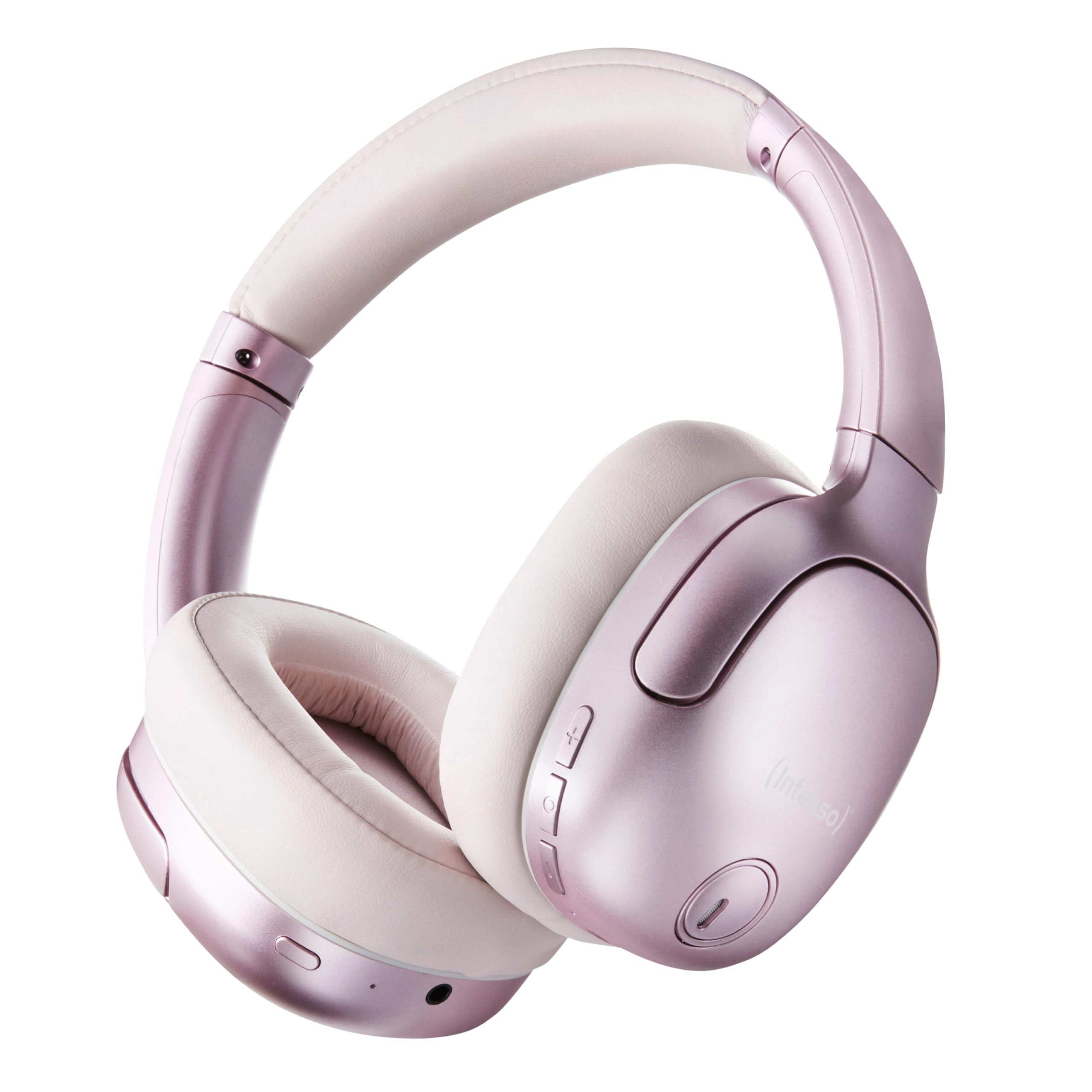
Image 1.1: Intenso O400HA Over-Ear Headphones (Pink)
The Intenso O400HA headphones feature a comfortable over-ear design with soft ear pads, an adjustable headband, and intuitive controls on the earcups.
2. محتويات العبوة
يرجى التحقق من الحزمة للعناصر التالية:
- Intenso O400HA Over-Ear Headphones
- كابل شحن USB-C إلى USB-C
- 1.5m Audio Cable (3.5mm jack)
- دليل المستخدم
3. انتهى المنتجview
Familiarize yourself with the various parts and controls of your Intenso O400HA headphones.

الصورة 3.1: الجانب view of Intenso O400HA headphones with controls
This image displays the right earcup with its control buttons and ports. These typically include power, volume, multi-function buttons, and a charging port.
الضوابط والمنافذ:
- زر الطاقة: تُستخدم لتشغيل/إيقاف سماعات الرأس وبدء عملية الاقتران عبر البلوتوث.
- زر رفع الصوت/المسار التالي: يزيد مستوى الصوت بضغطة قصيرة، وينتقل إلى المقطع التالي بضغطة طويلة.
- زر خفض الصوت/المسار السابق: Decreases volume with a short press, goes to the previous track with a long press.
- زر متعدد الوظائف (MFB): Controls playback (play/pause), answers/ends calls, activates voice assistant.
- زر وضع إلغاء الضوضاء النشط/الشفافية: Toggles between Hybrid Active Noise Cancelling, Transparency Mode, and normal mode.
- منفذ شحن USB-C: لشحن سماعات الرأس.
- مقبس صوت 3.5 ملم: للاتصال السلكي.
- الميكروفونات: Internal and external microphones for ANC and calls.
4. الإعداد
4.1. شحن سماعات الرأس
قبل الاستخدام الأول، اشحن سماعات الرأس بالكامل.
- قم بتوصيل كابل الشحن USB-C المرفق بمنفذ USB-C الموجود في سماعات الرأس.
- قم بتوصيل الطرف الآخر من الكابل بمحول طاقة USB (غير متضمن) أو بمنفذ USB الخاص بالكمبيوتر.
- سيُظهر مؤشر LED حالة الشحن. وعادةً ما ينطفئ أو يتغير لونه عند اكتمال الشحن.
A full charge takes approximately 2 hours. A quick charge of 15 minutes provides up to 6 hours of playtime.
4.2. اقتران بلوتوث
لتوصيل سماعات الرأس بجهاز يدعم تقنية البلوتوث:
- تأكد من إيقاف تشغيل سماعات الرأس.
- اضغط مع الاستمرار على زر الطاقة لمدة تتراوح بين 5 و 7 ثوانٍ تقريبًا حتى يومض مؤشر LED باللونين الأزرق والأحمر، مما يشير إلى وضع الاقتران.
- على جهازك (الهاتف الذكي، الجهاز اللوحي، الكمبيوتر المحمول)، انتقل إلى إعدادات البلوتوث وقم بتمكين البلوتوث.
- بحث عن available devices and select "Intenso O400HA" from the list.
- Once connected, the LED indicator will typically flash blue slowly or remain solid blue.
ستحاول سماعات الرأس تلقائيًا إعادة الاتصال بآخر جهاز مقترن بها عند تشغيلها.
5. تشغيل سماعات الرأس
5.1. تشغيل/إيقاف التشغيل
- تشغيل الطاقة: اضغط مع الاستمرار على زر التشغيل لمدة 2-3 ثوانٍ.
- إيقاف التشغيل: اضغط مع الاستمرار على زر التشغيل لمدة 3-4 ثوانٍ.
5.2. Audio Modes: ANC, Transparency, Music
The Intenso O400HA headphones offer three distinct audio modes to suit your environment.

الصورة 5.1: انتهىview of Noise Control Modes
This image illustrates the key noise control technologies: Hybrid Active Noise Cancellation (ANC) for reducing ambient noise, Environmental Noise Cancellation (ENC) for clear calls, and Transparency Mode for hearing your surroundings.

Image 5.2: Hybrid Active Noise Cancelling Explained
This diagram shows how Hybrid ANC works using both external and internal microphones to filter out up to 95% of ambient noise, such as engine sounds.
- نظام إلغاء الضوضاء النشط الهجين (ANC): Press the ANC/Transparency Mode button to activate. This mode significantly reduces ambient noise, ideal for travel or noisy environments.
- وضع الشفافية: Press the ANC/Transparency Mode button again to switch to Transparency Mode. This allows external sounds to pass through, enabling you to hear your surroundings without removing the headphones.
- Normal Mode (Music Mode): Press the ANC/Transparency Mode button a third time to return to normal mode, where ANC and Transparency are off. This mode provides balanced sound for a comprehensive listening experience.
5.3. Music Playback and Calls
- تشغيل/إيقاف مؤقت: Short press the Multi-function Button (MFB).
- المسار التالي: اضغط لفترة طويلة على زر رفع الصوت.
- المسار السابق: اضغط لفترة طويلة على زر خفض الصوت.
- رفع الصوت: اضغط لفترة قصيرة على زر رفع الصوت.
- اخفض الصوت: اضغط لفترة قصيرة على زر خفض الصوت.
- الرد/إنهاء المكالمة: اضغط قصيرًا على MFB.
- رفض المكالمة: اضغط لفترة طويلة على MFB.
- تنشيط مساعد الصوت: اضغط مرتين على MFB.
5.4. Wired Connection (Passive Mode)
You can use the headphones in passive mode even if the battery is depleted or if you prefer a wired connection.
- قم بتوصيل أحد طرفي كابل الصوت 3.5 ملم بمقبس الصوت الموجود على سماعات الرأس.
- قم بتوصيل الطرف الآخر بمخرج الصوت 3.5 ملم الخاص بجهازك.
Note: ANC and Transparency modes may not function or may have reduced performance when using the wired connection without power.
6. الصيانة
To ensure the longevity and optimal performance of your Intenso O400HA headphones, follow these maintenance guidelines:
- تنظيف: استخدم قطعة قماش ناعمة وجافة لتنظيف سماعات الرأس. لا تستخدم المنظفات الكاشطة أو المذيبات أو المواد الكيميائية القاسية.
- تخزين: Store the headphones in a cool, dry place away from direct sunlight and extreme temperatures. When not in use, it is recommended to store them in a protective case (if provided or purchased separately).
- التعرض للماء: هذه السماعات ليست مقاومة للماء. تجنب تعريضها للماء أو الرطوبة أو المطر.
- العناية بالبطارية: For optimal battery life, avoid fully discharging the battery frequently. Charge the headphones regularly, even if not used for extended periods.
- العناية بالكابلات: Handle the charging and audio cables gently. Avoid bending or twisting them excessively.
7. استكشاف الأخطاء وإصلاحها
إذا واجهت أي مشاكل مع سماعات الرأس الخاصة بك، فراجع المشاكل والحلول الشائعة التالية:
| مشكلة | السبب المحتمل | حل |
|---|---|---|
| سماعات الرأس لا تعمل | بطارية منخفضة | اشحن سماعات الرأس بالكامل. |
| لا يمكن الاقتران عبر البلوتوث | Headphones not in pairing mode; Device Bluetooth off; Interference | Ensure headphones are in pairing mode (flashing blue/red). Turn Bluetooth on your device. Move closer to the device. Forget previous pairings and try again. |
| لا يوجد صوت أو مستوى صوت منخفض | Volume too low; Incorrect audio source; Loose cable (wired mode) | Increase volume on headphones and device. Check if the correct audio output is selected on your device. Ensure 3.5mm cable is securely connected. |
| مؤتمر الرعاية التوليدية غير فعال | ANC not activated; Improper fit | اضغط على زر إلغاء الضوضاء النشط لتفعيله. اضبط سماعات الرأس لتناسب أذنيك بإحكام. |
| تشويه الصوت | Distance from device; Interference; Low battery | Move closer to your device. Avoid strong electromagnetic fields. Charge the headphones. |
8. المواصفات
| ميزة | التفاصيل |
|---|---|
| اسم الموديل | Over-Ear O400HA |
| تكنولوجيا الاتصال | Wireless (Bluetooth 5.3) / Wired (3.5mm jack) |
| التحكم في الضوضاء | إلغاء الضوضاء الهجين |
| عمر البطارية | حتى ساعتين |
| وقت الشحن | Approximately 2 Hours (15 min for 6 hours playtime) |
| لاسلكي المدى | حتى 15 أمتار |
| استجابة التردد | 20 هرتز إلى 20 كيلو هرتز |
| مقاومة | 32 أوم |
| طريقة التحكم | اللمس/الأزرار |
| وزن | 0.25 كيلوغرام |
| مادة | الإيلاستومر الحراري البلاستيكي (TPE) |
| الأجهزة المتوافقة | Mobile phones, Laptops, Tablets, Gaming Consoles, Car Audio Systems |
9. الضمان والدعم
Intenso products are designed for reliability and performance. For warranty information and customer support, please refer to the warranty card included with your purchase or visit the official Intenso webالموقع. احتفظ بإثبات الشراء الخاص بك لاستخدامه في أي مطالبات بالضمان.
For further assistance, you may contact Intenso customer service through their official channels.