
1. تعليمات السلامة الهامة
Before operating the BH Fitness Sherpa Run treadmill, please read and understand all safety instructions. Keep this manual for future reference.
- استشر طبيبك دائمًا قبل البدء بأي برنامج تمرين جديد.
- ضع جهاز المشي على سطح مستوٍ وثابت مع وجود مساحة كافية حوله (مترين على الأقل خلفه و0.6 متر على كل جانب).
- Ensure the safety key is properly attached to your clothing and the console before starting. In case of emergency, the safety key will stop the treadmill.
- لا تسمح للأطفال أو الحيوانات الأليفة بالاقتراب من جهاز المشي أثناء تشغيله.
- The maximum user weight for this treadmill is 110 kg (242 lbs).
- ارتدي الأحذية والملابس الرياضية المناسبة.
- لا تقم بتشغيل جهاز المشي إذا كان تالفًا أو لا يعمل بشكل صحيح.
- احتفظ بيديك وقدميك بعيدًا عن جميع الأجزاء المتحركة.
- افصل جهاز المشي عن مأخذ الطاقة عند عدم استخدامه أو قبل التنظيف والصيانة.
2. انتهى المنتجview
The BH Fitness Sherpa Run treadmill is designed for regular home use, offering a combination of convenience and performance. It features a compact folding design, a 120x42cm running surface, and a maximum speed of 14 km/h. The treadmill includes 12 pre-defined training programs and 15 levels of electrical incline.
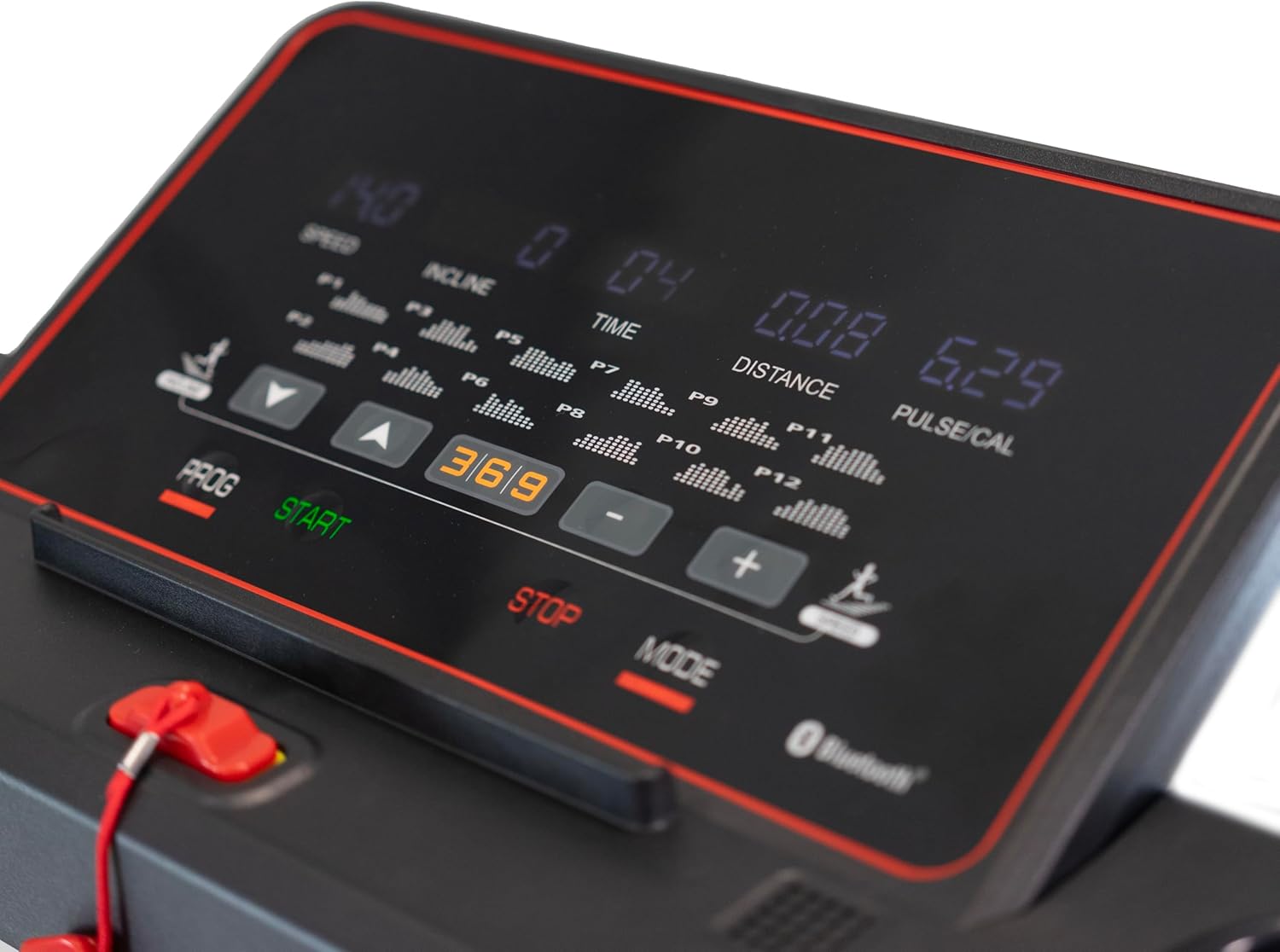
Figure 2.1: BH Fitness Sherpa Run treadmill in unfolded position.
This image shows the complete treadmill with its running deck, console, and handrails, ready for exercise.

Figure 2.2: BH Fitness Sherpa Run treadmill in folded position.
The treadmill is shown vertically folded, highlighting its compact design for easy storage, with wheels visible at the base.
3. الإعداد والتجميع
The BH Fitness Sherpa Run treadmill is semi-assembled for your convenience. Minimal assembly is required to get your treadmill ready for use.
3.1 فك التعبئة
- قم بإزالة جميع المكونات بعناية من العبوة.
- Verify that all parts listed in the 'What's in the Box' section are present.
3.2 خطوات التجميع
- Place the treadmill base on a clear, level surface.
- Carefully unfold the handrails into their upright position.
- Using the provided assembly tool kit, tighten the 4 screws that secure the handrails.
- Ensure all connections are secure and the treadmill is stable.
- قم بتوصيل كابل الطاقة بجهاز المشي ثم بمأخذ كهربائي مؤرض.
Your treadmill should be ready for use in less than 5 minutes after unfolding and securing the handrails.
4. تعليمات التشغيل
تعرف على لوحة التحكم والوظائف قبل البدء في التمرين.
4.1 انتهت لوحة التحكمview
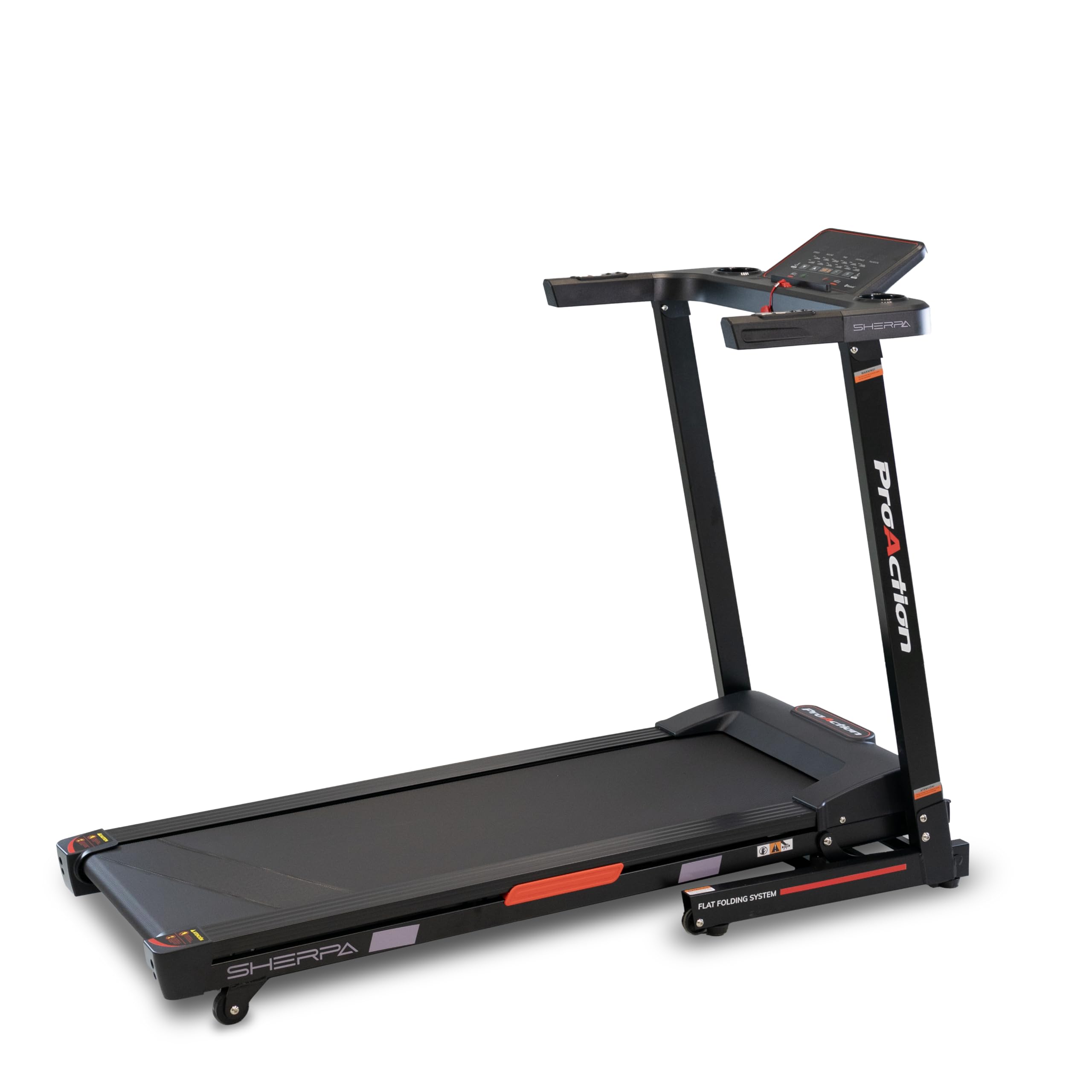
Figure 4.1: LED Monitor and Control Panel.
The LED monitor displays speed, incline, time, distance, pulse, and calories. Control buttons for programs, start, stop, mode, speed, and incline are visible.
- LED Monitor: Displays real-time information including speed, incline, time, distance, pulse, and calories burned.
- زر البدء: يبدأ حركة سير جهاز المشي.
- زر التوقف: يوقف حركة سير جهاز المشي.
- زر الوضع: يتنقل بين أوضاع أو إعدادات العرض المختلفة.
- زر PROG: Selects from the 12 pre-defined training programs.
- أزرار السرعة (+/-): Adjusts the treadmill speed (up to 14 km/h).
- Incline Buttons (Up/Down): Adjusts the electrical incline (15 levels).
- مفتاح الأمان: A magnetic key that must be placed on the console for the treadmill to operate. Pulling it off will immediately stop the treadmill.
4.2 بدء التمرين
- قف على القضبان الجانبية لجهاز المشي.
- قم بتثبيت مشبك مفتاح الأمان على ملابسك وضع الطرف المغناطيسي على المنطقة المخصصة على وحدة التحكم.
- اضغط على يبدأ اضغط على الزر. سيبدأ جهاز المشي بسرعة منخفضة.
- قم بزيادة السرعة تدريجيًا باستخدام + button to your desired pace.
- اضبط الميل باستخدام أعلى/أسفل incline buttons as needed.
- للتوقف، اضغط على قف اضغط على الزر أو اسحب مفتاح الأمان.
4.3 Using Pre-defined Programs
The treadmill offers 12 pre-defined programs to vary your workout intensity.
- من شاشة الاستعداد، اضغط على الزر بروغ button to cycle through the available programs (P1-P12).
- Once you have selected a program, press يبدأ to begin. The treadmill will automatically adjust speed and incline according to the program profile.
4.4 Bluetooth FTMS Connectivity
The integrated Bluetooth FTMS technology allows you to connect your treadmill to compatible fitness applications on your smartphone or tablet for enhanced interactivity and personalized training options.
- تأكد من تمكين Bluetooth على جهازك الذكي.
- Open your preferred fitness application that supports FTMS.
- Follow the app's instructions to search for and connect to your BH Fitness Sherpa Run treadmill.
4.5 Integrated Speakers and Audio Input
Connect your smartphone or tablet via the auxiliary audio jack to enjoy music through the integrated speakers during your workout.

Figure 4.2: Console with Cup Holder.
A close-up of the console showing the convenient cup holder, designed to keep hydration accessible during workouts.

Figure 4.3: Handrail Controls.
This image focuses on the buttons located on the handrails, providing quick access to speed or incline adjustments during a workout.
5. الصيانة
تضمن الصيانة المنتظمة طول عمر جهاز المشي الخاص بك والأداء الأمثل.
5.1 التنظيف
- افصل دائمًا جهاز المشي قبل التنظيف.
- امسح وحدة التحكم والأسطح الأخرى بالزيتamp امسح بقطعة قماش بعد كل استخدام لإزالة العرق والغبار. تجنب المنظفات الكاشطة.
- Periodically vacuum underneath the treadmill to prevent dust buildup from affecting motor performance.
5.2 تشحيم حزام الجري
The running belt requires periodic lubrication to reduce friction and extend its lifespan. Refer to the specific lubrication instructions provided with your treadmill or contact customer support for guidance on the correct lubricant and frequency.
5.3 تعديل حزام الجري
Over time, the running belt may become off-center or loose. Consult the detailed instructions in the full manual (if provided separately) or contact customer support for proper adjustment procedures. Incorrect adjustment can damage the treadmill.
6. استكشاف الأخطاء وإصلاحها
If you encounter issues with your treadmill, refer to the following common troubleshooting steps.
- جهاز المشي لا يعمل: Ensure the power cable is securely plugged into a grounded outlet and the treadmill. Check that the safety key is correctly placed on the console. Verify the circuit breaker has not tripped.
- Belt stops or slips: The running belt may require tension adjustment or lubrication. Refer to the maintenance section or contact customer support.
- ضوضاء غير عادية: Check for any loose parts or foreign objects under the belt. If the noise persists, discontinue use and contact customer support.
- Console display not working: Ensure all cables are securely connected. Try unplugging the treadmill for 5 minutes and plugging it back in to reset the console.
For issues not covered here, please contact BH Fitness customer support.
7. المواصفات
| ميزة | مواصفة |
|---|---|
| نموذج | جي6319 |
| ماركة | اللياقة البدنية BH |
| سطح التشغيل | 120 × 42 سم |
| السرعة القصوى | 14 كم/س |
| مستويات الانحدار | 15 (Electrical) |
| برامج محددة مسبقًا | 12 |
| الحد الأقصى لوزن المستخدم | 110 كجم |
| شاشة | LED (Speed, Incline, Time, Distance, Pulse, Calories) |
| الاتصال | Bluetooth FTMS, Auxiliary Audio Jack |
| المميزات الخاصة | Integrated Speakers, K-Dumpers (shock absorption) |
| الأبعاد غير المطوية (الطول × العرض × الارتفاع) | 143 × 66 × 104 سم |
| الأبعاد المطوية (الطول × العرض × الارتفاع) | 64 × 66 × 130 سم |
| مادة | Plastic, Rubber, Fiberglass (frame) |
| مصدر الطاقة | الكابلات الكهربائية |
8. الضمان والدعم
8.1 ضمان المنتج
The BH Fitness Sherpa Run treadmill comes with a warranty period of 3 years in Spain and 2 years in Germany, France, Italy, Netherlands, and Belgium. Please retain your proof of purchase for warranty claims.
8.2 دعم العملاء
For technical assistance, spare parts, or warranty inquiries, please contact BH Fitness customer support. Refer to the contact information provided in your warranty documentation or visit the official BH Fitness webموقع.