
Temtop PMD371 & Airing2000 Bundle
Temtop PMD371 & Airing2000 Professional Air Quality Monitoring Bundle User Manual
Model: PMD371 & Airing2000 | Brand: Temtop
1. المقدمة
This user manual provides detailed instructions for the operation and maintenance of the Temtop PMD371 and Airing2000 Professional Air Quality Monitoring Bundle. This bundle offers a comprehensive solution for precise particle and air quality monitoring in various environments, including laboratories, cleanrooms, and field applications. The PMD371 is designed for detailed particle detection and environmental monitoring, while the Airing2000 extends capabilities with advanced particulate and formaldehyde detection. Please read this manual thoroughly before using the devices to ensure proper function and safety.
2. معلومات السلامة
- لا تعرض الأجهزة لدرجات حرارة شديدة أو رطوبة عالية أو لأشعة الشمس المباشرة.
- تجنب إسقاط الأجهزة أو تعريضها لصدمات قوية.
- Do not attempt to disassemble or modify the devices. Refer all servicing to qualified personnel.
- أبقِ الأجهزة بعيدة عن الماء والسوائل الأخرى.
- تأكد من التهوية المناسبة عند التشغيل في الأماكن المغلقة.
- Use only the specified power adapters and accessories provided by Temtop.
3. محتويات العبوة
تأكد من وجود جميع العناصر في العبوة:
- Temtop PMD371 Particle Counter
- Temtop Airing2000 Particulate Monitor
- كابلات شحن USB (عدد 2)
- محولات الطاقة (x2)
- دليل المستخدم (هذا المستند)
- Calibration Certificate (if applicable)
4. انتهى المنتجview

Image: The Temtop PMD371 (right) and Airing2000 (left) air quality monitors, showcasing their distinct designs and displays.
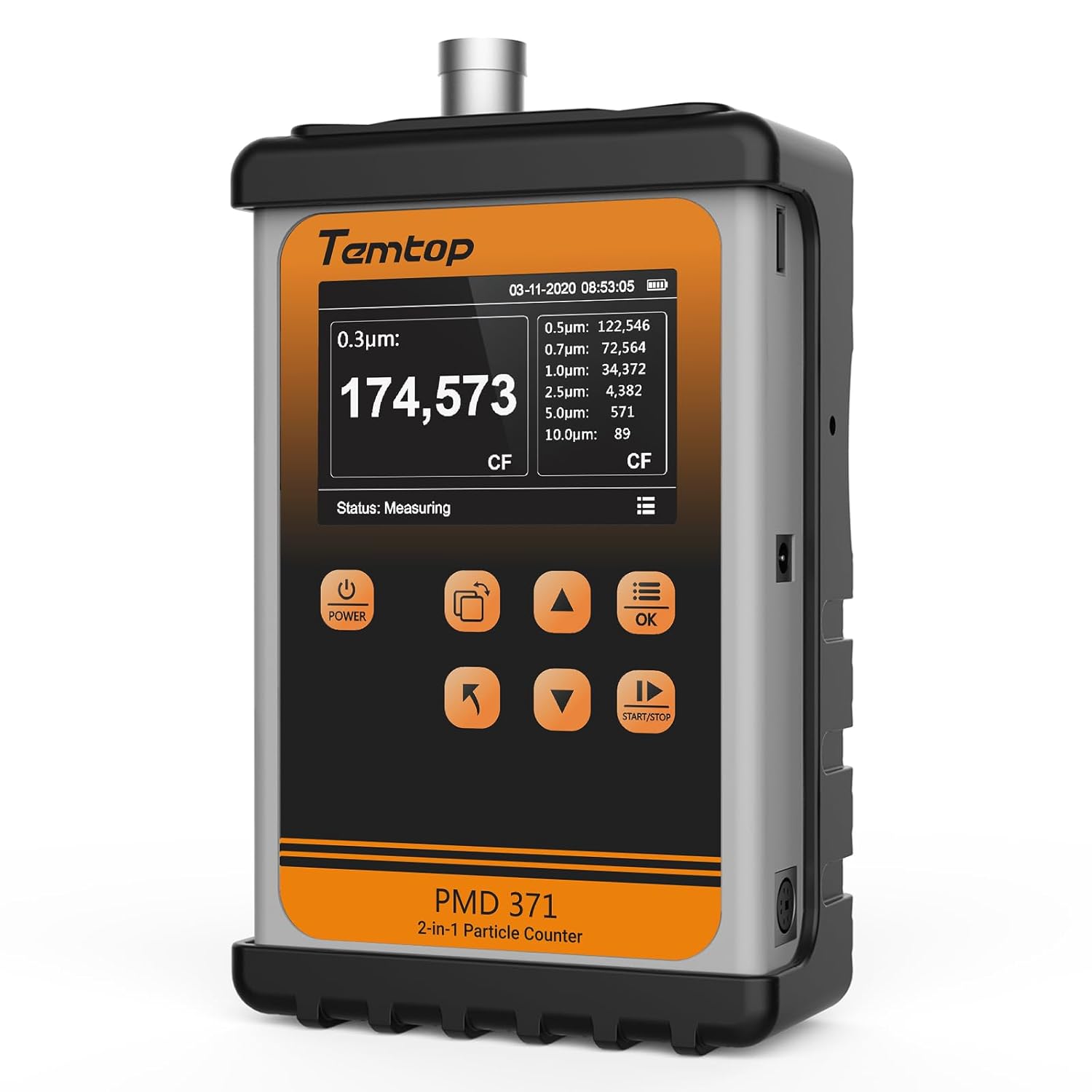
الصورة: الجبهة view of the Temtop PMD371 Particle Counter, highlighting its display and control buttons.

الصورة: الجبهة view of the Temtop Airing2000 Particulate Monitor, showing its ergonomic design and display.
4.1 Temtop PMD371 Particle Counter
The PMD371 is a precision instrument designed for multi-size particle detection and environmental monitoring. It features a robust all-metal construction for durability and reliable data collection.
- شاشة العرض: Shows real-time particle counts (0.3µm, 0.5µm, 1.0µm, 2.5µm, 5.0µm, 10.0µm), PM2.5, PM10, temperature, and humidity.
- زر الطاقة: يقوم بتشغيل/إيقاف تشغيل الجهاز.
- أزرار الوظائف: Navigation and selection for various modes and settings.
- منفذ المدخل: Where air samples are drawn in for analysis.
- منفذ USB: للشحن ونقل البيانات.

Image: The Temtop PMD371 highlighting its durable all-metal casing, ensuring robust performance.

Image: The Temtop PMD371 illustrating its compact size (170 x 110 x 48 mm) and lightweight design (1.76 lbs), emphasizing its portability.
4.2 Temtop Airing2000 Particulate Monitor
The Airing2000 is designed for comprehensive field monitoring, providing accurate measurements of PM2.5, PM10, TSP, temperature, humidity, and formaldehyde.
- شاشة العرض: Shows real-time readings for PM2.5, PM10, TSP, temperature, humidity, and HCHO.
- زر الطاقة: لتشغيل الجهاز وإيقاف تشغيله.
- أزرار التنقل: للتنقل في القائمة وضبط الإعدادات.
- مدخل / مخرج الهواء: Ports for air sampلينغ.
- منفذ الشحن: لإعادة شحن البطارية الداخلية.

Image: The Temtop Airing2000 showcasing its enterprise-grade precision, industrial-grade pumping sensor, comprehensive monitoring, instant data access, user-friendly operation, and portable design.

Image: The Temtop Airing2000 demonstrating its comprehensive monitoring capabilities, including particulate concentration (PM2.5, PM10, TSP), particle count (0.3µm, 0.5µm, 1.0µm), and environmental conditions (temperature, humidity).

الصورة: تفصيلية view of the Temtop Airing2000's internal pump-suction sensor, highlighting its advanced optics and wide particle size detection capabilities.
5. الإعداد
5.1 الشحن الأولي
Before first use, fully charge both the PMD371 and Airing2000 devices. Connect the provided USB charging cables to the respective devices and plug them into the power adapters. A full charge typically takes 3-4 hours. The battery indicator on the screen will show charging status.
5.2 تشغيل/إيقاف التشغيل
- لتشغيل الجهاز: اضغط مع الاستمرار على قوة اضغط على الزر حتى تضيء الشاشة.
- لإيقاف التشغيل: اضغط مع الاستمرار على قوة اضغط على الزر حتى يتم إيقاف تشغيل الشاشة.
5.3 الإعدادات الأساسية
Upon first power-on, you may need to set the date, time, and preferred units. Navigate through the menu using the arrow buttons and confirm selections with the OK زر.
- التاريخ والوقت: Set current date and time for accurate data logging.
- الوحدات: Select preferred units for temperature (°C/°F) and particulate matter (µg/m³).
6. تعليمات التشغيل
6.1 Taking Measurements with PMD371
- الموقع: Position the PMD371 in the area you wish to monitor. Ensure the air inlet is unobstructed.
- بدء القياس: اضغط على البدء/التوقف button to begin continuous monitoring. The screen will display real-time particle counts and environmental data.
- Interpreting Readings:
- Particle Counts: Displays the number of particles per liter for various sizes (0.3µm, 0.5µm, 1.0µm, 2.5µm, 5.0µm, 10.0µm).
- PM2.5/PM10: Shows the concentration of particulate matter in micrograms per cubic meter (µg/m³).
- درجة الحرارة/الرطوبة: Displays ambient temperature and relative humidity.
- Stop Measurement: اضغط على البدء/التوقف button again to pause or stop monitoring.
- تسجيل البيانات: The device automatically logs data. You can access historical data through the menu.

Image: The Temtop PMD371's screen displaying detailed particle count data for various sizes (0.3µm, 0.5µm, 0.7µm, 1.0µm, 2.5µm, 5.0µm, 10.0µm) and PM2.5/PM10 concentrations.
6.2 Taking Measurements with Airing2000
- الموقع: Hold the Airing2000 or place it in the desired monitoring location. Ensure the air inlet is clear.
- بدء القياس: The device typically starts measuring automatically upon power-on. Observe the real-time readings on the display.
- Interpreting Readings:
- PM2.5/PM10/TSP: Displays concentrations of various particulate matters.
- هكو: Shows formaldehyde concentration.
- درجة الحرارة/الرطوبة: Displays ambient temperature and relative humidity.
- إدارة البيانات: Use the navigation buttons to review historical data or adjust settings.
6.3 Data Transfer and Analysis
Both devices support data export. Connect the devices to a computer using the provided USB cables. The devices will appear as a removable storage device, allowing you to access logged data files (e.g., CSV format) for further analysis using spreadsheet software.
7. الصيانة
7.1 التنظيف
- Wipe the exterior of the devices with a soft, dry cloth.
- لا تستخدم المنظفات الكاشطة أو المذيبات أو المواد الكيميائية القوية.
- Ensure the air inlet and outlet ports are free from dust and debris. Use a soft brush or compressed air if necessary, but avoid forcing anything into the ports.
7.2 التخزين
- Store the devices in a cool, dry place, away from direct sunlight and extreme temperatures.
- If storing for an extended period, ensure the batteries are partially charged (around 50%) to prolong battery life. Recharge every 3-6 months.
7.3 المعايرة
The devices are factory calibrated. For professional applications requiring high accuracy, periodic re-calibration by authorized service centers is recommended. Refer to Temtop's official website or contact customer support for calibration services.
8. استكشاف الأخطاء وإصلاحها
| مشكلة | السبب المحتمل | حل |
|---|---|---|
| الجهاز لا يعمل. | بطارية منخفضة، عطل في الجهاز. | اشحن الجهاز بالكامل. إذا استمرت المشكلة، تواصل مع الدعم. |
| قراءات غير دقيقة. | Sensor obstruction; environmental interference; need for calibration. | Ensure air inlets are clear. Move away from strong air currents or dust sources. Consider professional calibration. |
| الشاشة فارغة أو متجمدة. | Software error; low battery. | Recharge the device. Perform a hard reset (refer to specific device manual for button combination, usually holding power for 10+ seconds). |
| لا يمكن الاتصال بالكمبيوتر. | Faulty USB cable; driver issue; device not in data transfer mode. | Try a different USB cable or port. Ensure the device is powered on and in data transfer mode if applicable. |
9. المواصفات
9.1 Temtop PMD371 Particle Counter
- Particle Size Channels: 0.3µm, 0.5µm, 1.0µm, 2.5µm, 5.0µm, 10.0µm
- Measurement Range (PM2.5/PM10): 0-999 ميكروجرام/مXNUMX
- نطاق درجة الحرارة: -10 درجة مئوية إلى 50 درجة مئوية (14 درجة فهرنهايت إلى 122 درجة فهرنهايت)
- نطاق الرطوبة: 0-99% رطوبة نسبية
- بطارية: قابلة للشحن ليثيوم أيون
- أبعاد: تقريبًا 170 × 110 × 48 ملم (6.7 × 4.3 × 1.9 بوصة)
- وزن: 0.8 كجم تقريبًا (1.76 رطلاً)
- تخزين البيانات: Up to 5000 sets of data
9.2 Temtop Airing2000 Particulate Monitor
- Particulate Measurement: PM2.5, PM10, TSP
- Formaldehyde (HCHO) Range: 0-1.0 مجم / متر مكعب
- نطاق درجة الحرارة: -10 درجة مئوية إلى 50 درجة مئوية (14 درجة فهرنهايت إلى 122 درجة فهرنهايت)
- نطاق الرطوبة: 0-99% رطوبة نسبية
- بطارية: Rechargeable Lithium-ion (Extended battery life)
- تخزين البيانات: Ample storage for continuous logging
- نوع المستشعر: Industrial-grade pumping sensor
10. الضمان والدعم
10.1 معلومات الضمان
Temtop products typically come with a standard manufacturer's warranty covering defects in materials and workmanship. Please refer to the warranty card included with your product or visit the official Temtop webللاطلاع على شروط وأحكام الضمان، يُرجى زيارة الموقع. احتفظ بإيصال الشراء كإثبات للشراء.
10.2 دعم العملاء
For technical assistance, troubleshooting, or service inquiries, please contact Temtop customer support:
- Webموقع: www.temtop.com
- بريد إلكتروني: يرجى الرجوع إلى قسم الاتصال على الموقع الرسمي webموقع.
- هاتف: يرجى الرجوع إلى قسم الاتصال على الموقع الرسمي webموقع.
When contacting support, please have your product model number (PMD371 & Airing2000) and purchase date ready.
Ask a question about this manual
Ask about setup, troubleshooting, compatibility, parts, safety, or missing instructions. Manuals+ will review the question and use this page’s manual context to help answer it.