
1. المقدمة
Welcome to the user manual for your Emerson CKSS7071 Sunrise Smartset Alarm Clock Radio. This device is designed to enhance your daily routine with its unique features, including a sunrise simulation, soothing sound options, Bluetooth connectivity, and an 8-color dimmable LED display. Please read this manual thoroughly to understand the full functionality and ensure proper use and care of your new alarm clock radio.
فيديو 1: زيادةview of the Emerson CKSS7071 Sunrise Smartset Alarm Clock Radio. This video demonstrates the key features and design of the product.
2. معلومات هامة حول السلامة
- اقرأ جميع التعليمات قبل تشغيل الجهاز.
- احتفظ بهذه التعليمات للرجوع إليها في المستقبل.
- لا تستخدم هذا الجهاز بالقرب من الماء.
- نظف فقط بقطعة قماش جافة.
- لا تسد أي فتحات تهوية. ثبّت المنتج وفقًا لتعليمات الشركة المصنعة.
- لا تقم بالتثبيت بالقرب من أي مصادر للحرارة مثل المشعات أو فتحات التدفئة أو المواقد أو أي أجهزة أخرى (بما في ذلك ampالمُضخِّمات) التي تنتج الحرارة.
- احمِ سلك الطاقة من أن يدوس عليه أحد أو يضغط عليه، وخاصةً عند المقابس ومنافذ التوصيل الكهربائية ونقطة خروجها من الجهاز.
- استخدم فقط المرفقات/الملحقات المحددة من قبل الشركة المصنعة.
- افصل هذا الجهاز أثناء العواصف الرعدية أو عند عدم استخدامه لفترات طويلة من الزمن.
- أحل جميع أعمال الصيانة إلى موظفي الصيانة المؤهلين. يلزم إجراء الصيانة عند تعرض الجهاز للتلف بأي شكل من الأشكال، مثل تلف سلك مصدر الطاقة أو القابس، أو انسكاب السوائل أو سقوط الأشياء داخل الجهاز، أو تعرض الجهاز للمطر أو الرطوبة، أو عدم تشغيله بشكل طبيعي، أو سقوطه.
3. محتويات العبوة
تأكد من وجود جميع العناصر عند فتح العبوة:
- Emerson CKSS7071 Sunrise Smartset Alarm Clock Radio
- محول التيار المتردد
- دليل المستخدم
4. انتهى المنتجview
4.1 الجبهة View

الصورة 1: أمام view of the alarm clock, featuring the digital time display and the sunrise simulation light panel.
The front of the unit features the main 1.2-inch LED time display and the large circular light panel for sunrise simulation and ambient lighting. Indicators for AM/PM, Alarm 1/2, and Bluetooth status are also visible.
4.2 الجانب View (ضوابط)
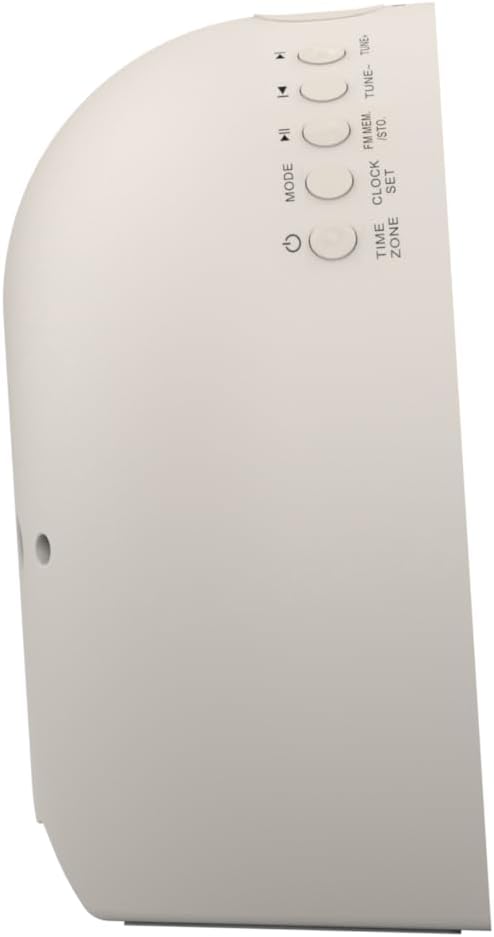
الصورة 2: جانب view of the alarm clock, highlighting the control buttons for various functions.
The side panel houses the primary control buttons, including Power, Mode, Clock Set, Time Zone, Tune/Skip, and Volume controls. These buttons are used for setting time, alarms, and navigating audio functions.
4.3 خلفي View

الصورة 3: مؤخرة view of the alarm clock, showing the speaker grille and power connection port.
The rear of the unit features the main speaker grille and the power input port for connecting the AC adapter.
5. الإعداد
5.1 توصيل الطاقة
- Plug the AC power adapter into the DC IN jack located on the back of the unit.
- Plug the other end of the adapter into a standard wall outlet (AC 100-240V, 50/60Hz).
- سيتم تشغيل الوحدة تلقائيًا.
5.2 SmartSet Automatic Time Setting
The SmartSet system automatically sets the correct time and date as soon as you plug in the unit. It also maintains time and alarm settings during power disruptions or outages, provided the button cell battery is installed.
5.3 تركيب بطارية احتياطية
A button cell battery (CR2032, included) is required for battery backup. This ensures that time and alarm settings are retained during a power outage.
- حدد مكان حجرة البطارية في الجزء السفلي من الوحدة.
- افتح غطاء حجرة البطارية.
- Insert one CR2032 button cell battery, ensuring the correct polarity (+/-).
- أغلق غطاء حجرة البطارية جيدًا.
6. تعليمات التشغيل
6.1 Setting the Clock Manually
- اضغط مع الاستمرار على ضبط الساعة زر. سوف تومض أرقام الساعة.
- استخدم اللحن -/+ الأزرار لضبط الساعة. اضغط ضبط الساعة للتأكيد.
- ستومض أرقام الدقائق. استخدم اللحن -/+ أزرار لضبط الدقائق. اضغط ضبط الساعة للتأكيد.
- استمر في هذه العملية لضبط السنة والشهر واليوم.
- يضعط ضبط الساعة مرة أخرى للخروج من وضع ضبط الوقت.
6.2 ضبط المنبهات (المنبه 1 والمنبه 2)
The unit features dual alarms. Follow these steps for each alarm:
- اضغط مع الاستمرار على إنذار 1 or إنذار 2 اضغط على الزر. ستومض أرقام ساعة المنبه.
- استخدم اللحن -/+ buttons to adjust the alarm hour. Press the respective إنذار زر للتأكيد.
- ستومض أرقام الدقائق في المنبه. استخدم اللحن -/+ buttons to adjust the alarm minutes. Press the respective إنذار زر للتأكيد.
- Select the alarm source (Buzzer, FM Radio, or Soothing Sound). Press the respective إنذار زر للتأكيد.
- اضبط مستوى صوت المنبه باستخدام المجلد - / + اضغط على الأزرار المناسبة. إنذار زر للتأكيد.
- The alarm is now set. The alarm indicator (AL1 or AL2) will appear on the display.
6.3 محاكاة شروق الشمس
The sunrise simulation feature gradually brightens the light panel before your set alarm time, mimicking a natural sunrise to gently wake you.
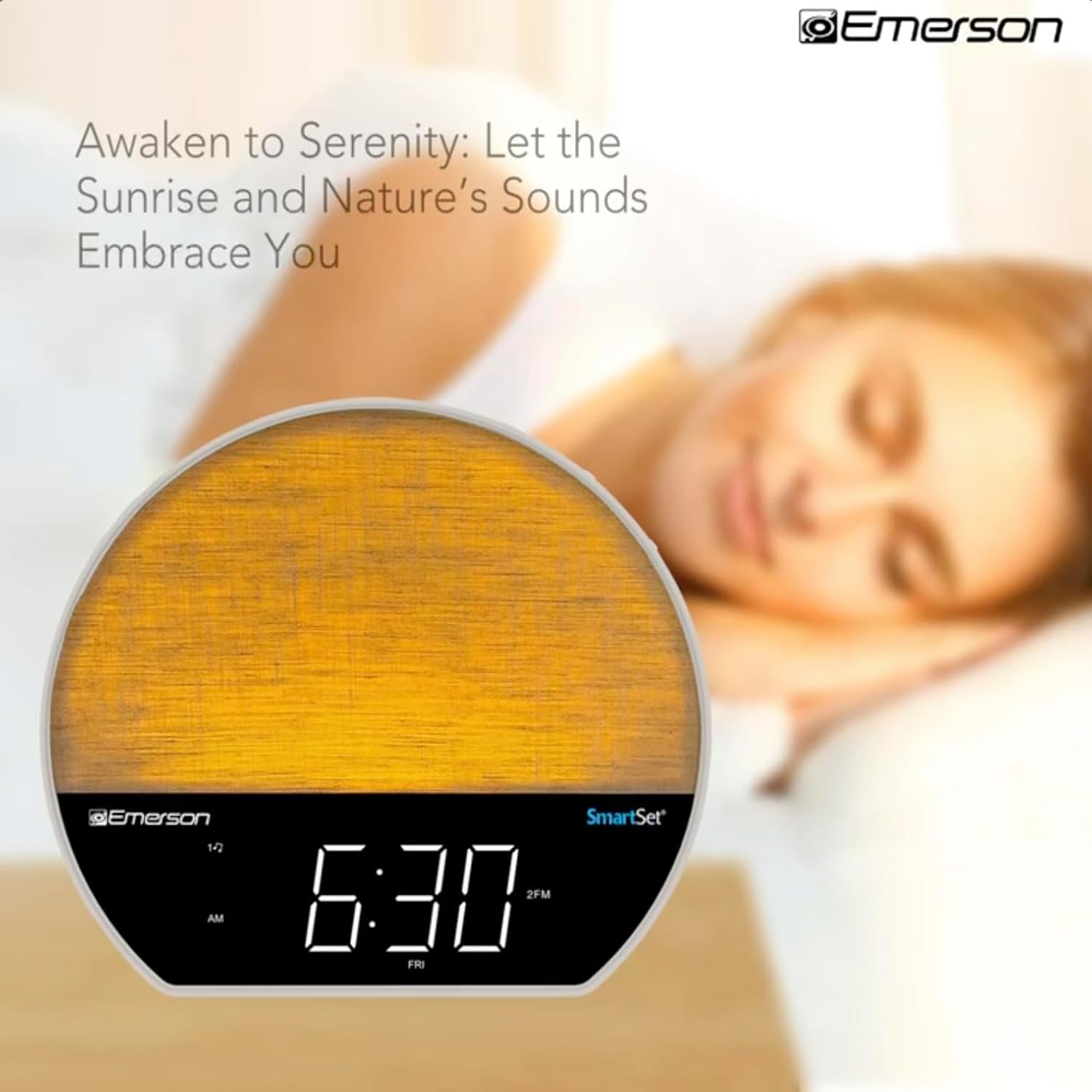
الصورة 4: The alarm clock simulating a sunrise with a warm, increasing light intensity.
To activate, ensure the sunrise option is selected during alarm setup. The light will begin to brighten 30 minutes before the alarm sounds.
6.4 Soothing Sounds and White Noise
The unit includes 6 soothing sounds and white noise to help with relaxation or waking up.
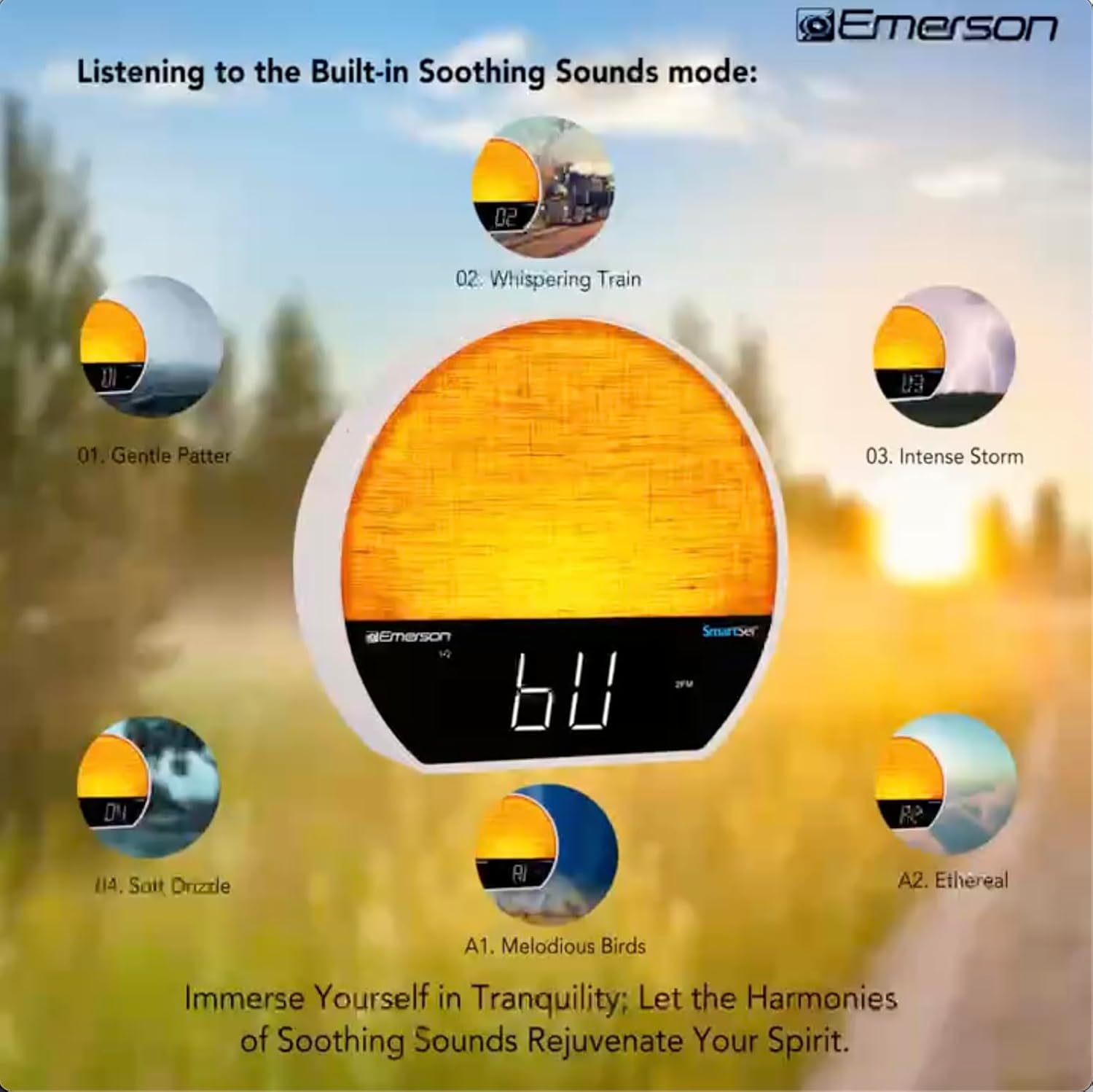
الصورة 5: Visual representation of the six soothing sound modes available on the alarm clock.
- اضغط على وضع button repeatedly until the Soothing Sound mode is selected.
- استخدم اللحن -/+ buttons to cycle through the available sounds (e.g., Gentle Patter, Whispering Train, Intense Storm, Soft Drizzle, Melodious Birds, Ethereal, White Noise).
- اضبط مستوى الصوت باستخدام ملف المجلد - / + أزرار.
6.5 وظيفة سمّاعات بلوتوث
قم بتوصيل هاتفك الذكي أو أي جهاز آخر مزود بتقنية البلوتوث لبث الصوت لاسلكيًا.

الصورة 6: The alarm clock in Bluetooth mode, paired with a mobile device for audio streaming.
- اضغط على وضع button until 'BT' appears on the display, indicating Bluetooth mode.
- On your device, enable Bluetooth and search for 'Emerson CKSS7071'.
- Select the device to pair. A confirmation tone will sound upon successful pairing.
- يمكنك الآن تشغيل الصوت من جهازك عبر مكبر صوت ساعة المنبه.
تشغيل راديو 6.6 FM
استمع إلى محطات الراديو المفضلة لديك على موجة FM.
- اضغط على وضع اضغط على الزر حتى تظهر كلمة "FM" على الشاشة.
- اضغط على اللحن -/+ buttons briefly to manually tune to a station.
- اضغط مع الاستمرار على اللحن -/+ أزرار للبحث تلقائيًا عن المحطة التالية المتاحة.
- لحفظ محطة، اضغط مع الاستمرار على FM MEM اضغط على الزر حتى يومض الرقم المحدد مسبقاً. استخدم اللحن -/+ لاختيار رقم محدد مسبقًا، ثم اضغط FM MEM مرة أخرى للحفظ.
6.7 LED Decor and Dimmer Control
Customize the ambient light with 8 different colors and adjust the brightness.

الصورة 7: The alarm clock demonstrating its 8-color dimmable LED decor options.
- اضغط على ضوء button to cycle through the 8 available colors or turn the light off.
- To adjust the brightness of the LED decor light, press and hold the ضوء button. The brightness will cycle through 5 levels. Release the button at your desired brightness.
6.8 وحدة التحكم في سطوع الشاشة
Adjust the brightness of the 1.2-inch LED time display.

الصورة 8: The alarm clock illustrating the five distinct levels of display luminescence.
اضغط على ديمر button (often combined with another function, refer to button labels) to cycle through 4 levels of display brightness (Bright, Moderate, Dim, Faint).
6.9 مؤقت النوم
Set a timer for the audio to automatically turn off after a specified duration.

الصورة 9: The alarm clock set for a sunset sleep timer, providing a harmonious end to the day.
- While audio is playing (FM or Soothing Sound), press the ينام زر.
- اضغط بشكل متكرر على ينام button to cycle through available sleep timer durations (e.g., 15, 30, 60, 90 minutes, or OFF).
- The audio will automatically turn off after the selected time.
6.10 وظيفة الغفوة
عندما يصدر صوت التنبيه، اضغط على غفوة button (usually a large button on top) to temporarily silence the alarm for a few minutes. The alarm will sound again after the snooze period.
7. الصيانة
7.1 التنظيف
- افصل الوحدة دائمًا عن مأخذ التيار الكهربائي قبل التنظيف.
- استخدم قطعة قماش ناعمة وجافة لتنظيف الأسطح الخارجية.
- Do not use liquid cleaners, abrasive cleaners, or chemical sprays, as these may damage the finish.
7.2 استبدال البطارية
إذا لم يتم الاحتفاظ بإعدادات الوقت والمنبه أثناء انقطاع التيار الكهربائيtage, the button cell backup battery may need to be replaced. Follow the instructions in section 5.3 to replace the CR2032 battery.
8. استكشاف الأخطاء وإصلاحها
| مشكلة | السبب المحتمل | حل |
|---|---|---|
| الوحدة لا تعمل بالطاقة. | محول الطاقة غير متصل أو معيب. | تأكد من توصيل محول التيار المتردد بشكل آمن بالجهاز وبمأخذ حائط يعمل. |
| تُفقد إعدادات الوقت/المنبه بعد انقطاع التيار الكهربائيtage. | البطارية الاحتياطية ميتة أو غير مثبتة. | Install or replace the CR2032 button cell battery (see section 5.3). |
| لا يصدر صوت الإنذار. | لم يتم تفعيل المنبه أو أن مستوى الصوت منخفض للغاية. | Ensure the alarm is set and activated (AL1/AL2 indicator on). Increase alarm volume. |
| لا يمكن لجهاز البلوتوث الاقتران. | Unit not in Bluetooth mode or device too far. | Ensure the unit is in Bluetooth mode ('BT' displayed). Move your device closer to the unit. Try unpairing and re-pairing. |
| استقبال راديو FM ضعيف. | الهوائي غير ممتد ولا يوجد تداخل. | Extend the FM wire antenna fully and reposition it for better reception. Avoid placing near other electronic devices. |
| الشاشة ساطعة/خافتة للغاية. | يلزم ضبط إعدادات سطوع الشاشة. | اضغط على ديمر button to cycle through brightness levels (see section 6.8). |
9. المواصفات
| ميزة | التفاصيل |
|---|---|
| رقم الموديل | سي كي اس اس 7071 |
| مصدر الطاقة | AC 100-240V, 50/60Hz (via AC adapter) |
| النسخ الاحتياطي للبطارية | 1 x CR2032 Button Cell Battery (included) |
| نوع العرض | 1.2-inch LED Display |
| نسخة البلوتوث | رقم V5.4 |
| اصوات مهدئة | 6 Nature Sounds + White Noise |
| LED Decor Colors | 8 Dimmable Colors |
| أبعاد المنتج (العرض × العمق × الارتفاع) | 7.09 بوصة × 3.15 بوصة × 6.37 بوصة |
| وزن | غير محدد |
10. معلومات الضمان
Emerson products are manufactured to the highest quality standards. This product is covered by a limited warranty against defects in materials and workmanship for a period of one (1) year from the original date of purchase. This warranty does not cover damage caused by misuse, accident, unauthorized modification, or normal wear and tear. Proof of purchase is required for all warranty claims. Please retain your receipt.
11. دعم العملاء
If you have any questions, require assistance, or experience issues with your Emerson CKSS7071 Sunrise Smartset Alarm Clock Radio, please contact our customer support team.
- Webموقع: Visit the official Emerson webالموقع للأسئلة الشائعة وموارد الدعم.
- بريد إلكتروني: راجع عبوة المنتج أو الموقع الرسمي webموقع مخصص للتواصل عبر البريد الإلكتروني لخدمة العملاء.
- هاتف: راجع عبوة المنتج أو الموقع الرسمي webموقع للحصول على أرقام هواتف خدمة العملاء.
Please have your model number (CKSS7071) and proof of purchase ready when contacting support.