
1. المقدمة
The MiBOXER TRI-PW 500W AC Triac Dimmer is designed for precise control of lighting systems in residential and commercial environments. This device integrates WiFi and 2.4GHz technology, allowing for remote operation via compatible applications and MiBOXER remote controls. It supports triac dimming, ensuring compatibility with a wide range of lighting fixtures, including LED, halogen, and incandescent lights, for smooth and consistent dimming from full brightness to a soft glow.
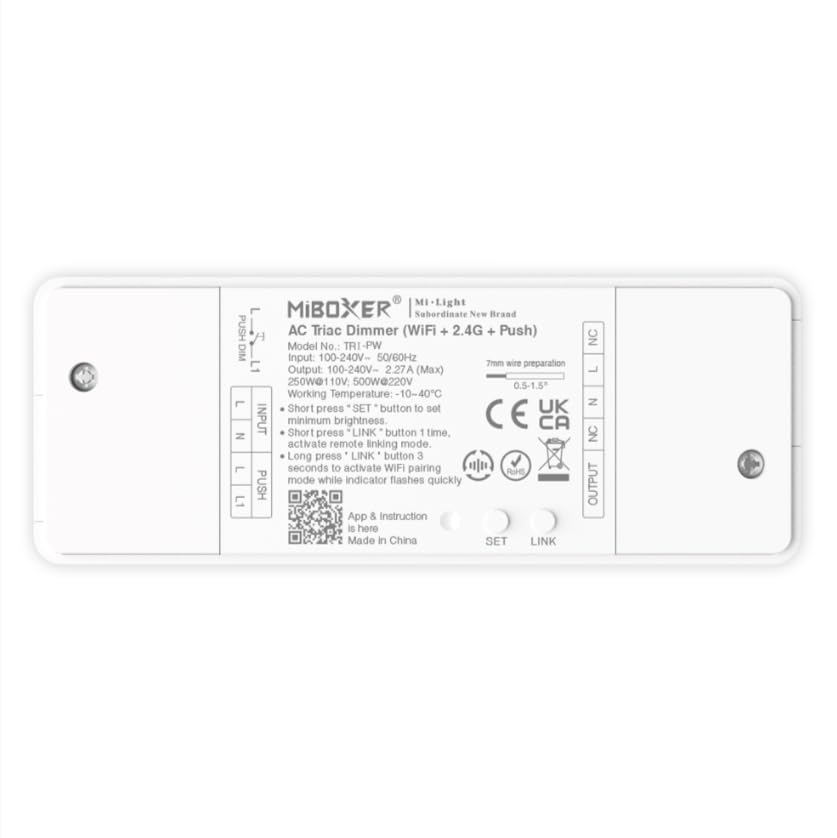
الصورة 1.1: انتهىview of the MiBOXER TRI-PW 500W AC Triac Dimmer unit.
2. معلومات السلامة
- التركيبات الكهربائية: يجب أن يتم التركيب بواسطة كهربائي مؤهل وفقًا لقوانين ولوائح الكهرباء المحلية.
- انقطاع التيار الكهربائي: افصل التيار الكهربائي دائمًا من قاطع الدائرة قبل تركيب أو صيانة جهاز التحكم في شدة الإضاءة.
- المجلدtagالتوافق ه: تأكد من مستوى الصوت المدخلtage matches the dimmer's specifications (100-240V AC).
- قدرة التحميل: Do not exceed the maximum load capacity of 500W. Overloading can cause damage or fire.
- للاستخدام الداخلي فقط: This device is intended for indoor use in dry locations. Avoid exposure to moisture or extreme temperatures.
- التوافق: Use only with compatible dimmable lighting fixtures (LED, halogen, incandescent).
3. محتويات العبوة
تأكد من وجود جميع المكونات في العبوة:
- MiBOXER TRI-PW 500W AC Triac Dimmer Unit
- User Manual (may be included as a separate document)

Image 3.1: MiBOXER TRI-PW Dimmer unit shown with its packaging and a user manual.
4. مواصفات المنتج
- Powerful 500W Capacity: Supports high-power loads, suitable for various lighting fixtures.
- Triac Dimming Technology: Provides flicker-free dimming for LED, halogen, and incandescent lights.
- WiFi & 2.4GHz Control: Integrates with WiFi and MiBOXER 2.4GHz systems for smartphone or remote control.
- Push Control Compatibility: Allows for quick, on-site dimming adjustments via a push button.
- التحكم بالتطبيق والصوت: Compatible with major smart home platforms for app-based and voice command control.
- وظيفة الذاكرة: Retains previous lighting settings after power cycles.
5. المواصفات
| ميزة | التفاصيل |
|---|---|
| ماركة | ميبوكسر |
| اسم الموديل | ثلاثي-PW |
| ميزة خاصة | 500 واط التيار المتناوب ترياك باهتة |
| فئة نطاق التردد | نطاق واحد |
| معيار الاتصال اللاسلكي | 802.11ب |
| الأجهزة المتوافقة | دعم PUSH يعتم |
| الاستخدامات الموصى بها | Home lighting systems |
| تكنولوجيا الاتصال | واي فاي |
| التوافق مع المنزل الذكي | Smart Home Compatible (e.g., Amazon Alexa, Google Assistant) |
| التغطية | LED, halogen, incandescent, high-power loads |
| تكرار | 2.4 جيجاهرتز |
| الأبعاد (تقريبًا) | 117 مم (طول) × 45 مم (عرض) × 24 مم (ارتفاع) |
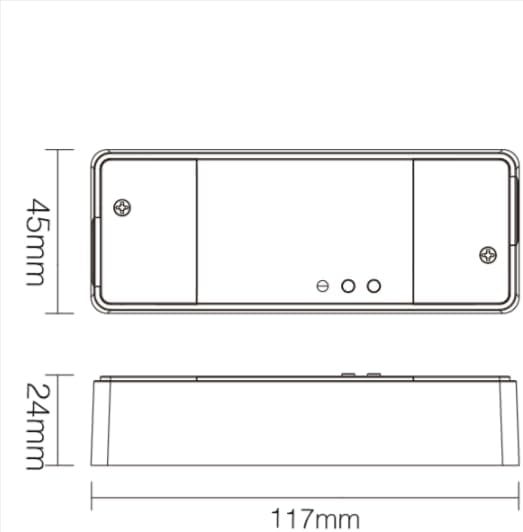
Image 5.1: Technical drawing showing the approximate dimensions of the TRI-PW dimmer.

Image 5.2: Packaging dimensions for the MiBOXER TRI-PW dimmer.
6. الإعداد والتثبيت
مهم: تأكد من فصل التيار الكهربائي من قاطع الدائرة قبل البدء في التركيب.
مخطط الأسلاك
The MiBOXER TRI-PW dimmer supports two primary wiring methods for integration with a push switch. Both methods are suitable for triac dimming LED lights, traditional filament lampق ، والهالوجين لترamps.

Image 6.1: Wiring diagrams for connecting the MiBOXER TRI-PW dimmer with a push switch.
Method 1: Single-Wire Push Switch Connection
- Connect the Live (L) and Neutral (N) input wires from your power supply (100-240V~) to the corresponding 'INPUT' terminals on the dimmer.
- Connect the Live (L) and Neutral (N) output wires to your lighting fixture (100-240V~) from the 'OUTPUT' terminals.
- Connect one wire from the push switch to the 'PUSH' terminal on the dimmer.
- Connect the other wire from the push switch to the Live (L) input terminal.
Method 2: Two-Wire Push Switch Connection
- Connect the Live (L) and Neutral (N) input wires from your power supply (100-240V~) to the corresponding 'INPUT' terminals on the dimmer.
- Connect the Live (L) and Neutral (N) output wires to your lighting fixture (100-240V~) from the 'OUTPUT' terminals.
- Connect the two wires from the push switch directly to the 'PUSH' terminals on the dimmer.
After wiring, secure the dimmer in a suitable electrical box or enclosure. Restore power at the circuit breaker.
7. تعليمات التشغيل
7.1. Push Switch Control
- الصحافة القصيرة: Turn the lights ON or OFF.
- ضغطة طويلة: Adjust the brightness level. Release the button to set the desired brightness.
7.2. WiFi App Control
The TRI-PW dimmer supports control via a smart app (e.g., Tuya Smart app). No additional 2.4G gateway is required for app control.
- Download the compatible smart home app from your device's app store.
- تسجيل أو تسجيل الدخول إلى حسابك.
- Put the dimmer into pairing mode (refer to the app's instructions or the dimmer's specific pairing procedure, usually involving a long press of the 'SET' button or power cycling).
- Follow the in-app instructions to add the device to your network.
- Once connected, you can control the dimmer's ON/OFF state and brightness from your smartphone.
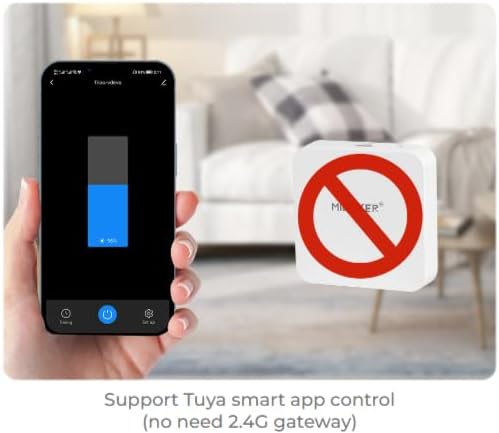
الصورة 7.1: مثالample of controlling the dimmer using a smartphone application.
7.3. 2.4GHz Remote Control
The dimmer can be paired with MiBOXER 2.4GHz remote controls for direct wireless control.
- Ensure the dimmer is powered on.
- Refer to your MiBOXER 2.4GHz remote control's manual for specific pairing instructions. Typically, this involves pressing a "Link" or "Pair" button on the remote within a few seconds of powering on the dimmer or pressing the dimmer's 'SET' button.
- A successful pairing is usually indicated by the connected light flashing.
7.4. Voice Control (Alexa/Google Assistant)
The TRI-PW dimmer is compatible with smart home voice assistants like Amazon Alexa and Google Assistant when integrated through a compatible smart home app.
- Ensure your dimmer is successfully connected to the smart home app (e.g., Tuya Smart).
- افتح تطبيق Amazon Alexa أو Google Home.
- Enable the skill or service for the smart home app you are using (e.g., "Tuya Smart" skill).
- Discover devices. Your dimmer should appear in the list.
- Assign a name to your dimmer (e.g., "Living Room Light").
- You can now control your light using voice commands, such as "Alexa, turn on Living Room Light" or "Hey Google, dim Living Room Light to 50%."

Image 7.2: The dimmer is compatible with voice control platforms like Amazon Alexa and Google Assistant.
8. الصيانة
- تنظيف: Disconnect power before cleaning. Wipe the dimmer with a soft, dry cloth. Do not use liquid cleaners or aerosols.
- تقتيش: قم بفحص توصيلات الأسلاك بشكل دوري للتأكد من إحكامها وخلوها من علامات التآكل أو التلف.
- تحديثات البرامج الثابتة: If available, check the smart home app for firmware updates to ensure optimal performance and security.
9. استكشاف الأخطاء وإصلاحها
| مشكلة | السبب المحتمل | حل |
|---|---|---|
| الأضواء لا تعمل. | No power, incorrect wiring, faulty bulb, dimmer not paired. | Check circuit breaker. Verify wiring according to diagrams. Test bulb. Re-pair dimmer with app/remote. |
| الأضواء تومض أو تصدر صوت طنين. | Incompatible bulb, overloaded circuit, loose wiring. | Ensure bulbs are dimmable and compatible with triac dimmers. Reduce load. Check wiring connections. |
| Dimmer not responding to app/remote. | Dimmer out of range, WiFi issue, not paired. | Ensure dimmer is within WiFi/2.4GHz range. Check WiFi router. Re-pair dimmer with app/remote. |
| لا يمكن الاتصال بشبكة الواي فاي. | Incorrect WiFi password, 5GHz network, dimmer not in pairing mode. | Verify WiFi password. Ensure you are connecting to a 2.4GHz network. Put dimmer into WiFi pairing mode. |
10. الضمان والدعم
This MiBOXER TRI-PW dimmer comes with a ضمان لمدة 2 سنوات من تاريخ الشراء. يغطي هذا الضمان عيوب المواد والصناعة في ظل الاستخدام العادي.
The warranty does not cover damage caused by improper installation, misuse, unauthorized modifications, or acts of nature.
For technical support or warranty claims, please contact your retailer or the manufacturer directly. Please have your purchase receipt and product model number (TRI-PW) available when contacting support.
لمزيد من المعلومات، يمكنك زيارة متجر MiBOXER على أمازون.