
1. المقدمة
This manual provides essential information for setting up, operating, maintaining, and troubleshooting your Acer Nitro V ANV15-41 gaming laptop. Please read this manual thoroughly to ensure proper use and to maximize the performance and longevity of your device.

الشكل 1.1: الجبهة view of the Acer Nitro V ANV15-41 Gaming Laptop.
2. البدء
2.1 فك الحزمة والإعداد الأولي
- قم بإزالة الكمبيوتر المحمول وجميع الملحقات من العبوة بعناية.
- تأكد من وجود جميع المكونات المدرجة في قسم "محتويات الصندوق".
- Connect the power adapter to the laptop's power connector and then to an electrical outlet.
- افتح غطاء الكمبيوتر المحمول واضغط على زر الطاقة لتشغيل الجهاز.
- اتبع التعليمات التي تظهر على الشاشة لإكمال الإعداد الأولي لنظام التشغيل Windows 11 Home.
2.2 محتويات الصندوق
- Acer Nitro V ANV15-41 Laptop
- محول الطاقة
- بطارية (متكاملة)
3. انتهت الأجهزةview
3.1 العرض
The laptop features a 15.6-inch (39.6 cm) Full HD (1920 x 1080) IPS display with a 165 Hz refresh rate. It includes Acer ComfyView technology for reduced glare and enhanced viewجي الراحة.

Figure 3.1: The laptop's 15.6-inch Full HD IPS display with a high refresh rate.
3.2 لوحة المفاتيح ولوحة اللمس
The Acer Nitro V ANV15-41 is equipped with a backlit keyboard, offering visibility in low-light conditions. It includes a dedicated NitroSense key for quick access to system performance settings and a Copilot key for AI assistance.
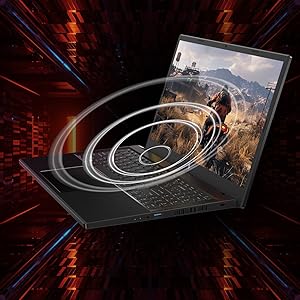
Figure 3.2: Keyboard layout highlighting the NitroSense and Copilot keys.
3.3 المنافذ والموصلات
The laptop provides various ports for connectivity:
- 2 منافذ USB 3.2 الجيل الأول
- 1 x USB 3.2 Gen 1 port with power-off charging
- 1 × منفذ USB 4
- 1 × منفذ HDMI 2.1
- 1 × منفذ إيثرنت (RJ-45)
- 1 x Headset/speaker jack
- Power connector (DC-in)
- فتحة قفل كينسينجتون
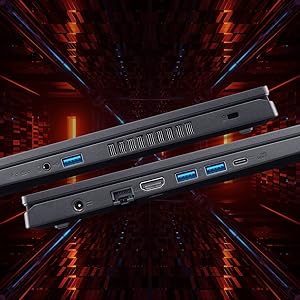
الشكل 3.3: الجانب view illustrating the available ports and connectors.
4. ميزات الأداء
4.1 المعالج والرسومات
The laptop is powered by an AMD Ryzen 5 6600H hexa-core processor and features an NVIDIA GeForce RTX 3050 GPU with 6 GB of dedicated GDDR6 VRAM for graphics processing.
4.2 الذاكرة والتخزين
It comes with 16 GB of DDR5 system memory, upgradable up to 32 GB. Storage is provided by a 512 GB PCIe Gen4 NVMe SSD, with support for up to two 1 TB drives.
4.3 نظام التبريد
The Acer Nitro V ANV15-41 incorporates a dual-fan cooling system designed to maintain optimal operating temperatures during intensive use.
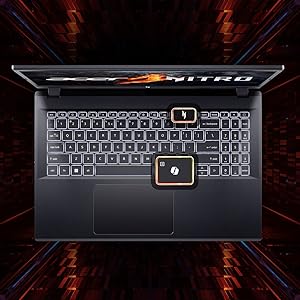
Figure 4.1: Illustration of the dual-fan cooling system.
5. Audio and Visual
5.1 تقنية الصوت
The laptop features DTS:X Ultra Audio for an immersive sound experience. Acer PurifiedVoice technology, with AI-powered noise reduction, enhances clarity for built-in microphones.

Figure 5.1: Visual representation of DTS:X Ultra Audio and Acer PurifiedVoice technologies.
5.2 Webكاميرا
A T-Type HD camera is integrated for video conferencing and communication.
6. الصيانة والعناية
- تنظيف: Use a soft, lint-free cloth to clean the screen and exterior. Avoid harsh chemicals.
- تهوية: Ensure the laptop's ventilation openings are clear and unobstructed to prevent overheating.
- تحديثات البرامج: Regularly update your operating system and drivers to ensure optimal performance and security.
- العناية بالبطارية: To prolong battery life, avoid extreme temperatures and fully discharging the battery frequently.
- تخزين: Store the laptop in a cool, dry place when not in use.
7. استكشاف الأخطاء وإصلاحها
7.1 المشكلات والحلول الشائعة
| مشكلة | الحل المحتمل |
|---|---|
| الكمبيوتر المحمول لا يعمل | Ensure the power adapter is securely connected and the outlet is functional. Check battery charge level. |
| النظام بطيء أو لا يستجيب | أغلق التطبيقات غير الضرورية. تحقق من وجود عمليات تعمل في الخلفية. تأكد من وجود مساحة تخزين كافية. قم بتحديث برامج التشغيل. |
| ارتفاع درجة الحرارة | Ensure ventilation openings are clear. Use the laptop on a hard, flat surface. Consider using NitroSense software to adjust fan speeds. |
| مشاكل في العرض (لا توجد صورة، وميض) | Check display cable connections if using an external monitor. Restart the laptop. Update graphics drivers. |
| إضاءة لوحة المفاتيح الخلفية لا تعمل | Check keyboard backlight settings in Windows or via dedicated function keys. |
8. المواصفات الفنية
| ميزة | مواصفة |
|---|---|
| ماركة | أيسر |
| اسم الموديل | Nitro V |
| رقم الموديل | ANV15-41 |
| حجم الشاشة | 15.6 بوصة |
| دقة العرض | 1920 × 1080 (دقة عالية كاملة) |
| تكنولوجيا العرض | IPS, LED, 165 Hz Refresh Rate |
| المعالج | AMD Ryzen 5 6600H hexa-core (3.3 GHz base, up to 4.5 GHz max boost) |
| بطاقة الرسوميات | بطاقة رسومات NVIDIA GeForce RTX 3050 بذاكرة GDDR6 سعة 6 جيجابايت |
| ذاكرة الوصول العشوائي (RAM) | 16 GB DDR5 (4800 MHz), upgradable to 32 GB |
| تخزين | 512 GB NVMe SSD (PCIe Gen4) |
| نظام التشغيل | ويندوز 11 هوم |
| الاتصال اللاسلكي | واي فاي 6 (802.11ax)، بلوتوث |
| الموانئ | 2x USB 3.2 Gen 1, 1x USB 3.2 Gen 1 (power-off charging), 1x USB 4, 1x HDMI 2.1, 1x RJ-45, 1x Headset/speaker jack |
| Webكاميرا | T-Type HD camera |
| لوحة المفاتيح | لوحة مفاتيح بإضاءة خلفية، لوحة مفاتيح رقمية |
| محتوى طاقة البطارية | 57 Watt Hours (Lithium Ion) |
| وزن العنصر | 2.1 كيلوغرام |
| الأبعاد (الطول × العرض × السماكة) | 24L x 36.2W x 2.4Th Centimeters |
9. الضمان والدعم
9.1 معلومات الضمان
This product comes with a 1-Year Manufacturer's Limited Warranty. Please refer to the warranty card included with your product for detailed terms and conditions.
9.2 Manufacturer and Importer Information
الشركة المصنعة: Acer, Compal Electronics Pvt Ltd, No.D01, Zone D, Air Port Section of LiangLu CunTan Free Trade Port Area, YuBei District, Chongqing, China
المستورد: ACER INDIA PRIVATE LIMITED Embassy Heights, 6th Floor, No. 13 Magrath Road, Next to HOSMAT Hospital, Bangalore, INDIA – 560025
For technical support or service inquiries, please contact your local Acer support center or visit the official Acer webموقع.