
1. تعليمات السلامة الهامة
يرجى قراءة جميع تعليمات السلامة وفهمها جيداً قبل استخدام هذا المنتج. احتفظ بهذه التعليمات للرجوع إليها مستقبلاً.
- مصدر الطاقة: استخدم فقط محول الطاقة أو البطاريات المحددة. تأكد من أن مستوى الصوتtagيتوافق مع متطلبات الوحدة.
- الماء والرطوبة: Do not expose the unit to rain, moisture, or dripping water. Do not place objects filled with liquids on the unit.
- تهوية: تأكد من التهوية الجيدة. لا تسد أي فتحات تهوية.
- حرارة: احتفظ بالوحدة بعيدًا عن مصادر الحرارة مثل المشعات أو فتحات التدفئة أو المواقد أو أي أجهزة أخرى تنتج الحرارة.
- تنظيف: تنظيف فقط بقطعة قماش جافة. لا تستخدم المنظفات أو منظفات يتم رشها السائل.
- الخدمة: لا تحاول خدمة هذا المنتج بنفسك. قم بإحالة جميع أعمال الصيانة إلى أفراد الخدمة المؤهلين.
- سلامة الليزر: This unit contains a laser component. Do not open the CD compartment while a disc is playing. Avoid direct exposure to the laser beam.
2. محتويات العبوة
تأكد من وجود جميع العناصر في العبوة:
- G Keni Portable CD and Cassette Player Boombox Combo
- سلك الطاقة المتردد
- جهاز التحكم عن بعد
- دليل المستخدم (هذا المستند)
3. انتهى المنتجview
The G Keni BT-9224MU is a versatile audio system combining a CD player, cassette player/recorder, AM/FM radio, Bluetooth speaker, and USB playback. It features dual 3W speakers for stereo sound and can be powered by AC or batteries for portability.
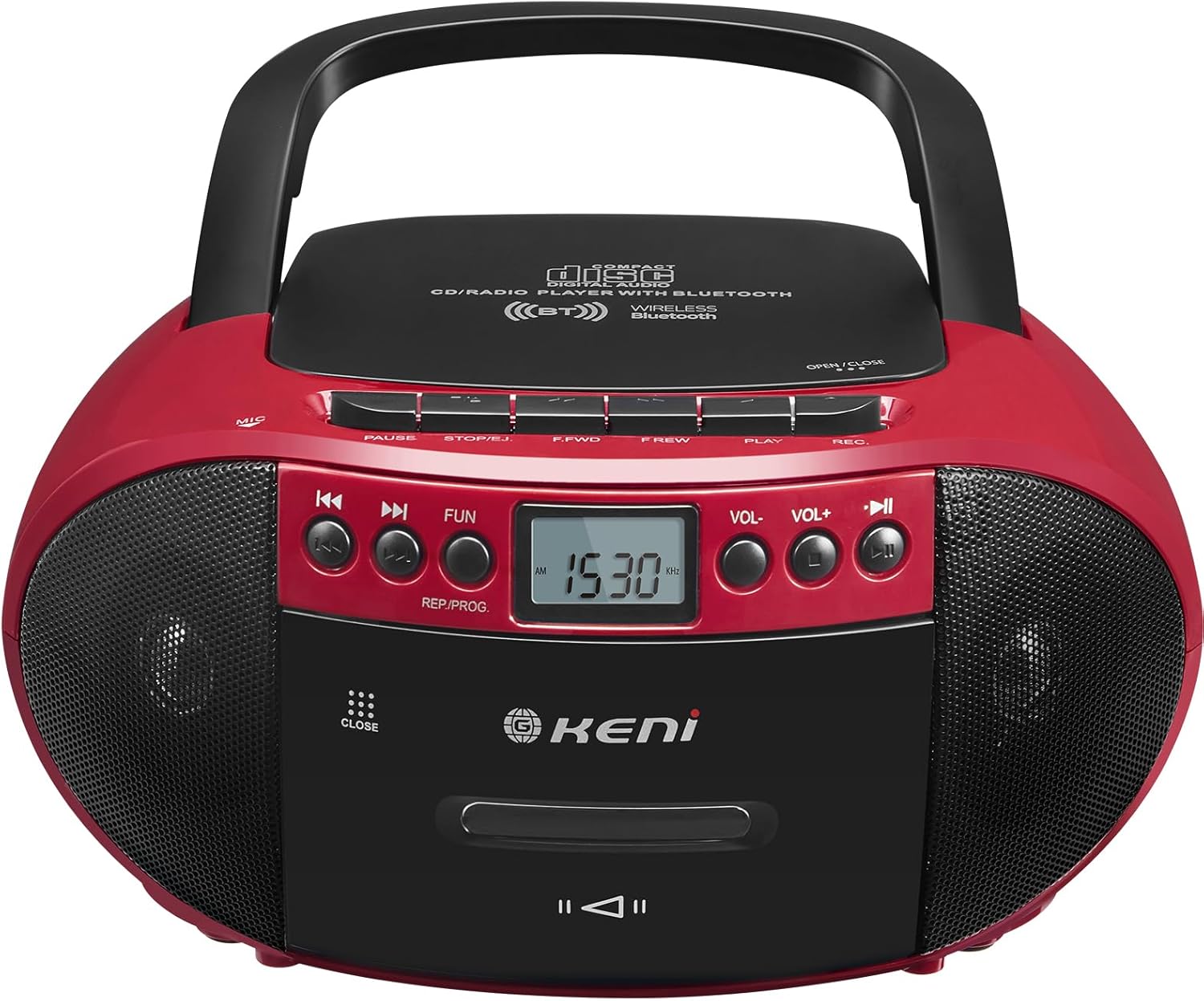
الشكل 3.1: الجبهة view of the G Keni BT-9224MU Boombox.

Figure 3.2: The boombox highlighting its five playback modes: CD Player, Cassette Player, FM/AM Radio, USB Input, and Bluetooth.
4. الإعداد
4.1 تشغيل الوحدة
يمكن تشغيل جهاز الراديو المحمول إما بواسطة التيار المتردد أو البطاريات.
4.1.1 توصيل طاقة التيار المتردد
- Locate the AC power input jack on the back of the unit.
- Connect the supplied AC power cord to the jack.
- Plug the other end of the AC power cord into a standard wall outlet (100-240V, 50/60Hz).
4.1.2 تركيب البطارية
للاستخدام المحمول، تتطلب الوحدة 6 بطاريات من الحجم "C" (غير مرفقة).
- افتح غطاء حجرة البطارية الموجود في الجزء السفلي من الوحدة.
- أدخل 6 بطاريات من الحجم "C"، مع التأكد من صحة القطبية (+/-) كما هو موضح داخل الحجرة.
- أغلق غطاء حجرة البطارية جيدًا.

Figure 4.1: Illustrations of AC power connection and battery installation.
4.2 ضبط الهوائي
For optimal FM radio reception, extend the telescopic antenna. For AM reception, the unit has a built-in ferrite bar antenna, so repositioning the unit may improve reception.
5. تعليمات التشغيل
5.1 الضوابط العامة
- زر الطاقة: يقوم بتشغيل الوحدة أو إيقاف تشغيلها.
- زر الوظيفة/الوضع: Switches between CD/USB/Bluetooth, Cassette, and AM/FM Radio modes.
- أزرار رفع وخفض مستوى الصوت: يضبط مستوى إخراج الصوت.
- زر التشغيل / الإيقاف المؤقت: Starts or pauses playback in CD, USB, or Bluetooth modes.
- زر الإيقاف/الإخراج: Stops playback and opens the CD lid or cassette door.
- أزرار التخطي/البحث (◀◀ / ▶▶): يتخطى المسارات/files or fast forwards/rewinds.
تشغيل مشغل الأقراص المضغوطة 5.2
The unit supports CD, CD-R, CD-RW, and MP3 discs.
- مهم: Before first use, remove the laser lens protector paper plate from the CD compartment.
- اضغط على الوظيفة / الوضع زر لتحديد وضع القرص المضغوط.
- اضغط على توقف / إخراج زر لفتح غطاء حجرة الأقراص المدمجة.
- ضع قرصًا مضغوطًا بحيث يكون جانب الملصق متجهًا لأعلى على محور القرص.
- أغلق غطاء حجرة القرص المضغوط. سيقرأ الجهاز القرص.
- اضغط على تشغيل/إيقاف مؤقت زر لبدء التشغيل.
- يستخدم تخطي / بحث أزرار للتنقل بين المسارات.

Figure 5.1: Inserting a CD into the boombox, with the remote control visible.
5.3 Cassette Player & Recorder Operation
The unit allows playback and recording of standard audio cassettes.
5.3.1 تشغيل الكاسيت
- اضغط على الوظيفة / الوضع زر لتحديد وضع الكاسيت.
- اضغط على توقف / إخراج زر لفتح باب الكاسيت.
- قم بإدخال شريط الكاسيت مع توجيه الحافة المفتوحة لأعلى.
- أغلق باب الكاسيت.
- اضغط على يلعب button (usually indicated by a triangle) to start playback.
- يستخدم FAST FORWARD (F.FWD) و REWIND (F.REW) الأزرار للتنقل عبر الشريط.
- اضغط على توقف / إخراج button to stop playback and open the door.

Figure 5.2: A cassette tape being inserted into the boombox.
5.3.2 التسجيل على شريط كاسيت
The unit can record from the radio, CD, or via its built-in microphone.
- أدخل شريط كاسيت فارغًا في حجرة الكاسيت.
- Select the desired source for recording (CD, Radio, or ensure no other source is playing for voice recording).
- اضغط على سجل (ريك) button (usually red) to begin recording. The PLAY button will also engage automatically.
- لإيقاف التسجيل ، اضغط على توقف / إخراج زر.
تشغيل راديو 5.4 AM/FM
Enjoy local radio broadcasts with the built-in tuner.
- اضغط على الوظيفة / الوضع زر لاختيار وضع راديو AM أو FM.
- Extend the telescopic antenna for FM reception. Adjust its position for best signal.
- استخدم ضبط knob or buttons (if available) to scan for stations. The LCD screen will display the frequency.
- ضبط مقدار إلى المستوى المطلوب.

Figure 5.3: The boombox being used to listen to AM/FM radio outdoors.
5.5 تشغيل بلوتوث
Connect your Bluetooth-enabled devices to stream audio wirelessly.
- اضغط على الوظيفة / الوضع button to select Bluetooth mode. The unit will enter pairing mode, indicated by a flashing Bluetooth icon or audible prompt.
- على جهازك المحمول، قم بتمكين Bluetooth وابحث عن الأجهزة المتاحة.
- Select "G Keni BT-9224MU" (or similar name) from the list to pair.
- Once paired, you can play audio from your device through the boombox.

Figure 5.4: A smartphone streaming music to the boombox via Bluetooth 5.1.
5.6 تشغيل USB
تشغيل ملفات صوتية بصيغة MP3/WMA files مباشرة من محرك أقراص فلاش USB.
- أدخل محرك أقراص فلاش USB في منفذ USB بالوحدة.
- اضغط على الوظيفة / الوضع button to select USB mode. The unit will automatically detect and begin playing compatible audio files.
- يستخدم تشغيل/إيقاف مؤقت و تخطي / بحث أزرار للتحكم في التشغيل.
5.7 استخدام جهاز التحكم عن بعد
The included remote control provides convenient operation for certain functions.
- The remote control can operate functions for CD, Bluetooth, and USB playback.
- It cannot control cassette and radio playback.
- Ensure the remote control has working batteries and is pointed towards the front of the boombox.
5.8 Headphone Usage
Connect headphones to the 3.5mm headphone jack for private listening. When headphones are connected, the main speakers will be muted.
6. الصيانة
6.1 تنظيف الوحدة
- امسح الجزء الخارجي من الوحدة بقطعة قماش ناعمة وجافة.
- لا تستخدم المنظفات الكاشطة أو الشمع أو المذيبات لأنها قد تؤدي إلى إتلاف الطبقة النهائية.
6.2 العناية بعدسات الأقراص المدمجة
- A dirty CD lens can cause skipping or playback errors. Use a specialized CD lens cleaning kit if necessary.
- Avoid touching the lens directly.
6.3 تنظيف رأس الكاسيت
- Over time, cassette heads can accumulate dust and oxide, affecting sound quality. Use a cassette head cleaning tape or a cotton swab with isopropyl alcohol to gently clean the heads and pinch rollers.
7. استكشاف الأخطاء وإصلاحها
If you encounter issues with your G Keni BT-9224MU, refer to the following common problems and solutions:
| مشكلة | السبب المحتمل | حل |
|---|---|---|
| لا يوجد طاقة | سلك التيار المتردد غير متصل؛ البطاريات فارغة أو تم إدخالها بشكل غير صحيح. | تحقق من توصيل سلك التيار المتردد؛ استبدل البطاريات أو تأكد من صحة القطبية. |
| عدم تشغيل القرص المضغوط / التخطي | Disc is dirty or scratched; Laser lens is dirty; Disc inserted incorrectly. | Clean the disc; Clean the laser lens; Re-insert disc with label side up. Ensure laser lens protector was removed. |
| Cassette not playing / Poor sound | Tape is tangled or damaged; Cassette heads are dirty. | Check tape condition; Clean cassette heads and pinch rollers. |
| استقبال الراديو ضعيف | الهوائي غير ممتد/غير مضبوط؛ إشارة ضعيفة. | Extend and adjust FM antenna; Reposition the unit for AM reception. |
| البلوتوث غير متصل | Unit not in Bluetooth mode; Device not in pairing mode; Too far from unit. | Ensure unit is in Bluetooth mode; Put device in pairing mode; Move device closer to the unit. |
| جهاز التحكم عن بعد لا يعمل | نفدت البطاريات؛ وجود عائق بين جهاز التحكم عن بعد والوحدة. | Replace remote batteries; Remove any obstructions. Note: Remote does not control cassette or radio. |
8. المواصفات
| ميزة | مواصفة |
|---|---|
| رقم الموديل | BT-9224MU |
| مصدر الطاقة | AC 100-240V ~ 50/60Hz / 6 x 'C' size batteries (DC 9V) |
| طاقة خرج السماعة | 3 واط (لكل سماعة، بإجمالي 6 واط) |
| الاتصال | Bluetooth 5.1, USB, Auxiliary, AM/FM Radio |
| أنواع الأقراص المتوافقة | CD ، CD-R ، CD-RW ، MP3 |
| وضع إخراج الصوت | ستيريو |
| أبعاد المنتج | 10 × 8.8 × 5 بوصة (25.4 × 22.35 × 12.7 سم) |
| وزن العنصر | 2.64 رطل (1.2 كجم) |
| مادة | بلاستيك |
| المكونات المضمنة | AC Cord, Remote Control |
9. الضمان والدعم
9.1 معلومات الضمان
This G Keni product is covered by a خدمة الضمان لمدة 12 شهرًا من تاريخ الشراء. يغطي هذا الضمان عيوب التصنيع والتصنيع في ظل الاستخدام العادي.
9.2 دعم العملاء
For any questions, technical assistance, or warranty claims, please contact G Keni customer service. We are committed to providing support and ensuring customer satisfaction.
Please refer to the detailed user manual included in your package or visit the official G Keni webالموقع للحصول على أحدث معلومات الدعم.