مقدمة
This manual provides detailed instructions for the installation, operation, and maintenance of your STARLEAD LED Bathroom Mirror. This mirror features integrated LED lighting with adjustable color temperature and brightness, a built-in Bluetooth speaker, and an anti-fog function. Please read this manual thoroughly before installation and use to ensure proper function and safety.
معلومات هامة حول السلامة
- التثبيت الاحترافي: يجب أن يتم تركيب هذا المنتج بواسطة كهربائي مؤهل.
- التثبيت لشخصين: Always ensure at least two people are present during installation due to the mirror's size and weight.
- حواف حادة: Exercise caution when handling the mirror to avoid injury from sharp edges.
- فيلم الحماية: Remove all protective films from the mirror surface before use.
- الزجاج المقسّى: The mirror is made of toughened glass for increased durability and safety, minimizing the risk of injury from breakage compared to traditional glass.
- ضد للماء: The mirror is designed to be waterproof, suitable for bathroom environments.

Figure 1: Tempered Glass Safety Feature. The STARLEAD mirror uses tempered glass for increased durability and safety, minimizing the risk of injury from breakage compared to traditional glass.
محتويات الحزمة
يرجى التأكد من وجود كافة المكونات قبل البدء في التثبيت:
- STARLEAD LED Bathroom Mirror (Model USM3303)
- Mounting Hardware (screws, anchors, mounting bracket)
- دليل التعليمات (هذا المستند)
- Power Cable (for plug-in option)

الشكل 2: انفجرت view of the mirror and its packaging, illustrating the protective layers and components included.
تحديد
| ماركة | ستارليد |
| رقم الموديل | USM3303 |
| أبعاد | 36 بوصة طول × 24 بوصة عرض |
| شكل | مقوس |
| مادة الإطار | زجاج مقسّى |
| نوع التركيب | حامل الحائط |
| المميزات الخاصة | 3 Color Temperatures, Bluetooth Speaker, Anti-Fog, Stepless Dimmable, Memory Function, Waterproof |
| درجة حرارة اللون | 3000 كلفن (دافئ)، 4000 كلفن (طبيعي)، 6500 كلفن (بارد) |
| ضبط السطوع | 5% to 100% (Stepless Dimming) |
| Light Strip Lifespan | 50,000+ ساعات |
| وزن العنصر | 18.51 رطل |
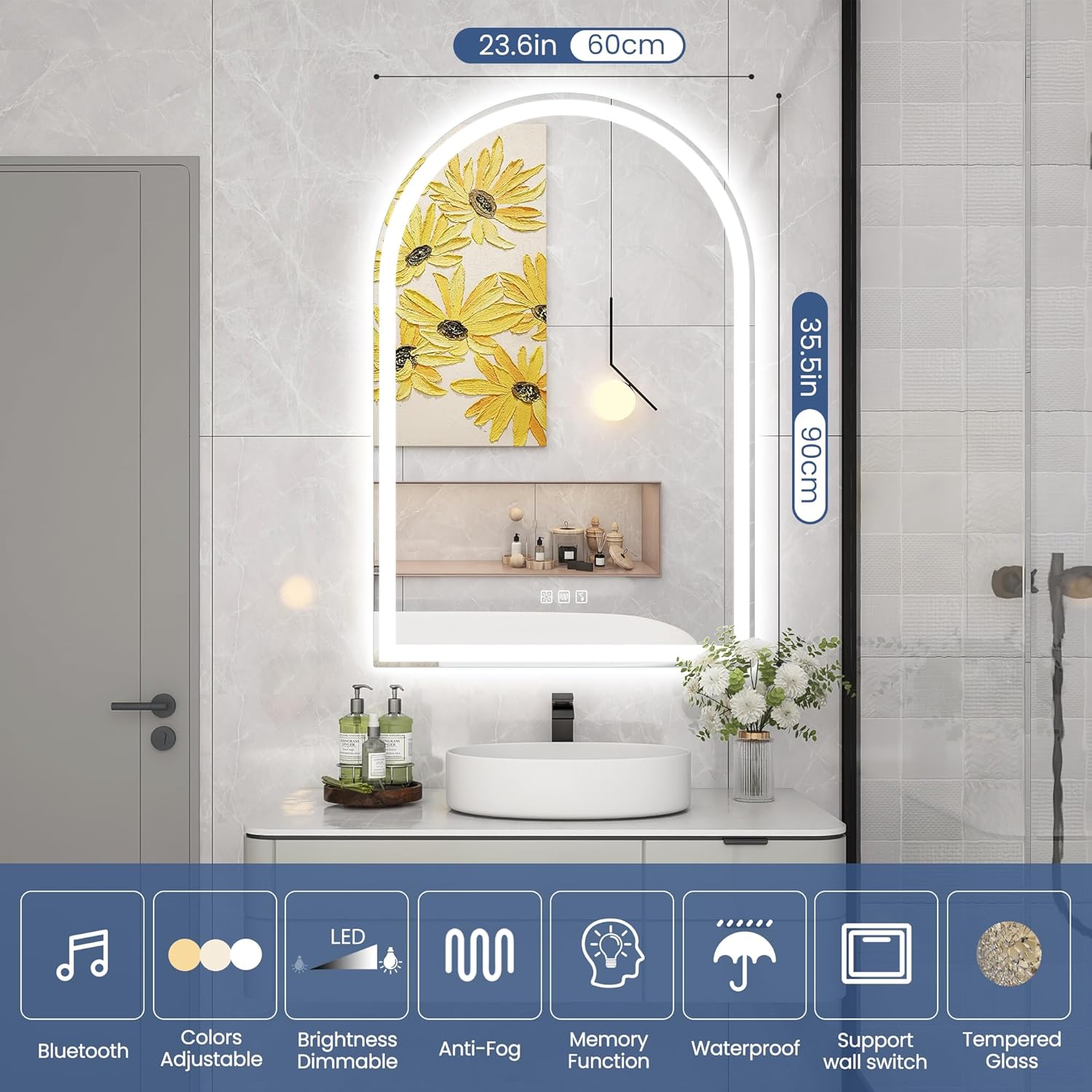
Figure 3: Key features and dimensions of the STARLEAD LED Bathroom Mirror.
الإعداد والتثبيت
مهم: Installation should be performed by a qualified electrician with at least two people. Ensure power is disconnected at the circuit breaker before starting any electrical work.
1. Choosing the Right Location and Size
Measure your space to ensure the mirror fits without crowding. For optimal placement above a countertop, allow 10-15 cm (4-6 inches) between the mirror's bottom and the counter for easy cleaning and aesthetic balance.

Figure 4: Guide for measuring and selecting the appropriate mirror size and placement.
2. تركيب المرآة
- العلامة: Use the provided mounting template or measure carefully to mark the drilling points on the wall.
- حفر: Drill holes at the marked points. Insert wall anchors if necessary.
- Attaching Bracket: Secure the mounting bracket to the wall using screws. Ensure it is level and firmly attached.

Figure 5: Step 1 - Measuring and marking the installation area.

Figure 6: Step 2 - Drilling holes for mounting hardware.
3 الربط الكهربائي
The mirror supports two connection methods: hardwiring or plug-in.
- الأسلاك: If hardwiring, cut off the plug from the power cable. Connect the mirror's wires to your home's electrical wiring (Live, Neutral, Ground) according to local electrical codes. Use appropriate wire connectors.
- المكونات الإضافية: If using the plug-in option, simply plug the mirror's power cable into a standard electrical outlet.

Figure 7: Preparing the power cable for hardwiring by cutting the plug.

Figure 8: Electrical wiring connections.

Figure 9: Securing electrical connections with wire connectors.
4. Final Mounting
Carefully hang the mirror onto the wall bracket. Ensure it is securely seated and stable. Restore power at the circuit breaker.

Figure 10: Final step of mounting the mirror onto the wall.
تعليمات التشغيل
The mirror features touch-sensitive controls located on the mirror surface. These controls allow you to manage lighting, anti-fog, and Bluetooth functions.

Figure 11: The mirror supports both touch sensor and external wall switch for lighting control.
1. Power On/Off and Light Color Adjustment
- تشغيل/إيقاف التشغيل: انقر على أيقونة الطاقة الموجودة على المرآة لتشغيل الأضواء أو إيقافها.
- درجة حرارة اللون: Double-tap the power icon to cycle through the three available color temperatures:
- 3000 كلفن ضوء دافئ: Ideal for a relaxing ambiance.
- 4000K Natural Light: Suitable for general use.
- 6500K Cool Light: Best for tasks requiring bright, clear illumination, such as makeup application.

Figure 12: Demonstrates the three adjustable color temperatures of the mirror's LED lighting.

Figure 13: Visual representation of the three light color options and their recommended uses.
2. Brightness Dimming
Long-press the power icon to adjust the brightness. The brightness will smoothly transition from 5% to 100%. Release your finger when the desired brightness level is reached.

الشكل 14: يسمح التعتيم التدريجي بالتحكم الدقيق في شدة الإضاءة.

Figure 15: Visual demonstration of the mirror's adjustable brightness levels.
3. وظيفة مقاومة الضباب
Press the dedicated anti-fog button (often represented by a steam icon) to activate the demist function. This feature helps keep the mirror clear after a shower. Press the button again to turn it off. Note that the anti-fog function does not have an automatic shut-off.

Figure 16: The anti-fog feature ensures a clear reflection even in steamy conditions.

Figure 17: Comparison of the mirror with and without the anti-fog function active.
4. إقران مكبر الصوت بتقنية البلوتوث
The mirror is equipped with dual Bluetooth speakers for audio playback.
- تفعيل البلوتوث: Press the Bluetooth icon on the mirror to activate the speaker.
- الاقتران: On your mobile device, search for Bluetooth devices and select "STARLEAD Mirror" (or similar name) to pair.
- التشغيل: Once paired, you can play music or podcasts through the mirror's speakers.

Figure 18: The mirror's integrated Bluetooth speakers allow for audio streaming.

Figure 19: Visual guide for pairing your device with the mirror's Bluetooth speaker.
5. Intelligent Memory Function
The mirror is equipped with an intelligent memory function. It will remember your last preferred light brightness and color temperature settings. These settings will be retained even after the mirror is turned off and restarted.

Figure 20: The memory function automatically restores your last used light settings.
صيانة
- تنظيف: استخدمي قطعة قماش ناعمةamp cloth and a mild glass cleaner to clean the mirror surface. Avoid abrasive cleaners or harsh chemicals that could damage the mirror or its components.
- السلامة الكهربائية: Before cleaning or performing any maintenance, ensure the mirror is disconnected from the power supply.
- عمر الصمام: The LED light strip has a lifespan of over 50,000 hours, requiring minimal maintenance.

Figure 21: The durable LED light strip is designed for long-term performance and low maintenance.
استكشاف الأخطاء وإصلاحها
| مشكلة | السبب المحتمل | حل |
|---|---|---|
| أضواء المرآة لا تعمل. | No power supply; loose connection; faulty touch sensor. | Check power connection and circuit breaker. Ensure wires are securely connected. Contact support if touch sensor is unresponsive. |
| خاصية منع الضباب لا تعمل. | لم يتم تفعيل الوظيفة؛ عطل كهربائي. | Press the anti-fog button to activate. Check power supply. |
| Bluetooth speaker not pairing. | Bluetooth not activated on mirror; device too far; incorrect pairing process. | Ensure Bluetooth is active on the mirror and your device. Keep device within range. Follow pairing instructions. |
| تومض الأضواء أو تخفت بشكل غير متوقع. | مصدر طاقة غير مستقر؛ أسلاك مفكوكة. | Verify stable power. Check all electrical connections. Consult a qualified electrician. |
الضمان والدعم
For warranty information or technical support, please refer to the STARLEAD official webيمكنك زيارة موقعهم الإلكتروني أو الاتصال بخدمة العملاء مباشرةً. عادةً ما تتوفر معلومات الاتصال على عبوة المنتج أو على موقع الشركة المصنعة. webموقع.
You can visit the STARLEAD Store for more information: STARLEAD Store on Amazon