
مقدمة
This manual provides detailed instructions for the installation, operation, and maintenance of your Carro Smart Ceiling Fan. The Tilbury 52-inch smart ceiling fan is designed to provide efficient cooling and lighting for large indoor and outdoor living spaces. It features a modern design with a white finish, elegant plywood blades, and an integrated 4000K LED cool light. This fan incorporates remote control, Wi-Fi app control, Siri Shortcut, and voice control technology, compatible with Amazon Alexa and Google Home Assistant, to customize your fan preferences.
معلومات السلامة
يرجى قراءة جميع تعليمات السلامة بعناية قبل التركيب والاستخدام. قد يؤدي عدم اتباع هذه التعليمات إلى حدوث صدمة كهربائية أو حريق أو إصابة شخصية.
- تأكد من إيقاف تشغيل الطاقة عند قاطع الدائرة قبل التثبيت أو الصيانة.
- يجب أن تكون جميع الأسلاك مطابقة للقوانين الكهربائية الوطنية والمحلية.
- استشر كهربائيًا مؤهلًا إذا كنت غير متأكد من إجراءات الأسلاك.
- Mount the fan to a structurally sound ceiling capable of supporting the fan's weight.
- Keep hands, hair, and clothing clear of the fan blades during operation.
- لا تحاول إصلاح المروحة أو تعديلها بنفسك. تواصل مع خدمة دعم العملاء للحصول على المساعدة.
الإعداد والتثبيت
The Carro Smart Ceiling Fan is designed for straightforward installation. The process typically takes about 20 minutes to replace your current ceiling fan.
- فك مكونات الحزمة: قم بإزالة جميع الأجزاء من العبوة بعناية. تأكد من وجود جميع المكونات وفقًا لقائمة التعبئة.
- انقطاع التيار الكهربائي: Before beginning installation, ensure the power supply to the fan location is turned off at the main circuit breaker.
- تركيب قوس تصاعد: Securely attach the mounting bracket to the ceiling junction box. Ensure the junction box is rated for ceiling fan support.
- التوصيلات السلكية: قم بتوصيل الأسلاك الكهربائية للمروحة بأسلاك المنزل وفقًا لمخطط الأسلاك المرفق. تأكد من أن جميع التوصيلات محكمة ومعزولة بشكل صحيح.
- المروحة: Attach the fan motor assembly to the mounting bracket. Install the fan blades and light kit as per the instructions.
- استعادة الطاقة: Once installation is complete, restore power at the circuit breaker and test the fan's operation.

الصورة: أكثر منview of Carro Smart Ceiling Fan components and general installation steps.
تعليمات التشغيل
Your Carro Smart Ceiling Fan offers multiple control methods for convenience and customization.
1. طرق التحكم
The fan can be controlled via the included remote, a mobile app, or voice commands through smart home assistants.
- جهاز التحكم عن بعد: Use the dedicated remote to adjust fan speed, light settings, and turn the fan on/off. This ensures control even without a Wi-Fi connection.
- تطبيق الهاتف المحمول: Download the Carro Home app to customize settings remotely. The app allows for advanced control and scheduling.
- التحكم الصوتي: The fan is compatible with Amazon Alexa, Siri, and Google Assistant. Use voice commands such as "Alexa, set the white ceiling fan in the bedroom to speed 8, turn the yellow light to 75%, and adjust the white light to 36%."

Image: Remote control and mobile phone app interface for fan operation.

Image: Demonstrates voice control functionality with Amazon Alexa, Google Assistant, and Siri Shortcuts.
2. Fan Operation (DC Motor)
The fan is equipped with an efficient DC motor, offering quiet operation and energy savings.
- إعدادات السرعة: Choose from 10 adjustable wind speeds, ranging from a maximum airflow of 4500 CFM to a minimum of 980 CFM.
- تدفق الهواء العكسي: The reversible function allows you to change the direction of airflow. Use the downward airflow for cooling in summer and upward airflow to circulate warm air in winter.
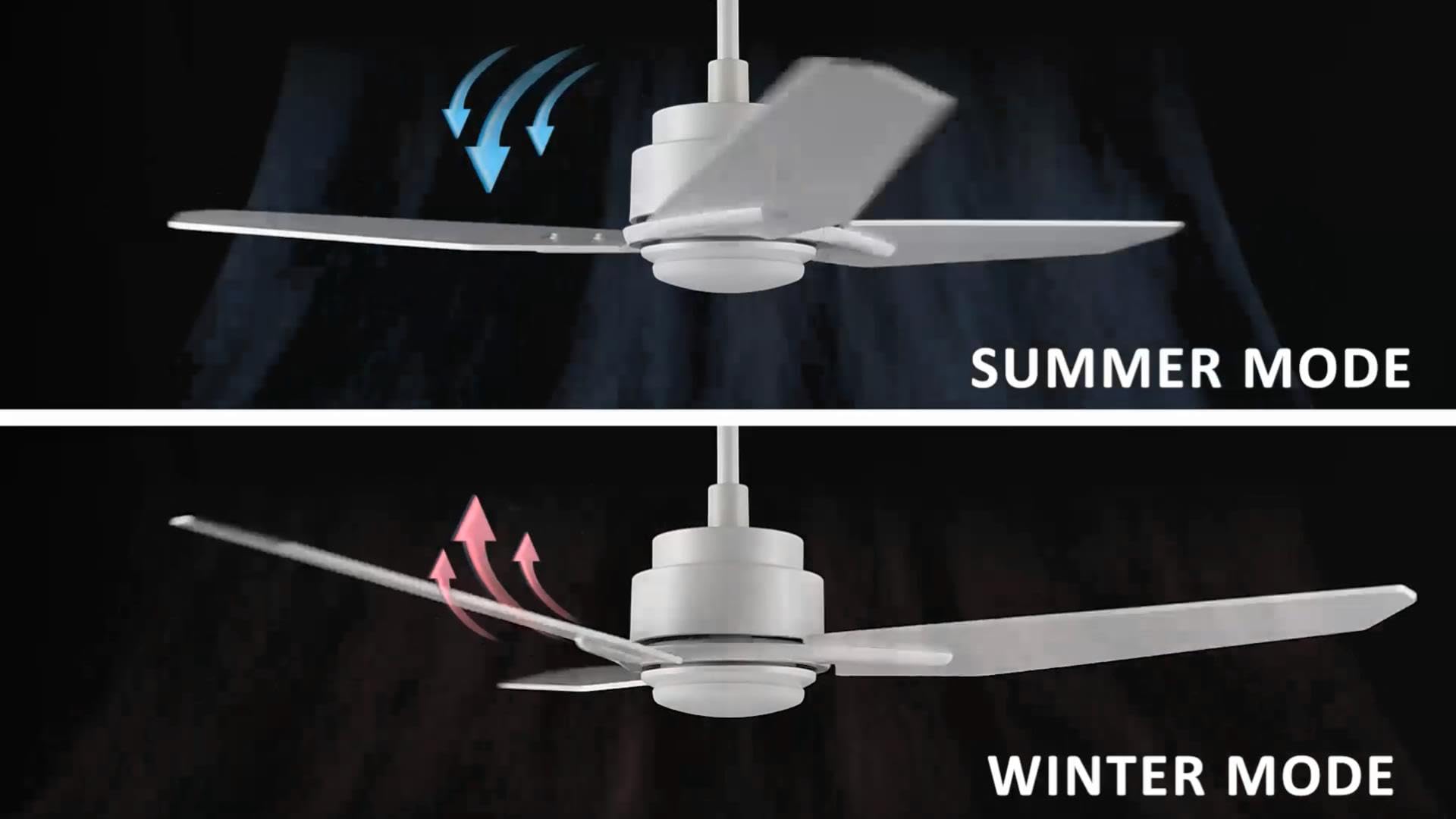
Image: Illustration of summer mode (downward airflow) and winter mode (upward airflow) for optimal air circulation.
3. Adjustable Dimmable LED Lights
Control the fan's lighting independently with ease.
- خيارات درجة حرارة اللون: Select from three light colors: 4000K (cool light), 3000K (bright light), and 2700K (warm light).
- وظيفة عكس الضوء: The LED lights are dimmable from 1% to 100%, allowing you to adjust brightness for any situation.
- Smart Grouping: Group the LED lights with the fan or other smart devices for unified control via the app or voice commands.

Image: Visual representation of the three dimmable light color options: Cool Light (4000K), Natural Light (3000K), and Warm Light (2700K).
4. Timer and Scheduling Options
Utilize the scheduling feature through the mobile app to automate fan and light operations.
- Set Routines: Program the fan to activate at specific times, with desired light and fan settings, for different areas of your home.
- Exampعلى: Program the living room fan to turn on daily at 18:00 with both yellow and white lights. Set the study fan to turn on at 21:00 from Monday to Friday, illuminating only the yellow light.
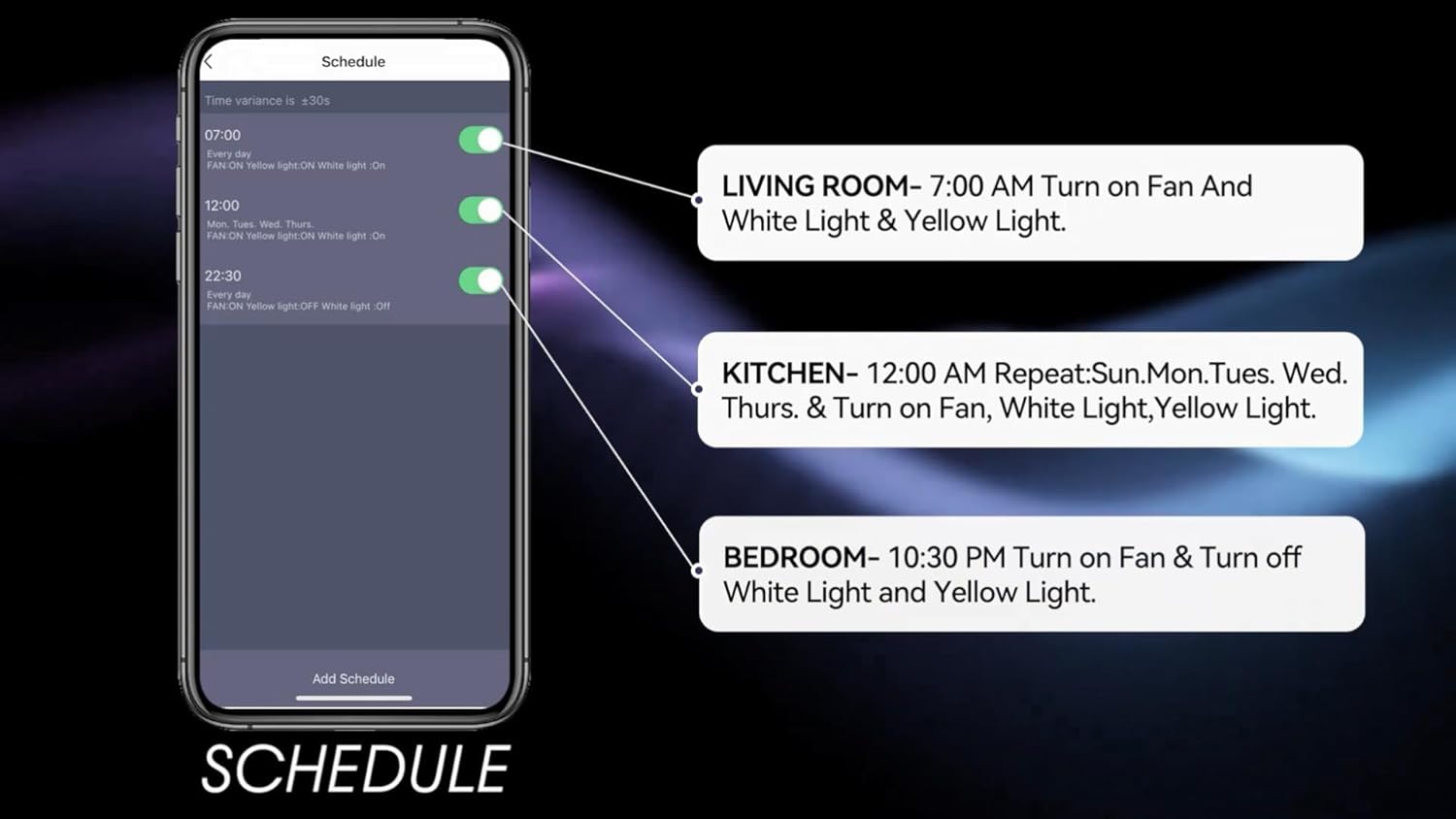
Image: Screenshot of the mobile app's scheduling interface, demonstrating how to set routines for different rooms.
صيانة
تضمن الصيانة المنتظمة الأداء الأمثل وطول العمر لمروحة السقف الخاصة بك.
- تنظيف: قم بتنظيف شفرات المروحة وغطاء المحرك بشكل دوري باستخدام قطعة قماش ناعمة.amp القماش. لا تستخدم المنظفات أو المذيبات الكاشطة.
- إحكام الشفرة: Check blade screws annually to ensure they are secure. Loose blades can cause wobbling and noise.
- مجموعة الإضاءة: The integrated LED light source is designed for long life and typically does not require replacement. If issues arise, contact customer support.
- إيقاف التشغيل: Always turn off the power at the circuit breaker before performing any cleaning or maintenance.
استكشاف الأخطاء وإصلاحها
If you encounter issues with your Carro Smart Ceiling Fan, refer to the following common problems and solutions:
| مشكلة | السبب المحتمل | حل |
|---|---|---|
| المروحة لا تبدأ | لا يوجد طاقة للمروحة؛ توصيلات الأسلاك فضفاضة؛ بطارية جهاز التحكم عن بعد منخفضة. | التحقق من قاطع الدائرة؛ والتأكد من سلامة جميع توصيلات الأسلاك؛ واستبدال بطارية جهاز التحكم عن بعد. |
| تذبذب المروحة | براغي الشفرة مفكوكة؛ شفرات غير متوازنة بشكل صحيح؛ دعامة تثبيت مفكوكة. | أحكم ربط جميع براغي الشفرات؛ استخدم مجموعة موازنة (غير مرفقة) لموازنة الشفرات؛ تأكد من تثبيت دعامة التثبيت بإحكام. |
| الضوء لا يعمل | No power to the light kit; Loose wire connections; Light setting off. | Check power supply; Verify light kit wiring; Ensure light is turned on via remote, app, or voice control. |
| جهاز التحكم عن بعد لا يعمل | بطارية منخفضة؛ جهاز التحكم عن بعد غير مقترن. | Replace remote battery; Refer to pairing instructions in the full manual (if applicable). |
| لا يمكن الاتصال بشبكة Wi-Fi/التطبيق | كلمة مرور الواي فاي غير صحيحة؛ جهاز التوجيه بعيد جدًا؛ التطبيق غير محدّث. | Verify Wi-Fi password; Move router closer or use a Wi-Fi extender; Update the Carro Home app to the latest version. |
مواصفات المنتج
| ميزة | مواصفة |
|---|---|
| ماركة | كارو |
| نموذج | 52" White |
| لون | أبيض |
| تصميم المروحة الكهربائية | مروحة سقف |
| مصدر الطاقة | تيار متردد/تيار مستمر |
| أسلوب | حديث |
| أبعاد المنتج | 52 بوصة عمق × 52 بوصة عرض × 13.4 بوصة ارتفاع |
| نوع الغرفة | Bedroom, Dining Room, Home Office, Living Rooms, Study Room |
| ميزة خاصة | قابلة للبرمجة |
| الاستخدامات الموصى بها | دوران الهواء |
| عدد الشفرات | 3 |
| سعة تدفق الهواء | 4500 قدم مكعب في الدقيقة |
| طول الشفرة | 22.7 بوصة |
| المجلدtage | 120 فولت |
| المكونات المضمنة | Ceiling fan X1 |
| التقى المواصفات | استخراج وتحويل وتحميل |
| طريقة التحكم | الصوت، جهاز التحكم عن بعد، التطبيق |
| وزن العنصر | 15.7 رطل |
| نوع التركيب | تحميل Downrod |
معلومات الضمان
Carro products are manufactured to the highest quality standards. This product comes with a limited warranty against defects in materials and workmanship. Please refer to the warranty card included in your product packaging or visit the official Carro webالموقع للحصول على شروط وأحكام الضمان التفصيلية.
دعم العملاء
For technical assistance, troubleshooting, or warranty claims, please contact Carro customer support:
- Webموقع: Visit the official Carro webالموقع للأسئلة الشائعة وموارد الدعم.
- بريد إلكتروني: Refer to your product packaging for customer service email.
- هاتف: Refer to your product packaging for customer service phone number.
Please have your model number (52" White) and purchase date ready when contacting support.