
1. المقدمة
شكرا لك على الشراءasing the Generic APAYADO-M70 Wired Mini Low Profile Keyboard. This manual provides essential information for setting up, operating, and maintaining your new keyboard. Please read this manual thoroughly before use to ensure proper function and longevity of your device.
2. انتهى المنتجview
2.1 الميزات الرئيسية
- الحجم الصغير: Slim and lightweight design (29×12×3.5cm; 220g) with a 78-key mini layout, saving desk space and enhancing portability.
- لو بروfile تصميم: Keys feature a short travel distance for responsive keystrokes and a comfortable typing experience.
- Chocolate Keycaps: Alphanumeric translucent keycaps ensure letters and numbers are clearly visible.
- الإضاءة الخلفية RGB: Integrated LED backlighting for enhanced visibility and aesthetics.
- مفاتيح الهدوء: Bass buttons are designed for quiet operation, reducing typing noise.
2.2 محتويات العبوة
يرجى التحقق من الحزمة للعناصر التالية:
- APAYADO-M70 Wired Mini Low Profile لوحة المفاتيح
- كابل USB (متكامل)
- دليل المستخدم (هذا المستند)
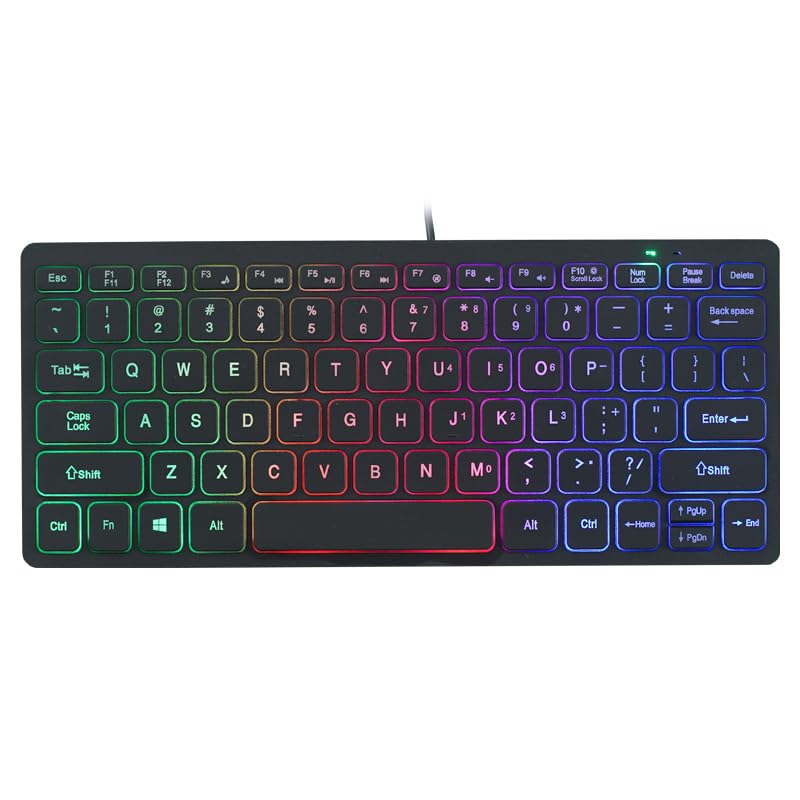
Image: The APAYADO-M70 Wired Mini Low Profile Keyboard, illustrating its compact form factor and illuminated keys.
3. تعليمات الإعداد
- فك لوحة المفاتيح: قم بإزالة لوحة المفاتيح من عبوتها بعناية.
- الاتصال بجهاز الكمبيوتر: Locate an available USB port on your computer (PC or Laptop). Insert the USB connector of the keyboard into the USB port.
- تثبيت برنامج التشغيل: لوحة المفاتيح سهلة الاستخدام، حيث يقوم نظام التشغيل (ويندوز، ماك أو إس، لينكس) بالكشف عنها وتثبيت برامج التشغيل اللازمة تلقائيًا. لا يتطلب الأمر عادةً تثبيت أي برامج إضافية.
- التحقق من الوظيفة: Open a text editor or word processor and type to ensure the keyboard is functioning correctly.
4. تعليمات التشغيل
4.1 الطباعة الأساسية
The APAYADO-M70 functions as a standard US English layout keyboard. Simply press the desired keys to input characters.
4.2 التحكم في الإضاءة الخلفية RGB
The keyboard features integrated RGB backlighting. To control the backlighting:
- Turn On/Off Backlighting: اضغط على FN مفتاح في وقت واحد مع ف10 مفتاح (ف ن + ف 10) to toggle the LED lights on or off.
- Note: Specific RGB modes or brightness adjustments are not detailed in the product information. The FN+F10 combination is for basic on/off functionality.
5. الصيانة
تضمن الصيانة المناسبة طول عمر لوحة المفاتيح لديك وأدائها.
- تنظيف:
- افصل لوحة المفاتيح عن الكمبيوتر قبل التنظيف.
- استخدم قطعة قماش ناعمة وخالية من الوبر وامسحها برفق.ampاغسل لوحة المفاتيح بالماء أو بمحلول تنظيف خفيف لمسح أغطية المفاتيح والسطح.
- تجنب استخدام المواد الكيميائية القاسية، أو المنظفات الكاشطة، أو المذيبات.
- استخدم الهواء المضغوط لإزالة الغبار والحطام من بين المفاتيح.
- تخزين: قم بتخزين لوحة المفاتيح في بيئة نظيفة وجافة بعيدًا عن درجات الحرارة القصوى وأشعة الشمس المباشرة.
- التعامل: تجنب إسقاط لوحة المفاتيح أو تعريضها للسوائل. لا تحاول تفكيك لوحة المفاتيح، لأن ذلك سيلغي الضمان.
6. استكشاف الأخطاء وإصلاحها
| مشكلة | السبب المحتمل | حل |
|---|---|---|
| لوحة المفاتيح لا تستجيب | اتصال USB فضفاض، منفذ USB معيب، مشكلة في برنامج التشغيل. |
|
| الإضاءة الخلفية لا تعمل | انطفأت الإضاءة الخلفية، مشكلة في الطاقة. |
|
| المفاتيح ملتصقة أو لا تستجيب | Debris under keycaps, liquid spill. |
|
7. المواصفات
| نموذج | APAYADO-M70 |
| الشركة المصنعة | APAYADO |
| ماركة | نوعي |
| تكنولوجيا الاتصال | USB سلكي |
| وصف لوحة المفاتيح | Membrane, Low-Profile |
| المميزات الخاصة | Backlit, Lightweight, Low-Profile مفتاح |
| الأبعاد (الطول × العرض × الارتفاع) | 29 × 12 × 3.5 cm (approx.) |
| وزن | 220 جم (تقريبًا) |
| الأجهزة المتوافقة | كمبيوتر محمول ، كمبيوتر شخصي |
| Color/Backlight | Mixed Light (RGB) |
8. الضمان والدعم
This product is covered by a standard manufacturer's warranty. Please refer to the retailer's return policy or contact the seller for specific warranty terms and conditions. For technical support or inquiries, please contact your point of purchase or the manufacturer directly.
احتفظ بإيصال الشراء الخاص بك كدليل على الشراء في حالة مطالبات الضمان.