
1. المقدمة
This instruction manual provides comprehensive guidance for the assembly, operation, and maintenance of your TRYX LUCA L70 E-ATX Mid-Tower PC Case. The LUCA L70 is designed to accommodate a wide range of components, supporting E-ATX, ATX, Micro-ATX, and Mini-ITX motherboards. It features a 270° panoramic tempered glass panel for an unobstructed view of your internal components, a modular design for flexible power supply placement, and extensive cooling capabilities. Please read this manual carefully before beginning assembly to ensure proper installation and safe use.
2. معلومات السلامة
Always observe the following safety precautions to prevent injury and damage to your components:
- كهرباء ساكنة: Always ground yourself before handling internal components to prevent electrostatic discharge (ESD) damage. Use an anti-static wrist strap if available.
- انقطاع التيار الكهربائي: Ensure all power is disconnected from the power supply unit (PSU) and the wall outlet before installing or removing any components.
- حواف حادة: احذر من الحواف الحادة داخل العلبة أثناء التركيب.
- وزن: The PC case, especially when fully assembled with components, can be heavy. Lift with care and seek assistance if necessary.
- تهوية: Ensure adequate airflow around the case to prevent overheating. Do not block ventilation openings.
- الزجاج المقسّى: Handle the tempered glass panels with extreme care. They are fragile and can shatter if dropped or subjected to impact. Avoid placing heavy objects on the glass.
3. انتهى المنتجview والميزات
The TRYX LUCA L70 PC case offers a blend of aesthetic design and functional features for high-performance PC builds.
3.1 الميزات الرئيسية
- 270° Panoramic Tempered Glass: Front and side panels feature reinforced tempered glass for an unobstructed view من مكوناتك الداخلية.
- التصميم المعياري: The power supply unit (PSU) can be positioned at the top or bottom, offering flexibility for various build configurations and improved cable management.
- Excellent Cooling Support: Supports up to nine fans and radiators up to 420mm, ensuring optimal thermal performance for demanding systems.
- مساحة داخلية واسعة: Accommodates E-ATX motherboards (up to 280mm width), graphics cards up to 460mm in length, and CPU coolers up to 170mm in height. Rear cable management space up to 65mm.
- خيارات التخزين: Features nine 2.5-inch drive bays and two 3.5-inch drive bays for ampلو التخزين.
- Advanced I/O Ports: Includes one USB 3.2 Gen2x2 Type-C port (20Gbps, 30W Power Delivery), two USB 3.0 Type-A ports, and one 3.5mm 4-pole TRRS audio jack.
- فلاتر الغبار: Equipped with dust filters on the top and bottom to maintain a clean interior.
- Vertical GPU Mount Support: Ready for vertical GPU mounting (riser cable sold separately).
3.2 الانعكاس المرئيview

Figure 1: Stylish Design & Superior Performance. This image highlights the internal layout of the TRYX LUCA L70 PC case, showcasing its spacious interior, fan mounting options, and the 270-degree tempered glass panels. It also indicates a 19mm ultra-slim chassis, 4mm thick tempered glass, and an X-shaped floating foot construction that elevates the case by 40mm for improved airflow.
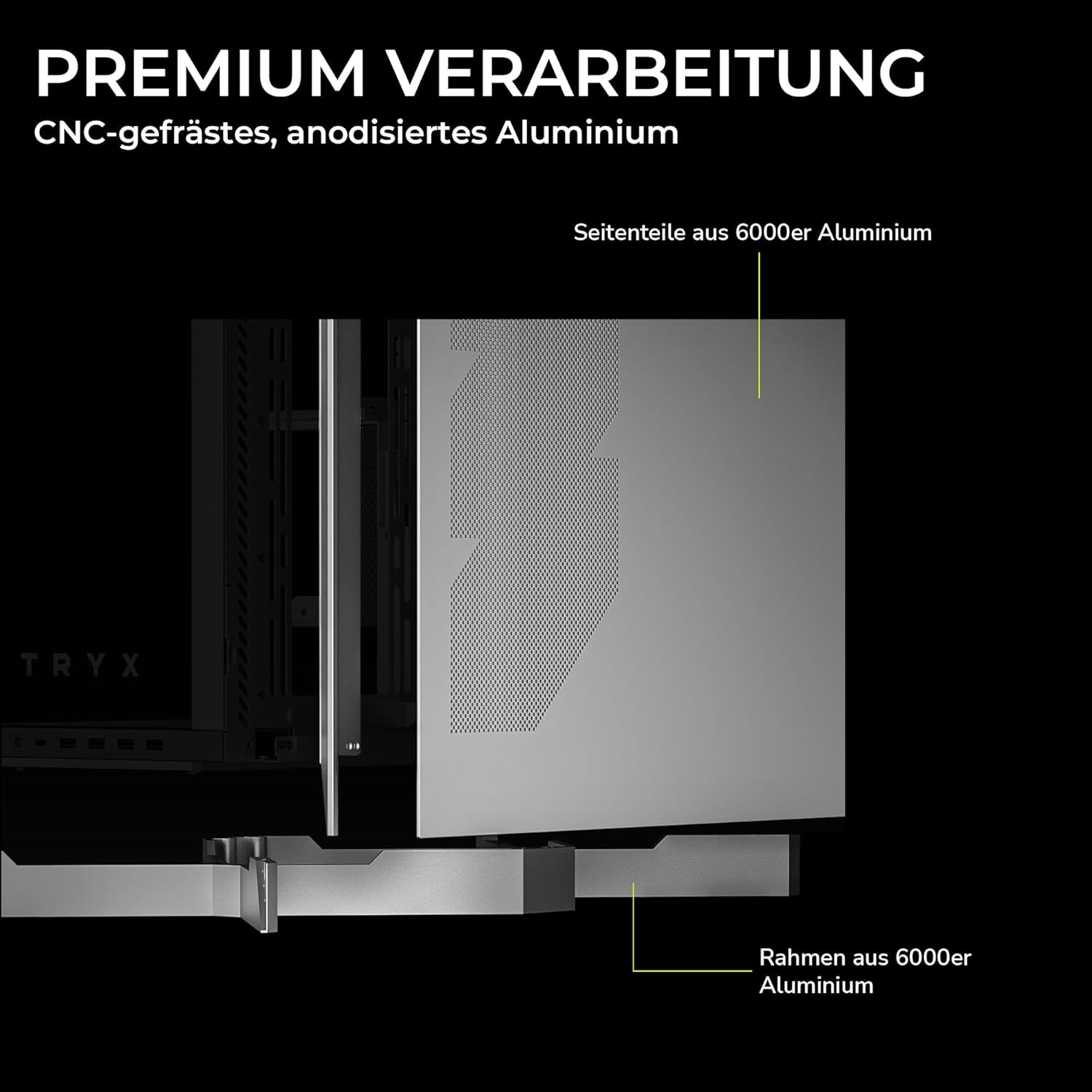
Figure 2: Premium Craftsmanship. This image details the construction materials, specifically highlighting the side panel made from 6000 series aluminum and the frame also constructed from 6000 series aluminum, emphasizing the case's durable and high-quality build.

Figure 3: Effortless Access with Swivel Front Panel. This image demonstrates the swing-out front panel feature, which allows for easy access to the front fan mounts and radiator space, simplifying installation and maintenance.

Figure 4: Modular Design. This illustration shows the flexible power supply unit (PSU) positioning (top or bottom) and the removable motherboard tray, which facilitates easier component installation and cable management. It also indicates various fan and radiator mounting points.

Figure 5: Extensive Connectivity Options. This image details the front I/O panel, including the microphone and speaker jacks, one USB-C 3.2 Gen 2x2 port (with 30W Power Delivery), and two USB-A 3.2 Gen 1 ports.

الشكل 6: أبعاد المنتج. This image provides a visual representation of the case's approximate dimensions: 26cm (width), 57cm (height), and 54cm (depth). Note that precise dimensions are listed in the specifications section.
4. الإعداد والتثبيت
This section outlines the general steps for installing your PC components into the TRYX LUCA L70 case. Always refer to your individual component manuals for specific installation instructions.
4.1 إعداد القضية
- ضع العلبة على سطح مستوٍ وثابت.
- Carefully remove the tempered glass side panel by unscrewing the thumb screws and gently pulling it away. Set it aside on a soft, non-abrasive surface.
- Remove any other panels or covers as needed for easier access to the interior.
4.2 تركيب اللوحة الأم
- Install the CPU, CPU cooler (if air cooler), and RAM onto your motherboard before placing it in the case.
- تأكد من تثبيت الدعامات الصحيحة لشكل اللوحة الأم (E-ATX، ATX، Micro-ATX، Mini-ITX).
- Carefully align your motherboard with the standoffs and the I/O shield opening at the rear of the case.
- قم بتأمين اللوحة الأم باستخدام البراغي المتوفرة.
4.3 تركيب وحدة إمداد الطاقة (PSU)
- Determine your preferred PSU mounting position (top or bottom) based on your modular design preference.
- قم بإدخال وحدة إمداد الطاقة في المكان المخصص لها من الجزء الخلفي للعلبة.
- قم بتأمين وحدة إمداد الطاقة باستخدام البراغي من الجزء الخلفي للعلبة.
- قم بتوصيل كابلات الطاقة اللازمة باللوحة الأم والمكونات الأخرى.
4.4 تركيب محرك التخزين
- محركات أقراص بحجم 2.5 بوصة: Locate the 2.5-inch drive mounts (up to 9 available). Secure SSDs or 2.5-inch HDDs using the provided screws or tool-less mechanisms.
- محركات أقراص بحجم 3.5 بوصة: Locate the 3.5-inch drive bays (up to 2 available). Install HDDs into the drive cages, typically using trays or screws.
4.5 تثبيت بطاقة الرسومات (GPU)
- قم بإزالة أغطية فتحات التوسعة اللازمة الموجودة في الجزء الخلفي من العلبة.
- أدخل وحدة معالجة الرسومات (GPU) في فتحة PCIe المناسبة على اللوحة الأم.
- Secure the GPU with screws to the expansion slots.
- If using a vertical GPU mount (riser cable sold separately), follow the instructions provided with your vertical mount kit.
4.6 تركيب المروحة والرادياتير
The LUCA L70 supports extensive cooling configurations:
- قمة: Up to 2x 120mm / 140mm fans or radiators up to 420mm.
- جانب: Up to 3x 120mm / 140mm fans or radiators up to 420mm.
- قاع: Up to 3x 120mm / 140mm fans or radiators up to 360mm.
- مؤخرة: مروحة واحدة مقاس 120 مم.
Install fans and radiators using the appropriate screws, ensuring correct airflow direction.
4.7 إدارة الكابلات
استخدم ample cable routing cutouts and tie-down points behind the motherboard tray to manage cables neatly. This improves airflow and aesthetics. The case offers up to 65mm of space for cable management.
4.8 منافذ الإدخال/الإخراج الأمامية
قم بتوصيل كابلات اللوحة الأمامية (USB، الصوت، مفتاح الطاقة، مفتاح إعادة التشغيل، مؤشرات LED) بالمنافذ المناسبة على اللوحة الأم. راجع دليل اللوحة الأم لمعرفة مواقع هذه المنافذ.
5. تشغيل علبة الكمبيوتر
Once all components are installed and cables are connected, replace all panels, including the tempered glass side panel. Connect your peripherals (monitor, keyboard, mouse) and power cable to the PSU.
- تشغيل الطاقة: Press the power button on the front I/O panel to turn on your PC.
- إيقاف التشغيل: Shut down your operating system normally. You can also press and hold the power button for a few seconds for a forced shutdown (use only when necessary).
- إعادة تشغيل: Use the reset button on the front I/O panel if available, or restart through your operating system.
6. الصيانة
تساعد الصيانة الدورية على ضمان الأداء الأمثل وطول عمر مكونات جهاز الكمبيوتر الخاص بك.
- فلاتر الغبار: The top and bottom dust filters should be regularly cleaned. Gently remove them and clean with compressed air or rinse with water (ensure they are completely dry before reinstallation).
- التنظيف الخارجي: Wipe the exterior surfaces, including the tempered glass panels, with a soft, damp القماش. تجنب استخدام المنظفات أو المذيبات الكاشطة.
- التنظيف الداخلي: Periodically open the case and use compressed air to remove dust buildup from fans, heatsinks, and other components. Ensure the PC is powered off and unplugged before cleaning the interior.
7. استكشاف الأخطاء وإصلاحها
إذا واجهت مشاكل، فضع في اعتبارك خطوات استكشاف الأخطاء وإصلاحها الشائعة التالية:
- جهاز الكمبيوتر لا يعمل:
- تأكد من تشغيل وحدة تزويد الطاقة من الخلف.
- تأكد من توصيل جميع كابلات الطاقة (24-pin ATX، 8-pin CPU، طاقة وحدة معالجة الرسومات) بشكل آمن.
- تأكد من أن كابل مفتاح الطاقة في اللوحة الأمامية متصل بشكل صحيح بموصل اللوحة الأم.
- لا يوجد إخراج للعرض:
- Ensure your monitor is connected to the graphics card (not the motherboard I/O, unless using integrated graphics).
- أعد تركيب بطاقة الرسومات ووحدات ذاكرة الوصول العشوائي (RAM).
- ارتفاع درجة الحرارة:
- تحقق من توصيلات المراوح وتأكد من دورانها.
- قم بتنظيف فلاتر الغبار والمكونات الداخلية.
- Verify proper airflow direction within the case.
- منافذ USB لا تعمل:
- Ensure the front panel USB cables are correctly connected to the motherboard headers.
- Check your motherboard's BIOS/UEFI settings for USB port configuration.
For more complex issues, consult your motherboard or component manuals, or seek professional assistance.
8. المواصفات
| ميزة | مواصفة |
|---|---|
| ماركة | تريكس |
| اسم الموديل | LUCA L70 |
| رقم الموديل | C-L700N-NN0H-G0W |
| نوع الحالة | برج متوسط |
| لون | أبيض |
| التوافق مع اللوحة الأم | إي-ATX، إيه تي إكس، ميكرو-إيه تي إكس، ميني آي تي إكس |
| الأبعاد (العرض × الارتفاع × العمق) | 261.8 مم × 540.4 مم × 571.85 مم (حوالي 10.3 × 21.3 × 22.5 بوصة) |
| وزن | حوالي 16.2 كجم (35.7 رطل) |
| مواد | Aluminum Alloy, SGCC Steel, Tempered Glass |
| فتحات التوسعة | 7 |
| أقصى طول GPU | 460 ملم |
| أقصى ارتفاع لمبرد وحدة المعالجة المركزية | 170 ملم |
| أقصى طول PSU | 190 مم (ATX) |
| حجرات القيادة | 9x 2.5-inch, 2x 3.5-inch |
| دعم الجماهير (أعلى الصفحة) | 2 × 120 ملم / 140 ملم |
| دعم الجماهير (الجانب) | 3 × 120 ملم / 140 ملم |
| دعم الجماهير (أسفل الصفحة) | 3 × 120 ملم / 140 ملم |
| دعم المروحة (الخلفي) | 1 × 120 مم |
| دعامة المبرد (أعلى) | حتى 420 ملم |
| دعم المبرد (الجانبي) | حتى 420 ملم |
| دعامة المبرد (السفلية) | حتى 360 ملم |
| منافذ الإدخال / الإخراج الأمامية | 1x USB 3.2 Gen2x2 Type-C (20Gbps, 30W PD), 2x USB 3.0 Type-A, 1x 3.5mm 4-pole TRRS Jack |
| مرشحات الغبار | أعلى، أسفل |
| المميزات الخاصة | 270° Tempered Glass, Modular Design, Vertical GPU Mount Ready |
| رقم GTIN | 06977029650209 |
9. الضمان والدعم
9.1 معلومات الضمان
The TRYX LUCA L70 PC Case comes with a ضمان لمدة 2 سنوات from the date of purchase. This warranty covers defects in materials and workmanship under normal use. It does not cover damage caused by misuse, accident, modification, unauthorized repair, or improper installation. Please retain your proof of purchase for warranty claims.
9.2 الدعم الفني
For technical assistance, troubleshooting, or warranty inquiries, please contact TRYX customer support. Refer to the official TRYX website or your retailer's support channels for the most up-to-date contact information. When contacting support, please have your product model (LUCA L70) and proof of purchase ready.