
1. المقدمة
This manual provides detailed instructions for the installation, operation, and maintenance of your Sharkoon MK6 RGB Micro ATX PC Case. Please read this manual thoroughly before beginning assembly to ensure proper setup and optimal performance.
The Sharkoon MK6 RGB is a compact Micro ATX PC case designed with a modern glass aesthetic, featuring tempered glass panels on the front and side. It includes three pre-installed addressable RGB PWM fans for efficient cooling and customizable lighting. The case supports BTF motherboards and offers ample space for various components, including large graphics cards and extensive cooling solutions.
2. الإعداد وتثبيت المكونات
Before starting, ensure you have all necessary tools, including a screwdriver set and anti-static wrist strap.
2.1 فتح القضية
Carefully remove the tempered glass side panel by unscrewing the retaining thumbscrews, typically located at the rear of the case. Gently slide the panel off and set it aside on a soft, flat surface to prevent scratches.
2.2 تركيب اللوحة الأم
- Install the I/O shield into the designated opening at the rear of the case.
- Align your Micro ATX or BTF motherboard with the standoffs inside the case. Ensure all standoffs match the motherboard's mounting holes.
- ثبّت اللوحة الأم باستخدام البراغي المرفقة. لا تُشدّها أكثر من اللازم.
2.3 تركيب وحدة إمداد الطاقة (PSU)
The MK6 RGB supports bottom-mount power supplies up to 23.5 cm in length.
- قم بإدخال وحدة إمداد الطاقة في الحجرة المخصصة لها في الجزء الخلفي السفلي من العلبة.
- Secure the PSU to the case using screws from the rear panel.
2.4 تركيب محرك التخزين
The case accommodates up to two 3.5" HDDs or three 2.5" SSDs.
- محركات الأقراص الصلبة مقاس 3.5 بوصة: Locate the drive cage, typically near the PSU shroud. Mount the HDDs using the provided trays or screws.
- أقراص SSD مقاس 2.5 بوصة: SSDs can be mounted on dedicated brackets behind the motherboard tray or within the drive cage.
2.5 تثبيت بطاقة الرسومات (GPU)
The MK6 RGB supports graphics cards up to 41 cm in length and includes a rubberized graphics card holder for support.
- قم بإزالة أغطية فتحة PCIe الضرورية من الجزء الخلفي للعلبة.
- قم بإدخال بطاقة الرسوميات في فتحة PCIe المناسبة على اللوحة الأم.
- Secure the graphics card with screws. Adjust the graphics card holder to provide additional support if needed.
2.6 تركيب نظام التبريد
The case comes with three pre-installed 120mm addressable RGB PWM fans. Two fans are inverted on the side for intake, and one is at the rear for exhaust. The case supports up to eight fans in total.
- المراوح الإضافية: Install additional 120mm or 140mm fans in available mounting positions (top, bottom, side) as required for optimal airflow.
- Liquid Cooling Radiators: The case supports a 360mm radiator and an additional 240mm radiator. Mount radiators to the designated areas (e.g., top, side) using appropriate screws.
2.7 إدارة الكابلات
استخدم فتحات توجيه الكابلات ونقاط التثبيت خلف لوحة الأم لتنظيم الكابلات. هذا يحسن تدفق الهواء والمظهر العام.

الشكل 1: داخلي view of the Sharkoon MK6 RGB PC case, highlighting the pre-installed fans and drive bay locations.

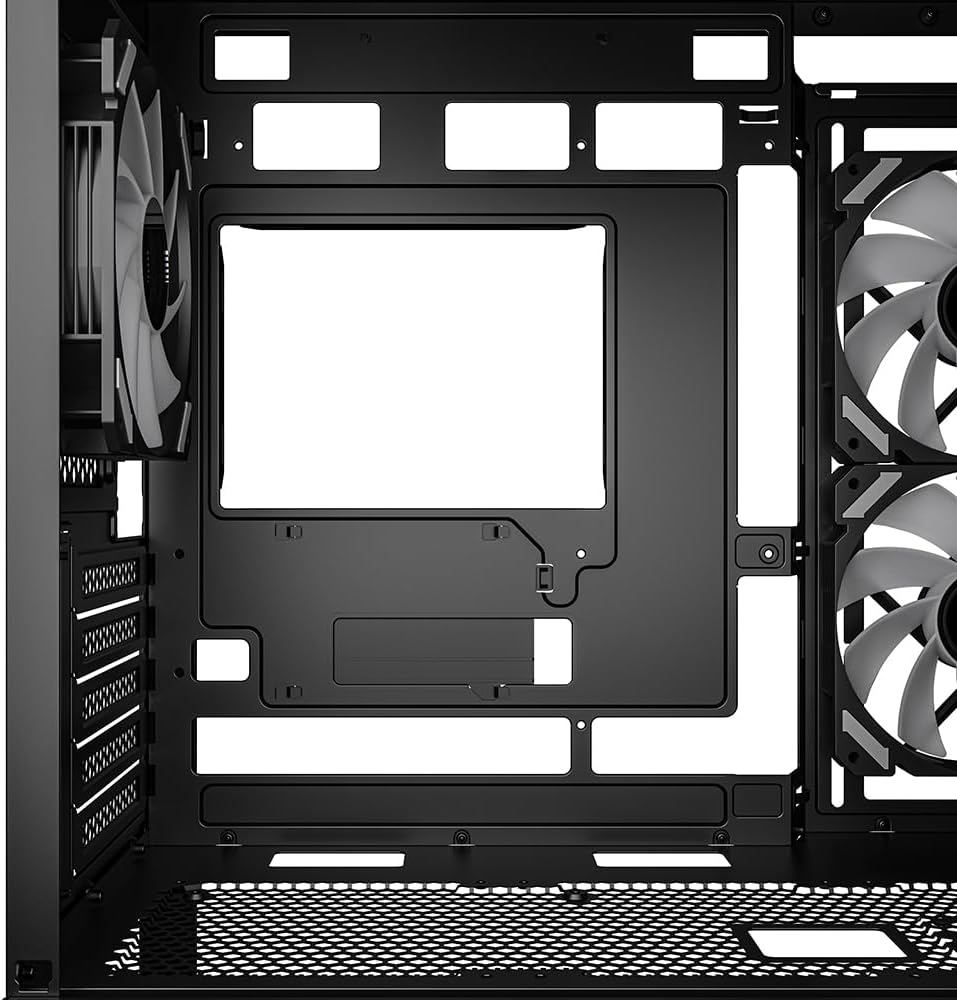
الشكل 2: داخلي view showing the motherboard tray and various cutouts for efficient cable management.

الشكل 3: داخلي view illustrating the available mounting points for liquid cooling radiators.

الشكل 4: داخلي view displaying the adjustable graphics card holder for enhanced GPU support.
3. تعليمات التشغيل
3.1 التشغيل
After all components are installed and cables are connected, close the side panel. Connect your monitor, keyboard, mouse, and power cable to the PC. Press the power button on the front panel to start your system.
3.2 التحكم في إضاءة RGB
The MK6 RGB includes an RGB controller that provides connections for up to four LED elements and up to four PWM fans. The pre-installed fans are connected to this controller.
- Default Modes: The RGB lighting will typically cycle through default patterns upon startup.
- التحكم في البرنامج: If connected to a compatible motherboard, RGB lighting can be controlled via the motherboard's RGB synchronization software. Refer to your motherboard manual for specific instructions.
- التحكم اليدوي: Some cases may feature a dedicated button on the front panel to cycle through RGB modes. Consult the case's quick start guide for this feature.
3.3 توصيلات اللوحة الأمامية
The front panel features modern TRRS and USB-C ports for broad compatibility with various devices. Connect your peripherals and storage devices as needed.

الشكل 5: الجبهة view of the Sharkoon MK6 RGB PC case, showcasing the tempered glass panel and visible RGB fans.
4. الصيانة
تساعد الصيانة الدورية على ضمان الأداء الأمثل وطول عمر مكونات جهاز الكمبيوتر الخاص بك.
4.1 تنظيف فلتر الغبار
The case features dust filters to prevent dust accumulation. Regularly clean these filters to maintain good airflow.
- حدد مواقع مرشحات الغبار وقم بإزالتها (على سبيل المثال، العلوية والسفلية والأمامية).
- Clean the filters using compressed air or by rinsing them with water. Ensure they are completely dry before reinstallation.
4.2 Tempered Glass Cleaning
Use a soft, lint-free cloth and a non-abrasive glass cleaner to clean the tempered glass panels. Avoid harsh chemicals that could damage the glass or coatings.
4.3 تنظيف المروحة
Over time, dust can accumulate on fan blades, reducing cooling efficiency. Use compressed air to gently clean the fan blades. Ensure the system is powered off before cleaning.
الشكل 6: الجزء العلوي view of the Sharkoon MK6 RGB PC case, illustrating the removable magnetic dust filter for easy cleaning.
5. استكشاف الأخطاء وإصلاحها
يتناول هذا القسم المشكلات الشائعة التي قد تواجهها.
5.1 النظام لا يعمل
- توصيلات الطاقة: Verify that the PSU is properly connected to the wall outlet and the power switch on the PSU is in the 'ON' position.
- موصلات اللوحة الأمامية: Ensure the power button cable from the front panel is correctly connected to the motherboard's front panel header.
- المكونات الداخلية: Check that all major components (motherboard, CPU, GPU, RAM) are securely seated and connected to the PSU.
5.2 المراوح لا تدور أو إضاءة RGB لا تعمل
- روابط المعجبين: Confirm that all fan power cables are securely connected to the motherboard or the RGB controller.
- RGB Controller Power: Ensure the RGB controller itself is receiving power, typically via a SATA power connector from the PSU.
- Software/Button: If using software control, check the software settings. If there's a physical RGB button, try cycling through modes.
5.3 ضعف تدفق الهواء أو ارتفاع درجة الحرارة
- فلاتر الغبار: نظف أي فلاتر غبار مسدودة.
- اتجاه المروحة: Ensure fans are oriented correctly for optimal airflow (intake at front/side, exhaust at rear/top).
- إدارة الكابلات: تحسين إدارة الكابلات لتقليل العوائق أمام تدفق الهواء.
6. المواصفات
| ميزة | التفاصيل |
|---|---|
| اسم الموديل | MK6 RGB |
| ماركة | شاركون |
| نوع الحالة | البرج الاوسط |
| التوافق مع اللوحة الأم | Micro ATX, BTF |
| مادة | زجاج مقسّى |
| لون | أسود |
| أبعاد المنتج (الطول × العرض × الارتفاع) | 17.13 × 8.86 × 17.52 بوصة (43.5 × 22.5 × 44.5 سم) |
| وزن العنصر | 13.42 رطل (6.1 كجم) |
| ارتفاع مبرد وحدة المعالجة المركزية | حتى 17 سم |
| مساحة طول بطاقة الرسومات | حتى 41 سم |
| خلوص طول وحدة إمداد الطاقة | حتى 23.5 سم |
| حجرات القيادة | قرصان صلبان بحجم 3.5 بوصة أو أربعة أقراص SSD بحجم 2.5 بوصة |
| مراوح مثبتة مسبقًا | 3x 120mm Addressable RGB PWM Fans |
| دعم ماكس فان | ما يصل إلى 8 مراوح |
| دعم المبرد | 1x 360 مم، 1x 240 مم |
| منافذ الإدخال / الإخراج الأمامية | TRRS, USB-C, USB 3.0 (1 port listed in specs) |
| طريقة التبريد | هواء |
| نوع تركيب مصدر الطاقة | التركيب السفلي |
7. معلومات الضمان
For detailed warranty information regarding your Sharkoon MK6 RGB PC Case, please refer to the official Sharkoon website or contact your local retailer. Warranty terms and conditions may vary by region and purchase location.
8. الدعم الفني
If you encounter any issues or require technical assistance beyond the scope of this manual, please visit the official Sharkoon support website for FAQs, driver downloads, and contact information. You may also reach out to your point of purchase for support.