
1. المقدمة
Thank you for choosing the Sharkoon AK6 RGB ATX PC Case. This manual provides essential information for the proper installation, operation, and maintenance of your new PC case. Please read this guide thoroughly before beginning the assembly process to ensure optimal performance and longevity of your components.
2. معلومات السلامة
- افصل دائمًا مصدر الطاقة من مقبس الحائط قبل تركيب أو إزالة أي مكونات داخل علبة الكمبيوتر.
- تعامل مع ألواح الزجاج المقسى بحذر. فهي هشة وقد تنكسر إذا سقطت أو تعرضت لصدمة.
- تجنب تعريض العلبة لدرجات حرارة عالية أو رطوبة أو أشعة الشمس المباشرة.
- احفظ الأجزاء الصغيرة والبراغي بعيداً عن متناول الأطفال.
- تأكد من التأريض السليم لمنع تلف المكونات الإلكترونية الحساسة بسبب التفريغ الكهروستاتيكي (ESD).
3. محتويات العبوة
يرجى التأكد من وجود جميع العناصر في الحزمة الخاصة بك:
- علبة كمبيوتر Sharkoon AK6 RGB ATX
- صندوق الملحقات (يحتوي على براغي، وربطات كابلات، وأجزاء صغيرة أخرى)
- دليل المستخدم (هذا المستند)
4. انتهى المنتجview
The Sharkoon AK6 RGB ATX PC Case is designed with a modern glass aesthetic, featuring seamless integration of tempered glass on the front and side panels. It includes four pre-installed 120mm addressable RGB PWM fans for optimal airflow and visual appeal. The case supports a wide range of components, including BTF motherboards, and offers ample space for high-performance hardware.

Figure 4.1: Front interior view of the Sharkoon AK6 RGB PC case, showcasing the pre-installed addressable RGB fans and the spacious main chamber.

الشكل 4.2: بزاوية view of the Sharkoon AK6 RGB PC case, highlighting the tempered glass side panel and the top mesh for ventilation.

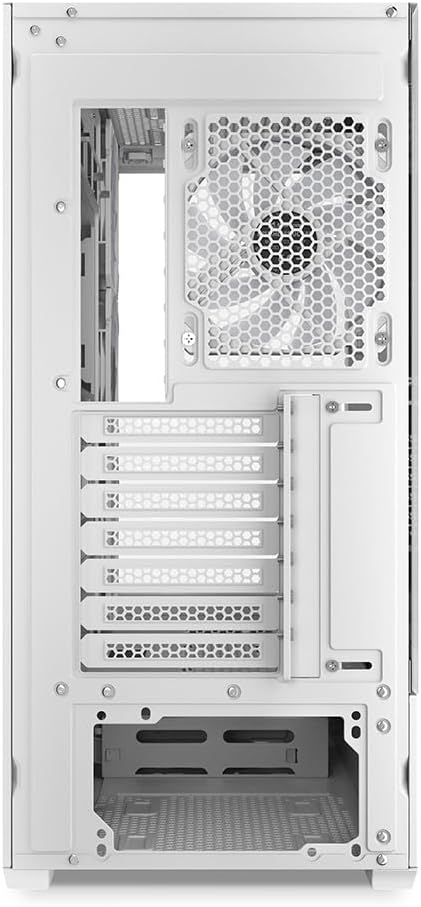
الشكل 4.3: خلفي view of the Sharkoon AK6 RGB PC case, showing the I/O shield cutout, rear exhaust fan mount, and expansion slots.
لوحة الإدخال والإخراج الأمامية
The front I/O panel is located on the side of the case and includes:
- زر الطاقة
- زر إعادة الضبط
- 2 x USB Ports (Type-A)
- 1 منفذ USB من النوع C
- Audio Jacks (TRRS)
5. الإعداد والتثبيت
Follow these steps to install your components into the Sharkoon AK6 RGB PC Case.
5.1 إعداد القضية
- ضع العلبة على سطح مستوٍ وثابت.
- Carefully remove the tempered glass side panel by unscrewing the thumb screws at the rear and gently pulling the panel away.
- Remove the rear metal side panel by unscrewing the thumb screws.
5.2 تركيب اللوحة الأم
The AK6 RGB supports Mini-ITX, Micro-ATX, ATX, and BTF motherboards.
- Install the I/O shield into the cutout at the rear of the case (if not pre-installed on your motherboard).
- Align your motherboard with the standoffs inside the case. Ensure all standoffs match the motherboard's mounting holes.
- قم بتثبيت اللوحة الأم باستخدام البراغي المناسبة من صندوق الملحقات.
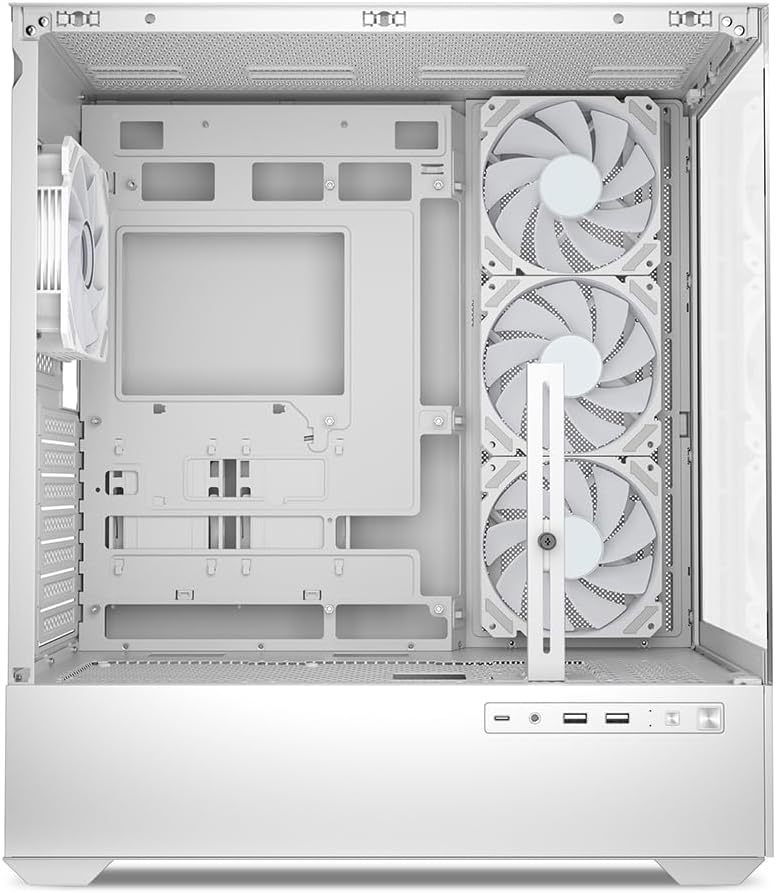
الشكل 5.1: الداخلية view of the Sharkoon AK6 RGB PC case, illustrating the motherboard tray, cable management cutouts, and front fan mounting points.
5.3 تركيب مصدر الطاقة
The case features a bottom-mount power supply design.
- Slide the power supply unit (PSU) into the dedicated compartment at the bottom rear of the case.
- Align the PSU with the screw holes at the rear of the case.
- قم بتأمين وحدة إمداد الطاقة باستخدام البراغي المرفقة.
5.4 تركيب جهاز التخزين
The AK6 RGB supports up to two 3.5" HDDs or four 2.5" SSDs.
- بالنسبة لمحركات الأقراص الصلبة مقاس 3.5 بوصة: Locate the drive cages beneath the PSU shroud. Slide the HDD into a drive tray and secure it with screws.
- بالنسبة لمحركات الأقراص الصلبة SSD مقاس 2.5 بوصة: SSDs can be mounted on the dedicated brackets behind the motherboard tray or on the 3.5" drive trays using adapter screws.
الشكل 5.2: الجزء الخلفي الداخلي view of the Sharkoon AK6 RGB PC case, detailing the drive cages for 3.5-inch HDDs and 2.5-inch SSDs, and the power supply shroud area.
5.5 تركيب بطاقة الرسومات وبطاقة التوسعة
- قم بإزالة أغطية فتحات التوسعة اللازمة الموجودة في الجزء الخلفي من العلبة.
- Insert your graphics card or other expansion cards into the appropriate PCIe slots on your motherboard.
- Secure the cards with screws. The case includes a rubberized graphics card support for larger cards.
5.6 CPU Cooler and Radiator Installation
The case supports CPU coolers up to 17 cm in height and allows for extensive liquid cooling setups.
- قم بتركيب مبرد وحدة المعالجة المركزية وفقًا لتعليمات الشركة المصنعة.
- For liquid cooling, the case can accommodate a 360mm radiator at the top and an additional 280mm radiator.
5.7 إدارة الكابلات
استخدم فتحات إدارة الكابلات ونقاط التثبيت خلف لوحة الأم لتوجيه الكابلات وتأمينها. هذا يحسن تدفق الهواء والمظهر العام.
6. تعليمات التشغيل
6.1 التشغيل
After all components are installed and cables are connected, replace the side panels. Connect the power cable to your PSU and a wall outlet, then press the power button on the front I/O panel to start your system.
6.2 التحكم في مروحة RGB
The AK6 RGB comes with four pre-installed addressable RGB PWM fans. These fans are connected to an RGB controller which also provides connections for up to four LED elements and four PWM fans. The RGB lighting can typically be controlled via your motherboard's RGB software (if compatible) or through a dedicated button on the case (if present and connected).
6.3 تحسين تدفق الهواء
The case is designed for ideal airflow, with three inverted fans drawing air from the side into the case. The top and rear fan mounts allow for additional exhaust fans. Ensure proper fan orientation for optimal cooling performance.

الشكل 6.1: مثالample of a fully assembled system within the Sharkoon AK6 RGB PC case, featuring various components and active RGB lighting.
7. الصيانة
تساعد الصيانة الدورية على ضمان طول عمر مكونات جهاز الكمبيوتر الخاص بك وأدائها.
- فلاتر الغبار: Periodically clean the removable dust filters (e.g., on the top and bottom) to maintain optimal airflow and prevent dust buildup inside the case. Use compressed air or a soft brush.
- الألواح الزجاجية: نظّف ألواح الزجاج المقسّى بقطعة قماش ناعمة خالية من الوبر ومنظف زجاج. تجنّب المواد الكاشطة التي قد تخدش السطح.
- التنظيف الداخلي: Use compressed air to remove dust from internal components and fans. Ensure the system is powered off and unplugged before cleaning.
8. استكشاف الأخطاء وإصلاحها
If you encounter issues with your PC case, refer to the following common troubleshooting steps:
- لا يوجد طاقة: Ensure the power supply is properly connected to the wall outlet and the motherboard. Check all internal power cables (24-pin ATX, 8-pin CPU, PCIe power).
- المراوح لا تدور/إضاءة RGB لا تعمل: Verify that all fan and RGB cables are correctly connected to the motherboard or the included RGB controller. Check your motherboard's BIOS/UEFI settings or RGB software for fan speed and lighting control.
- Front I/O Ports Not Functioning: Confirm that the front panel connectors (USB, audio, power/reset switches) are correctly plugged into the corresponding headers on your motherboard.
- ارتفاع درجة الحرارة: Ensure all fans are spinning correctly and oriented for proper airflow. Clean dust filters and internal components. Verify CPU cooler installation.
For further assistance, please contact Sharkoon support.
9. المواصفات
| ميزة | مواصفة |
|---|---|
| ماركة | شاركون |
| اسم الموديل | AK6 ار جي بي |
| رقم الموديل | C-AK6W |
| نوع الحالة | برج ATX |
| لون | أبيض |
| مادة | زجاج مقسّى |
| التوافق مع اللوحة الأم | Mini ITX, Micro ATX, ATX, BTF |
| نوع تركيب مصدر الطاقة | التركيب السفلي |
| طريقة التبريد | هواء |
| مراوح مثبتة مسبقًا | 4 x 120mm Addressable RGB PWM Fans |
| أقصى ارتفاع لمبرد وحدة المعالجة المركزية | 17 سم |
| الحد الأقصى لطول بطاقة الرسومات | 41 cm (with rubberized support) |
| أقصى طول PSU | 23.5 سم |
| دعم المبرد | Top: up to 360mm, Additional: up to 280mm |
| حجرات القيادة | 2 x 3.5" HDD or 4 x 2.5" SSD |
| منافذ الإدخال / الإخراج الأمامية | 2 x USB Type-A, 1 x USB Type-C, Audio (TRRS) |
| وزن العنصر | 6.1 كيلوغرام |
| المميزات الخاصة | RGB Lighting, Unique Glass Appearance, BTF Motherboard Support |
10. الضمان
Sharkoon products are manufactured to high quality standards. For detailed warranty information, please refer to the warranty card included with your product or visit the official Sharkoon webيغطي الضمان عادةً عيوب المواد والصناعة في ظل الاستخدام العادي.
11. الدعم
If you require technical assistance or have questions regarding your Sharkoon AK6 RGB ATX PC Case, please visit the official Sharkoon website for support resources, FAQs, and contact information. You may also find updated drivers or software for the RGB controller there.
Webموقع: www.sharkoon.com