
1. المقدمة
This user manual provides comprehensive instructions for the setup, operation, maintenance, and troubleshooting of your Thomson 27-inch QHD Gaming Monitor (Model: M27QG5Y14). This monitor is designed to deliver a superior visual experience with its QHD resolution, 180Hz refresh rate, and IPS panel technology, making it ideal for gaming and multimedia applications.

الصورة 1.1: الجبهة view of the Thomson 27-inch QHD Gaming Monitor, showcasing its sleek design and display area.
2. معلومات السلامة
يرجى قراءة جميع تعليمات السلامة بعناية قبل استخدام الشاشة. احتفظ بهذا الدليل للرجوع إليه مستقبلًا.
- مصدر الطاقة: استخدم فقط محول الطاقة المرفق مع الشاشة. تأكد من تأريض مقبس الطاقة جيدًا.
- تهوية: لا تسد فتحات التهوية. اترك مساحة كافية حول الشاشة لضمان تدفق الهواء بشكل صحيح ومنع ارتفاع درجة الحرارة.
- السائل والرطوبة: Keep the monitor away from water, rain, or excessive moisture. Do not place objects filled with liquids on the monitor.
- تنظيف: Disconnect the power cable before cleaning. Use a soft, dry cloth. Do not use liquid cleaners or aerosol cleaners.
- الموقع: ضع الشاشة على سطح ثابت ومستوٍ. تجنب وضعها تحت أشعة الشمس المباشرة أو بالقرب من مصادر الحرارة.
- التعامل: Handle the monitor with care. Avoid dropping or subjecting it to strong impacts.
- الخدمة: لا تحاول صيانة الشاشة بنفسك. أحل جميع أعمال الصيانة إلى فني صيانة مؤهل.
3. محتويات العبوة
تأكد من وجود جميع المنتجات في العبوة. في حال وجود أي منتجات مفقودة أو تالفة، يرجى الاتصال بالبائع.
- Thomson 27-inch QHD Gaming Monitor
- حامل الشاشة (القاعدة والرقبة)
- محول الطاقة وكابل الطاقة
- كابل HDMI
- DisplayPort (DP) Cable (may vary by region)
- كابل USB-B إلى USB-A (لوظائف موزع USB)
- دليل المستخدم (هذا المستند)
- مسامير لتجميع الحامل
4. الإعداد
4.1. تجميع حامل الشاشة
- قم بإزالة الشاشة بعناية من عبوتها وضعها ووجهها لأسفل على سطح ناعم ونظيف لمنع الخدوش.
- قم بتثبيت قاعدة الحامل على لوحة الشاشة باستخدام البراغي المرفقة.
- Attach the stand base to the stand neck and secure it with the designated screw.
- Once assembled, carefully lift the monitor and place it on a stable desk or table.

Image 4.1: Monitor dimensions and stand assembly overview. The monitor measures approximately 61 cm wide, 54 cm high (with stand), and 24 cm deep (with stand).
4.2. توصيل الشاشة
Connect the necessary cables to the monitor's input ports. Refer to the image below for port locations.
- توصيل الطاقة: Connect the power adapter to the "DC IN" port on the monitor, then plug the power cable into a power outlet.
- مدخلات الفيديو:
- Connect an HDMI cable from your computer's graphics card to an "HDMI 2.1" port on the monitor.
- Alternatively, connect a DisplayPort (DP) cable from your computer's graphics card to a "DP 1.2" port on the monitor.
- محور USB: To enable the monitor's USB 3.0 ports, connect a USB-B cable from the "USB 3.0 B" port on the monitor to a USB-A port on your computer.
- مخرج الصوت: Connect headphones or external speakers to the "Earphone Plug" (3.5mm audio jack) for audio output.

Image 4.2: Rear panel of the monitor displaying the various input and output ports for connectivity.
4.3. التعديلات المريحة
يتيح حامل الشاشة إجراء تعديلات متنوعة لتحسين تجربتك viewالراحة:
- الإمالة: Adjust the screen's vertical angle (up or down).
- قطب: قم بتدوير الشاشة أفقيًا (يسارًا أو يمينًا).
- المحور: قم بتدوير الشاشة 90 درجة لوضع الصورة viewعمل.
- ضبط الارتفاع: ارفع أو اخفض الشاشة إلى مستوى نظرك المفضل.
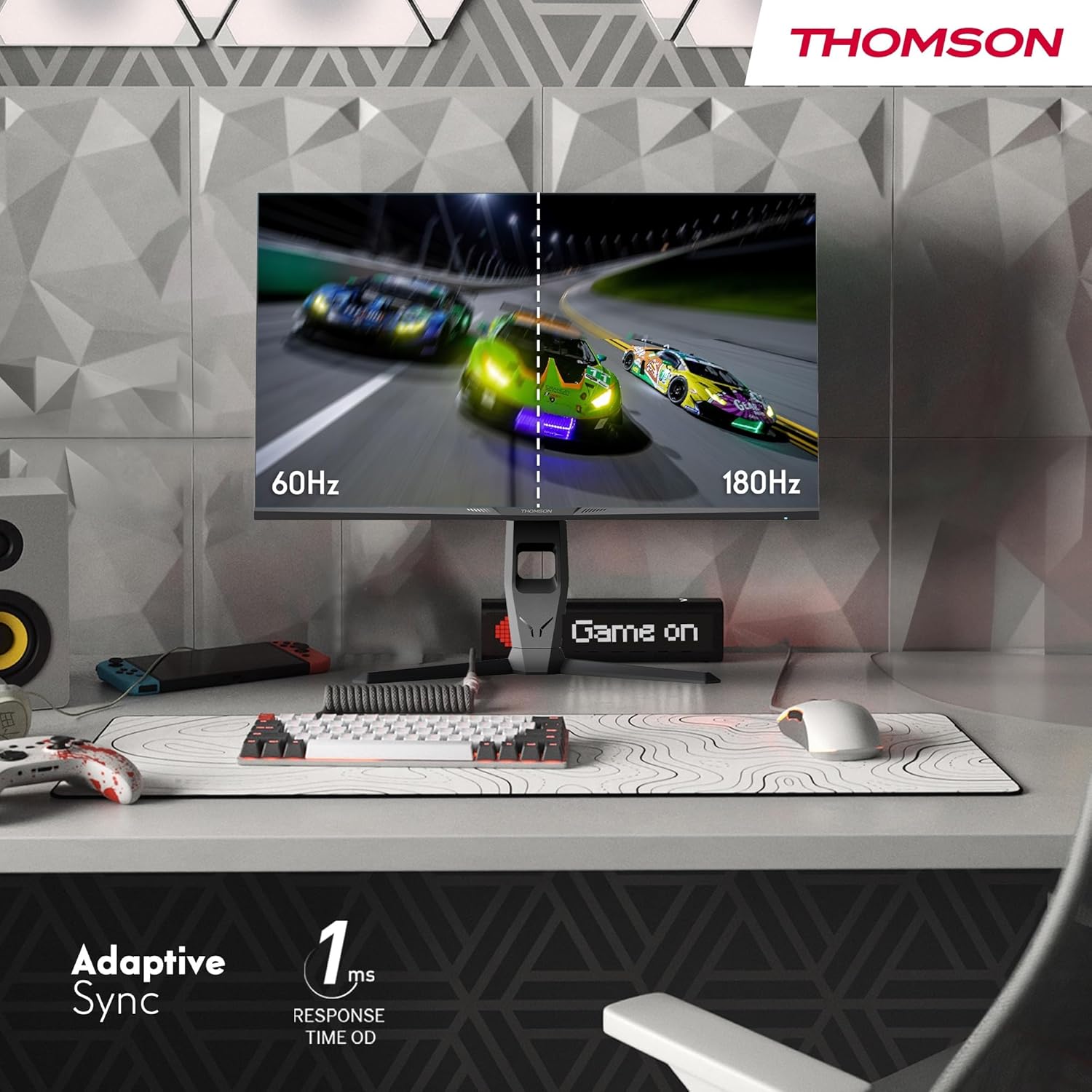
Image 4.3: Demonstrations of the monitor's ergonomic capabilities, including tilt, swivel, and pivot for optimal viewزوايا متعددة.
4.4. تركيب VESA
The monitor is compatible with VESA 100x100mm mounting standards. To mount the monitor on a wall or an alternative stand, remove the original stand and attach the VESA-compatible mount (sold separately) using appropriate screws.
5. تعليمات التشغيل
5.1. تشغيل/إيقاف التشغيل
اضغط على زر التشغيل، الموجود عادةً في الجزء الخلفي أو السفلي من الشاشة، لتشغيلها أو إيقاف تشغيلها. سيضيء مؤشر الطاقة عند تشغيل الشاشة.
5.2. قائمة العرض على الشاشة (OSD)
The OSD menu allows you to adjust various monitor settings. Use the joystick or buttons (location may vary) on the monitor to navigate the menu.
- إعدادات الصورة: اضبط السطوع والتباين والحدة ودرجة حرارة اللون ومعامل جاما.
- إعدادات الألوان: Fine-tune RGB levels, saturation, and hue.
- تحديد الإدخال: قم بالتبديل يدويًا بين مدخلات HDMI و DisplayPort.
- صوتي: Adjust volume for built-in speakers or headphone output.
- إعدادات OSD: قم بتغيير لغة العرض على الشاشة، والشفافية، والمهلة الزمنية.
- إعدادات الألعاب: Access features like Adaptive Sync, response time (OD), and crosshair overlays.
5.3. ميزات الألعاب
- معدل تحديث 180 هرتز: Provides smoother motion and reduced input lag, especially beneficial for fast-paced games. Ensure your graphics card and cable support this refresh rate.
- زمن الاستجابة 1 مللي ثانية (OD): Minimizes motion blur and ghosting for clear, crisp images during rapid movements.
- المزامنة التكيفية: Synchronizes the monitor's refresh rate with your graphics card's frame rate, eliminating screen tearing and stuttering. Enable this feature in the OSD menu and your graphics card control panel.

Image 5.1: Visual comparison illustrating the difference between 60Hz and 180Hz refresh rates, highlighting the smoother motion provided by the higher refresh rate, alongside the Adaptive Sync feature.
5.4. ميزات العناية بالعيون
- تقنية مكافحة الوميض: يقلل من وميض الشاشة، الذي قد يسبب إجهاد العين أثناء الاستخدام المطول.
- وضع الضوء الأزرق الخافت: Filters out harmful blue light emissions to protect your eyes and reduce fatigue. This mode can be activated through the OSD menu.
- شاشة مضادة للوهج: The matte screen surface minimizes reflections from ambient light, providing clear visuals without distraction.

Image 5.2: Depiction of the monitor's eye comfort features, including an anti-glare screen and technologies like Anti-Flicker and Low Blue Light for reduced eye strain.
5.5. RGB Ambient Lighting
The monitor features integrated RGB ambient lighting on the rear. This lighting can be customized via the OSD menu to enhance your gaming environment or match your setup's aesthetics.
6. الصيانة
6.1. تنظيف الشاشة
- شاشة: امسح الشاشة برفق بقطعة قماش ناعمة وخالية من الوبر. لإزالة البقع الصعبة، امسح برفقampen the cloth with water or a specialized screen cleaner (ensure it's safe for LCD/IPS panels) and wipe gently. Never spray liquid directly onto the screen.
- Casing: استخدم قطعة قماش ناعمة وجافة لمسح الشاشة.asinز. تجنب استخدام المنظفات أو المذيبات الكاشطة.
- افصل كابل الطاقة دائمًا قبل التنظيف.
6.2. التخزين
في حالة تخزين الشاشة لفترة طويلة، افصل جميع الكابلات، وقم بتعبئتها في عبوتها الأصلية (إن وجدت)، وخزنها في مكان بارد وجاف بعيدًا عن أشعة الشمس المباشرة ودرجات الحرارة القصوى.
7. استكشاف الأخطاء وإصلاحها
يتناول هذا القسم المشكلات الشائعة التي قد تواجهها. إذا استمرت المشكلة، فاتصل بخدمة دعم العملاء.
| مشكلة | السبب المحتمل | حل |
|---|---|---|
| لا يوجد طاقة | Power cable not connected; Power outlet faulty; Monitor off. | Ensure power cable is securely connected. Test the power outlet. Press the monitor's power button. |
| لا توجد إشارة / شاشة فارغة | Video cable not connected; Incorrect input selected; Computer not outputting signal. | Check HDMI/DP cable connections. Select the correct input source via OSD. Ensure computer is on and outputting video. |
| Distorted image / Flickering | Incorrect resolution/refresh rate; Faulty cable; Graphics driver issue. | Set display resolution to 2560x1440 and refresh rate to 180Hz. Try a different video cable. Update graphics drivers. |
| No audio from speakers/headphones | Volume too low; Audio cable not connected; Incorrect audio output selected on PC. | Increase monitor volume via OSD. Ensure headphones/speakers are connected. Select monitor as audio output device in PC settings. |
8. المواصفات
Detailed technical specifications for the Thomson M27QG5Y14 monitor.
| ميزة | مواصفة |
|---|---|
| ماركة | تومسون |
| نموذج | M27QG5Y14 |
| حجم الشاشة | 27 بوصة |
| نوع اللوحة | اي بي اس |
| دقة | 2560 × 1440 (دقة QHD) |
| معدل التحديث | 180 هرتز |
| وقت الاستجابة | 1 Millisecond (OD) / 5 Milliseconds (GtG) |
| سطوع | 350 Nits |
| نسبة التباين | 1200:1 |
| Viewزاوية جي | 178 درجة (أفقي/رأسي) |
| مجموعة الألوان | 120% إس آر جي بي |
| دعم HDR | HDR10 (10-bit) |
| المزامنة التكيفية | نعم |
| الاتصال | 2x HDMI 2.1, 1x DisplayPort 1.2, 1x USB 3.0 Type-B (upstream), 3x USB 3.0 Type-A (downstream), 1x Earphone Plug (3.5mm) |
| مكبرات صوت مدمجة | Yes (2x2W) |
| التوافق مع حامل VESA | 100×100 ملم |
| أبعاد المنتج (مع الحامل) | 61 × 54 × 24 سم (العرض × الارتفاع × العمق) |
| الوزن (مع الحامل) | 7.3 كجم |
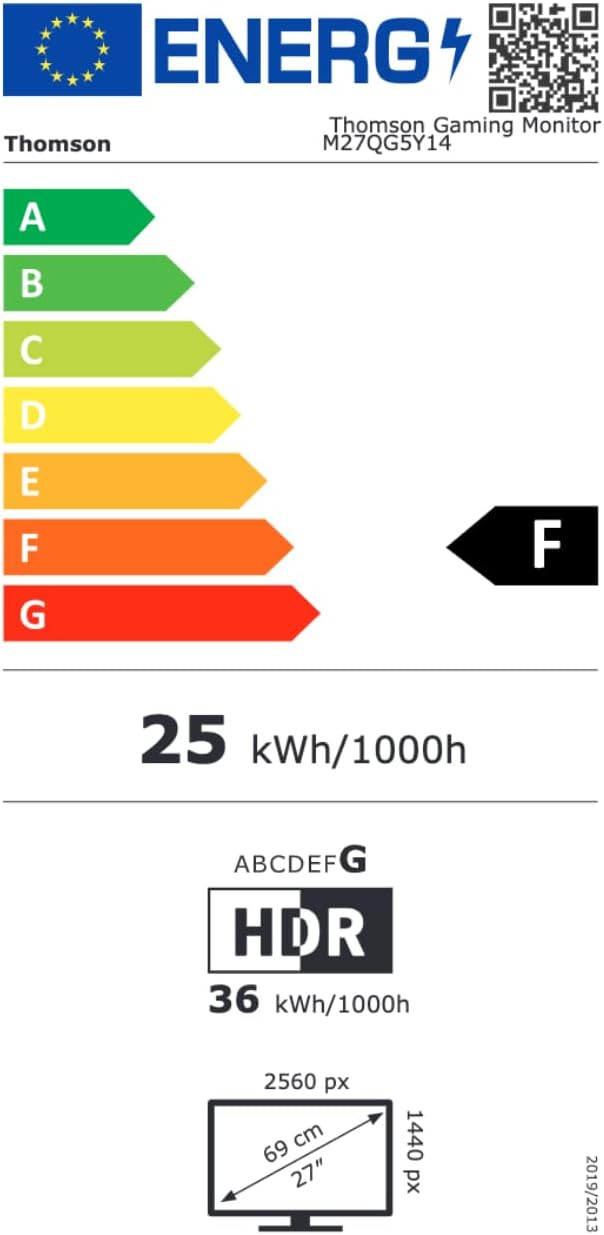
Image 8.1: EU Energy Label for the Thomson M27QG5Y14 monitor. For more details, visit the قاعدة بيانات EPREL.
9. الضمان والدعم
Thomson products are designed for reliability and performance. This monitor typically comes with a ضمان لمدة 3 سنوات من تاريخ الشراء، مع تغطية عيوب التصنيع. يُرجى الاحتفاظ بإيصال الشراء للمطالبة بالضمان.
For technical assistance, troubleshooting beyond this manual, or warranty inquiries, please contact Thomson customer support or your local retailer. Refer to the official Thomson website or your product packaging for specific contact details.
You can also visit the official Thomson store on Amazon for more information: Thomson Store.