
CAPXSNOB ST-542S EU(CE)
Magician1 Mini 5-in-1 Coffee Machine User Manual
Brand: CAPXSNOB | Model: ST-542S EU(CE)
This manual provides detailed instructions for the safe and efficient use of your Magician1 Mini 5-in-1 Coffee Machine. Please read it thoroughly before first use and keep it for future reference.
تعليمات السلامة الهامة
عند استخدام الأجهزة الكهربائية، يجب دائمًا اتباع احتياطات السلامة الأساسية لتقليل خطر نشوب حريق أو حدوث صدمة كهربائية و/أو إصابة الأشخاص، بما في ذلك ما يلي:
- اقرأ كافة التعليمات.
- لا تلمس الأسطح الساخنة. استخدم المقابض أو الأزرار.
- للحماية من الحريق والصدمات الكهربائية وإصابات الأشخاص، لا تغمر الأسلاك أو المقابس أو آلة القهوة في الماء أو أي سائل آخر.
- من الضروري المراقبة الدقيقة عند استخدام أي جهاز بواسطة الأطفال أو بالقرب منه.
- افصل الجهاز عن المقبس عند عدم استخدامه وقبل التنظيف. اتركه ليبرد قبل تركيب أو خلع الأجزاء وقبل تنظيف الجهاز.
- لا تقم بتشغيل أي جهاز به سلك أو قابس تالف أو بعد تعطل الجهاز أو تعرضه للتلف بأي شكل من الأشكال. قم بإعادة الجهاز إلى أقرب مركز خدمة معتمد للفحص أو الإصلاح أو التعديل.
- قد يؤدي استخدام ملحقات غير موصى بها من قبل الشركة المصنعة للجهاز إلى نشوب حريق أو حدوث صدمة كهربائية أو إصابة الأشخاص.
- لا تستخدمه في الهواء الطلق.
- لا تترك السلك يتدلى على حافة الطاولة أو المنضدة، أو يلامس الأسطح الساخنة.
- لا تضعه على أو بالقرب من موقد غاز أو كهرباء ساخن، أو في فرن ساخن.
- احرص دائمًا على توصيل القابس بالجهاز أولًا، ثم وصل السلك بمقبس الحائط. لفصله، أدر أي جهاز تحكم إلى وضع "إيقاف التشغيل"، ثم افصل القابس من مقبس الحائط.
- لا تستخدم الجهاز لغير الغرض المخصص له.
- توخ الحذر الشديد عند استخدام الماء الساخن أو البخار.
- هذا الجهاز مخصص للاستخدام المنزلي فقط.
المنتج انتهىview
The Magician1 Mini is a versatile 5-in-1 coffee machine designed to accommodate various coffee formats, including Nespresso Original, Dolce Gusto, Lavazza A Modo Mio, ESE 44mm pods, and ground coffee. It features a 20-bar pump, 1450W power, and an LED display for easy operation.

الشكل 1: الجبهة view of the Magician1 Mini Coffee Machine with various coffee types it supports.
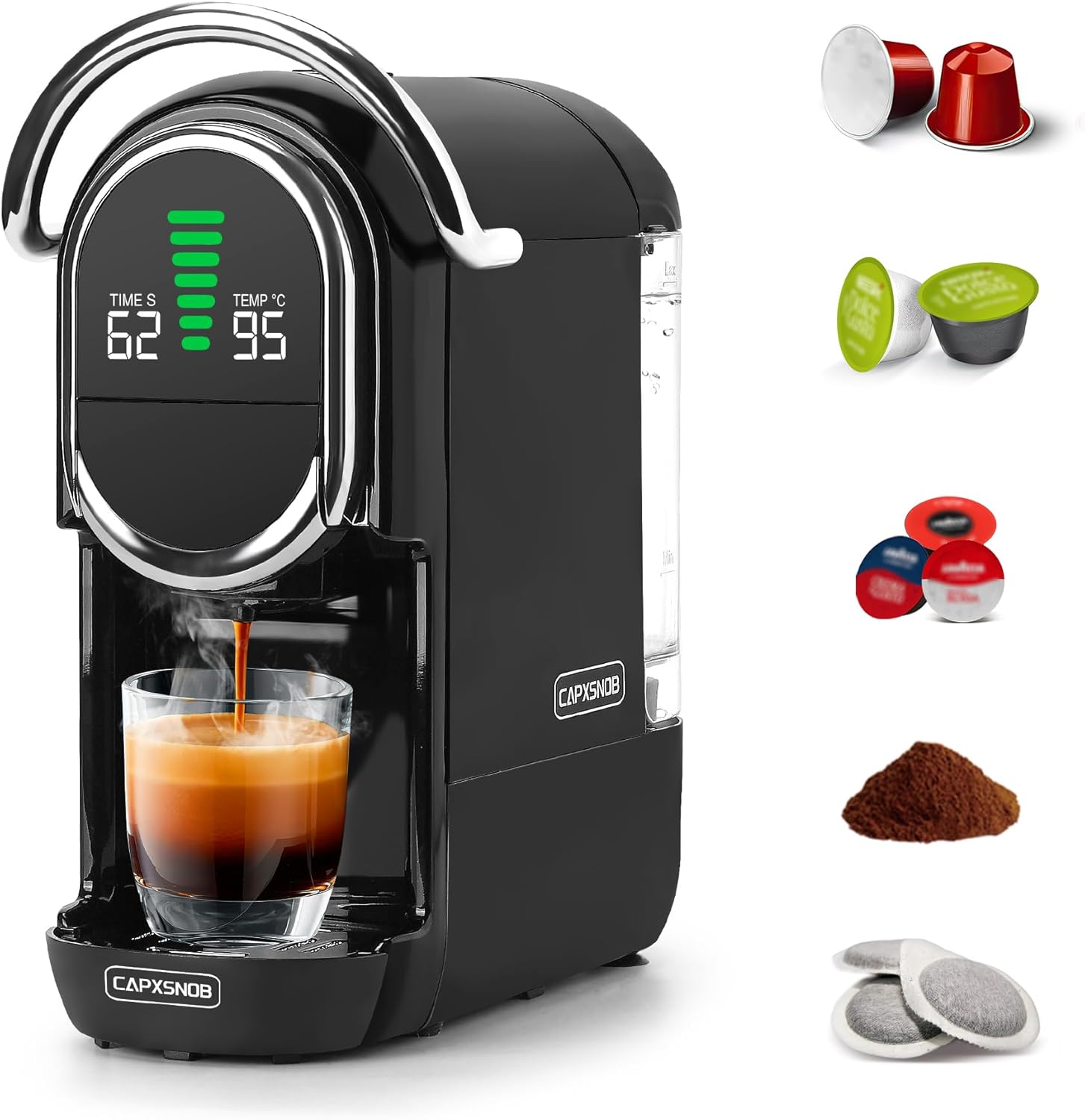
الشكل 2: الجانب view of the Magician1 Mini Coffee Machine, highlighting the removable water tank.
المميزات الرئيسية:
- توافق 5 في 1: Supports Nespresso Original, Dolce Gusto, Lavazza A Modo Mio, ESE 44mm pods, and ground coffee.
- مضخه عالية الضغط: 20 Bar pump for optimal extraction (15-19 Bar stable extraction).
- تسخين سريع: Pre-heats in just 25 seconds.
- التحكم في درجة الحرارة: Adjustable brewing temperature from 85°C to 97°C.
- تخصيص الحجم: 7 adjustable water volume levels for various cup sizes.
- Hot & Cold Brewing: Capable of preparing both hot and cold coffee.
- عرض الصمام: Clear display showing temperature, water volume, and time.
- تصميم مضغوط: Space-saving dimensions (27.4D x 14.4W x 28.5H cm) with a 600ml removable water tank.
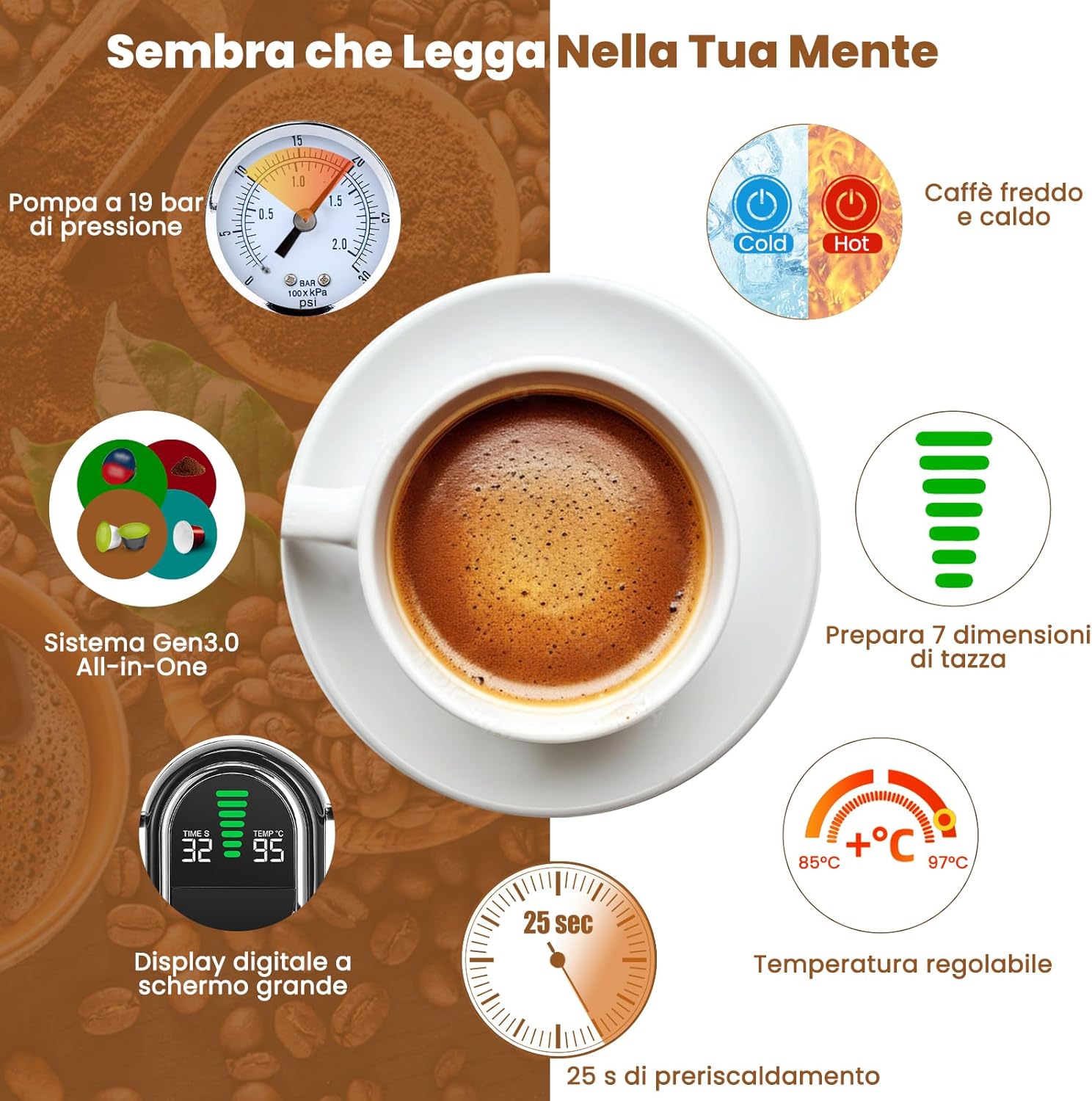
الشكل 3: انتهىview of the Magician1 Mini's advanced features.
يثبت
1. فك التعبئة
Carefully remove all packaging materials and the coffee machine from the box. Ensure all components are present: main unit, water tank, drip tray, and various capsule adapters.
2. First Use and Initial Cleaning
Before first use, clean all removable parts (water tank, drip tray, capsule adapters) with warm, soapy water. Rinse thoroughly and dry. Perform a pre-rinse cycle without coffee:
- املأ خزان المياه بالمياه العذبة.
- ضع كوبًا فارغًا على صينية التنقيط.
- Insert an empty adapter (e.g., the ground coffee adapter without coffee) into the machine.
- Press the brew button to run a full cycle of hot water through the machine. Repeat this process 2-3 times to ensure the internal system is clean.
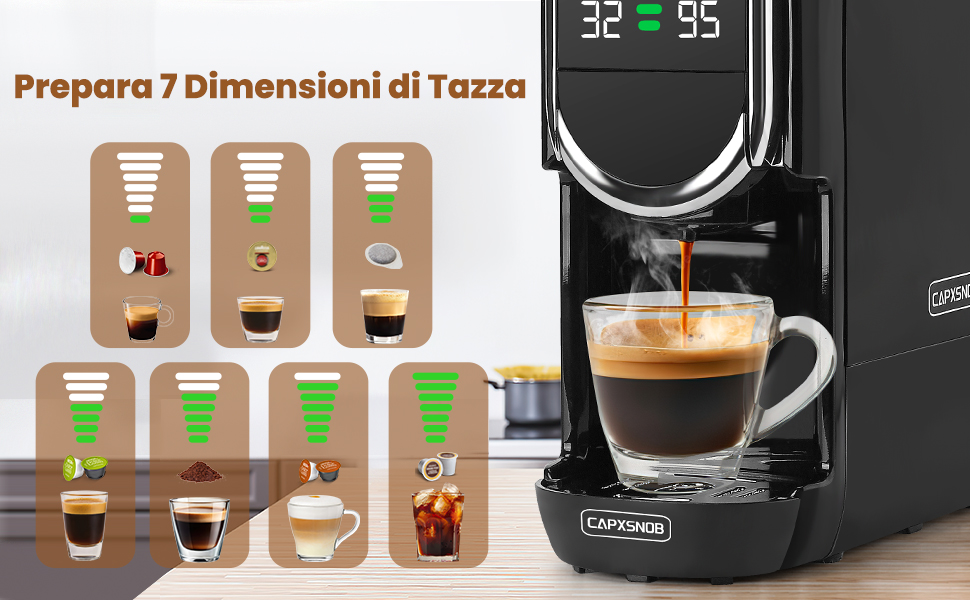
Figure 4: Useful tips, including the importance of pre-rinsing.
3. ملء خزان المياه
- قم بإزالة خزان المياه من الجزء الخلفي من الجهاز.
- Fill the tank with fresh, cold drinking water up to the MAX fill line.
- قم بوضع خزان المياه مرة أخرى على الجهاز، وتأكد من تثبيته بشكل آمن.
تعليمات التشغيل
1. تشغيل / إيقاف التشغيل
- قم بتوصيل الجهاز بمأخذ تيار كهربائي مؤرض.
- Press the power button to turn on the machine. The LED display will light up.
- The machine will begin pre-heating, which takes approximately 25 seconds. The display will show the temperature.
- To turn off, press the power button again. The machine also features programmable automatic shut-off.
2. Brewing Coffee (Hot)
The Magician1 Mini supports various coffee formats. Ensure you use the correct adapter for your chosen coffee type.

الشكل 5: انتهىview of compatible capsule types and their respective adapters.
- Select and Insert Adapter: Choose the appropriate adapter for your capsule/pod/ground coffee.
- For Nespresso Original, Dolce Gusto, Lavazza A Modo Mio: Insert the capsule into its dedicated adapter.
- For ESE 44mm Pods: Place the ESE pod into the ground coffee adapter.
- For Ground Coffee: Fill the ground coffee adapter with 12-14g of fine ground coffee and tamp بخفة.
- Place Adapter in Machine: Insert the filled adapter firmly into the machine's brewing chamber.
- المقبض السفلي: Close the handle securely.
- مكان الكأس: Position your cup on the drip tray. Note: The machine supports cups between 8.5-9.8 cm in height.
- حدد كمية الماء: Use the volume selection buttons to choose one of the 7 available levels, ranging from Ristretto (25ml) to Americano (240ml). The LED display will show the selected volume.
- ضبط درجة الحرارة (اختياري): To adjust the brewing temperature (85°C to 97°C):
- Press and hold the temperature button for 5 seconds until the temperature flashes on the screen.
- Use the volume buttons to adjust the temperature.
- سيتم حفظ الإعداد تلقائيًا بعد 3 ثوانٍ.
- ابدأ التخمير: Press the brew button. The machine will start dispensing coffee.
- توقف عن التخمير: The machine will stop automatically once the selected volume is reached. You can also manually stop brewing by pressing the brew button again.

Figure 6: Simple three-step brewing process.
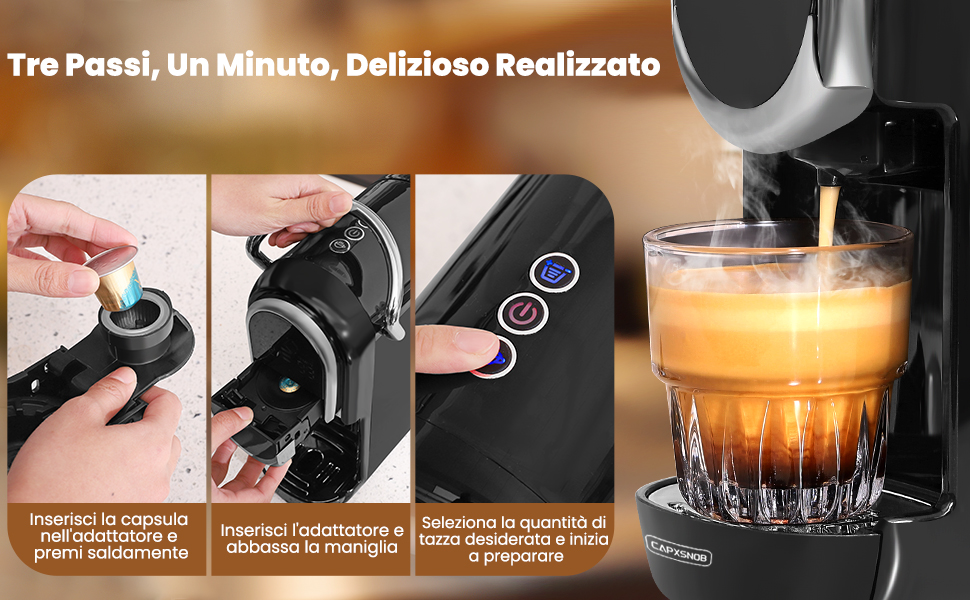
Figure 7: Seven cup size options for different coffee types.
3. Hot and Cold Brewing
The machine supports both hot and cold brewing. Cold brew refers to preparation with room temperature water. This machine does not support ice production.
- To switch between hot and cold modes, press and hold the power button for 5 seconds until the power light changes. The display will show "CO" for cold mode.
- Follow the same brewing steps as above, ensuring the water tank is filled with room temperature water for cold brewing.
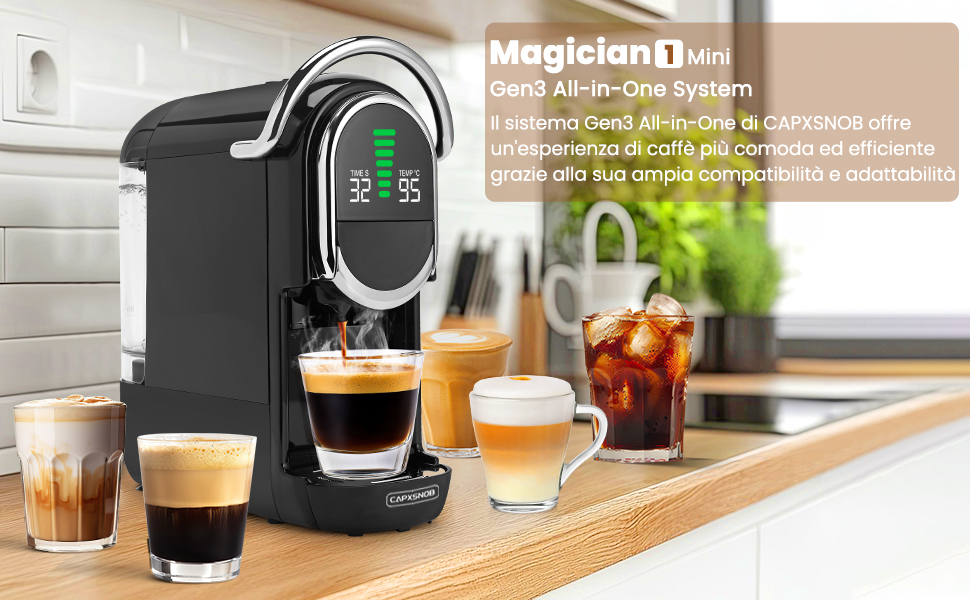
Figure 8: Hot and Cold brewing options.
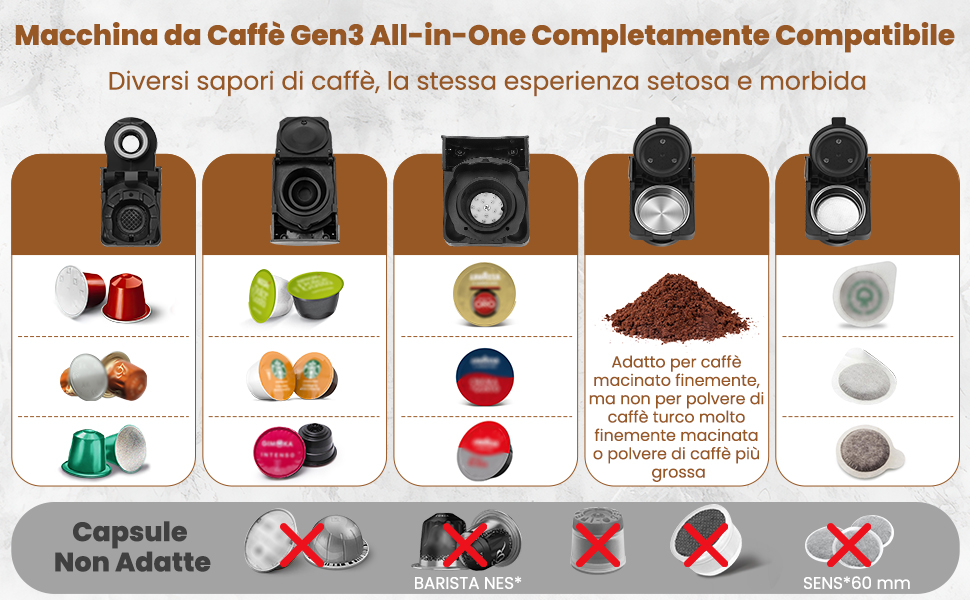
Figure 9: Customizing temperature settings.
الصيانة والتنظيف
1. التنظيف اليومي
- صينية التنقيط: Empty and rinse the drip tray after each use or when the indicator shows it's full.
- حاوية الكبسولة: Remove and empty the used capsule container after each use. Rinse with warm water.
- خزان المياه: اشطف خزان المياه يوميًا وأعد ملئه بالماء العذب.
- الخارج: امسح الجزء الخارجي من الجهاز بقطعة قماش ناعمة، دamp لا تستخدم المنظفات الكاشطة أو تغمر الجهاز في الماء.
2. Ground Coffee Adapter Care
Proper care of the ground coffee adapter is crucial for optimal performance and to prevent blockages.
- After each use, remove the ground coffee adapter.
- تخلص من بقايا القهوة المستعملة.
- Rinse the plastic holes and stainless steel filters thoroughly. Blockages can prevent coffee from dispensing or cause leaks.
- For thorough cleaning, the adapter can be disassembled and reassembled as shown in Figure 10.
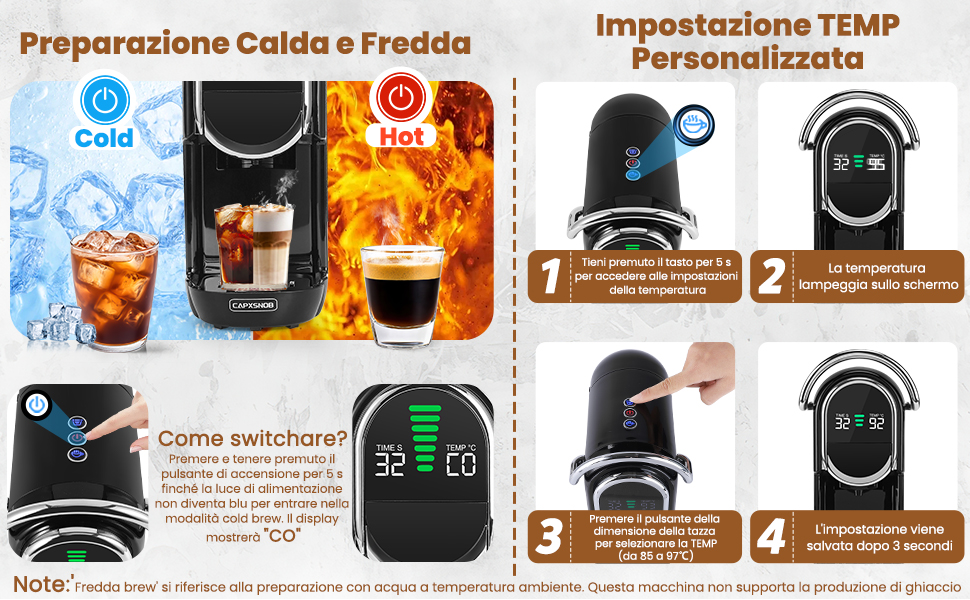
Figure 10: Maintenance and care of the ground coffee adapter.
3. إزالة الترسبات
Regular descaling is essential to maintain the machine's performance and extend its lifespan, especially in areas with hard water. Descale every 3-6 months depending on water hardness and usage.
- Empty the water tank and fill it with a descaling solution (follow the descaler manufacturer's instructions for dilution).
- ضع وعاءً كبيرًا أسفل صنبور القهوة.
- قم بتشغيل عدة دورات تحضير بدون قهوة حتى يفرغ خزان الماء.
- اشطف خزان المياه جيدًا ثم املأه بالماء العذب.
- Run several cycles of fresh water through the machine to rinse out any descaling solution residue.
استكشاف الأخطاء وإصلاحها
If you encounter any issues with your coffee machine, please refer to the table below for common problems and their solutions.
| مشكلة | السبب المحتمل | حل |
|---|---|---|
| الجهاز لا يعمل. | Not plugged in; power outlet malfunction; machine fault. | Check power cord connection; try another outlet; contact customer support. |
| No coffee dispenses or only a few drops. | Water tank empty; air in the system; clogged adapter/filter; machine needs descaling. | Fill water tank; run a few cycles without coffee to prime; clean adapter/filter; descale the machine. |
| القهوة ضعيفة جدًا أو مائية. | Incorrect water volume selected; coffee grounds too coarse (for ground coffee); capsule/pod not properly inserted. | Adjust water volume setting; use finer ground coffee; ensure capsule/pod is seated correctly. |
| الآلة تتسرب. | Water tank not properly seated; drip tray full; adapter not correctly inserted; internal seal issue. | Ensure water tank is secure; empty drip tray; re-insert adapter; contact customer support if problem persists. |
| القهوة ليست ساخنة بما فيه الكفاية. | Temperature setting too low; machine needs descaling. | Adjust temperature setting (see Operating Instructions); descale the machine. |
| تصدر الآلة صوتًا غير عادي. | Normal pump operation; air in the system; blockage. | Some noise is normal during brewing. If excessive, run a few cycles without coffee to clear air; check for blockages. |
المواصفات الفنية
- ماركة: CAPXSNOB
- نموذج: ST-542S EU(CE)
- لون: أسود
- أبعاد المنتج: 27.5 × 14.4 × 28.5 سم (العمق × العرض × الارتفاع)
- وزن السلعة: 3.3 كجم
- المجلدtage: 230 فولت (تيار متردد)
- قوة: 1450 واط
- ضغط المضخة: 20 بار
- سعة خزان المياه: 600 مل
- المميزات الخاصة: Automatic cleaning function, Programmable, Single cup brew, Removable tank, Adjustable brew strength, LED Display.
- الإغلاق التلقائي: نعم
الضمان والدعم
Your Magician1 Mini Coffee Machine comes with a comprehensive warranty and support package for your peace of mind.
- ضمان استرداد الأموال خلال 60 يومًا: إذا لم تكن راضيًا تمامًا عن عملية الشراء، فقد تكون مؤهلاً لاسترداد أموالك في غضون 60 يومًا.
- 2-Year Limited Manufacturer's Warranty: The product is covered by a 2-year limited warranty from the manufacturer against defects in materials and workmanship.
- خدمة استبدال مجانية: By registering your product on the official CAPXSNOB website, you may receive a free replacement service for 2 years. Please visit the official CAPXSNOB website for registration details and full warranty terms and conditions.
For further assistance, troubleshooting, or warranty claims, please contact CAPXSNOB customer support through their official webالموقع أو بائع التجزئة الذي اشتريت منه المنتج.
Ask a question about this manual
Ask about setup, troubleshooting, compatibility, parts, safety, or missing instructions. Manuals+ will review the question and use this page’s manual context to help answer it.