
1. المقدمة
Thank you for choosing the XHDATA D109WB and D220 Portable Radios. This manual provides detailed instructions for the setup, operation, and maintenance of your new radios. Please read this manual thoroughly before use to ensure optimal performance and longevity of your devices.

Image 1: The XHDATA D109WB (black) and D220 (orange) portable radios.
2. انتهى المنتجview
The XHDATA D109WB and D220 are versatile portable radios designed for excellent reception and ease of use. The D109WB offers a wide range of bands including FM, AM, Shortwave (SW), Longwave (LW), and NOAA Weather Band (WB), along with advanced features like Bluetooth, TF card playback, and an alarm clock. The D220 is a compact and lightweight FM/AM/SW radio, ideal for portability and simple operation.
2.1 XHDATA D109WB Key Features
- نطاقات التردد: FM (64-108MHz), AM (520-1710KHz), LW (153-513KHz), SW (1711-29999KHz), NOAA Weather Band (162.40-162.55MHz).
- شريحة DSP: Enhances reception sensitivity.
- مخرج الصوت: 40mm speaker for clear sound, 3.5mm stereo headphone jack.
- الوسائط المتعددة: MP3 music mode, Bluetooth 5.0 connectivity, TF card support.
- ميزات الطوارئ: NOAA Weather Band for alerts, SOS Distress Alarm.
- راحة: Alarm clock, 500 memory stations, Auto Frequency Search (ATS).

Image 2: The XHDATA D109WB radio highlighting its various features including FM/AM/SW/WB, NOAA Scan Alert, Bluetooth, TF card, Alarm Clock, 5W Speaker, SOS Alarm, 500 Memory Stations, Earphone Jack, and Auto Frequency Search.
2.2 XHDATA D220 Key Features
- نطاقات التردد: FM, AM, Shortwave (SW).
- تصميم مضغوط: Small size (125x74x30mm) and lightweight (125g without batteries) for easy portability.
- ضوابط بسيطة: Tuning knob, band switch, volume/power switch button for straightforward operation.
- استقبال: Excellent signal reception with a long antenna.

Image 3: The XHDATA D220 radio demonstrating its compact size and ease of carrying, with dimensions of 125mm (4.9 inches) in height, 72mm (2.8 inches) in width, and 28mm (1.1 inches) in depth.
3. محتويات العبوة
يرجى التحقق من الحزمة للعناصر التالية:
- XHDATA D109WB Radio (if purchased as a set)
- XHDATA D220 Radio (if purchased as a set)
- مقبس سماعة الرأس
- Power Adapter (for D109WB, if included)
- دليل المستخدم (هذا المستند)
ملاحظة: البطاريات غير مشمولة عادةً ويجب شراؤها بشكل منفصل.
4. عناصر التحكم والميزات
4.1 XHDATA D109WB Controls
The D109WB features a comprehensive control panel and display. Refer to the image below for a visual guide to its main components.

Image 4: The XHDATA D109WB radio displaying its frequency ranges for WB (162.40-162.55MHz), LW (153-513KHz), SW (1711-29999KHz), MW (520-1710KHz), and FM (64-108MHz).
- زر الطاقة: يقوم بتشغيل/إيقاف تشغيل الراديو.
- Tuning Dial/Buttons: For manual station selection.
- مفتاح النطاق: Selects between FM, AM, SW, LW, WB.
- التحكم في مستوى الصوت: ضبط مستوى إخراج الصوت.
- شاشة العرض: Shows frequency, time, battery status, and other information.
- المفاتيح العددية: For direct frequency input or memory recall.
- Memory Buttons: Save and recall favorite stations.
- Bluetooth/MP3/TF Card Controls: Play, pause, skip tracks, mode selection.
- Alarm A/B Buttons: اضبط وفعّل أجهزة الإنذار.
- زر الاستغاثة: Activates distress alarm.
- مقبس سماعة الرأس: للاستماع الخاص.
- منفذ DC-IN: For external power adapter.
- الهوائي: هوائي تلسكوبي قابل للتمديد لتحسين الاستقبال.
4.2 XHDATA D220 Controls
The D220 is designed for simplicity. Its main controls are located on the side and front panels.

Image 5: The XHDATA D220 radio with its key components labeled, including the long antenna, tuning dial, volume/power switch, FM/AM/SW switch, bracket, 2xAA battery compartment, and 3.5mm earphone jack.
- Long Antenna: Extendable for enhanced signal reception.
- ضبط الطلب: For manual station selection.
- مفتاح التحكم في مستوى الصوت/الطاقة: Rotates to adjust volume and push to power on/off.
- FM/AM/SW Switch: Slides to select the desired frequency band.
- قوس: Integrated stand for upright positioning.
- حجرة البطارية: Holds 2xAA batteries.
- مقبس سماعة أذن مقاس 3.5 ملم: للاستماع الخاص.
5. الإعداد
5.1 تركيب البطارية
Both radios require batteries for portable operation.
- XHDATA D109WB: Typically uses a rechargeable lithium battery. Open the battery compartment cover, insert the battery according to the polarity markings, and close the cover. Ensure the battery is fully charged before first use using the provided power adapter.
- XHDATA D220: Requires 2xAA batteries. Open the battery compartment cover on the back of the radio. Insert the batteries, matching the positive (+) and negative (-) terminals as indicated inside the compartment. Close the cover securely.
5.2 التشغيل المبدئي
- XHDATA D109WB: اضغط مع الاستمرار على زر الطاقة حتى تضيء الشاشة.
- XHDATA D220: Rotate the Volume/Power switch clockwise until you hear a click and the radio turns on.
6. تعليمات التشغيل
6.1 تشغيل/إيقاف التشغيل والتحكم في مستوى الصوت
- تشغيل/إيقاف التشغيل:
- D109WB: Press and hold the Power button.
- D220: Rotate the Volume/Power switch.
- ضبط مستوى الصوت:
- D109WB: Use the dedicated volume buttons or knob (if present).
- D220: Rotate the Volume/Power switch.
6.2 اختيار النطاق وضبطه
قم بتمديد الهوائي التلسكوبي بالكامل للحصول على استقبال مثالي، وخاصة بالنسبة لنطاقات FM و SW.
- XHDATA D109WB:
- اختيار فرقة: Press the "BAND" button or use the dedicated band switch to cycle through FM, AM, SW, LW, WB.
- ضبط يدوي: Use the tuning knob or up/down arrow buttons to fine-tune to a specific frequency.
- Automatic Tuning (ATS): Press the "ATS" button (if available) to automatically scan and save strong stations.
- إدخال التردد المباشر: Use the numeric keypad to enter a frequency directly.
- XHDATA D220:
- اختيار فرقة: Use the FM/AM/SW slide switch on the side of the radio.
- ضبط يدوي: Rotate the Tuning Dial on the side to find desired stations.
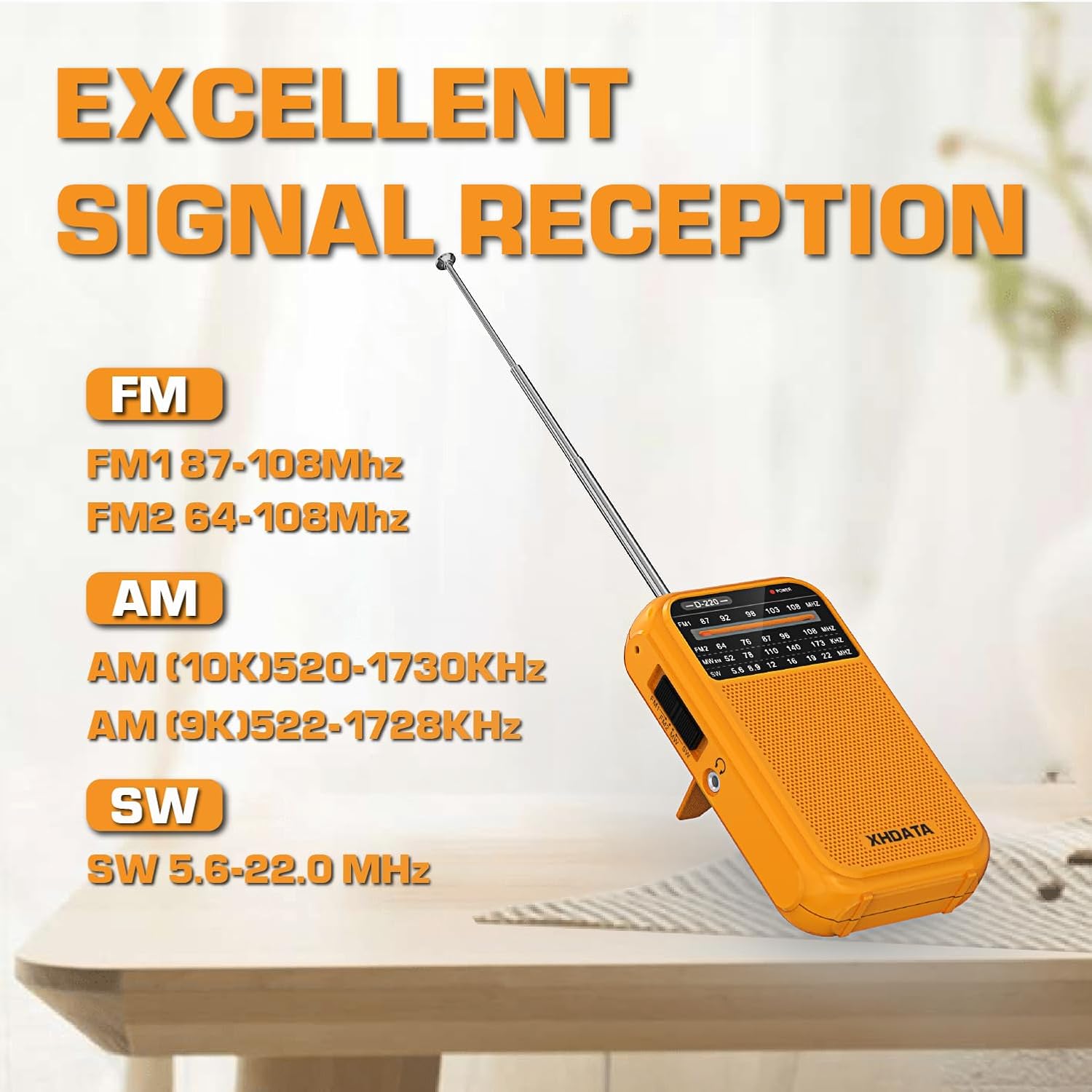
Image 6: The XHDATA D220 radio demonstrating its excellent signal reception capabilities across FM (FM1 87-108MHz, FM2 64-108MHz), AM (AM 10K 520-1730KHz, AM 9K 522-1728KHz), and SW (5.6-22.0 MHz) bands.
6.3 NOAA Weather Band (D109WB Only)
The D109WB can receive 7 NOAA Weather Bands to provide real-time weather alerts.
- Accessing WB: Switch the band to "WB". The radio will automatically scan for NOAA weather channels.
- تنبيهات الطقس: The radio is designed to alert you to severe weather conditions when in WB mode.

Image 7: The XHDATA D109WB radio featuring 7 NOAA Weather Bands and an SOS Distress Alarm function, indicated by a red glowing circle around the SOS button.
6.4 Multimedia Playback (D109WB Only)
- اتصال بلوتوث:
- Switch the D109WB to Bluetooth mode.
- Enable Bluetooth on your mobile device and search for "XHDATA D109WB" (or similar).
- Pair the devices. Once connected, you can play audio from your device through the radio.
- تشغيل بطاقة TF:
- أدخل بطاقة TF (MicroSD) تحتوي على ملفات صوتية MP3 fileضعها في الفتحة المخصصة.
- Switch the radio to MP3/TF card mode.
- Use the playback controls (play/pause, next/previous track) to manage your music.

Image 8: The XHDATA D109WB radio showcasing its wireless Bluetooth connectivity and support for TF cards, allowing for music playback from external devices or memory cards.
6.5 Alarm Clock and SOS Alarm (D109WB Only)
- ضبط المنبه: Refer to the D109WB's specific instructions for setting Alarm A and Alarm B, usually involving pressing and holding the alarm button, then using tuning buttons to set time.
- إنذار SOS: Press the "SOS" button to activate a loud distress alarm. Press it again to deactivate.
6.6 استخدام سماعات الرأس
Both radios are equipped with a 3.5mm headphone jack for private listening. Insert standard 3.5mm headphones into the jack. The internal speaker will typically mute automatically.
7. الصيانة
- تنظيف: امسح الراديو بقطعة قماش ناعمة وجافة. لا تستخدم المنظفات الكاشطة أو المذيبات.
- العناية بالبطارية:
- Remove batteries from the D220 if the radio will not be used for an extended period to prevent leakage.
- For the D109WB, ensure the rechargeable battery is charged regularly to maintain its lifespan. Avoid fully discharging the battery frequently.
- تخزين: قم بتخزين الراديو في مكان بارد وجاف بعيدًا عن أشعة الشمس المباشرة ودرجات الحرارة القصوى.
- الهوائي: تعامل مع الهوائي التلسكوبي بحرص لتجنب ثنيه أو كسره. اسحبه عند عدم استخدامه.
8. استكشاف الأخطاء وإصلاحها
| مشكلة | السبب المحتمل | حل |
|---|---|---|
| الراديو لا يعمل. | البطاريات الميتة أو المثبتة بشكل غير صحيح. | Check battery polarity. Replace batteries (D220) or charge battery (D109WB). |
| استقبال ضعيف/ثابت. | الهوائي غير ممتد، إشارة ضعيفة، تداخل. | Extend antenna fully. Reposition the radio. Try tuning to a different frequency. Move away from electronic devices. |
| لا يوجد صوت من مكبر الصوت. | مستوى الصوت منخفض جدًا، سماعات الرأس موصولة، تم تفعيل كتم الصوت. | Increase volume. Disconnect headphones. Check for mute function (D109WB). |
| D109WB Bluetooth not connecting. | Radio not in Bluetooth mode, device not discoverable, too far. | Ensure D109WB is in Bluetooth mode. Make sure your device's Bluetooth is on and discoverable. Move devices closer. |
9. المواصفات
9.1 XHDATA D109WB Specifications
- نطاق التردد:
- FM: 64-108 ميجا هرتز
- صباحا: 520-1710 كيلو هرتز
- LW: 153-513KHz (9K)
- تردد: 1711-29999 كيلو هرتز
- NOAA WB: 162.40-162.55MHz
- المتحدث: 40 ملم
- الاتصال: Bluetooth 5.0, TF Card, 3.5mm Headphone Jack
- المميزات الخاصة: DSP Chip, NOAA Weather Band, SOS Alarm, Alarm Clock, MP3 Playback, 500 Memory Stations, ATS.
- مصدر الطاقة: Battery Powered (Rechargeable Lithium, typically)
- المكونات المتضمنة: Headphone Jack, Power Adapter, User Manual
9.2 XHDATA D220 Specifications
- نطاق التردد:
- FM: 64-108MHz (FM1 87-108MHz, FM2 64-108MHz)
- AM: 520-1730KHz (10K), 522-1728KHz (9K)
- SW: 5.6-22.0 ميجا هرتز
- أبعاد: 125 مم × 74 مم × 30 مم (تقريبًا 4.9 × 2.9 × 1.2 بوصات)
- وزن: 125g (بدون بطاريات)
- الاتصال: شنومكسم سماعة جاك
- مصدر الطاقة: 2 بطاريات AA
- المكونات المتضمنة: دليل المستخدم
10. معلومات السلامة
- لا تعرض الراديو للماء أو الرطوبة الزائدة.
- تجنب درجات الحرارة القصوى، وأشعة الشمس المباشرة، والبيئات المتربة.
- لا تحاول تفكيك الراديو أو تعديله. سيؤدي ذلك إلى إلغاء الضمان وقد يتسبب في تلفه.
- يحفظ بعيدًا عن متناول الأطفال.
- تخلص من البطاريات بالطريقة الصحيحة وفقًا للوائح المحلية.
- قد يؤدي الاستماع المطول بمستويات صوت عالية إلى تلف السمع.
11. الضمان والدعم
XHDATA products are designed for reliability and performance. For specific warranty details, please refer to the warranty card included with your purchase or contact XHDATA customer support directly. For technical assistance or further inquiries, please visit the official XHDATA webالموقع أو الاتصال بقسم خدمة العملاء.