
مقدمة
Thank you for choosing the AWEI T36 Bluetooth Earbuds. This manual provides detailed instructions on how to set up, operate, and maintain your new earbuds. Please read this manual carefully before use to ensure optimal performance and longevity of your device.
محتويات الحزمة
- AWEI T36 Wireless Earbuds (Left and Right)
- حافظة الشحن
- كابل شحن USB-C
- أطراف الأذن (أحجام مختلفة)
- دليل المستخدم
المنتج انتهىview
Familiarize yourself with the components of your AWEI T36 earbuds and charging case.
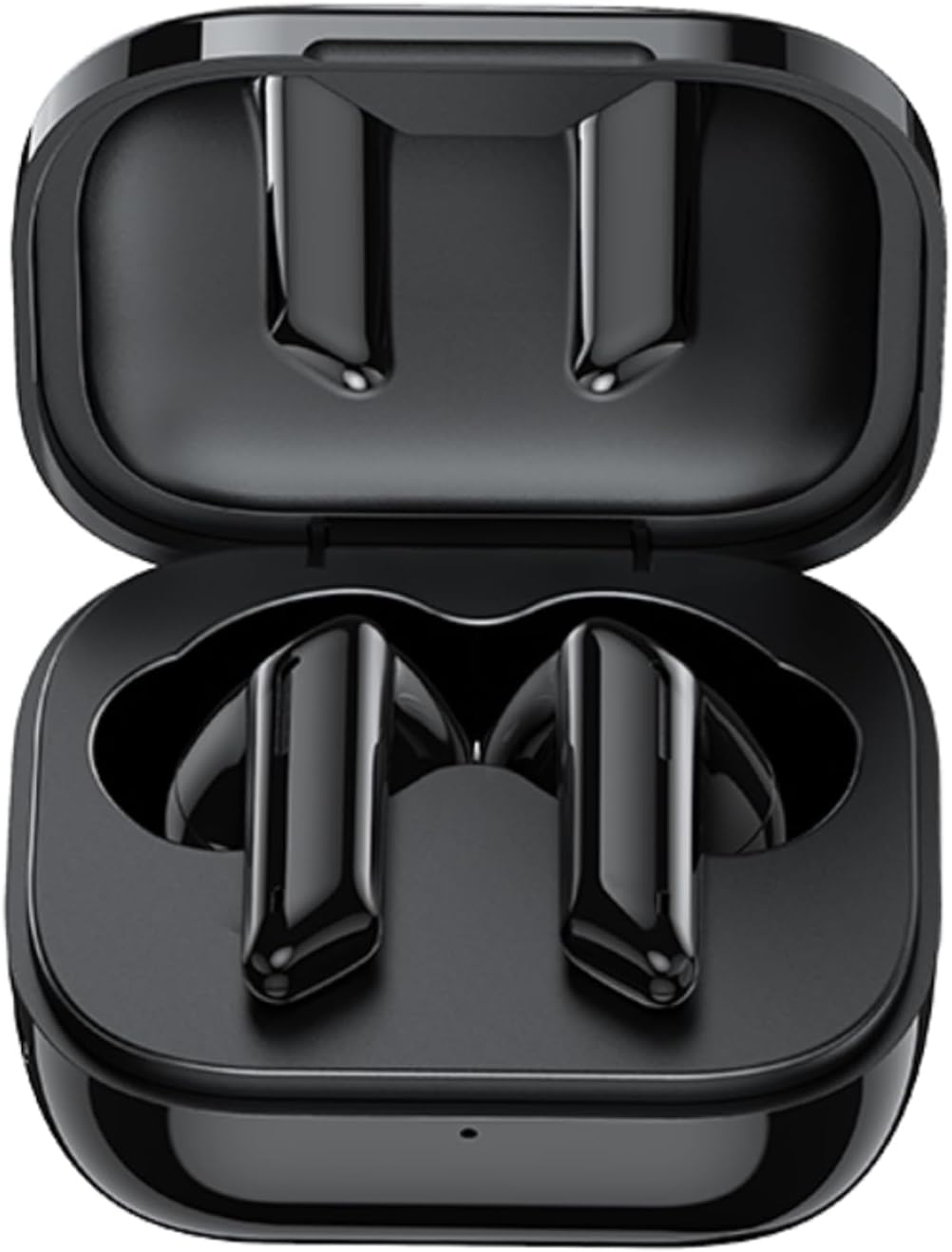
Image: AWEI T36 earbuds securely placed inside their open charging case, showcasing the sleek black design of both the earbuds and the case interior.
مكونات سماعات الأذن
- منطقة التحكم باللمس: لإدارة تشغيل الموسيقى والمكالمات والمساعد الصوتي.
- ميكروفون: For clear call performance.
- شحن جهات الاتصال: موجود في أسفل كل سماعة أذن.
- مؤشر LED: يعرض حالة الاقتران ومستوى البطارية.
مكونات علبة الشحن
- فتحات شحن سماعات الأذن: قم بحمل سماعات الأذن وشحنها بأمان.
- منفذ شحن USB-C: لشحن العلبة.
- مؤشر LED: Displays charging status of the case.
يثبت
1. شحن سماعات الأذن والعلبة
قبل الاستخدام الأول، قم بشحن سماعات الأذن وعلبة الشحن بالكامل.
- Place the earbuds into the charging case, ensuring they are correctly seated. The earbuds' LED indicators will light up to show they are charging.
- قم بتوصيل كابل الشحن USB-C بمنفذ الشحن الموجود على العلبة والطرف الآخر بمحول طاقة USB (غير متضمن) أو منفذ USB الخاص بالكمبيوتر.
- The charging case LED indicator will show charging progress. A full charge takes approximately 1.5 hours for the case.

Image: AWEI T36 earbuds and their charging case resting on a circular charging pad, illustrating the product's battery life and charging capabilities. The image indicates a 320mAh charging case, 4-5 hours playtime, and 1.5 hours charging time.
Note: The product specifications indicate 7 hours of continuous use per charge for earbuds and 35 hours of playback with the charging case.
2. الاقتران بجهازك
تدعم سماعات الأذن تقنية بلوتوث 5.3 لتوفير اتصال مستقر وسريع.
- الاقتران لأول مرة:
- افتح علبة الشحن. سيتم تشغيل سماعات الأذن تلقائيًا ودخول وضع الاقتران.
- على جهازك (الهاتف الذكي، الجهاز اللوحي، الكمبيوتر المحمول)، قم بتمكين البلوتوث.
- بحث عن "AWEI T36" in the list of available Bluetooth devices and select it to connect.
- Once connected, you will hear a confirmation tone, and the earbud LED indicators will turn off or flash slowly.
- الاقتران اللاحق:
- Once paired, the earbuds will automatically connect to the last paired device when taken out of the charging case, provided Bluetooth is enabled on the device.

Image: A smartphone displaying a game, with the AWEI T36 earbuds and their charging case in the foreground, illustrating the Bluetooth connection. The image highlights "Bluetooth 5.1 Faster & More Stable" (Note: Product specifications state Bluetooth 5.3 for this model, which offers improved performance.)

Image: Two AWEI T36 earbuds, one in its open charging case and one outside, demonstrating that both earbuds can function independently as "hosts" or "main engines" for flexible use.
تعليمات التشغيل
The AWEI T36 earbuds feature smart touch controls for easy operation.
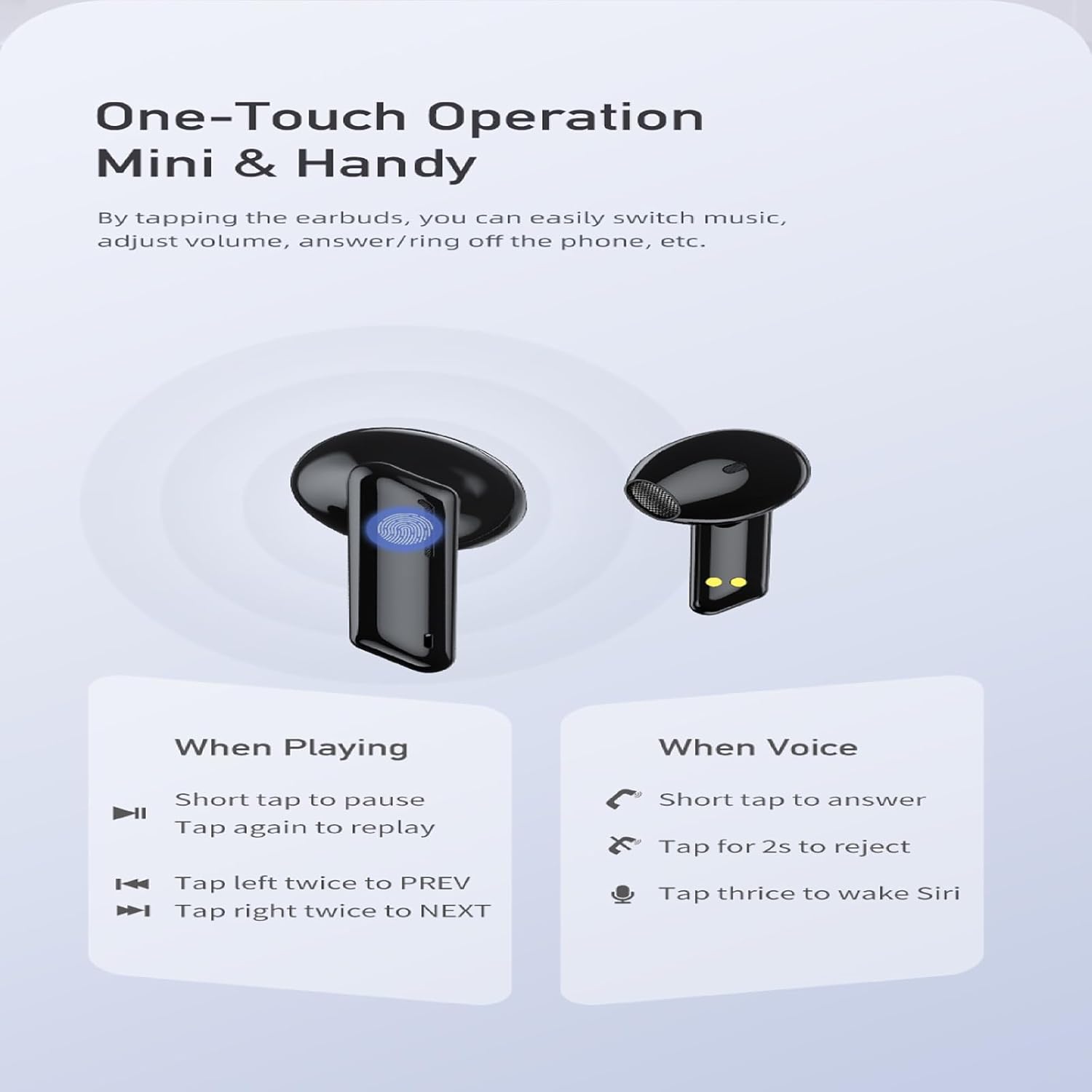
Image: A visual guide to the one-touch operation of the AWEI T36 earbuds, detailing touch commands for music playback (pause/play, previous/next song) and call management (answer/reject, activate voice assistant).
تشغيل الموسيقى
- تشغيل/إيقاف مؤقت: Short tap on either earbud.
- الأغنية التالية: اضغط على سماعة الأذن اليمنى مرتين.
- الأغنية السابقة: اضغط على سماعة الأذن اليسرى مرتين.
- التحكم في مستوى الصوت: (Specific gesture not detailed in image, typically long press or multiple taps. Refer to device settings if not working as expected.)
استدعاء إدارة
- الرد على المكالمة: Short tap on either earbud.
- رفض المكالمة: انقر مع الاستمرار فوق أي من سماعتي الأذن لمدة 2 ثوانٍ.
- إنهاء المكالمة: Short tap on either earbud during a call.
مساعد صوتي
- تفعيل المساعد الصوتي (Siri/Google Assistant): Tap either earbud three times.
تشغيل/إيقاف الطاقة
- تشغيل الطاقة: يتم تشغيل سماعات الأذن تلقائيًا عند إزالتها من علبة الشحن.
- إيقاف التشغيل: Earbuds automatically power off when placed back into the charging case and the lid is closed.
صيانة
تنظيف
- قم بتنظيف سماعات الأذن وعلبة الشحن بانتظام باستخدام قطعة قماش ناعمة وجافة وخالية من الوبر.
- استخدمي قطعة قطنية برفقampened with isopropyl alcohol to clean the charging contacts on both the earbuds and inside the case.
- لا تستخدم منظفات كاشطة أو تغمر سماعات الأذن أو العلبة في الماء.
تخزين
- قم بتخزين سماعات الأذن في علبة الشحن الخاصة بها عند عدم استخدامها لحمايتها وإبقائها مشحونة.
- تجنب تخزين الجهاز في درجات حرارة قصوى (ساخنة أو باردة) أو في بيئات ذات رطوبة عالية.
العناية بالبطارية
- للحفاظ على عمر البطارية، اشحن سماعات الأذن والعلبة بانتظام، حتى لو لم يتم استخدامها بشكل متكرر.
- تجنب تفريغ البطارية بالكامل قبل إعادة شحنها.

Image: AWEI T36 earbuds and their charging case with water droplets on them, emphasizing their IPX4 waterproof rating, which protects against sweat and light rain during exercise.
استكشاف الأخطاء وإصلاحها
If you encounter any issues with your AWEI T36 earbuds, please refer to the following common solutions:
- سماعات الأذن غير مقترنة بالجهاز:
- تأكد من شحن سماعات الأذن بالكامل.
- Make sure Bluetooth is enabled on your device and the earbuds are within range (up to 10 meters).
- Forget "AWEI T36" from your device's Bluetooth list and try pairing again.
- Place both earbuds back into the charging case, close the lid, wait a few seconds, then open the lid to reset them.
- سماعة أذن واحدة فقط تعمل:
- تأكد من شحن كلا سماعات الأذن.
- Place both earbuds back into the charging case, close the lid, then open it again. This often re-syncs them.
- قم بتنظيف نقاط اتصال الشحن الموجودة على سماعتي الأذن وداخل العلبة.
- سماعات الأذن لا يتم شحنها:
- تأكد من توصيل كابل الشحن بشكل آمن بكل من العلبة ومصدر الطاقة.
- تأكد من أن نقاط اتصال الشحن الموجودة على سماعات الأذن وداخل العلبة نظيفة وخالية من الحطام.
- جرّب كابل USB-C أو محول طاقة مختلفًا.
- انخفاض مستوى الصوت أو جودة الصوت رديئة:
- قم بضبط مستوى الصوت على جهازك وسماعات الأذن.
- Ensure the eartips are properly seated in your ears to create a good seal. Try different sized eartips.
- Clean any earwax or debris from the earbud speaker mesh.
تحديد
| ميزة | وصف |
|---|---|
| اسم الموديل | ت36 |
| ماركة | أوي |
| تكنولوجيا الاتصال | لاسلكي (بلوتوث 5.3) |
| مدى البلوتوث | حتى 10 مترا (33 قدما) |
| عمر بطارية سماعة الأذن | حتى 7 ساعات (شحنة واحدة) |
| إجمالي وقت اللعب (مع الحقيبة) | تصل إلى 35 ساعة |
| مدة الشحن (العلبة) | حوالي 1.5 ساعات |
| مقاومة الماء | IPX4 (Sweat and splash proof) |
| نوع التحكم | التحكم باللمس |
| شكل سماعة الأذن | داخل الأذن |
| مادة | سيليكون (أطراف الأذن) |
| المكونات المضمنة | Earbuds, Charging Case, USB-C Cable, Eartips, User Manual |
الضمان والدعم
AWEI products are manufactured to the highest quality standards. For information regarding warranty coverage, technical support, or customer service, please refer to the warranty card included in your package or visit the official AWEI webموقع.
For further assistance, please contact AWEI customer support with your product model number (T36) and purchase details.